Vim: [Feature Request] Support easymotion-jumptoanywhere
[FEATURE REQUEST]
Hello,
I'm happy to report that I'm a daily user of vscodevim and really happy with the integration of easymotion so far!
It would be cool to support easymotion-jumptoanywhere, which is basically a combination of <leader><leader> w/W and <leader><leader> b/B - it searches for start and end of word on the entire viewport. Documentation.
It basically gives us the same functionality as jumpy, which has 16k installs despite the fact that it has never worked 🤣.
How easy / hard would it be to implement this feature? I'd happy to send a PR over the weekend if you could give me a hand on how you think it should be implemented.
Thanks!
xkxx
 xkxx
xkxx
All 8 comments
edit: Nevermind my previous comment, I misread!
👍🏼to this feature...I just discovered easymotion-jumptoanywhere because of this post and gave it a shot. It's awesome - I currently have bd-w bound to my space bar making it easy to jump, but having to use a modifier to go to the end of the word with bd-e isn't optimal.
 jsonMartin
on 15 Mar 2018
jsonMartin
on 15 Mar 2018
Hey @xkxx ,
I ended up liking this feature and missing it from VSCode so much that I just hacked together a solution to add this functionality. It's my first time ever working on the VSCodeVim codebase so the implementation is currently quite rough around the edges, but it definitely seems to get the job done!
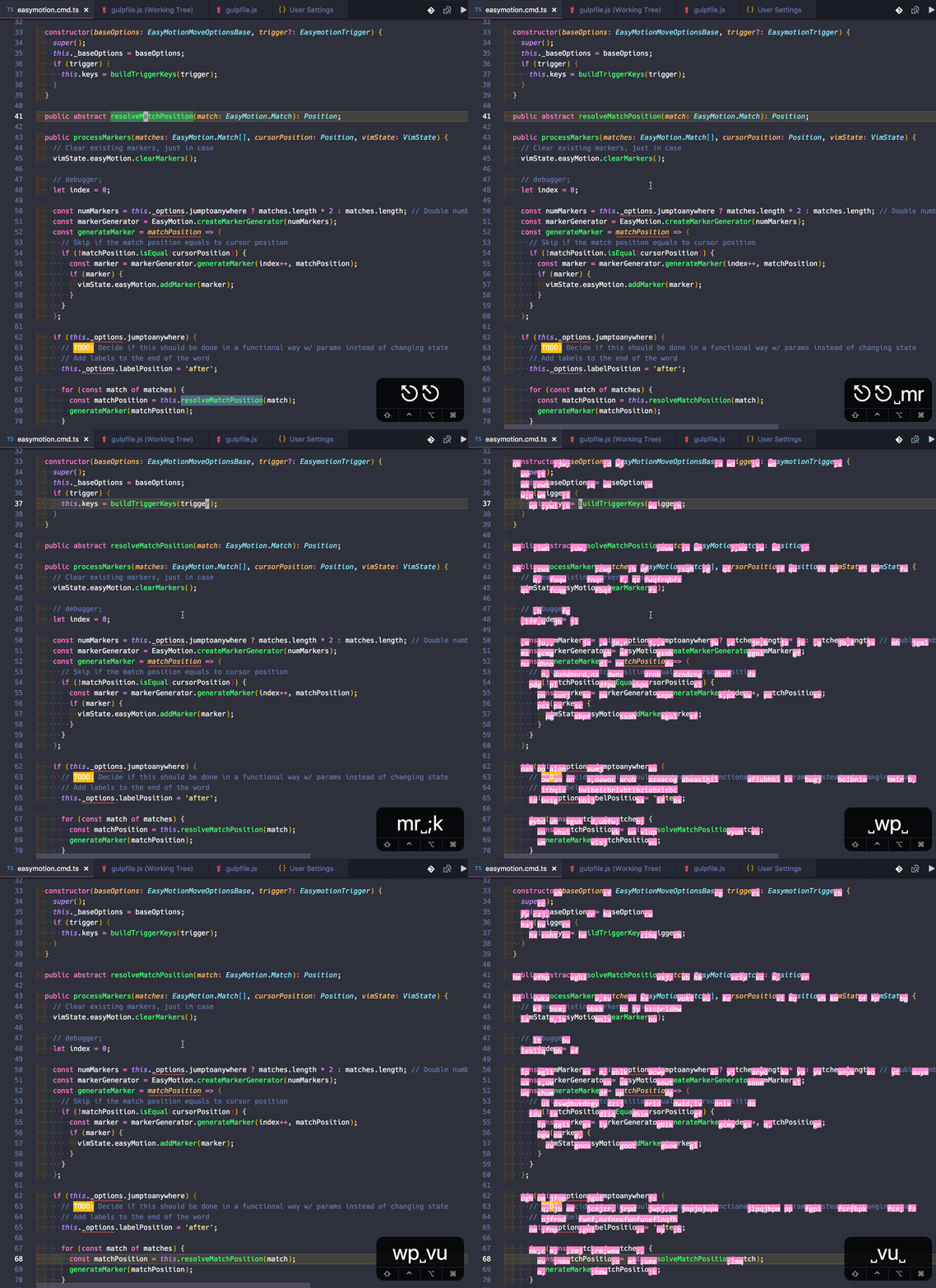
^ There's an example of it in action - note that my spacebar is mapped to <Leader><Leader><Leader>bdj, which is the new command I created for jumptoanywhere.
I just pushed up the new functionality to my forked Repo on the master branch, you can feel free to install it on your end and give it a try if you'd like. It's still very much a work in progress but jumptoanywhere-like functionality should work! Here's the link: https://github.com/jsonMartin/Vim
jsonMartin
on 16 Mar 2018
Hi @jsonMartin,
I'm sorry my original description isn't accurate - while bdw does jump to the start of the word (which is exactly what the popular atom-jumpy does, jumptoanywhere allows you to jump to the beginning and End of word, Camelcase, after '_', and after '#'. As you have discovered, it's very handy for jumping around without even needing to think about motions!
Thanks a ton for jumping in and contributing your patch - I don't think adding this functionality is going to add a lot of complexity to the codebase, and as what we've seen it's quite useful. Even better would be if we can allow customizing jump targets via regex like the original command. I'll play around with the code and try to implement this - unfortunately I won't have time until next week to prepare a complete patch. In the meantime, if you'd like to jump in and prepare a PR, you are more than welcome to do so! Thanks a lot!
xkxx
on 17 Mar 2018
@xkxx Ah yeah, I see the difference; thanks for the clarification. My quick & dirty implementation only matched the beginning and end of word (bd-w & bd-e).
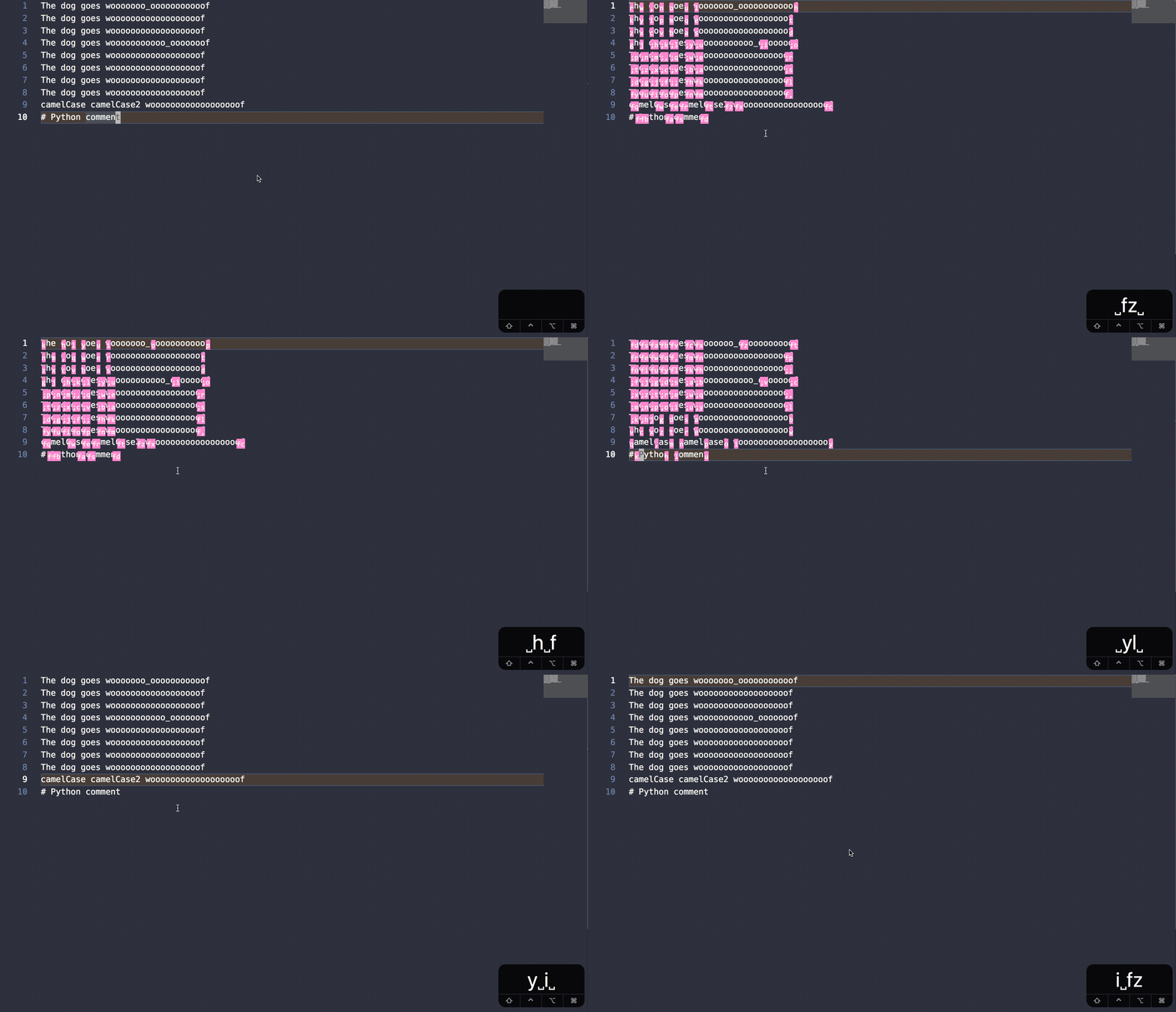
After digging around for a bit, I found a much better way of implementing this based purely on RegEx, which I agree is a much better solution. I just opened a PR for it here: https://github.com/VSCodeVim/Vim/pull/2454
Since this is my first commit to the codebase I just want to keep it simple, but once this gets merged in I plan on allowing dynamic regex settings from the preferences 😎
Here's what the updated version looks like now:
jsonMartin
on 20 Mar 2018
@xkxx FYI, just added another update to the PR to allow custom regex a la the Easymotion_re_anywhere setting in .vimrc; the new setting is named vim.easymotionJumptoanywhereRegex
Now I have my personal config set up so it also matches the beginning / end of line, as well as // for javascript comments 😎
Thanks for the great suggestion!
jsonMartin
on 22 Mar 2018
@jsonMartin since it seems like Easymotion is something you use, how do you feel about darkening everything else and using the standard red on black coloring.
See https://twitter.com/cHHillee/status/927203737202020353
and https://github.com/Chillee/VSCodeNeovim/blob/VSCodeNeovim/srcNV/screen.ts#L136
 Chillee
on 22 Mar 2018
Chillee
on 22 Mar 2018
Hey @Chillee!
Just took a look at the screenshot - that implementation looks nice and clean, as well as better matches how it works natively in VIM.
However, one thing that might be worth considering is how it looks & acts when there are a large amount of matches. For reference, this is how standard easymotion looks with a lot of matches:

Note how much the text gets shifted around in certain parts, making it easy to get lost; the number of shortcuts can be so large it garbles the text and location too much to reasonably decipher which key to press.
One thing I do like about the way it is currently implemented in VSCode is that since the keybindings are just UI labels, you can actually see part of the text behind the labels, and it doesn't shift around the position text at all which means you know exactly where to go. While the current implementation could definitely use some improvement displaying a large amount of matches in close proximity at once, it still seems less confusing to me than the native behavior where text is shifted around the screen to accomidate the longer strings caused by multi-key shortcuts.
Not saying one way is better than another per-se, I'm honestly cool with both implementations - just something to keep in mind if going down that route :)
jsonMartin
on 23 Mar 2018
Closed with https://github.com/VSCodeVim/Vim/pull/2454
 jpoon
on 1 Apr 2018
jpoon
on 1 Apr 2018
Related issues
 AndersenJ
·
3Comments
AndersenJ
·
3Comments
 triztian
·
3Comments
triztian
·
3Comments
 jaredly
·
3Comments
jaredly
·
3Comments
 orn688
·
3Comments
orn688
·
3Comments
 typeoneerror
·
3Comments
typeoneerror
·
3Comments
Most helpful comment
Closed with https://github.com/VSCodeVim/Vim/pull/2454