Vim: Cannot create a new file or folder in explorer viewlet that contains the letter "o"
- Click thumbs-up 👍 on this issue if you want it!
- Click confused 😕 on this issue if not having it makes VSCodeVim unusable.
The VSCodeVim team prioritizes issues based on reaction count.
BUG REPORT
Environment:
- VSCode Version: Version 1.19.0-insider (1.19.0-insider) 3c470706ded48fc75c05f86bc4f9c7b0f4d6c708
- VsCodeVim Version: 0.10.5
- OS: macOS High Sierra 10.13.1
What happened:
I can't create a file or directory with the letter "o" in it. As soon as I type "o", the file is created as if I hit "enter".
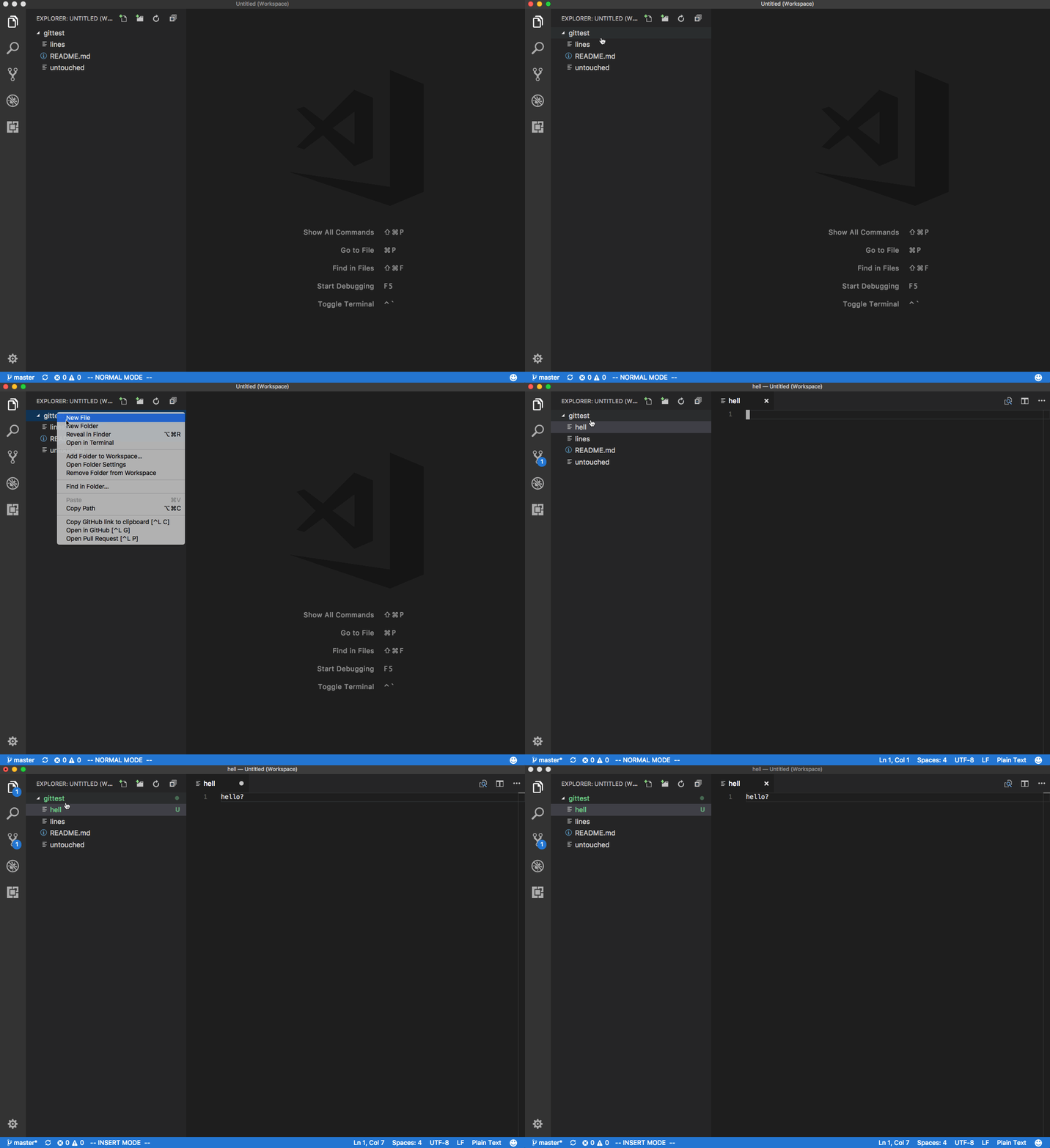
Disabling the extension fixes the problem.
What did you expect to happen:
I should be able to.
How to reproduce it:
- While in a workspace, right click on a folder and select "New file".
- Type "hello"
 nicksnyder
All 10 comments
To add to this, pressing 'k' will move up, and pressing 'o' expands it if you are creating a folder.
It seems like this bug was introduced when VSCode insiders went up to 1.19
 Mikodin
on 27 Nov 2017
Mikodin
on 27 Nov 2017
Is affecting multiple characters such as o g h j k j as far as I can see...
It effectively renders the generation of files completely useless... Had to generate my files by calling touch hello.js in the terminal as opposed to the workspace explorer. This is super painful 😭
 rodrigoelp
on 28 Nov 2017
rodrigoelp
on 28 Nov 2017
Luckily, this wasn't our fault! This was due to a regression on the VSCode side. https://github.com/Microsoft/vscode/pull/39102#issuecomment-347780232
Sounds like it should be fixed in the next release of the insiders build.
 Chillee
on 29 Nov 2017
Chillee
on 29 Nov 2017
Actual upstream issue is https://github.com/Microsoft/vscode/issues/39211
 jpoon
on 29 Nov 2017
jpoon
on 29 Nov 2017
Works for me on insiders again. I am going to close this issue since it was an upstream bug.
nicksnyder
on 29 Nov 2017
Just so you guys know... it is happening again (with o, j, k)
With o is a little more annoying because it exits the name editing mode.
rodrigoelp
on 13 Dec 2017
On Insiders? If so, you should file an issue against VSCode or update the existing issue.
jpoon
on 13 Dec 2017
Yes, on insiders 1.19.0 (951f5a20fc820e32a65ca05bb87af86f65027470)
The problem to raise it in vscode is that it does not happen when the vscodevim extension is disabled.
rodrigoelp
on 13 Dec 2017
Still broken as of today in the latest release
Edit: after updating the VIM plugin, it works now.
 texasbruce
on 26 Feb 2018
texasbruce
on 26 Feb 2018
Running into this issue as well - everything appears to be up to date for non-insiders
Version 1.21.1
Commit 79b44aa704ce542d8ca4a3cc44cfca566e7720f1
Date 2018-03-14T14:47:13.351Z
Shell 1.7.9
Renderer 58.0.3029.110
Node 7.9.0
Architecture ia32
 dring1
on 28 Mar 2018
dring1
on 28 Mar 2018
Related issues
 WangRongda
·
3Comments
WangRongda
·
3Comments
 cckowin
·
3Comments
cckowin
·
3Comments
 rajinder-yadav
·
3Comments
rajinder-yadav
·
3Comments
 triztian
·
3Comments
triztian
·
3Comments
 gerardmrk
·
3Comments
gerardmrk
·
3Comments
Most helpful comment
Is affecting multiple characters such as
o g h j k jas far as I can see...It effectively renders the generation of files completely useless... Had to generate my files by calling
touch hello.jsin the terminal as opposed to the workspace explorer. This is super painful 😭