Vim: Bug: Mac OS Multiple Line Highlight and Tab to Indent Fails
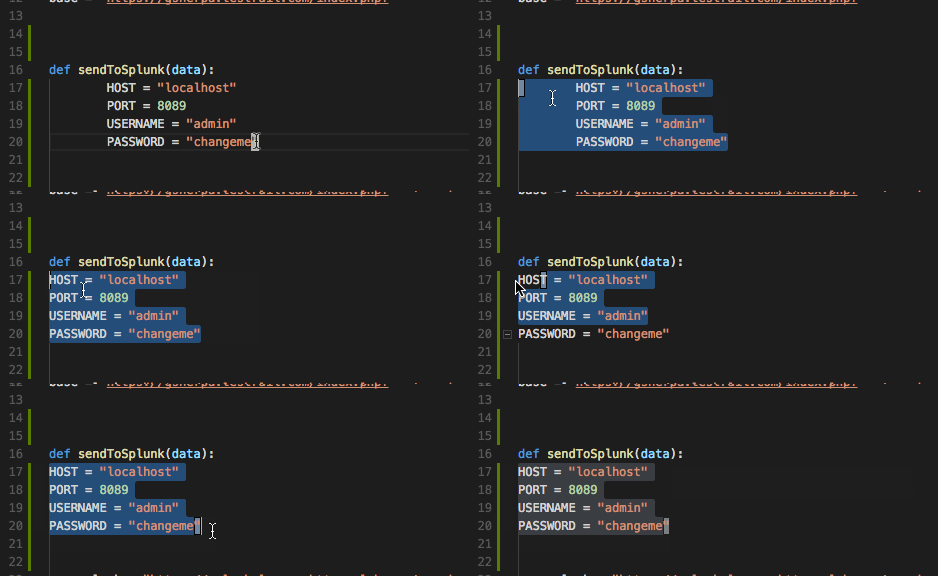
Highlighting multiple lines and then hitting tab to indent does not work. Using shift-tab to undent (de-indent?) - works as expected.
VSCode Version: 1.17.2
OS Version: mac OS sierra - 10.12.6
Steps to Reproduce:
highlight multiple lines
click tab - no effect
if pre-indented - shift-tab works as expected
Extensions:
vscodevim - 0.10.2
donjayamanne.python 0.7.0
esbenp.prettier-vscode 0.24.0
PeterJausovec.vscode-docker 0.0.20
ms-vscode.azure-account 0.1.3
Reproduces without extensions: No
Works as expected without the extensions...
Buggy capture - imagine tab being hit where nothing happens...
 aliwatters
All 6 comments
In Vim, the Tab key only adds an indent in Insert mode. The Tab key has no effect in Visual mode. Instead, the > and < keys are used to indent and unindent a block in Visual mode, respectively.
While this may not be a bug, it could be a valid feature request.
 westim
on 4 Nov 2017
westim
on 4 Nov 2017
Interesting - without the extension enabled vscode will indent on a multi-line highlight.
Please consider this a feature request! (thanks for the < > tip)
Just tried the < > keys - it loses the highlight after a single tap.. not working as I'd prefer there either.
aliwatters
on 10 Nov 2017
I really want this feature.
 canxer314
on 22 Nov 2017
canxer314
on 22 Nov 2017
It may not be the expected behavior in Vim, but is inconsistent that Shift-Tab works to reduce indentation, but Tab does not work to increase the indentation. It should at least be consistent in that regard.
Also, I now tried the < and > to decrease and increase indentation, as suggested by @westim above, but although it works, it does not preserve the visual mode selection, so it does not work to continue altering the indentation by pressing the key more than once.
 gnapse
on 30 Nov 2017
gnapse
on 30 Nov 2017
Possible solution. In "settings.json":
```
"vim.visualModeKeyBindingsNonRecursive": [
{
"before": ["
"after": [ ">","g","v" ],
},
{
"before": ["
"after": [ "<","g","v" ],
},
],
"vim.normalModeKeyBindingsNonRecursive": [
{
"before": ["
"after": [ ">",">" ],
},
{
"before": ["
"after": [ "<","<" ],
}
],
```
 pablospe
on 10 Feb 2020
pablospe
on 10 Feb 2020
I can confirm that @pablospe's workaround above works like a charm. Thanks!
gnapse
on 10 Feb 2020
Related issues
 Jimmy-Z
·
3Comments
Jimmy-Z
·
3Comments
 rajinder-yadav
·
3Comments
rajinder-yadav
·
3Comments
 jaredly
·
3Comments
jaredly
·
3Comments
 typeoneerror
·
3Comments
typeoneerror
·
3Comments
 WangRongda
·
3Comments
WangRongda
·
3Comments
Most helpful comment
Possible solution. In "settings.json":
```"],"],
"vim.visualModeKeyBindingsNonRecursive": [
{
"before": ["
"after": [ ">","g","v" ],
},
{
"before": ["
"after": [ "<","g","v" ],
},
],
"vim.normalModeKeyBindingsNonRecursive": ["],"],
{
"before": ["
"after": [ ">",">" ],
},
{
"before": ["
"after": [ "<","<" ],
}
],
```