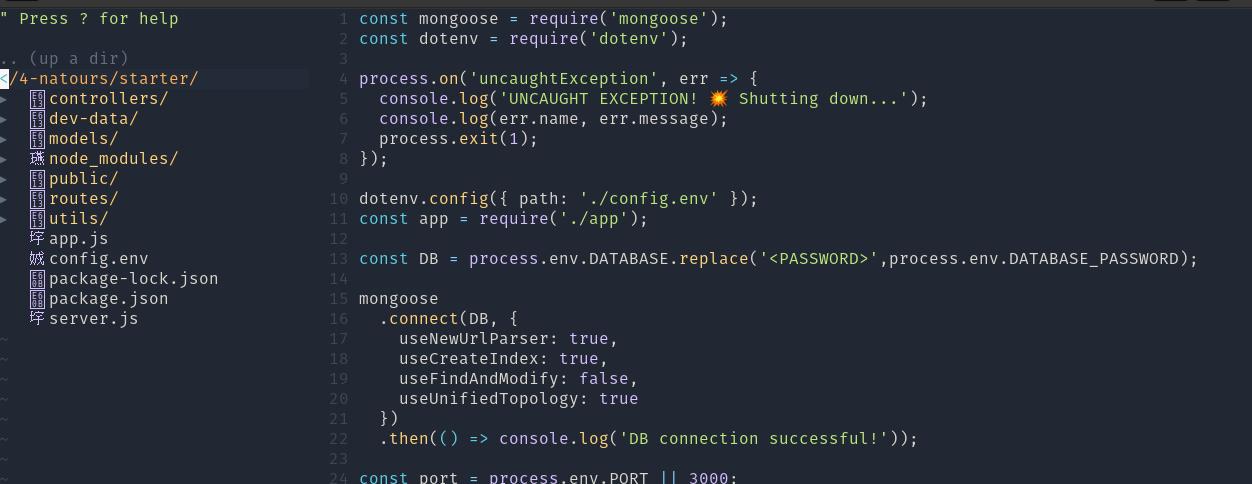
Vim-devicons: Showing Mandarin instead of real font
- [X] I have searched the issues for my issue and found nothing related and/or helpful
- [X] I have read or at least glanced at the FAQ
- [X] I have read or at least glanced at the Wiki
[X]
VimDevIconsis the last loaded vim plugin?[X] What version of vim are you using?
nvim v0.4.3- [X] What version of vim-devicons are you using?
- hint: 0.11.0
- [X] Are you using vim from the terminal or a GUI vim? ->
Terminal [X] Are you using Mac, Linux or Windows?
Pop-OSOptional Info
[X] Provide screenshots where appropriate
 x3rxe5
All 8 comments
Having the same issue, also in Pop OS. However most icons show up besides js file extensions for some reason and all other fonts besides "Hack" font make my text in terminal look weird.
 gamarobert
on 26 Nov 2020
gamarobert
on 26 Nov 2020
Having the same issue, All icons appear well just JavaScript icon.
 ousszizou
on 28 Nov 2020
ousszizou
on 28 Nov 2020
Hmm can you verify that the correct font is being used?
Please refer to https://github.com/ryanoasis/vim-devicons/wiki/FAQ-&-Troubleshooting#why-isnt-it-working-how-come-i-dont-see-any-icons to see if it's any help.
 ryanoasis
on 6 Dec 2020
ryanoasis
on 6 Dec 2020
Ensure that you're using a NERD patched font.
- Download font
- Move downloaded fonts to
~/.fonts - run
fc-cache -fv
 mrkvn
on 25 Dec 2020
mrkvn
on 25 Dec 2020
Worked for me in Ubuntu but when I installed Pop OS, I got the same issue. Did you solve the problem?
mrkvn
on 3 Jan 2021
Solved it by using alacritty as my terminal. Configured to use Monaco Nerd Font on the ~/.config/alacritty/alacritty.yml file.
# Font configuration
font:
  # Normal (roman) font face
  normal:
    family: "Monaco Nerd Font"
    style: Regular
Not sure why Monaco Nerd Font is not showing as option in gnome-terminal
mrkvn
on 3 Jan 2021
Hello :wave:
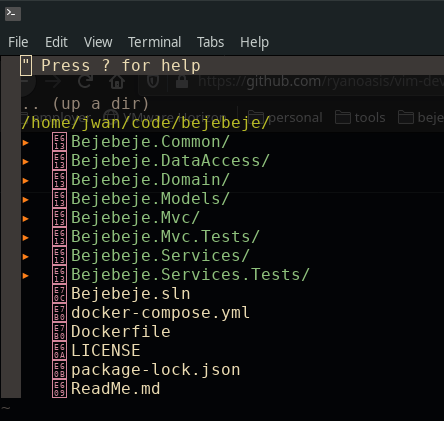
I am just getting started with VIM and NerdTree. I would like to have these dev icons, but I do not want to change my color scheme's font.
I'm using the gruvbox color scheme. If I install additional fonts, wouldn't that affect my gruvbox color scheme?
Right now, this is what I see:
 JwanKhalaf
on 23 Feb 2021
JwanKhalaf
on 23 Feb 2021
You need to patch your font or probably it's already here. The important thing is, you need to have a Nerd patched font.
mrkvn
on 23 Feb 2021
Related issues
 extrante
·
8Comments
extrante
·
8Comments
 marioortizmanero
·
3Comments
marioortizmanero
·
3Comments
 ntropia2
·
4Comments
ntropia2
·
4Comments
 justin-nguyen-1996
·
5Comments
justin-nguyen-1996
·
5Comments
 LumpyChen
·
12Comments
LumpyChen
·
12Comments
Most helpful comment
Having the same issue, also in Pop OS. However most icons show up besides js file extensions for some reason and all other fonts besides "Hack" font make my text in terminal look weird.