Vim-devicons: Bracket problem with decorated folder node
Bracket problem with decorated folder node
Hi, awesome plugin!
Now there goes a problem: a single bracket appear on the first line of my nerd-tree.
I set this in my .vimrc:
let g:WebDevIconsUnicodeDecorateFolderNodes = 1
let g:DevIconsEnableFoldersOpenClose = 1
The bracket dismisses as long as I delete the 2 sentences above.
Required Info
- [x] I have searched the issues for my issue and found nothing related and/or helpful
- [x] I have read or at least glanced at the FAQ
- [x] I have read or at least glanced at the Wiki
- [x] What version of vim are you using?
7.4
- [x] What version of vim-devicons are you using?
0.8.3
- [x] Are you using vim from the terminal or a GUI vim?
Terminal vim - [x] Are you using Mac, Linux or Windows?
Iterm2 on Mac
Screenshot:
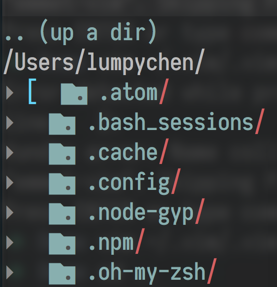
Looking forward to your reply!
 LumpyChen
All 12 comments
Interesting haven't seen that before. I'll check it out when I can. Thanks!
 ryanoasis
on 16 Sep 2016
ryanoasis
on 16 Sep 2016
Thanks for your fast replying!
Here goes my .vimrc.bundles.local which may help you.
LumpyChen
on 16 Sep 2016
@LumpyChen Thanks for the link, I haven't had a chance to follow up yet.
ryanoasis
on 24 Sep 2016
I have this problem too :(
 Leeiio
on 12 Oct 2016
Leeiio
on 12 Oct 2016
@LumpyChen Sorry for the delay in a proper reply.. just tested with your settings as best I could (not on iterm/mac).
Do you still have this issue? If so:
- Do you have the latest versions of all plugins, particularly https://github.com/tiagofumo/vim-nerdtree-syntax-highlight ?
- If you remove the plugin vim-nerdtree-syntax-highlight does the problem go away?
- With/in the open NERDTree buffer can you see what the value of
:set conceallevel?is ? - Try to highlight the open bracket with your cursor and try to debug the syntax highlighting:
- http://vim.wikia.com/wiki/Identify_the_syntax_highlighting_group_used_at_the_cursor
@Leeiio Can you share with me a minimal vimrc that you are able to reproduce this issue?
ryanoasis
on 15 Oct 2016
@ryanoasis It's ok now, and i don't know why because i have do a lot of things there days like PlugUpdate my plugins and brew update, brew upgrade my vim. :)
Leeiio
on 16 Oct 2016
@ryanoasis
I really appreciate your contribution, I solve this problem by a :PluginInstall! days ago.
I think there may be a compatible problem with other plugin's old version.
😧
LumpyChen
on 16 Oct 2016
I also ran into this issue. The offending plugin was
After removing this plugin, the extra bracket went away.
 bytebeast
on 22 Dec 2016
bytebeast
on 22 Dec 2016
Thanks for the updates all.
@bytebeast Thanks, interesting I will have to try that out.
ryanoasis
on 25 Dec 2016
This may becasue of this plugin changed the syntax definition of nerdtree filetype.
There is a workaround for this problem: just disable the rainbow plugin for the nerdtree filetype. I provided a configuration for my plugin here
 luochen1990
on 19 Nov 2017
luochen1990
on 19 Nov 2017
Thanks @luochen1990 . I am also going to look into this to see what I can do (if anything) to improve conflicts with other plugins :worried:
ryanoasis
on 22 Nov 2017
@ryanoasis Maybe you can define parentheses as keyword or match syntax, so that it will override the region syntax definition of parentheses, which almost all rainbow plugin uses.
luochen1990
on 22 Nov 2017
Related issues
 kiranps
·
7Comments
kiranps
·
7Comments
 flippidippi
·
9Comments
flippidippi
·
9Comments
 marioortizmanero
·
3Comments
marioortizmanero
·
3Comments
 ELLIOTTCABLE
·
5Comments
ELLIOTTCABLE
·
5Comments
 washtubs
·
11Comments
washtubs
·
11Comments
Most helpful comment
This may becasue of this plugin changed the syntax definition of
nerdtreefiletype.There is a workaround for this problem: just disable the rainbow plugin for the
nerdtreefiletype. I provided a configuration for my plugin here