Vim-devicons: NERDTree conceal brackets in file names
Required Info
- [x] I have searched the issues for my issue and found nothing related and/or helpful
- [x] I have read or at least glanced at the FAQ
- [x] I have read or at least glanced at the Wiki
- [x]
VimDevIconsis the last loaded vim plugin? - [x] What version of vim are you using?
- NVIM v0.3.7
- [x] What version of vim-devicons are you using?
- 0.11.0
- [x] Are you using vim from the terminal or a GUI vim?
- iTerm2 3.2.7
- [x] Are you using Mac, Linux or Windows?
- macOS 10.14.6
Optional Info
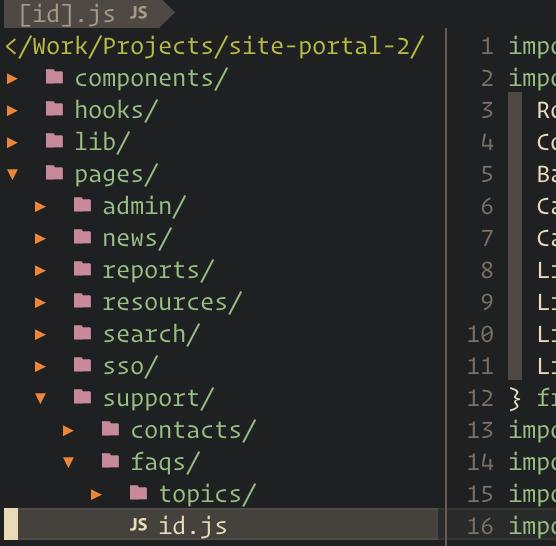
When using NERDTree, if a filename has brackets then they are not shown in NERDTree.
So for a file named [id].js, NERDTree only displays id.js.
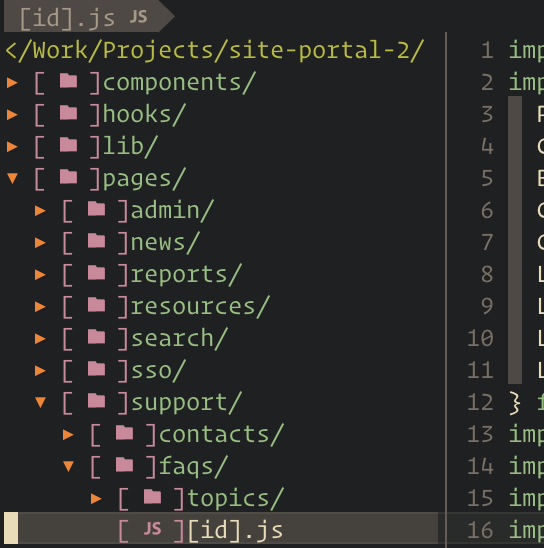
If I turn off conceal NERTree brackets like let g:webdevicons_conceal_nerdtree_brackets=0 then it will show the brackets in the filename but also show brackets around the icons which is unwanted.
Without setting let g:webdevicons_conceal_nerdtree_brackets=0:
With settting let g:webdevicons_conceal_nerdtree_brackets=0
 flippidippi
All 9 comments
Hah interesting right... Yes, this should be fixed.
 ryanoasis
on 18 Oct 2019
ryanoasis
on 18 Oct 2019
Hello @ryanoasis , I have similar problem
I can't get rid of the brackets in Gvim, I have tired your solutions from earlier posts about this problem, but none of them work.
I am on linux and terminal vim works just fine with the settings you provide in the wiki#usage.
So is there a way to disable them completle ??
 Goku-San
on 4 Feb 2020
Goku-San
on 4 Feb 2020
hey @Goku-San I take it you looked at https://github.com/ryanoasis/vim-devicons/wiki/FAQ-&-Troubleshooting#square-brackets-around-icons ?
Also perhaps it is possible your gvim is built with different options than your vim ?
:echo has('conceal')
ryanoasis
on 19 Feb 2020
Hi @ryanoasis yes I've looked at FAQ about the square brackets. According to that all should be ok
:echo has('conceal') on Gvim is 1 so that's good.

Also, now I have noticed that the icons are not showing properly
my Gvim version is 8.2, guifont = FiraCode Nerd Font Medium 12
Goku-San
on 19 Feb 2020
Hi @ryanoasis, I fixed the problem with the brackets. It was my fault all along, sorry for wasting your time, I had .gvimrc and .vimrc so they were in conflict, now I deleted .gvimrc and created a regular gvim.vim file with only things that concern Gvim, and I sourced it through .vimrc and all is good, except the font. I don't know how to fix that or if it needs fixing at all.
When I set guifont=FiraCode\ Nerd\ Font\ Medium\ 12 icons are not showing properly in Gvim, but when set guifont=Fira\ Code\ Medium\ 12 they are oki.
Again, sorry for wasting your time.
Goku-San
on 19 Feb 2020
@Goku-San no worries. glad you got it sorted out.
ryanoasis
on 23 Feb 2020
Hi,
I have the same problème.
This line replace all brackets in Nerdtree ?
https://github.com/ryanoasis/vim-devicons/blob/master/plugin/webdevicons.vim#L357
Has you solution for change only first bracket on line ?
Thank you
 apoutchika
on 20 Apr 2020
apoutchika
on 20 Apr 2020
@apoutchika Yes that's correct as long as the conceal feature is there in your build of vim.
Has you solution for change only first bracket on line ?
That is still a known issue I believe for some. Can you post a screenshot?
ryanoasis
on 21 Apr 2020
Thank you @ryanoasis for you'r fast response !
This is a screenshot without configuration :
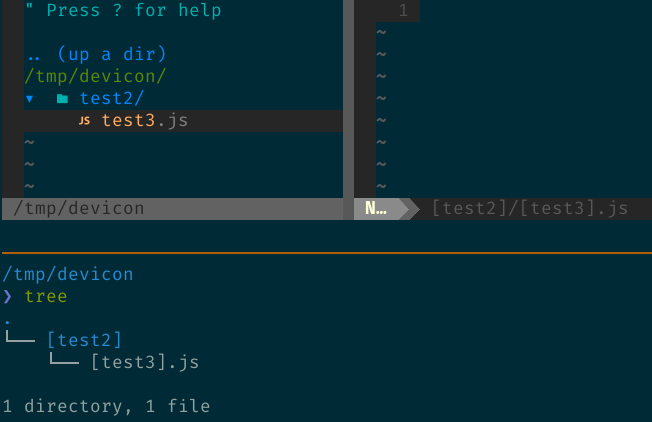
But, if I add let g:webdevicons_conceal_nerdtree_brackets = 0 in my vimrc, all brackets is OK
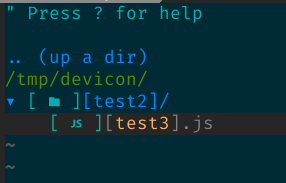
I would like to have this result:
.. (up a dir)
/tmp/devicon/
▾ [test2]/
[test3].js
( is icon)
It's Next js who use bracket in filename for dynamic routes : https://nextjs.org/docs/basic-features/pages#pages-with-dynamic-routes
$ vim --version
NVIM v0.3.8
Build type: Release
LuaJIT 2.1.0-beta3
Compilation: /usr/bin/cc -g -O2 -fdebug-prefix-map=/build/neovim-Bljd1N/neovim-0.3.8=. -fstack-protector-strong -Wformat -Werror=format-security -Wdate-time -D_FORTIFY_SOURCE=1 -DDISABLE_LOG -Wdate-time -D_FORTIFY_SOURCE=1 -Wconversion -O2 -DNDEBUG -DMIN_LOG_LEVEL=3 -Wall -Wextra -pedantic -Wno-unused-parameter -Wstrict-prototypes -std=gnu99 -Wimplicit-fallthrough -Wvla -fstack-protector-strong -fdiagnostics-color=auto -Wno-array-bounds -DINCLUDE_GENERATED_DECLARATIONS -D_GNU_SOURCE -DNVIM_MSGPACK_HAS_FLOAT32 -DNVIM_UNIBI_HAS_VAR_FROM -I/build/neovim-Bljd1N/neovim-0.3.8/build/config -I/build/neovim-Bljd1N/neovim-0.3.8/src -I/usr/include -I/build/neovim-Bljd1N/neovim-0.3.8/build/src/nvim/auto -I/build/neovim-Bljd1N/neovim-0.3.8/build/include
Compilé par [email protected]

Features: +acl +iconv -jemalloc +tui
See ":help feature-compile"

         fichier vimrc système : "$VIM/sysinit.vim"
               $VIM par défaut : "/usr/share/nvim"

Run :checkhealth for more info
Thank you for you'r help
apoutchika
on 21 Apr 2020
Related issues
 ELLIOTTCABLE
·
5Comments
ELLIOTTCABLE
·
5Comments
 slabua
·
6Comments
slabua
·
6Comments
 sodiumjoe
·
3Comments
sodiumjoe
·
3Comments
 washtubs
·
11Comments
washtubs
·
11Comments
 justin-nguyen-1996
·
5Comments
justin-nguyen-1996
·
5Comments
Most helpful comment
hey @Goku-San I take it you looked at https://github.com/ryanoasis/vim-devicons/wiki/FAQ-&-Troubleshooting#square-brackets-around-icons ?
Also perhaps it is possible your gvim is built with different options than your vim ?
:echo has('conceal')