Vim-devicons: My icons are surround by square brackets
Required Info
- [✓] I have searched the issues for my issue and found nothing related and/or helpful
- [✓] I have read or at least glanced at the FAQ
[✓] I have read or at least glanced at the Wiki
[✓] What version of vim are you using?
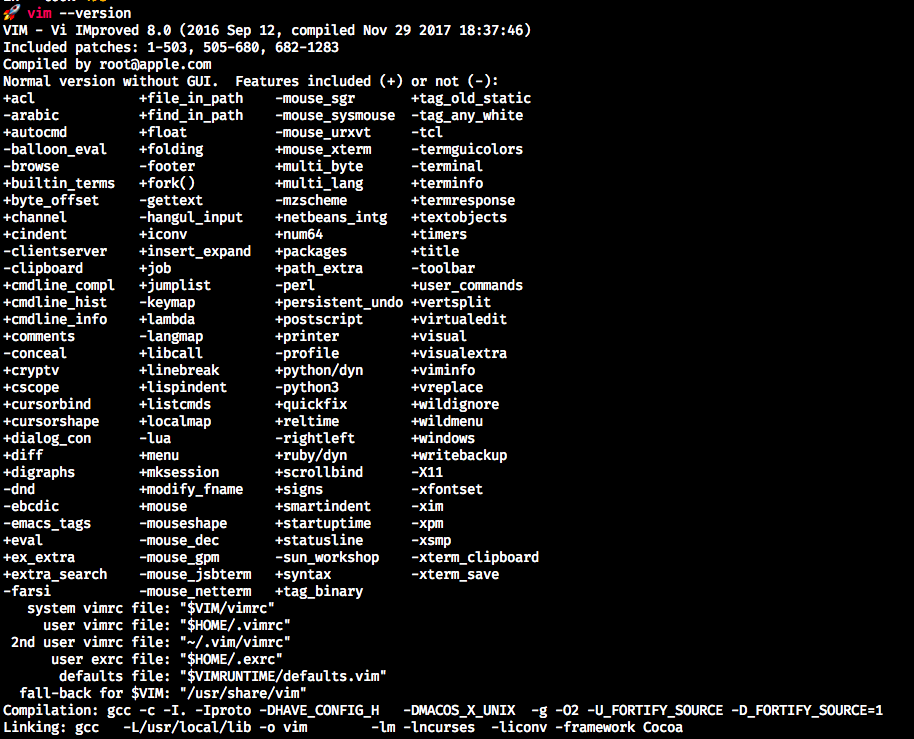
- [✓] What version of vim-devicons are you using?
- 0.10.0
- [✓] Are you using vim from the terminal or a GUI vim?
- From terminal
- [✓] Are you using Mac, Linux or Windows?
- Mac
MAIN Info
I follow the FAQ and I do not have the +conceal, I don't know if it is a must(I've tried to change that with no results).
This is my .vimrc
`filetype off
syntax on
colorscheme dracula
set hidden
set conceallevel=3
"Bsic settings
set nowrap " don't wrap lines
set tabstop=4 " a tab is four spaces
set backspace=indent,eol,start
" allow backspacing over everything in insert mode
set autoindent " always set autoindenting on
set copyindent
"Para los iconos
set encoding=UTF-8
"Set Font and size
set guifont="FuraCode Nerd Font Mono"\ Retina:h18
"Dont show the mode because airline already does
"set noshowmode
"I prefer not to make back up from vim
set nobackup
set noswapfile
"When I forget yo uso sudo I use w!!
cmap w!! w !sudo tee % >/dev/null
"To paste large chunks
set pastetoggle=
"Set relativenumber
set relativenumber
"Set a mapleader
let mapleader=","
"Reload vim config withot having to restart editor
map
set hidden
set history=100
filetype indent on
set nowrap
set tabstop=2
set shiftwidth=2
set expandtab
set smartindent
set autoindent
" searching
set ignorecase " case insensitive searching
set smartcase " case-sensitive if expresson contains a capital letter
set hlsearch " highlight search results
set incsearch " set incremental search, like modern browsers
set nolazyredraw " don't redraw while executing macros
set magic " Set magic on, for regex
" error bells
set noerrorbells
set visualbell
set t_vb=
set tm=500
set rtp+=~/.vim/bundle/Vundle.vim
call vundle#begin()
Plugin 'VundleVim/Vundle.vim'
Plugin 'scrooloose/nerdtree'
Plugin 'tpope/vim-fugitive'
Plugin 'tpope/vim-rhubarb' " hub extension for fugitive
Plugin 'junegunn/gv.vim'
Plugin 'sodapopcan/vim-twiggy'
Plugin 'tpope/vim-surround'
Plugin 'flazz/vim-colorschemes'
Plugin 'kien/ctrlp.vim'
Plugin 'ap/vim-css-color'
Plugin 'prettier/vim-prettier'
Plugin 'Valloric/YouCompleteMe'
"Plugin 'Xuyuanp/nerdtree-git-plugin'
Plugin 'ryanoasis/vim-devicons'
call vundle#end()
filetype plugin indent on
"PLUGINS
"call plug#begin()
" Plug 'scrooloose/nerdtree'
" Plug 'tpope/vim-fugitive'
" Plug 'tpope/vim-rhubarb' " hub extension for fugitive
" Plug 'junegunn/gv.vim'
" Plug 'sodapopcan/vim-twiggy'
" Plug 'tpope/vim-surround'
" Plug 'flazz/vim-colorschemes'
" Plug 'kien/ctrlp.vim'
" Plug 'ap/vim-css-color'
" Plug 'prettier/vim-prettier'
" Plug 'Valloric/YouCompleteMe'
"
"call plug#end()
" Add some stuff for plugins
if exists('g:loaded_webdevicons')
call webdevicons#refresh()
endif
" toggle nerd tree
nmap
" find the current file in nerdtree without needing to reload the drawer
nmap
"automatically close NerdTree when you open a file:
let NERDTreeWinSize=50
let NERDTreeQuitOnOpen = 1
let NERDTreeShowHidden=1
let g:NERDTreeDirArrowExpandable = '▸'
let g:NERDTreeDirArrowCollapsible = '▾'
let NERDTreeAutoDeleteBuffer = 1
let NERDTreeMinimalUI = 1
let NERDTreeDirArrows = 1
"Para evitar el ^G del nerdtree - En teoría es por la version del vim
let g:NERDTreeNodeDelimiter = "\u00a0"
"here is how to automatically close a tab if the only remaining window is NerdTree
autocmd StdinReadPre * let s:std_in=1
autocmd bufenter * if (winnr("$") == 1 && exists("b:NERDTree") && b:NERDTree.isTabTree()) | q | endif
autocmd VimEnter * if argc() == 0 && !exists("s:std_in") | NERDTree | endif
"Styling Nerd Tree for extensions"
" NERDTress File highlighting
function! NERDTreeHighlightFile(extension, fg, bg, guifg, guibg)
exec 'autocmd filetype nerdtree highlight ' . a:extension .' ctermbg='. a:bg .' ctermfg='. a:fg .' guibg='. a:guibg .' guifg='. a:guifg
exec 'autocmd filetype nerdtree syn match ' . a:extension .' #^\s+.*'. a:extension .'$#'
endfunction
call NERDTreeHighlightFile('jade', 'green', 'none', 'green', '#151515')
call NERDTreeHighlightFile('ini', 'yellow', 'none', 'yellow', '#151515')
call NERDTreeHighlightFile('md', 'blue', 'none', '#3366FF', '#151515')
call NERDTreeHighlightFile('yml', 'yellow', 'none', 'yellow', '#151515')
call NERDTreeHighlightFile('config', 'yellow', 'none', 'yellow', '#151515')
call NERDTreeHighlightFile('conf', 'yellow', 'none', 'yellow', '#151515')
call NERDTreeHighlightFile('json', 'yellow', 'none', 'yellow', '#151515')
call NERDTreeHighlightFile('html', 'yellow', 'none', 'yellow', '#151515')
call NERDTreeHighlightFile('styl', 'cyan', 'none', 'cyan', '#151515')
call NERDTreeHighlightFile('css', 'cyan', 'none', 'cyan', '#151515')
call NERDTreeHighlightFile('coffee', 'Red', 'none', 'red', '#151515')
call NERDTreeHighlightFile('js', 'Red', 'none', '#ffa500', '#151515')
call NERDTreeHighlightFile('php', 'Magenta', 'none', '#ff00ff', '#151515')
nmap
nmap
nmap
nmap
" map CtrlP
let g:ctrlp_map = '
let g:ctrlp_cmd = 'CtrlP'
" The custom ignore feature in ctrlp.vim is a useful feature
" when you want to ignore files and folder in your directory
" structure. However if yo set g:ctrlp_user_command then
" g:ctrlp_custom_ignore had no effect. This is all well and
" and good unless you use a vim distribution like spf13-vim
" that just so happens to set g:ctrlp_user_command. So here
" is how you get around that issue in your own .vimrc.local:
"
" unlet the original spf13-vim settings
"unlet g:ctrlp_custom_ignore
"unlet g:ctrlp_user_command
" set your own custom ignore settings
let g:ctrlp_custom_ignore = {
\ 'dir': '.git$\|.hg$\|.svn$\|bower_components$\|dist$\|node_modules$\|project_files$\|test$',
\ 'file': '.exe$\|.so$\|.dll$\|.pyc$' }
" Remap
" Remapping scape
inoremap jk
" Shortcut to save
nmap
" scroll the viewport faster
nnoremap
nnoremap
" moving up and down work as you would expect
nnoremap
nnoremap
nnoremap
`
 CristoAMH
All 2 comments
I was able to reproduce the issue with vim 8.0, VimDevicons 0.10.0, and iTerm2 on a Mac running Mojave. However, I was unable to reproduce it with vim 8.1 installed via homebrew on the same rig.
 gregmajor
on 24 Dec 2018
gregmajor
on 24 Dec 2018
Thanks! It works
CristoAMH
on 24 Dec 2018
Related issues
 flippidippi
·
9Comments
flippidippi
·
9Comments
 slabua
·
6Comments
slabua
·
6Comments
 extrante
·
8Comments
extrante
·
8Comments
 ctaylo21
·
3Comments
ctaylo21
·
3Comments
 kiranps
·
7Comments
kiranps
·
7Comments
Most helpful comment
Thanks! It works