Vim-devicons: Folders and files are badly aligned

It makes it hard to see which files and folders belong to the same parent folder, especially when brackets are disabled. Which settings can I change to improve this? An option would be to have the folder have icons too so that every file/folder in a given folder is vertically aligned.
I'm using 15pt Inconsolota Nerd Font Complete in iTerm2.
 olalonde
All 18 comments
+1
 leisurelicht
on 28 Oct 2018
leisurelicht
on 28 Oct 2018
Hi there Oli! I'm here to debug this problem but in order to reproduce, can you please include a .vimrc file with bare-minimum configuration in it? And before do that, just to make sure, update devicons and nerdtree plugins to their latest version.
 kutsan
on 12 Dec 2018
kutsan
on 12 Dec 2018
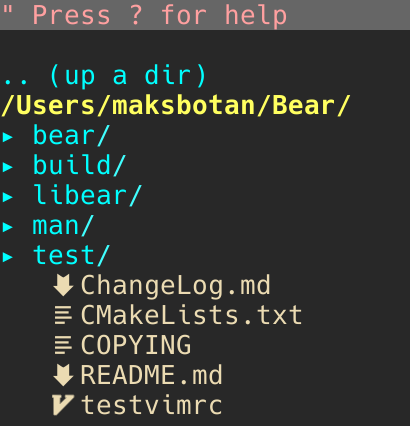
Hi @kutsan! I also has this problem. My minimal vimrc:
set termguicolors
call plug#begin('~/.local/share/nvim/plugged')
Plug 'scrooloose/nerdtree', { 'on': 'NERDTreeToggle' }
Plug 'ryanoasis/vim-devicons'
call plug#end()
I'm using nvim v0.3.2-dev (neovim/neovim@1cca5da05) built from git using homebrew, nerdtree at scrooloose/nerdtree@72c3656799289d4635520c28e17f737066ce19d6, devicons at ryanoasis/vim-devicons@ea5bbf0e2a960965accfa50a516773406a5b6b26 and Hack Nerd Font.
Here's how it looks with that minimal config:
 maksbotan
on 13 Dec 2018
maksbotan
on 13 Dec 2018
Well, turns out it was way bigger problem than I initially thought. The problem involves for users who has set g:WebDevIconsUnicodeDecorateFolderNodes to v:false and it is v:false by default. Since each Unicode icon need an extra space before them to show up correctly, there is a space padding for them. Although, we also add an extra padding by default just in case. You can remove that extra space by doing this:
let g:WebDevIconsNerdTreeBeforeGlyphPadding = ""
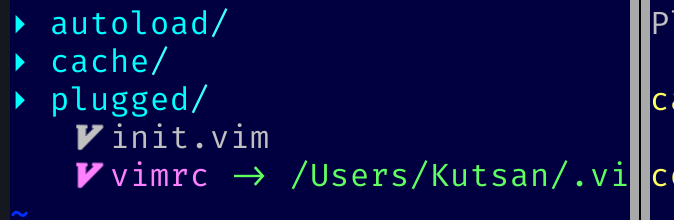
with default settings.
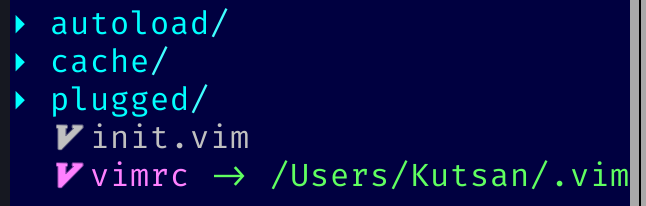
with
let g:WebDevIconsNerdTreeBeforeGlyphPadding = ""
See the difference? Now, it is somewhat aligned but not quite.
My recommendation is to enable folder icons and then they also will have that padding thus this makes them aligned.
let g:WebDevIconsUnicodeDecorateFolderNodes = v:true
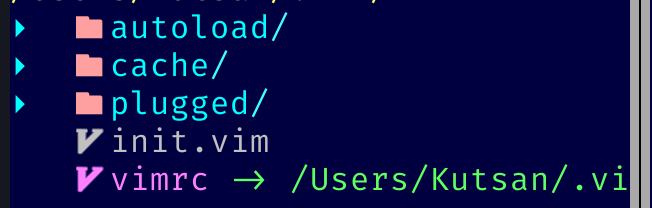
let g:WebDevIconsUnicodeDecorateFolderNodes = v:true
Going further, I don't think we need those ugly arrows anymore, you can disable them by:
" Disable arrow icons at the left side of folders for NERDTree.
let g:NERDTreeDirArrowExpandable = "\u00a0"
let g:NERDTreeDirArrowCollapsible = "\u00a0"

I think this is the best we can do for now. I'm not going to lie both vim-devicons and nerdtree itself are poorly written, due to this it is hard to fix those kind of bugs when we encounter.
And to fix folder icon color, see https://github.com/ryanoasis/vim-devicons/issues/250.
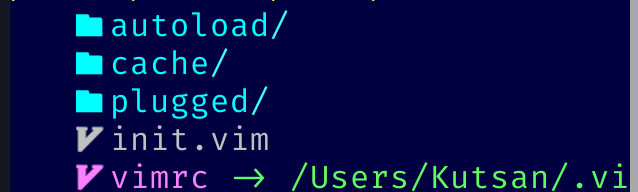
highlight! link NERDTreeFlags NERDTreeDir
kutsan
on 13 Dec 2018
I can't wait to get home and try your findings! It looks great on your screenshot!
 realestninja
on 13 Dec 2018
realestninja
on 13 Dec 2018
Hi,
I opened this issue some time ago: https://github.com/scrooloose/nerdtree/issues/848
As long as it's open, I'm using my patched nerdtree (zapashcanon/nerdtree).
In case that could be of any help... :)
 zapashcanon
on 13 Dec 2018
zapashcanon
on 13 Dec 2018
@zapashcanon Since devicons plugin itself adds those spaces to make it work; I don't think that is relevant to this issue.
kutsan
on 13 Dec 2018
I can confirm that this solves issue for me :)
let g:WebDevIconsNerdTreeBeforeGlyphPadding = ""
let g:WebDevIconsUnicodeDecorateFolderNodes = v:true
Any chance of making this default or at least mentioning in the docs?
maksbotan
on 14 Dec 2018
let g:WebDevIconsNerdTreeBeforeGlyphPadding = ""
let g:WebDevIconsUnicodeDecorateFolderNodes = v:true
This definitely does the trick.
I also tried
" Disable arrow icons at the left side of folders for NERDTree.
let g:NERDTreeDirArrowExpandable = "\u00a0"
let g:NERDTreeDirArrowCollapsible = "\u00a0"
This does take care of removing the arrows... But at the same time I can't expand/collapse folders in nerdtree anymore. Also pressing p to get to parent directory within nerdtree does not work anymore.
realestninja
on 14 Dec 2018
@maksbotan
Any chance of making this default or at least mentioning in the docs?
It's planned. I think we need better code resolutions for our fatal bugs.
kutsan
on 14 Dec 2018
nice, i really have strugling with that
 maulanakmal
on 27 Dec 2018
maulanakmal
on 27 Dec 2018
but this solution leave too much wide padding on the left side T_T
 bandithijo
on 6 Jan 2019
bandithijo
on 6 Jan 2019
@bandithijo There is not much we can do unfortunately. By the way, if you haven't, setting sign column to no reduces a little bit that space.
autocmd FileType nerdtree setlocal signcolumn=no
I tried :
let g:WebDevIconsNerdTreeBeforeGlyphPadding = ""
let g:WebDevIconsUnicodeDecorateFolderNodes = v:true
autocmd FileType nerdtree setlocal signcolumn=no
But still got a log of padding before file names.
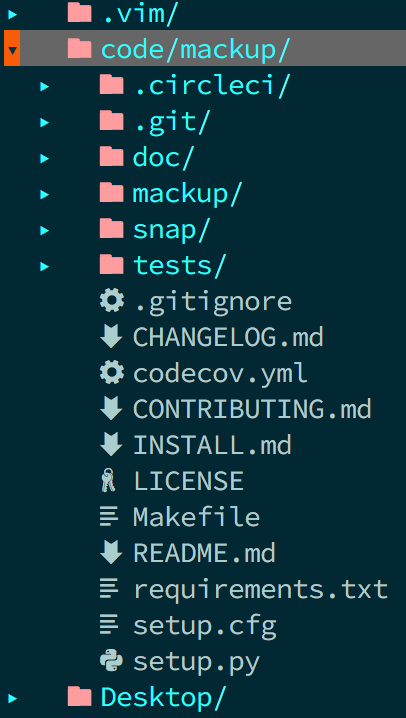
nvim --version
NVIM v0.3.4
I'm using 14pt 'font-sourcecodepro-nerd-font' in iTerm2.
 cocobear
on 24 Jan 2019
cocobear
on 24 Jan 2019
@cocobear
That padding cannot going anywhere for now.
But, maybe you want to hide that arrow with
let g:NERDTreeDirArrowExpandable = "\u00a0"
let g:NERDTreeDirArrowCollapsible = "\u00a0"
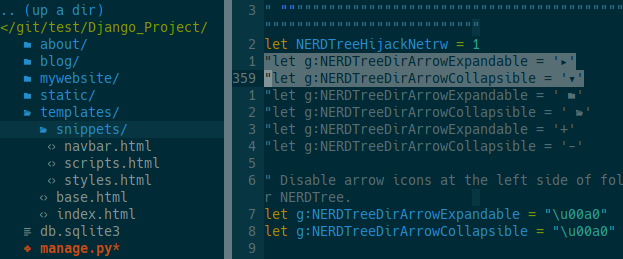
Honestly, that is not too bad for me. I can love it! (^_^)
bandithijo
on 24 Jan 2019
@kutsan Thanks for taking the early look into it and providing great info and screenshots.
I think we need better code resolutions for our fatal bugs.
Can you elaborate on this?
@cocobear I think at least some of the padding is likely because of g:WebDevIconsNerdTreeGitPluginForceVAlign which when set prepends padding to the glyph.
@maksbotan You are right it would make sense to have let g:WebDevIconsUnicodeDecorateFolderNodes on by default
I am working on this issue now (while looking into #223 again).
WIP/RFC Behaviour
I have some changes that seem promising and more consistent behavior:


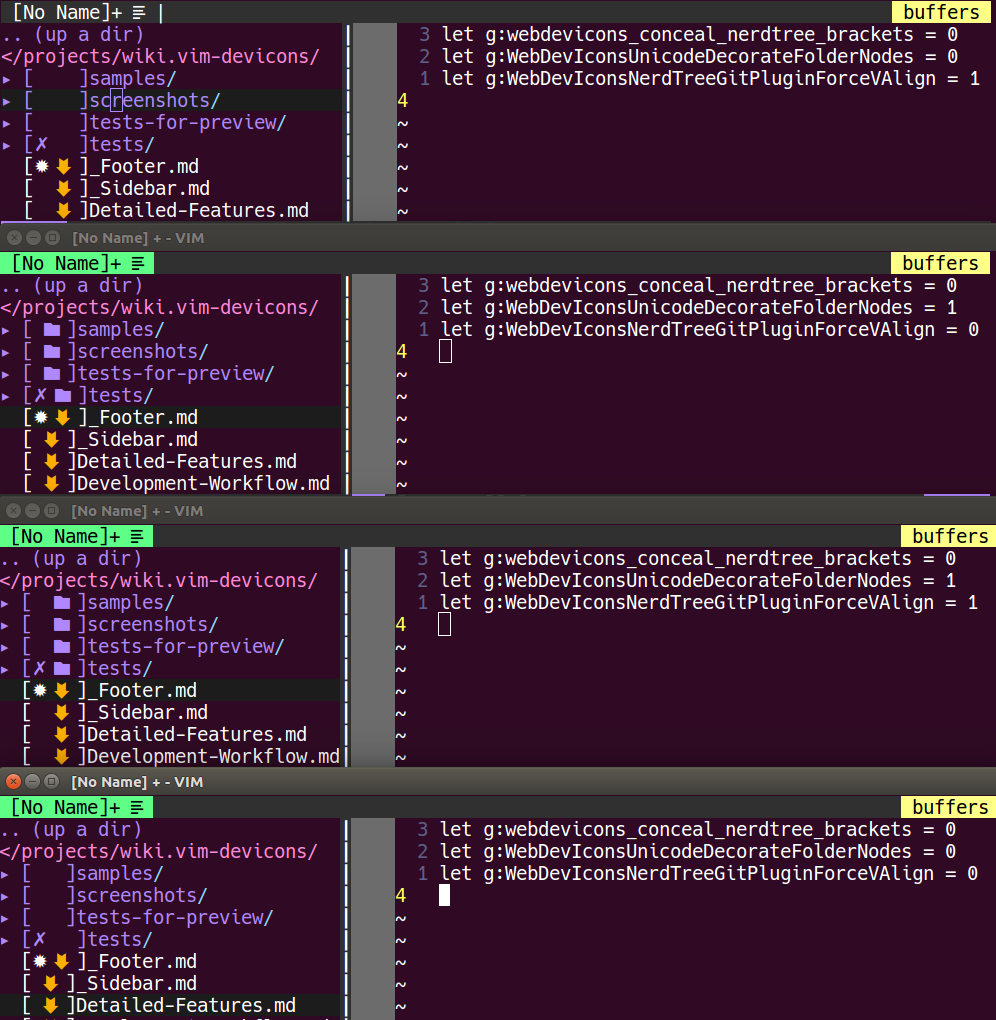
WIP/RFC PR:
Current WIP/RFC PR if anyone could try it out: #255
 ryanoasis
on 11 Feb 2019
ryanoasis
on 11 Feb 2019
This took me way too long to find! Thanks @kutsan your solution worked perfectly for me.
Does anyone know of anyone who has added lines just like tree would in your terminal? i.e. something like
.
├── api
│ ├── app
│ │ ├── audio_processing.py
│ │ ├── database.py
│ │ ├── __init__.py
 jerpint
on 23 Mar 2019
jerpint
on 23 Mar 2019
I tried :
let g:WebDevIconsNerdTreeBeforeGlyphPadding = "" let g:WebDevIconsUnicodeDecorateFolderNodes = v:true autocmd FileType nerdtree setlocal signcolumn=noBut still got a log of padding before file names.
nvim --version
NVIM v0.3.4
I'm using 14pt 'font-sourcecodepro-nerd-font' in iTerm2.
Just to note, this seems to be 2048 em (double-width) glyphs as opposed to 1000 em (monospace).
 polyzen
on 10 Apr 2020
polyzen
on 10 Apr 2020
Related issues
 ctaylo21
·
3Comments
ctaylo21
·
3Comments
 Leeiio
·
10Comments
Leeiio
·
10Comments
 slabua
·
6Comments
slabua
·
6Comments
 shammellee
·
4Comments
shammellee
·
4Comments
 PetarMetodiev
·
10Comments
PetarMetodiev
·
10Comments
Most helpful comment
Well, turns out it was way bigger problem than I initially thought. The problem involves for users who has set
g:WebDevIconsUnicodeDecorateFolderNodestov:falseand it isv:falseby default. Since each Unicode icon need an extra space before them to show up correctly, there is a space padding for them. Although, we also add an extra padding by default just in case. You can remove that extra space by doing this:See the difference? Now, it is somewhat aligned but not quite.
My recommendation is to enable folder icons and then they also will have that padding thus this makes them aligned.
Going further, I don't think we need those ugly arrows anymore, you can disable them by:
I think this is the best we can do for now. I'm not going to lie both vim-devicons and nerdtree itself are poorly written, due to this it is hard to fix those kind of bugs when we encounter.
And to fix folder icon color, see https://github.com/ryanoasis/vim-devicons/issues/250.