Vim-devicons: Icons show as question marks
Required Info
- [x] I have searched the issues for my issue and found nothing related and/or helpful
- [x] I have read or at least glanced at the FAQ
[x] I have read or at least glanced at the Wiki
[x] What version of vim are you using?
VIM - Vi IMproved 8.0 (2016 Sep 12, compiled Jan 22 2017 05:25:57) MacOS X (unix) version Included patches: 1-211 Compiled by Homebrew- [x] What version of vim-devicons are you using?
0.8.5 - [x] Are you using vim from the terminal or a GUI vim?
Terminal - [x] Are you using Mac, Lin
Optional Info
[x] Provide screenshots where appropriate


iTerm: Build 3.1.20170221-nightly
My vimrc has encoding=utf-8 and vim-devicons is loaded after vim-airline.
Any thoughts as to why this is not working?
 pdoak
pdoak
All 19 comments
Hey @pdoak what font are you using?
for more steps please follow these steps to see if they are helpful to you: https://github.com/ryanoasis/vim-devicons/wiki/FAQ-&-Troubleshooting#not-working-general (Just updated!)
 ryanoasis
on 25 Feb 2017
ryanoasis
on 25 Feb 2017
I'm having the same issue on Mac on linux works fine
 ArtStepanyuk
on 27 Feb 2017
ArtStepanyuk
on 27 Feb 2017
I'm having the same issue on Mac
 AntonRatnick
on 15 Mar 2017
AntonRatnick
on 15 Mar 2017
I've solved the problem. It was a problem with the font.
pdoak
on 15 Mar 2017
Thanks for the update @pdoak
@ArtStepanyuk and @AntonRatnick can you tell me which fonts you are using and if you still have the issue?
ryanoasis
on 15 Mar 2017
I use ITerm2 on my mac. Problem solved.
I just set in iterm preferences right ASCII font.
AntonRatnick
on 17 Mar 2017
Thanks for the updates. I'm considering this closed for now
ryanoasis
on 18 Mar 2017
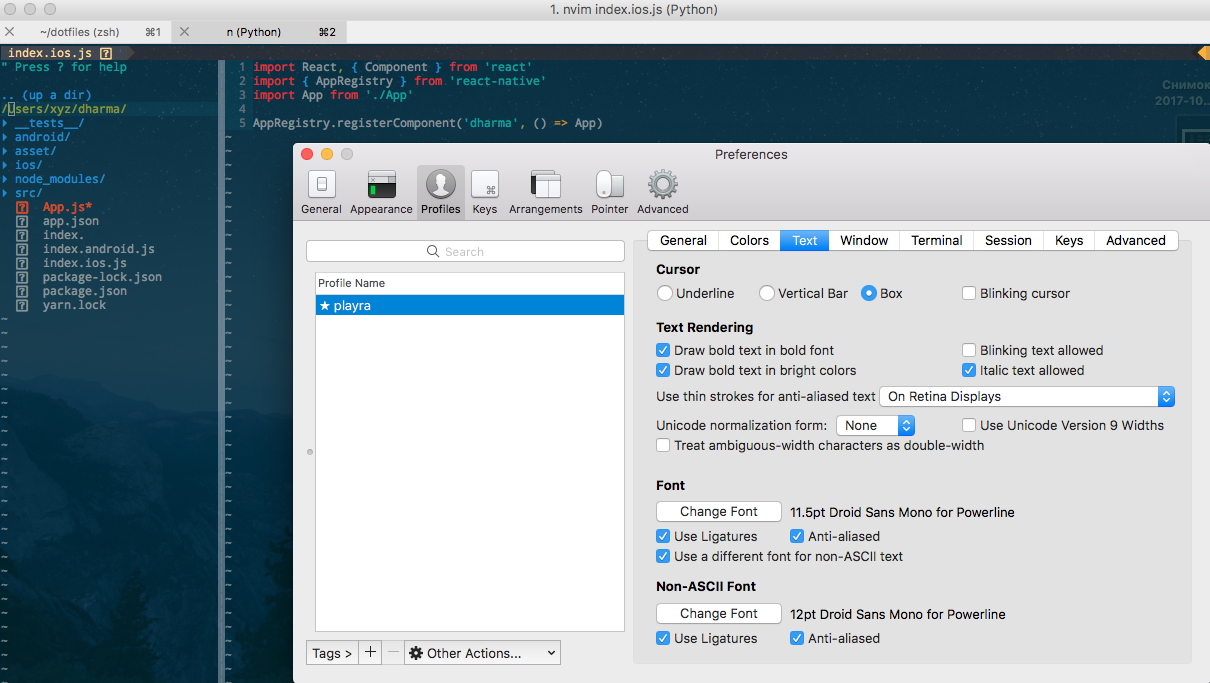
@AntonRatnick Tell me how you solved the problem, I have Mac, iTerm2 and NeoVim
- Step:
brew tap caskroom/fonts
brew cask install font-hack-nerd-font
- Step: Config in .vimrc
set encoding=utf8
let g:airline_powerline_fonts = 1
- Step:
 gHashTag
on 23 Oct 2017
gHashTag
on 23 Oct 2017
@gHashTag Hey it looks like you are not using a Nerd Font. That is required for vimdevicons to work "out of the box". It looks to me like you are only using a Powerline font
ryanoasis
on 23 Oct 2017
@ryanoasis Thanks for the quick response. Does not this command put a font?
brew tap caskroom/fonts
brew cask install font-hack-nerd-font
How to solve this problem?
gHashTag
on 23 Oct 2017
@gHashTag Hey sorry I did miss that part of your comment, however from your last screen shot the hack nerd font you downloaded with brew cask is not selected as your font. Is it available to be selected in the 'change font' ?
ryanoasis
on 24 Oct 2017
@ryanoasis It is he?

gHashTag
on 24 Oct 2017
@ryanoasis have ideas how to solve the error?
gHashTag
on 26 Oct 2017
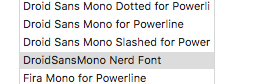
Thanks. Everything is working. It was necessary to choose this font in iTerm2:
gHashTag
on 26 Oct 2017
Hi @ryanoasis, I've this same problem right now. I already installed the NerdFont using Brew, but it seems I can't find any fonts that related to Nerd in my iTerm preferences. Am I missing something in here?
 wndisra
on 18 Jan 2018
wndisra
on 18 Jan 2018
Never mind, I found it. Thanks @ryanoasis
wndisra
on 18 Jan 2018
@ryanoasis Thanks for the quick response. Does not this command put a font?
brew tap caskroom/fonts
brew cask install font-hack-nerd-font
How to solve this problem?
I'm using mac to connect remote linux, it doesn't work after I installed fonts on remote linux, but after installed fonts on mac and do:
fc-cache -f -v
then choose hack-nerd-font, it finally works!
 kitaev-chen
on 15 Mar 2019
kitaev-chen
on 15 Mar 2019
@ryanoasis man you are crazily awesome!!!!! Thanks your input, it helped me to get what I wanted.
 nag-anoop
on 8 Apr 2020
nag-anoop
on 8 Apr 2020
Hi, I want to know does this plugin only support font that patched glyphs?
It seems like this plugin will not work when I was not using nerd font.
@ryanoasis Sorry for disturbing, but I really want to know the answer. 🤕️
 dalugm
on 4 Jun 2020
dalugm
on 4 Jun 2020
Related issues
 flippidippi
·
9Comments
flippidippi
·
9Comments
 Leeiio
·
10Comments
Leeiio
·
10Comments
 divramod
·
7Comments
divramod
·
7Comments
 marioortizmanero
·
3Comments
marioortizmanero
·
3Comments
 DemonCloud
·
3Comments
DemonCloud
·
3Comments
Most helpful comment
@AntonRatnick Tell me how you solved the problem, I have Mac, iTerm2 and NeoVim