Vim-devicons: icons in NERDtree can be only shown half.
A picture is worth a thousand words:
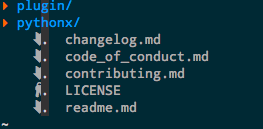
There are dots shield half part of each icon in NERDtree.
Also, the space between icons and characters seems to wide...
PS: I use neovim and iTerm2 in OSX 10.11.2
 d0u9
d0u9
All 71 comments
For the dots try:
autocmd FileType nerdtree setlocal nolist
For spacing you can adjust with:
let g:WebDevIconsNerdTreeAfterGlyphPadding = ' '
 ryanoasis
on 19 Dec 2015
ryanoasis
on 19 Dec 2015
@ryanoasis Works! Thank you!
d0u9
on 19 Dec 2015
Hey no problem. Maybe I should consider setting this in the plugin by default
ryanoasis
on 19 Dec 2015
Hi ryanoasis ,
I'm in trouble with configuration.

Version:

It seems to occupy only one character bit.
Regards,
PengJun
 code-geeker
on 7 Apr 2016
code-geeker
on 7 Apr 2016
I will try to test your vimrc, I think I found it on GitHub but could you post a link to the latest one?
In the meantime, are you using latest version of NerdTree and devicons?
Can you tell me which font you are using?
Is this macvim (gui) or vim on terminal?
ryanoasis
on 7 Apr 2016
Hi ryanoasis,
Thanks for your reply
I just pushed the latest .vimrc file
Yes,they are both latest version.
This is the font:

It is macvim(gui)
I suspect that the differing versions of macvim cause it.
It works well on version 7.4-77 but doesn't work on 7.4-101 (https://github.com/macvim-dev/macvim/releases/tag/snapshot-101)

Regards,
PengJun
code-geeker
on 7 Apr 2016
BTW, It works well on vim on termina

code-geeker
on 7 Apr 2016
@code-geeker Sorry for the delayed response. I am looking into this issue.
BTW for the terminal vim you showed can you give the output of :version there as well?
ryanoasis
on 13 May 2016
@ryanoasis Thanks for your response.

code-geeker
on 13 May 2016
It goes like this in the MacVim.

code-geeker
on 13 May 2016
Thanks. I will try to do some more digging
ryanoasis
on 14 May 2016
same issue as @code-geeker
MacVim snapshot-104
set guifont=Meslo\ LG\ M\ Regular\ for\ Powerline\ Nerd\ Font\ Complete:h12
works well in terminal, even in neovim
 lisposter
on 5 Jun 2016
lisposter
on 5 Jun 2016
Sorry I still haven't had a chance to look into this, however @xusiyuan841028 has shared some info in the Gitter Chat that might be of some help to some of you. ¯_(ツ)_/¯
Some other references from searching (unsure if completely related):
https://github.com/macvim-dev/macvim/issues/267
ryanoasis
on 8 Jun 2016
Hey guys,
I'm using last macvim version (in homebrew) and last version for devicons and I have the same issue here:

An yes, I tried this code, but no success.
autocmd FileType nerdtree setlocal nolist
let g:WebDevIconsNerdTreeAfterGlyphPadding = '  '
The half icons bug happens with tabs also

 lerrua
on 13 Jun 2016
lerrua
on 13 Jun 2016
So, this can fix the issue set ambiwidth=double BUT breaks airline status line. Damm...
lerrua
on 13 Jun 2016
The original issue from @d0u9 was actually a different problem (#84, #110) but we seem to now be using this issue in regards to a new (harder?) problem :stuck_out_tongue: ... so I am going to re-open this so there is less confusion and it's easier to find
@lerrua Hey yep sorry, still a serious issue.
Just wondering if anyone has been able to try @xusiyuan841028 suggested fix?
The cause of issue is that: https://github.com/macvim-dev/macvim/blob/0e954ac375d78d86cfd41377440c7f5977ae8924/src/screen.c#L8068-L8070
ryanoasis
on 13 Jun 2016
@ryanoasis
My fix https://github.com/xusiyuan841028/macvim/commit/27bcfd27d6c3500b6ca27c7387a19b5a8306df17
You can install my edge version by:
brew install --HEAD xusiyuan841028/macvim/macvim
 xusiyuan841028
on 14 Jun 2016
xusiyuan841028
on 14 Jun 2016
@xusiyuan841028 Thanks I just have not been able to test it out (I don't have access to a mac at the moment).
I was hoping someone else could verify/try the suggested fix
ryanoasis
on 14 Jun 2016
Seems like possibly due to change https://github.com/vim/vim/commit/cb0700844c1274fe8bc0ceaffaee0ad21c406f30 ?
I really need to test on an updated version of vim. Will try this weekend
ryanoasis
on 14 Jun 2016
@xusiyuan841028 I've tried your patched version, but still have half icons bug.
What I did:
brew unlink macvim
brew install --HEAD xusiyuan841028/macvim/macvim
brew link --overwrite macvim
Is there anything else needed here?
VIM - Vi IMproved 7.4 (2013 Aug 10, compiled May 14 2016 22:15:27)
MacOS X (unix) version
Included patches: 1-1816
Compiled by Homebrew

 valerybugakov
on 25 Jun 2016
valerybugakov
on 25 Jun 2016
@valerybugakov Thanks for trying! I am not really sure if anything else is needed :worried:
ryanoasis
on 26 Jun 2016
@ryanoasis oh, if there will be something I can do to help with this issue - tell me 😊
Awesome plugin and would be awesome to have it working properly on macvim!
valerybugakov
on 27 Jun 2016
@valerybugakov I have tested the fixed macvim in another macbook, and it is fine. The version info is as following:
VIM - Vi IMproved 7.4 (2013 Aug 10, compiled Jun 23 2016 09:53:11)
MacOS X (unix) version
Included patches: 1-1952
I find the message Compiled by Homebrew, so I don't think you really use my patched macvim. I suggest you uninstall macvim, and re-install my patched version.
brew uninstall macvim
brew cleanup
brew install --force xusiyuan841028/macvim/macvim --HEAD
@xusiyuan841028 thanks for the info, will try again in an hour 👍
valerybugakov
on 28 Jun 2016
@valerybugakov please pay attention to compiled Jun 23 2016 09:53:11, I think the date should be the moment you install patched macvim. I will keep update my patched version until official version fixes the double-width char display issue. Everyone can use command brew uninstall macvim && brew install --force xusiyuan841028/macvim/macvim --HEAD to install the updated version.
xusiyuan841028
on 28 Jun 2016
@xusiyuan841028 should my Included patches match yours?
$ mvim --version
VIM - Vi IMproved 7.4 (2013 Aug 10, compiled Jun 28 2016 19:00:38)
MacOS X (unix) version
Included patches: 1-1965
I still have the same result 😥 After installation I got a warning from brew that macvim wasn't linked properly and I did brew link --overwrite macvim. Is this ok or it can be a source of an issue?
valerybugakov
on 28 Jun 2016
@xusiyuan841028 Is there something specific that will identify your build for 100%? (that I've installed it correctly and test plugin with it)
valerybugakov
on 28 Jun 2016
@xusiyuan841028 also a strange thing, after that ctrlp stopped working for vim and macvim
valerybugakov
on 29 Jun 2016
@valerybugakov Could you give me your email? I wanna your compiled MacVim and send mine to you, in order to check whether the patched version is available. Or you can contact with me via my public email.
xusiyuan841028
on 29 Jun 2016
@xusiyuan841028 sent you an email ([email protected])
valerybugakov
on 29 Jun 2016


 keenwon
on 27 Aug 2016
keenwon
on 27 Aug 2016
@keenwon The font rendering becomes ugly!
xusiyuan841028
on 28 Aug 2016
I'm having the same issue:
OS: Xubuntu 16.04
Vim version: 8
In terminal Vim everything looks fine:

But in GVim it's cut in half:

I'm using Inconsolata font, specifically this one
 kristijanhusak
on 30 Sep 2016
kristijanhusak
on 30 Sep 2016
@kristijanhusak set ambiwidth=double should solve devicons problem, but all other unicode characters will look ugly (Try to write french characters: é,è...).
 KabbAmine
on 9 Oct 2016
KabbAmine
on 9 Oct 2016
@KabbAmine that fixes the icons issue, but messes up my airline, and i have $ at end of each line.

kristijanhusak
on 10 Oct 2016
@kristijanhusak I know for airline, but the $ is from list/listchars options.
KabbAmine
on 10 Oct 2016
Can confirm having this issue as well.
OS: macOS Sierra 10.12
Vim Version: MacVim VIM - Vi IMproved 8.0 (2016 Sep 12, compiled Nov 22 2016 21:04:38)

 seemethere
on 23 Nov 2016
seemethere
on 23 Nov 2016
Thanks all for the helpful details. I know this is a pretty important and critical bug for using this plugin on MacVim.
I've been busy on Nerd Fonts but even so not sure even if there is something specific I could do to contribute to solving this. That being said I will continue to try to look for and accept ideas on how to resolve :smile:
ryanoasis
on 10 Dec 2016
I use the UbuntuMono font, and there are actually two versions that conflict in the package. If you only install the all the .*Mono.ttf fonts then there is no clipping. The standard fonts must have larger icons that clip, FWIW.
If there is a way to get the non-Mono fonts working that would be nice to see though. 👍 :shipit:
 cmcginty
on 12 Jan 2017
cmcginty
on 12 Jan 2017
@xusiyuan841028 I can attest that your patch is working except for double width characters in the tabline. Any hope to see your fix merged into MacVim ?
 xguerin
on 5 Feb 2017
xguerin
on 5 Feb 2017
@keenwon solution (disable Use Core Text renderer) fixed half-size devicons issue for me in MacVim, but without this option checked MacVim started working much slower =(
 dvakatsiienko
on 24 Mar 2017
dvakatsiienko
on 24 Mar 2017
Happens on my Linux box too, using nerd fonts.
Btw the problem is this: tiagofumo/vim-nerdtree-syntax-highlight
Without color, icons display fine
 felixsanz
on 3 Jun 2017
felixsanz
on 3 Jun 2017
Been having the same issue with MacVim. While Preferences > Advanced > Use Core Text Renderer being unchecked fixed NERDTree it lead to everything else looking awful. So I've decided to leave the renderer on.
I added this to my .vimrc and things are now working in MacVim as expected...at least for icons. The problem now is that it seems to apply these settings to ALL buffers and not just the NERDTree buffers. Perhaps someone can clean/fix this up a bit?
    augroup devicons_nerdtree
        autocmd FileType nerdtree setlocal list
        autocmd FileType nerdtree setlocal listchars=space:.
        autocmd FileType nerdtree setlocal nolist
        autocmd FileType nerdtree setlocal ambiwidth=double
    augroup END
 ActionScripted
on 5 Jun 2017
ActionScripted
on 5 Jun 2017
The issue with MacVim is related to the CoreText engine.
I spent some time looking at the code. Currently, the glyph processor does not take into account double-width glyphs when painting the glyphs on the GC. And since the glyph processor does not use a proper path to layout the glyphs (I believe this is required to keep the column-based layout) the second half of the double-width glyph is overwritten.
I toyed with the CoreText API and it should be fairly doable to recognize double-width glyph before painting them and then instruct the CoreText engine to skip the next glyphs. If I get anywhere with this approach I'll let you know.
xguerin
on 5 Jun 2017
This is NOT related to only mac. All platforms suffer it.
felixsanz
on 5 Jun 2017
Mileage may vary. My point is that it's not a font-related issue but rather a tool-related one. Double-glyphs fonts work like a charm on macOS+Vim+iTerm2. They also work like a charm on *nix+Vim+libvte. However, they don't work with MacVim or GTKx renderers.
xguerin
on 5 Jun 2017
It doesn't work on Linux+Neovim+st terminal.
felixsanz
on 5 Jun 2017
if you use another terminal, like rxvt, it works fine. At least for me.
 Jeansen
on 12 Jul 2017
Jeansen
on 12 Jul 2017
@ActionScripted That's a very good idea :smile:
autocmd FileType nerdtree setlocal ambiwidth=double
however it looks like ambiwidth is not something that has a local value as it will always apply globally
ryanoasis
on 23 Jul 2017
I hope it helps:
In my airline, after open GVIM, CTRL P and open a file, the icons appears like that:

Then, I switch to VISUAL mode and the icons appears correctly:

But if I open nerdtree, the icons back to initial state.
 WillianGoncalves
on 28 Jul 2017
WillianGoncalves
on 28 Jul 2017
@WillianGoncalves thanks for the info. Hmm my guess is that this would be the same affect as doing a redraw ?
ryanoasis
on 30 Jul 2017
No, @ryanoasis. redraw didn't fix the icons. Instead, after get the full icons with VISUAL mode, redraw brought the problem back.
Besides that, I just realized that the method I posted works only for the first file.
WillianGoncalves
on 31 Jul 2017
@ActionScripted ambiwidth and listchars are global options and can not be set locally, so a better approach is to call a function on all the filetypes where the needed options will be applied only when we have a nerdtree file.
An simple example here using a global variable to stock the default options:
augroup custom_nerdtree_options
    autocmd!
    autocmd FileType,WinEnter * :call <SID>SetNerdTreeOptions()
augroup END

function! s:SetNerdTreeOptions() abort
    if &l:filetype ==# 'nerdtree'
        let g:default_opts = {
                    \   'ambiwidth': &ambiwidth,
                    \   'listchars': &listchars,
                    \   'list'     : &l:list,
                    \ }
        setlocal ambiwidth=double listchars=space:. nolist
    else
        if exists('g:default_opts')
            let [&ambiwidth, &listchars, &l:list] = [
                        \   g:default_opts.ambiwidth,
                        \   g:default_opts.listchars,
                        \   g:default_opts.list
                        \ ]
            unlet g:default_opts
        endif
    endif
endfunction
Having the same issue here, with neovim 0.2.0, and vim-devicons latest version. It doesn't look like it happens on every file though:

Note that the icon on stack.yml and on 30-icons.conf seems to be the same, but it's only cut in half in one of the instances.
Hope this helps.
EDIT: It looks like it's happening on the colourised ones only, maybe?
 mlopes
on 6 Oct 2017
mlopes
on 6 Oct 2017

hi, guys! as you can see, I met this problem when I tried to install vim-devicons, I just want to ask why the icons do not match the file type??????
 MyGitTools
on 19 Oct 2017
MyGitTools
on 19 Oct 2017
same issue here, Hi Friend!

 DemonCloud
on 7 Nov 2017
DemonCloud
on 7 Nov 2017
@MyGitTools That is strange. Which font are you using?
ryanoasis
on 21 Nov 2017
thank you for replying my question
On Tue, Nov 21, 2017 at 10:58 AM, Ryan L McIntyre notifications@github.com
wrote:
@MyGitTools https://github.com/mygittools That is strange. Which font
are you using?—
You are receiving this because you were mentioned.
Reply to this email directly, view it on GitHub
https://github.com/ryanoasis/vim-devicons/issues/133#issuecomment-345901434,
or mute the thread
https://github.com/notifications/unsubscribe-auth/AXqcshmZfhHTWf7cSIDKzevJiA21BVmMks5s4jxHgaJpZM4G4kYu
.
MyGitTools
on 25 Dec 2017
Summary of MacVim so far seems to be: Setting CoreText Renderer=off fixes the problem and tanks perf/quality.
Setting ambiwidth does seem to fix some of the icon drawing, and has some other remaining issues such as the following rendering of airline (latest MacVim, font=PragmataPro).
Notice the gap next to the arrow. That only shows up with ambiwidth=double.

 jordwalke
on 8 Feb 2018
jordwalke
on 8 Feb 2018
Still happening here:
- vim-devicons 8ee4c8cdef4f6ea0f27b341ac077c303d0e57a90 (May 19 20:01:06 2018 -0400)
- VIM 8.0 (2016 Sep 12, compiled Mar 24 2018 08:30:22)
- MacVim snapshot 146
- macOS High Sierra 10.13.4 (17E202)
 lucascaton
on 2 Jun 2018
lucascaton
on 2 Jun 2018
@lucascaton The latest macVim should have my pull request which fixes it.
jordwalke
on 2 Jun 2018
Awesome, thanks @jordwalke!
lucascaton
on 2 Jun 2018
It looks this issue only happens when gtk version is 2.0.
With GTK3.0 the icon is fine. Well, terrible lag issue on gvim with GTK3.0, cannot use that....
 IsOverThere
on 10 Sep 2018
IsOverThere
on 10 Sep 2018
I am facing the problem with the cut-off devicons under Windows 10 too with GVim 8.1. Patching the font with option --mono mitigates this but the icons are smaller in dimension. The problem also shows up in Startify and Airline plugins.
 jadero
on 19 Sep 2018
jadero
on 19 Sep 2018
I have suggested to @fabrizioschiavi (creator of Pragamata Pro font), that for maximum compatibility, NERD fonts (and other wide glyphs) be implemented as ligatures. So what that means is that everything can remain monospaced, but then if you include a vim-devicon character followed by a space, the font would render it as the nerd icon. This should avoid the most amount of rendering bugs and work in the most editors - as long as they support ligatures (which they are increasingly)
jordwalke
on 7 Nov 2018
I'm in Linux, and I can confirm for myself that its something related to tiagofumo/vim-nerdtree-syntax-highlight. My guess is that there is some error that makes the glyph only take one character, regardless of the padding, but I might be completely wrong.
 ChrisMGeo
on 7 Mar 2020
ChrisMGeo
on 7 Mar 2020
I have this problem with using Inconsolata font.
I have the same font on both my terminal and gvim. The terminal vim display icons fine, gvim cuts them in half.
 bellini666
on 21 May 2020
bellini666
on 21 May 2020
Same problem using Inconsolata font, too.
same font on both st and neovim.
 GioF
on 14 Jun 2020
GioF
on 14 Jun 2020
I had this very issue with neovim v0.4.3, with the font Noto Mono Nerd Font.
I discovered it was in fact the plugin tiagofumo/vim-nerdtree-syntax-highlight that caused the issue. Not all icons are displayed as expected.
 TheMasteredPanda
on 15 Jun 2020
TheMasteredPanda
on 15 Jun 2020
I had this very issue with neovim v0.4.3, with the font Noto Mono Nerd Font.
I discovered it was in fact the plugin tiagofumo/vim-nerdtree-syntax-highlight that caused the issue. Not all icons are displayed as expected.
@TheMasteredPanda I don't have that plugin and I also have the issue, not only in nerdtree which I barely use but also on ctrlpvim/ctrlp.vim
bellini666
on 15 Jun 2020
I had this very issue with neovim v0.4.3, with the font Noto Mono Nerd Font.
I discovered it was in fact the plugin tiagofumo/vim-nerdtree-syntax-highlight that caused the issue. Not all icons are displayed as expected.
thanks removing that plugin worked for me
 siduck76
on 20 Nov 2020
siduck76
on 20 Nov 2020
Related issues
 PetarMetodiev
·
10Comments
PetarMetodiev
·
10Comments
 x3rxe5
·
8Comments
x3rxe5
·
8Comments
 ELLIOTTCABLE
·
5Comments
ELLIOTTCABLE
·
5Comments
 justin-nguyen-1996
·
5Comments
DemonCloud
·
3Comments
justin-nguyen-1996
·
5Comments
DemonCloud
·
3Comments
Most helpful comment
I solve this problem by this:
and my vimrc is: https://github.com/keenwon/vim