Vim-airline: Q: Is there a way that I can manually set a statusline to inactive?
I'm using tmux and neovim with vim-airline (which I'm very happy with, so thank you for that). Now I'm trying to fix an annoyance I have with the statusline. When I switch panes from vim to tmux, the statusline remains active on the pane that I was in last before moving to the tmux pane.
It would be very nice if there is a way to trigger (e.g. update a variable or call a function) vim-airline to set that statusline to inactive. I cannot seem to find it myself, so hope anyone has some suggestions or a solution. Thanks!
environment
- vim: neovim 0.3.1
- vim-airline: latest (master)
- OS: latest (0.10.14)
 svanharmelen
All 38 comments
no this is not currently possible. Can you please provide a reproducible example using tmux? I am not sure I actually understand the problem.
 chrisbra
on 2 Oct 2018
chrisbra
on 2 Oct 2018
Maybe a this works better:
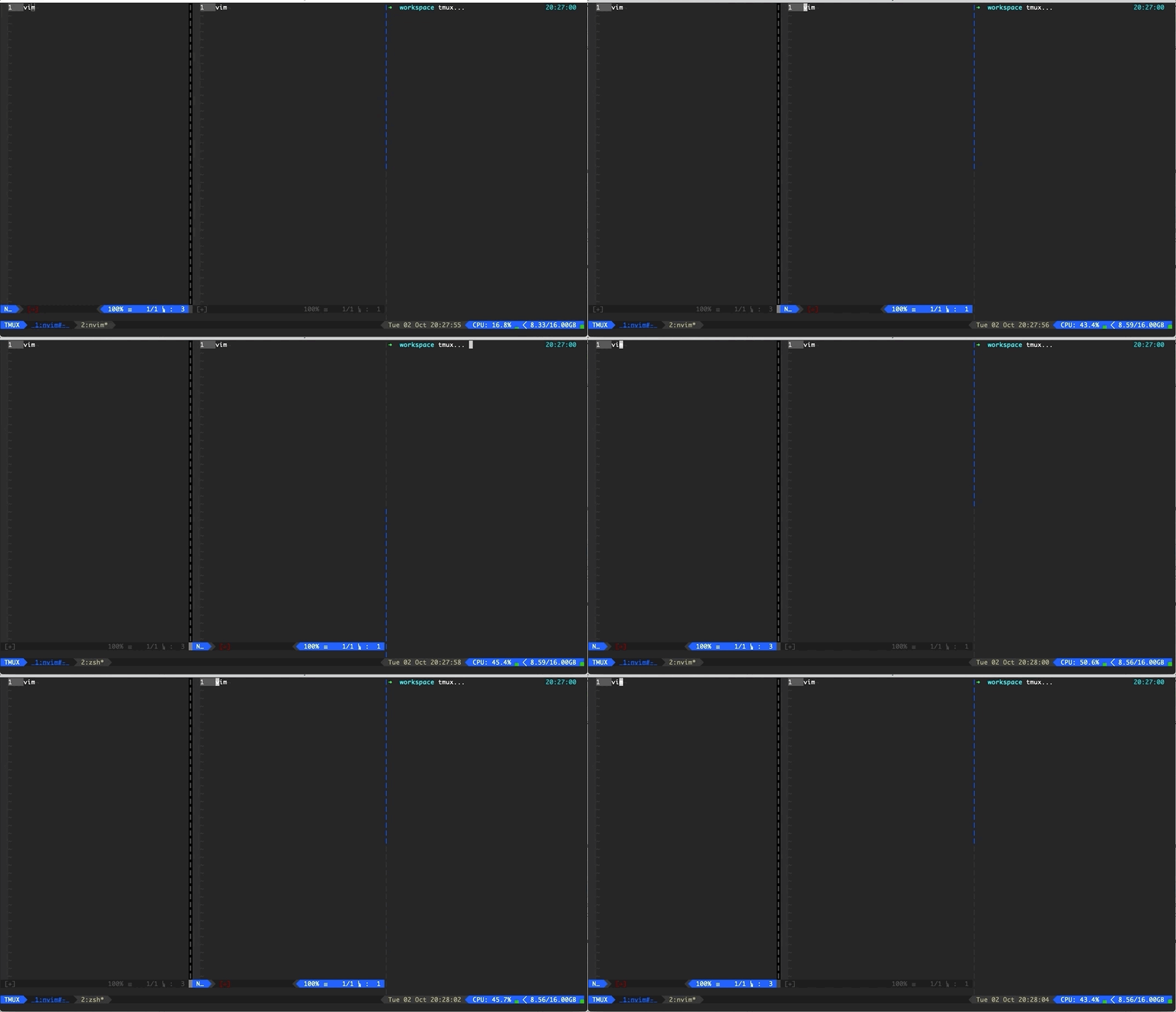
As you can see (follow the cursor to see where I am) when I move between vim windows/panes the statusline follows me. But when I leave the vim tmux pane all together and enter the tmux window on the right, the statusline in the middle keeps indicating its active.
That is of course perfectly correct from vim's point of view, so I wondered if I could manually update the statusline so it looks the same as the inactive one?
svanharmelen
on 2 Oct 2018
Yes, this is perfect from Vims point of view. See it from a different point of view, even if you are in a different pane in tmux, you always know which Vim window has the focus.
chrisbra
on 2 Oct 2018
Sure... I understand, but I don't like that. In addition my brain is currently wired to use neovim :term buffers to do terminal tasks, but I'm now switching that to using tmux. So in my old setup the statusline would follow me when I entered the :term buffer/window. But now it doesn't so I'm off by one now every time when I switch windows coming from the tmux pane.
For the record, I'm not asking for a complete solution, I can write some vimscript myself for that. Just if vim-airline as any kind of hook I can use to update/change this manually.
svanharmelen
on 2 Oct 2018
Hm, does tmux send a FocusLost autocommand?
chrisbra
on 2 Oct 2018
you could try this patch, which sets the statusline to inactive whenever Focus is lost:
diff --git a/autoload/airline.vim b/autoload/airline.vim
index 36475d1..01569bd 100644
--- a/autoload/airline.vim
+++ b/autoload/airline.vim
@@ -120,6 +120,20 @@ function! airline#update_statusline()
   call s:invoke_funcrefs(context, g:airline_statusline_funcrefs)
 endfunction

+function! airline#update_statusline_inactive()
+  if airline#util#getwinvar(winnr(), 'airline_disabled', 0)
+    return
+  endif
+  for nr in range(1, winnr('$'))
+    if airline#util#getwinvar(nr, 'airline_disabled', 0)
+      continue
+    endif
+    call setwinvar(nr, 'airline_active', 0)
+    let context = { 'winnr': nr, 'active': 0, 'bufnr': winbufnr(nr) }
+    call s:invoke_funcrefs(context, s:inactive_funcrefs)
+  endfor
+endfunction
+
 let s:contexts = {}
 let s:core_funcrefs = [
       \ function('airline#extensions#apply'),
diff --git a/plugin/airline.vim b/plugin/airline.vim
index c32a1bf..fa844cd 100644
--- a/plugin/airline.vim
+++ b/plugin/airline.vim
@@ -102,6 +102,10 @@ function! s:airline_toggle()
         " Make sure that g_airline_gui_mode is refreshed
         autocmd OptionSet termguicolors call <sid>on_colorscheme_changed()
       endif
+      if exists("##FocusLost")
+        " Set all statuslines to inactive
+        autocmd FocusLost * call airline#update_statusline_inactive()
+      endif
       if exists("##TerminalOpen")
         autocmd TerminalOpen * call <sid>on_colorscheme_changed()
       endif
@@ -119,7 +123,7 @@ function! s:airline_toggle()
             \ |   call <sid>on_window_changed()
             \ | endif

-      autocmd VimResized * unlet! w:airline_lastmode | :call <sid>airline_refresh()
+      autocmd VimResized,FocusGained * unlet! w:airline_lastmode | :call <sid>airline_refresh()
       autocmd TabEnter * :unlet! w:airline_lastmode | let w:airline_active=1
       autocmd BufWritePost */autoload/airline/themes/*.vim
             \ exec 'source '.split(globpath(&rtp, 'autoload/airline/themes/'.g:airline_theme.'.vim', 1), "\n")[0]
This works in Gvim, not sure if this works in tmux, perhaps you could call :doautocmd FocusLost whenever you switch tmux panes (don't know if this can be done in tmux) and call :doautocmd FocusGained whenever you enter a Vim window.
chrisbra
on 2 Oct 2018
Wow... Thank you so much for this! I'm going to test/try it right away. Will post results when I'm done.
svanharmelen
on 2 Oct 2018
@chrisbra it works like a charm! Very nice 👍Are you going to merge this into master, or...?
svanharmelen
on 2 Oct 2018
I will merge a similar patch. I wonder if this should be hidden by a configuration variable, but that can still be done, if people start complaining :)
chrisbra
on 3 Oct 2018
Very nice! And indeed, if needed it can always be controlled by a config var. Really happy with how it works now, so you definitely made my day/week 🎉
svanharmelen
on 3 Oct 2018
@chrisbra I works very well, but I noticed that when I only have one window open and move to a tmux window it looks like this:
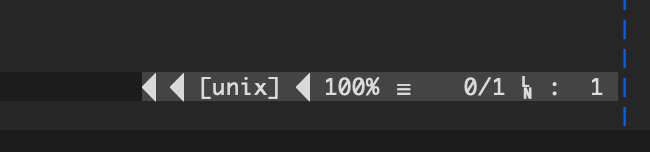
But when I have 2 (or more) vim windows open and first switch between those 2 vim windows before moving to the tmux window, it will look like this:

Does this ring a bell? It seems like something is not set/triggered, that is only triggered when moving between Vim windows and then will just keep working once its set/triggered.
svanharmelen
on 3 Oct 2018
FYI this only seems to happen on the right part of the statusline. The left part works as expected and changes as expected.
svanharmelen
on 3 Oct 2018
@chrisbra when I update to f045452 branch, the refresh will break the "about" in Vim.
 ZurrTum
on 3 Oct 2018
ZurrTum
on 3 Oct 2018
@ZurrTum not sure I understand. What exactly breaks?
chrisbra
on 3 Oct 2018
@svanharmelen don't know yet
chrisbra
on 3 Oct 2018
:intro
The introduction information is hidden after the "airline" is loaded.
Expected: Display information normally
Inconsistent with the previous branch

I am using the vim-plug to load the plugin and I have problems after using the :PlugUpdate update.
ZurrTum
on 4 Oct 2018
What terminal or gui?
Am 04.10.2018 um 01:42 schrieb ZurrTum notifications@github.com:
:intro
The introduction information is hidden after the "airline" is loaded.
Expected: Display information normally
Inconsistent with the previous branchI am using the vim-plug to load the plugin and I have problems after using the :PlugUpdate update.
—
You are receiving this because you were mentioned.
Reply to this email directly, view it on GitHub, or mute the thread.
chrisbra
on 4 Oct 2018
Reproduce steps:
- Download and unzip
gvim_8.1.0451_x64.zipfrom https://github.com/vim/vim-win32-installer/releases - Download vim-plug
cd vim/vim81
curl https://raw.githubusercontent.com/junegunn/vim-plug/master/plug.vim -o autoload/plug.vim - Add vimrc configuration
vim $VIM/vimrc
call plug#begin('$VIMRUNTIME/.vim/bundle')
Plug 'vim-airline/vim-airline'
call plug#end()
- Run
:w | source %and then:PlugInstall - Double click to run gvim or vim
- The strange thing is that the command line runs
vimwith no errors.
Use previous commit 13993d1:
--- a/vimrc
+++ b/vimrc
@@ -1,4 +1,4 @@
 call plug#begin('$VIMRUNTIME/.vim/bundle')
-Plug 'vim-airline/vim-airline'
+Plug 'vim-airline/vim-airline', { 'commit': '13993d1' }
 call plug#end()
run :PlugUpdate
Double click to run gvim or vim
ZurrTum
on 4 Oct 2018
So what terminal or GUI?
Am 04.10.2018 um 23:33 schrieb ZurrTum notifications@github.com:
Reproduce steps:
Download and unzip gvim_8.1.0451_x64.zip from https://github.com/vim/vim-win32-installer/releases
Download vim-plug
cd vim/vim81
curl https://raw.githubusercontent.com/junegunn/vim-plug/master/plug.vim -o autoload/plug.vim
Add vimrc configuration
vim $VIM/vimrc
call plug#begin('$VIMRUNTIME/.vim/bundle')
Plug 'vim-airline/vim-airline'
call plug#end()
Run :w | source % and then :PlugInstall
Double click to run gvim or vim
The strange thing is that the command line runs vim with no errors.
Use previous commit 13993d1:--- a/vimrc
+++ b/vimrc
@@ -1,4 +1,4 @@
call plug#begin('$VIMRUNTIME/.vim/bundle')
-Plug 'vim-airline/vim-airline'
+Plug 'vim-airline/vim-airline', { 'commit': '13993d1' }
call plug#end()
run :PlugUpdate
Double click to run gvim or vim—
You are receiving this because you were mentioned.
Reply to this email directly, view it on GitHub, or mute the thread.
chrisbra
on 4 Oct 2018
@chrisbra 13993d1 is the previous submission of f045452, so I can confirm that this is a problem with this submission.
ZurrTum
on 4 Oct 2018
I am using the win32 version of vim
ZurrTum
on 4 Oct 2018
cmd.exe running vim will not be a problem, but double-clicking open vim or gvim will not display intro
ZurrTum
on 4 Oct 2018
Does that patch change anything?
diff --git a/plugin/airline.vim b/plugin/airline.vim
index 386cf7b..23167e2 100644
--- a/plugin/airline.vim
+++ b/plugin/airline.vim
@@ -105,8 +105,6 @@ function! s:airline_toggle()
       if exists("##TerminalOpen")
         autocmd TerminalOpen * call <sid>on_colorscheme_changed()
       endif
-      " Set all statuslines to inactive
-      autocmd FocusLost * call airline#update_statusline_inactive(range(1, winnr('$')))
       " Refresh airline for :syntax off
       autocmd SourcePre */syntax/syntax.vim
             \ call airline#extensions#tabline#buffers#invalidate()
@@ -121,11 +119,14 @@ function! s:airline_toggle()
             \ |   call <sid>on_window_changed()
             \ | endif

-      autocmd VimResized,FocusGained * unlet! w:airline_lastmode | :call <sid>airline_refresh()
+      autocmd VimResized * unlet! w:airline_lastmode | :call <sid>airline_refresh()
       autocmd TabEnter * :unlet! w:airline_lastmode | let w:airline_active=1
       autocmd BufWritePost */autoload/airline/themes/*.vim
             \ exec 'source '.split(globpath(&rtp, 'autoload/airline/themes/'.g:airline_theme.'.vim', 1), "\n")[0]
             \ | call airline#load_theme()
+      " Set all statuslines to inactive
+      autocmd VimEnter * :autocmd FocusLost * call airline#update_statusline_inactive(range(1, winnr('$')))
+      autocmd VimEnter * :autocmd FocusGained * unlet! w:airline_lastmode | :call <sid>airline_refresh()
     augroup END

     if &laststatus < 2
The problem is still.
I tried to use the timer and it seems to solve the refresh problem.
diff --git a/plugin/airline.vim b/plugin/airline.vim
index 386cf7b..35514be 100644
--- a/plugin/airline.vim
+++ b/plugin/airline.vim
@@ -121,11 +121,12 @@ function! s:airline_toggle()
             \ |   call <sid>on_window_changed()
             \ | endif

-      autocmd VimResized,FocusGained * unlet! w:airline_lastmode | :call <sid>airline_refresh()
+      autocmd VimResized * unlet! w:airline_lastmode | :call <sid>airline_refresh()
       autocmd TabEnter * :unlet! w:airline_lastmode | let w:airline_active=1
       autocmd BufWritePost */autoload/airline/themes/*.vim
             \ exec 'source '.split(globpath(&rtp, 'autoload/airline/themes/'.g:airline_theme.'.vim', 1), "\n")[0]
             \ | call airline#load_theme()
+      autocmd VimEnter * :call timer_start(0, {-> execute('autocmd FocusGained * unlet! w:airline_lastmode | :call <sid>airline_refresh()')})
     augroup END

     if &laststatus < 2
After adding timer_start:
gvim.exe is displayed normally, but vim.exe still has problems.
I changed 0 to 100 milliseconds and then there was no problem.
ZurrTum
on 6 Oct 2018
I am not sure if <sid> will work properly.
You can refer to map.txt line 1133:
If you need to get the script number to use in a complicated script, you can
use this function:
function s:SID()
return matchstr(expand(''), ' \zs\d+\ze_SID$')
endfun
ZurrTum
on 6 Oct 2018
how about a PR then?
chrisbra
on 8 Oct 2018
@chrisbra I works very well, but I noticed that when I only have one window open and move to a tmux window it looks like this:
But when I have 2 (or more) vim windows open and first switch between those 2 vim windows before moving to the tmux window, it will look like this:
Does this ring a bell? It seems like something is not set/triggered, that is only triggered when moving between Vim windows and then will just keep working once its set/triggered.
@svanharmelen I'm seeing the same behavior after pulling down this commit. (using gvim)
 Oscillope
on 11 Oct 2018
Oscillope
on 11 Oct 2018
@chrisbra I works very well, but I noticed that when I only have one window open and move to a tmux window it looks like this:
But when I have 2 (or more) vim windows open and first switch between those 2 vim windows before moving to the tmux window, it will look like this:
Does this ring a bell? It seems like something is not set/triggered, that is only triggered when moving between Vim windows and then will just keep working once its set/triggered.
I'm also having this issue and it's very distracting (despite the fact that this commit is trying to make airline less distracting hehehe). BTW, I'm not using tmux, just plain neovim on st.
 isamert
on 14 Oct 2018
isamert
on 14 Oct 2018
+1 for making this a configurable option, it broke my spacebar heating. I happened to be renovating my vim configuration at the time, so it was a bit baffling.
 brianclemens
on 15 Oct 2018
brianclemens
on 15 Oct 2018
@Oscillope Yeah that is expected, as the statusline will only become inactive, however the separators are not changed.
@brianclemens I'll add another configuration variable then
chrisbra
on 15 Oct 2018
okay, changed in 07ac695, to enable, set :let g:airline_focuslost_inactive=1.
chrisbra
on 15 Oct 2018
I also encounter the issue that the welcome screen disappears after several millisecond, even if I :let g:airline_focus_lost_inactive=0.
Tested with Mac OS 10.12.6, tmux 2.8, neovim 0.3.1 and latest Alacrity/Iterm2 3.1.5 or Terminal.app.
Run neovim 0.3.1 directly from the terminal (i.e. not inside tmux) will not trigger this behavior.
Downgrade to 13993d120e3e8a44fb8bc22b940b26a46f341e67 would fix this problem.
 quinoa42
on 23 Oct 2018
quinoa42
on 23 Oct 2018
It is :let g:airline_focuslost_inactive=1 to enable (by default it is disabled).
Something is triggering a redraw for you. Can you find out what?
chrisbra
on 23 Oct 2018
@quinoa42 @chrisbra The Win32 version of vim still has intro display problems with the master branch of vim-airline.
I guess the problem is caused by triggering the FocusGained autocommand after startup.
In this issue, I used a timer to skip the first focus gained. Maybe there is a better way, I hope you can solve it.
ZurrTum
on 23 Oct 2018
@ZurrTum See https://github.com/vim-airline/vim-airline/issues/1807#issuecomment-427768445
chrisbra
on 23 Oct 2018
I have no free time to solve this.
It may take a long time to wait, and I would be happy to accept it if you don't mind.
ZurrTum
on 23 Oct 2018
@ZurrTum please check current head, should be fixed now.
chrisbra
on 7 Nov 2018
Related issues
 Tomalak
·
17Comments
Tomalak
·
17Comments
 uri
·
62Comments
svanharmelen
·
22Comments
uri
·
62Comments
svanharmelen
·
22Comments
 arthurkiller
·
34Comments
arthurkiller
·
34Comments
 c10b10
·
29Comments
c10b10
·
29Comments