Viewers: Failed to map 'CornerstoneTools@4'
JS error triggers on viewer load
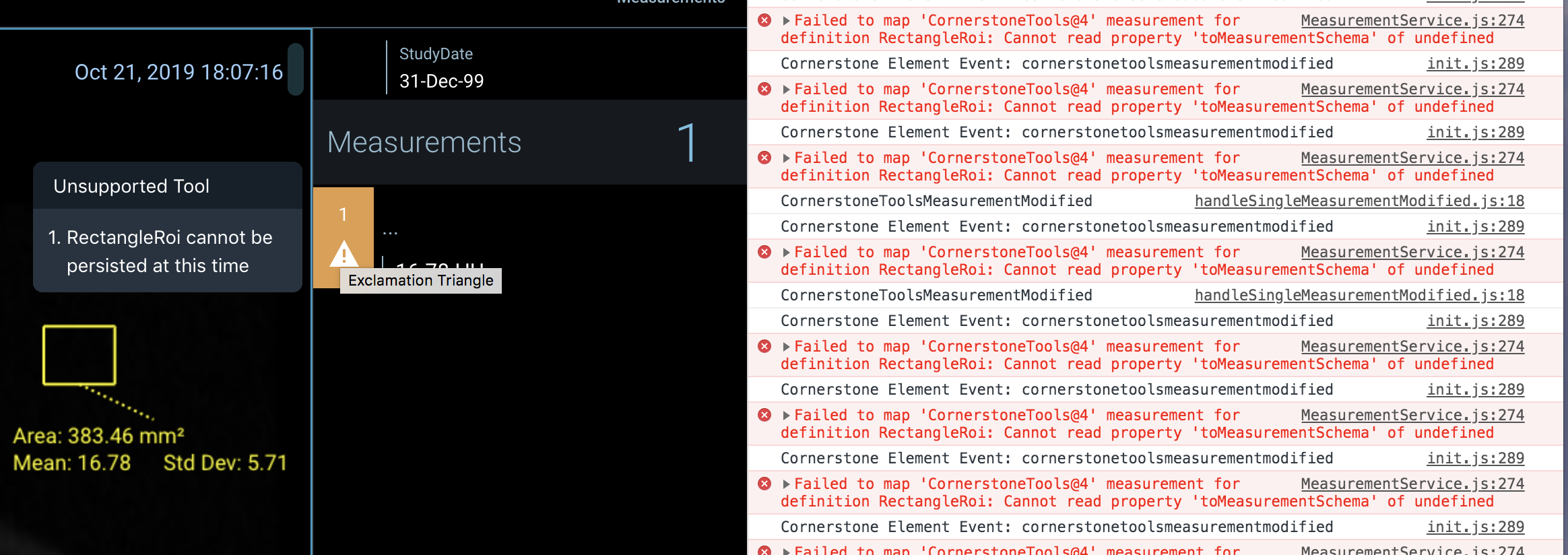
Failed to map 'CornerstoneTools@4' measurement for definition stack...
Most of the measuring tools (except for the length tool), when used, will show similar error messages. What can be the cause of this? is cornerstoneTools not being loaded properly? build issue or configuration error? Despite the error the tools work in the viewer as expected but on the measurements tab show an "unsupported tool" sign
 helghast79
All 8 comments
Ah, those should be warnings, not exceptions. We're improving how measurements are stored and exposed by the OHIF platform internally. The MeasurementService will eventually replace cornerstone-tools "ToolState" as the source of truth for measurements, and provide some niceties around mapping measurements between the different shapes/schemas expected by various 3rd party libraries and extensions.
The "not supported" warning in the UI is specific to what we can and cannot support for persisting with DICOM SR at this time. We currently only persist Length, but are looking to add support for bidirectional in the near future.
Other tools will likely eventually have support as well, but I'm not sure where they fall on our roadmap. If someone is interested in adding additional support, I could preemptively scope the issues that lay out guidance for what we would be looking for in a PR.
 dannyrb
on 19 Feb 2020
dannyrb
on 19 Feb 2020
CC: @igoroctaviano ^
dannyrb
on 19 Feb 2020
Thanks Danny, do you know how can i get the details of the tool
measurements done by the user. I mean, if I draw a rectangle for example,
how can I get the position, size, etc.
My goal is to use the rectangle or circle tool to select a ROI and to
export it as some kind of binary mask for processing later. Do you have any
ideia if this is doable with the current viewer and how?
cheers
Miguel Chambel
On Wed, Feb 19, 2020 at 1:27 AM Danny Brown notifications@github.com
wrote:
CC: @igoroctaviano https://github.com/igoroctaviano ^
—
You are receiving this because you authored the thread.
Reply to this email directly, view it on GitHub
https://github.com/OHIF/Viewers/issues/1451?email_source=notifications&email_token=AD77UAO3IBRW5UN6RO6EKRDRDSDGVA5CNFSM4KXCMRWKYY3PNVWWK3TUL52HS4DFVREXG43VMVBW63LNMVXHJKTDN5WW2ZLOORPWSZGOEMF73DY#issuecomment-587988367,
or unsubscribe
https://github.com/notifications/unsubscribe-auth/AD77UAP5SEG2HLYA2527BELRDSDGVANCNFSM4KXCMRWA
.
helghast79
on 20 Feb 2020
You can hook directly into cornerstone-tools "tool state". Check out the docs and source here:
In the near future, extensions will have access to a new "MeasurementService" that provides an OHIF specific way to request that information
dannyrb
on 20 Feb 2020
Great thanks
Miguel Chambel
On Fri, Feb 21, 2020 at 2:41 AM Danny Brown notifications@github.com
wrote:
Closed #1451 https://github.com/OHIF/Viewers/issues/1451 via #1454
https://github.com/OHIF/Viewers/pull/1454.—
You are receiving this because you authored the thread.
Reply to this email directly, view it on GitHub
https://github.com/OHIF/Viewers/issues/1451?email_source=notifications&email_token=AD77UALM5ZI4NPEMPTNPMWDRD45MDA5CNFSM4KXCMRWKYY3PNVWWK3TUL52HS4DFWZEXG43VMVCXMZLOORHG65DJMZUWGYLUNFXW5KTDN5WW2ZLOORPWSZGOWZKXWGQ#event-3059055386,
or unsubscribe
https://github.com/notifications/unsubscribe-auth/AD77UAMGN3XAX3PBHIQBAFDRD45MDANCNFSM4KXCMRWA
.
helghast79
on 21 Feb 2020
Hi @helghast79 Have you solved the problem?
I have the same problem.
Can you help me?
 wangning08115
on 28 Jun 2020
wangning08115
on 28 Jun 2020
Hi there,
While persisting tool state in standard Dicom-SR looks appealing, I have
made some tests and I'm able to use DCMJS to generate a report in dicom-sr
format and store it in Pacs system (Orthanc in my case) but it seems that
only some tools are translated by DCMJS, for example RectangleRoi is not
present but ellipticRoi is. I can point you in this direction if you want
but what I ended up doing is persisting the toolstate in database and
restore it later
save toolstate to variable
const toolState =
cornerstoneTools.globalImageIdSpecificToolStateManager.saveToolState()
you can then stringify it and append to a form for example
to restore the toolstate in ohif it's not so easy, you can however do
cornerstoneTools.globalImageIdSpecificToolStateManager.restoreToolState(
toolState)
after getting the toolstate and parse it if it was in string form of course
but this will not affect the measurements API so if you click on
measurements panel you'll see nothing but at least the tools will be loaded
and you will see them in the viewer
For now I'll stay with this procedure until I find a better solution, maybe
you can come out with a better one I hope, in that case, please share what
you find
cheers
Miguel Chambel
On Sun, Jun 28, 2020 at 3:20 PM 独孤九剑 notifications@github.com wrote:
Hi @helghast79 https://github.com/helghast79 Have you solved the
problem?
I have the same problem.
Can you help me?—
You are receiving this because you were mentioned.
Reply to this email directly, view it on GitHub
https://github.com/OHIF/Viewers/issues/1451#issuecomment-650767584, or
unsubscribe
https://github.com/notifications/unsubscribe-auth/AD77UAO7PJJBKI4OJPQNDADRY5GTBANCNFSM4KXCMRWA
.
helghast79
on 30 Jun 2020
const toolState =
cornerstoneTools.globalImageIdSpecificToolStateManager.saveToolState()
you can then stringify it and append to a form for example
to restore the toolstate in ohif it's not so easy, you can however do
cornerstoneTools.globalImageIdSpecificToolStateManager.restoreToolState(
toolState)
This is what I use for that solution so far. But if there is a way to get masurements and set it with SET_MEASUREMENTS would do the trick somehow. In 1800 issue of OHIF @timoangerer says that SET_MEASUREMENTS does not renders inside the viewer.
 smilegok
on 15 Jan 2021
smilegok
on 15 Jan 2021
Related issues
 ohif-bot
·
3Comments
ohif-bot
·
3Comments
 rossetantoine
·
5Comments
rossetantoine
·
5Comments
 TZubiri
·
3Comments
TZubiri
·
3Comments
 MathisGuilhin
·
3Comments
MathisGuilhin
·
3Comments
 panzhengo1
·
3Comments
panzhengo1
·
3Comments