Viewers: I want to deploy it to a web application, I follow the docs, but failed.
Hi, I am new here, these days I try to deploy ohif viewers into a web application , but it's hard to do it when I follow the docs.
Description
It seem that the docs is a little old.The docs tell me to download the react branch, but I can't find the react branch. And the docs tell me to input yarn run build:web, but this version don't have this command.
I try to use the master branch , go to platform/viewers and input build:viewer ,and I copy the dist folder into a tomcat's webapps.But it doesn't work. I can't see the ohif viewer on the browser.I really have no idea about how to deploy the application.
in short,I have 3 questions:
- which branch is suit for deploy.
- which command I shoule type if I want to deploy it.
- If tomcat could deploy the application?If not, what can?
Thank you for reading here. I will appreciate it if you can give me some advise.
 LRQLRQ
All 9 comments
@LRQLRQ, we've had a few major releases, and one large restructuring since those docs were written. Unfortunately, the items most impacted were those related to file locations and npm scripts. You can read more about how/where things now live here:
https://github.com/OHIF/Viewers/issues/768
More than happy to accept even very small behaviors to clean up what is now incorrect. After we have all of our CI updated, and IE + Edge functionality working as expected, rectifying docs are the next highest priority.
 dannyrb
on 30 Aug 2019
dannyrb
on 30 Aug 2019
which branch is suit for deploy.
master
which command I shoule type if I want to deploy it.
It depends on your use case, but most likely yarn run build from the repository root to generate the static assets you should deploy.
If tomcat could deploy the application?If not, what can?
Any web server capable of serving up static assets will suffice.
dannyrb
on 30 Aug 2019
which branch is suit for deploy.
masterwhich command I shoule type if I want to deploy it.
It depends on your use case, but most likely
yarn run buildfrom the repository root to generate the static assets you should deploy.If tomcat could deploy the application?If not, what can?
Any web server capable of serving up static assets will suffice.
Thank you very very much!! I will have a try!
LRQLRQ
on 30 Aug 2019
@LRQLRQ any updates?
dannyrb
on 6 Sep 2019
@dannyrb Thank you for still remember me! I was touched by you.
I am a little busy these days, just did little updates about viewers. Here are my new questions I met:
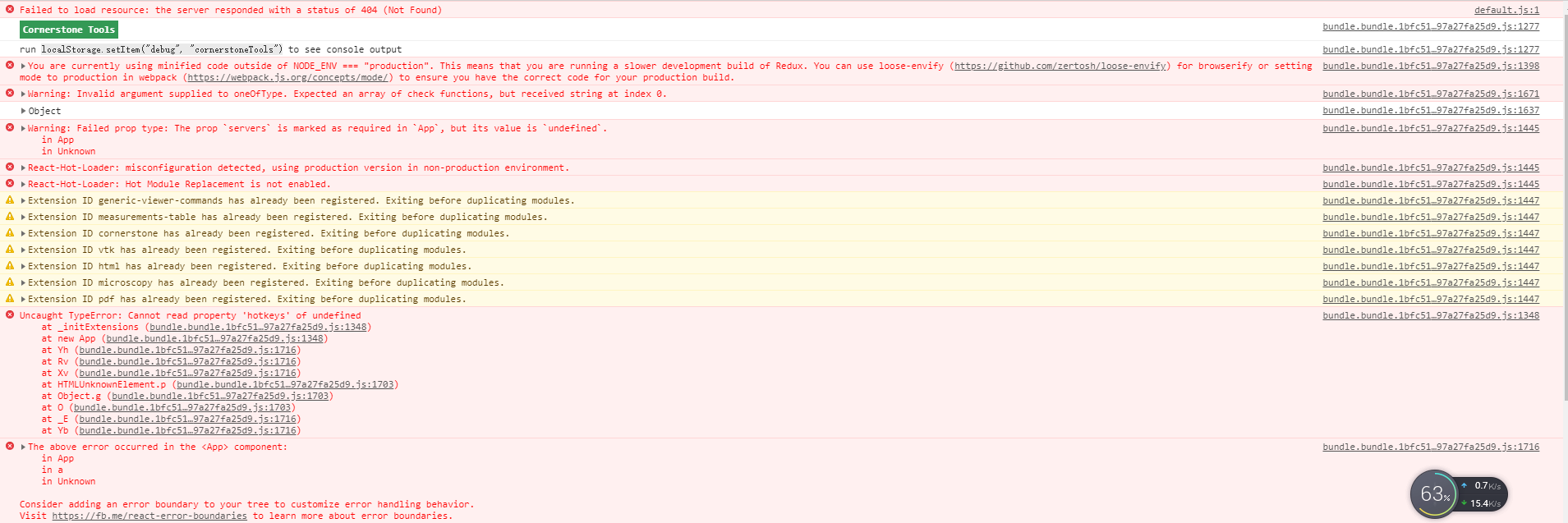
- I tried to follow what you said, but the console shows these errors. I think I probabely ignored some important config files.
- I want to build the
Nginx + Image + ArchiveandUser Account Controlwhich on the docs, and I learned docker to build it, but I meet some problems, I looked for the solution in these issues, and I
found my problems are the seem to #785 .
My chores have been dealt with, and I will study the documentation and how to deploy the application in the near future.
My English is a little poor ,but I really appreciate that! Thanks again!
LRQLRQ
on 7 Sep 2019
@LRQLRQ, it does look like default.js is missing. In the latest version, master, this would be app-config.js. It should be produced when you run yarn run build from the repository root, alongside the rest of the progressive web application's static assets.
yarn run build --> <repo-root>/platform/viewer/dist/**/*
You can see how the Dockerfile in the root of this repository builds that output, and then uses it in an nginx image:
dannyrb
on 27 Sep 2019
This issue has been automatically marked as stale because it has not had recent activity. It will be closed if no further activity occurs. Thank you for your contributions.
![stale[bot] picture](https://avatars.githubusercontent.com/in/1724?v=4&s=40) stale[bot]
on 18 Oct 2019
stale[bot]
on 18 Oct 2019
I think my problem relates to this. I have a Tomcat folder called ohif where i want to deploy platform/viewer/distcontent. However, OHIF is not able to find its static files. Here is a screenshot of what happens:
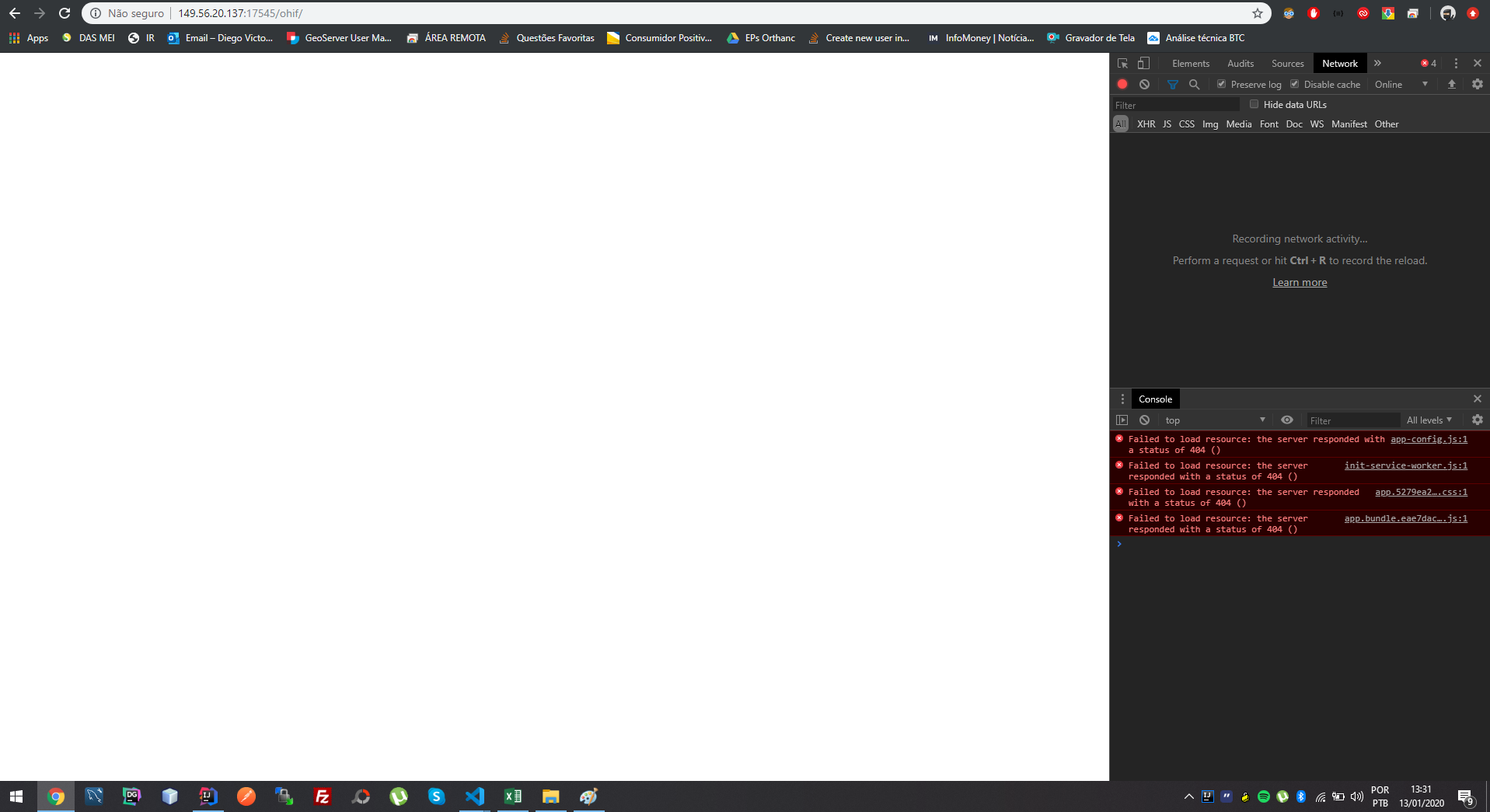
Tomcat runs at http://149.56.20.137:17545 and i want to serve OHIF at http://149.56.20.137:17545/ohif
I am trying to connect OHIF with an Orthanc instance behind a NGINX reverse proxy.
 Diegovictorbr
on 13 Jan 2020
Diegovictorbr
on 13 Jan 2020
@Diegovictorbr, can you ask this question in a new issue? This one is closed and older. We tend to not revisit these for new questions.
dannyrb
on 13 Jan 2020
Related issues
 szwang-wthealth
·
3Comments
szwang-wthealth
·
3Comments
 christianvargasforero
·
4Comments
christianvargasforero
·
4Comments
 rlaxodnjs199
·
3Comments
rlaxodnjs199
·
3Comments
 MuriloSchaefer
·
3Comments
MuriloSchaefer
·
3Comments
 ohif-bot
·
3Comments
ohif-bot
·
3Comments
Most helpful comment
@LRQLRQ any updates?