Video-hub-app: v3.0.0: "insufficient system resources exist to complete the requested service" when scanning a network drive with at least 10k+ videos
Error from windows when scanning a network drive in windows 10 with version 3.0.0 of videohubapp.
"insufficient system resources exist to complete the requested service"
I can watch windows processor monitor and see the scanning as normal for 1000s of files, then after 10k+ (exact number I will try to determine) it starts to get windows API errors during specific API calls.
for each file: windows api calls: CreateFile/QueryAllInformationFile/QueryInformationVolume/CloseFile for each dir: windows api calls: NotifyChangeDirectory
At some point (after 10k+ files) the CreateFile api call returns: INSUFFICIENT RESOURCES and never recovers.
I get the same general error when attempting to access the smb device via the windows gui.
Recent Call Stack for failed create file:
uv_fs_event_start + 0xe3 0x7ff7ccd10d83
RIGHT before the failures start the file paths vha3.exe is accessing change their format from:
\{server_name}{mount_point}*
to
\;LanmanRedirector\;Z:000000000004a02d{server_name}{mount_point}*
Exactly one of those, in that format, succeed. From that point on: it's all errors and they continue to be in that new path format.
This could be just a boring windows 10 smb issue, but it strikes me as some type of multithreaded file scanning "thing", or having too many file handles open, or not closing some resource after each file, etc etc.
More info to come as I debug.
 TheTacoScott
All 16 comments
Force closing vha3.0.exe resolves the issue on the smb drive, and everything returns to normal.
TheTacoScott
on 2 Dec 2020
Oh no 😢
Thank you for the report! I'm unsure where this may be happening.
1) Do you have "watch folder" enabled? I wonder if it's related to that.
2) Are you by chance creating the hub in the same directory as the input folder?
3) Are there any _symlink_ folders in there?
4) Could you describe what the UI is doing? Has it finished determining the number of files (in the sidebar it stopped flashing green next to number of files) and is in the process of adding files to the gallery view (all of them black rectangles at first). Or did it already start extracting screenshots?
5) After the crash, were you able to open the hub and see the already-added videos, or did they all disappear?
I'm unsure what "CloseFile" or "CreateFile" are - they must be part of some library I'm using (neither are part of my code).
I have tried my best to make everything run in sequence (nothing in parallel). The first step is always chokidar which should simply generate a list of file paths to extract. Each file path gets sent over to async which is a queue (that is paused until chokidar is finished). When that's over - the app will start extracting _metadata_ and sending it over to the front-end one file at a time (which will after about 100 files start updating the UI in batches). When all the metadata arrives safely, only _then_ will the app try to extract screenshots.
If there are multiple folders being watched, it's possible something could go wrong. But the standard process is as I describe above.
 whyboris
on 2 Dec 2020
whyboris
on 2 Dec 2020
- Do you have "watch folder" enabled? I wonder if it's related to that. -- No, just clicked the scan button.
- Are you by chance creating the hub in the same directory as the input folder? -- No, different root.
- Are there any symlink folders in there? --No
- Could you describe what the UI is doing? Has it finished determining the number of files (in the sidebar it stopped flashing green next to number of files) and is in the process of adding files to the gallery view (all of them black rectangles at first). Or did it already start extracting screenshots? --UI Hangs for a good while, then present an msgbox style popup with an error similar to what I mentioned, I'll copy paste the exact text asap
- After the crash, were you able to open the hub and see the already-added videos, or did they all disappear? In this case I'm opening an existing hub from 2.2.X and I can see the video added from that version. If I create a hub fresh with 3.0 it never writes the data to the vha files thus I can never see the files in the gui
TheTacoScott
on 4 Dec 2020
Possibly related to this: https://answers.microsoft.com/en-us/windows/forum/all/version-1903-just-installed-network-drive-does-not/5874ad9b-1347-4e59-b318-bde98c044069
maxworkitems seems related to lanmanserver, which as it shows up in the process monitor, seems like what I'll look at next. Assuming it fixes something I'll try to dial it back until it "breaks" again and I assume that will tell us something.
TheTacoScott
on 4 Dec 2020
Linking this for other tuning params that might matter: https://docs.microsoft.com/en-us/windows-server/administration/performance-tuning/role/file-server/#client-tuning-example
TheTacoScott
on 4 Dec 2020
Current guess: https://github.com/whyboris/Video-Hub-App/blob/dfeebc34512258976e684ba56cc36a71f456eb92/node/main-extract-async.ts#L236
This is a guess from ignorance, but my current guess non-the-less: the chokidar.watch function is likely identifiying my drive as a network drive correctly, and probably sets isNetworkAddress to true, thus turning on polling. persistent is likely set to false because I can doing a one off scan.
I bet usePolling being set to true does some async foo and is using too many commands, or resources, or handles, or whatever microsoft calls them in the smb world and it's choking up. I'll keep looking.
For smaller (10k or less) hubs over the network everything is fine, so it does seem volume/file count based.
I see a way to (using env vars) to tweak the operational characteristics of that underlying lib. I'll also see if those are respected over the explicit options passed. https://github.com/paulmillr/chokidar#performance
TheTacoScott
on 4 Dec 2020
Error returned from vha3:
A javascript error occurred in the main process.
Uncaught exception: unknown error, scandir 'Z:\Videos'
Then I click ok and a new error pops up:
A javascript error occurred in the main process.
Uncaught exception: Error: EMFILE: too many open files, scandir: 'Z:\Videos\test77'
Then I click ok and a new error pops up:
A javascript error occurred in the main process.
Uncaught exception: Error: EBADF: bad file desriptor, watch as FSEvent.FSWatcher._handle.onchange (internal/fs/watchers.hs:122:28)
Seems to be an infinite loop of that last error after that.
TheTacoScott
on 4 Dec 2020
So watching the open file handles with handle.exe from sysinternals (piped to line count) it starts off fairly small (but only ever grows, does not shrink) at the start of the scan (5 second sleeps between line output):
92
119
148
179
210
244
281
323
411
529
665
797
1034
1302
1586
1852
2117
2361
2596
2824
3053
3269
3478
3677
3849
4050
4245
4442
4609
4767
4920
5097
5272
5450
5620
5797
5821
after ~15 minutes or so it levels off:
16422
16422
16422
16422
16422
16422
16422
16422
16422 seems awfullly close to the ol' computer magic number of 16384. 16384 is the default number of open files per smb session allowed in windows 10.
I think we're on to something here.
TheTacoScott
on 4 Dec 2020
Alright so I bet chokidar is adding file watchers to every file it finds even though it's not going to run in persistent mode. It then keeps a file handle open for every file it has to watch, and even though it will discard them once the watch is complete (with persistent=false) they remain open during the "scan" which is really a "watch but terminate after you complete the first scan"
My instinct tells me to resolve this issue a simpler directory traversal function is needed that does not add any type of watcher "per file" that it finds.
It's also possible that I can increase the file handles available over the smb drive and resolve this. I'll see what I can do.
TheTacoScott
on 4 Dec 2020
I would say my theory is mostly confirmed. I can see (over the entire life of a vha 3.0 process scanning/watching) that the amount of file open eventsis always greater (typically by exactly one which I am going to assume is the stat/watcher process/thread) than the amount closed. This discrepency appears to be linked to directories only, and not files.
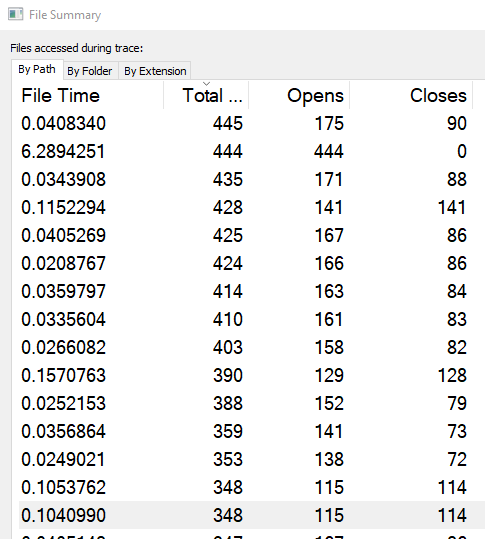
Once we get to that magic number of ~16k we start to see:
4,555 0 \;LanmanRedirector\;Z:000000000004a02d{servername}{mount}{path}
That is 4,555 file open events, and 0 close events. Feels like it's run out of "something" and is just leaking handles after ~16k.
More debugging to come.
TheTacoScott
on 4 Dec 2020
Here's a bit of a silver bullet. As soon as I close the process I immediately see 1000s of closefile events on files and directories that were clearly being watched. Handle count returns to what you would expect, and everything on the network drive returns to good health.
I think this has to be all the watchers that are created.
TheTacoScott
on 4 Dec 2020
I need to do more testing, but it seems like the following code change fixes it:
usePolling: isNetworkAddress ? true : false,
becomes
usePolling: (isNetworkAddress && persistent) ? true : false,
that seems to turn the "watchers" off and should break no other contracts. I'll need to make sure I"m not missing something, but that might become a PR.
polling will help ensure that watching "works" on a network drive but what do we care if "watching" works if it's not persistent.
TheTacoScott
on 6 Dec 2020
Thank you so much for your thorough 🔍 investigation 🙇
Initially I had my own folder walking method but it seemed like chokidar would be a better solution for everything.
I wish I was more familiar with all the various setups that can happen.
There's Map network drive which will give you a folder like Z:/movies and it will _look_ like a local drive, but it's all over network.
And then there's what I have //StoragePC/movies ... and then there's SMB which I've never dealt with 😓
I seem to have _deeply_ misunderstood the usePolling property -- I think now that it should be only enabled if the user wants to _watch_ a remote folder, not just _whenever_ it is a network drive!
I think your change is all that's needed.
Sorry for the annoying headache and the time sink 🙇 😞
whyboris
on 8 Dec 2020
I have a better solution:
https://github.com/thecodrr/fdir
On my network drive I have this result:
scan took 5.7 seconds.
number of files: 11678
I'll implement this solution 🚀
whyboris
on 8 Dec 2020
Solution: #602 🚀 initial scan will take under 5 seconds 😎
whyboris
on 8 Dec 2020
602 should fix everything 🚀 it has merged into main, if you're able to build the app from source, please try and let me know in the comments below 🙇
whyboris
on 9 Dec 2020
Related issues
whyboris
·
5Comments
whyboris
·
3Comments
 cal2195
·
4Comments
whyboris
·
5Comments
cal2195
·
4Comments
cal2195
·
4Comments
whyboris
·
5Comments
cal2195
·
4Comments