Video-hub-app: Doesn't show thumbnails or filmstrips at all
I tried open existing VHA2 file that I did with 2.2.0 and did new hub 3 times. Every time filmstrips and thumbnails were black, but it did generate them to the hub folder.
If there's logs somewhere, I don't know where they are. I give them, if you tell me where they are.
Version: 2.2.2
OS: Windows 10 Home, build 1909
 krisu5
All 24 comments
Thank you for sharing 🤝
Just to clarify, I'm guessing this happens:
- the initial import (with green horizontal bar) succeeds
- you get to the _thumbnails_ page and all the screenshots are black ✅
- you wait for the 2nd stage to finish (top-right corner "doughnut" progress bar)
- you hover with your mouse over thumbnails and they don't show up
- but when you go into the accompanying
vha-folder (next to the .vha2 file) the screenshots are there
Is this correct?
There is no logging, but if you hold CTRL + SHIFT and press the i key it should open up the _Developer Tools_ with the console showing. I think it will likely show you the errors about "File not found" or something. Please glance at the path (file:///C:/something/something/something.jpg) ... maybe something is wrong there?
Any details you share will be helpful in debugging it 🙇
ps - Just to clarify (I don't think this is the problem you have, but just in case) the .vha2 file and its vha- folder should be located together (and the folder should _not_ be renamed). If you move them separately, none of the screenshots will be visible. Putting the file and the folder together in the same location (same folder) again will make the screenshots re-appear.
 whyboris
on 25 Mar 2020
whyboris
on 25 Mar 2020
- the initial import (with green horizontal bar) succeeds
- you get to the _thumbnails_ page and all the screenshots are black ✅
- you wait for the 2nd stage to finish (top-right corner "doughnut" progress bar)
- you hover with your mouse over thumbnails and they don't show up
- but when you go into the accompanying
vha-folder (next to the .vha2 file) the screenshots are thereIs this correct?
Yes, all of them are correct.
There is no logging, but if you hold CTRL + SHIFT and press the i key it should open up the Developer Tools with the console showing. I think it will likely show you the errors about "File not found" or something. Please glance at the path (file:///C:/something/something/something.jpg) ... maybe something is wrong there?
Console had no errors. Not while generating or reopening the hub.
ps - Just to clarify (I don't think this is the problem you have, but just in case) the .vha2 file and its vha- folder should be located together (and the folder should not be renamed). If you move them separately, none of the screenshots will be visible. Putting the file and the folder together in the same location (same folder) again will make the screenshots re-appear.
Yes, VHA2 file and "thumbnails" folder were together all times inside of generated vha- folder.
I now noticed that when I actually looked into filmstrip / thumbnails images, those were generated as black, not with frames of the videos. I some reason didn't check that the first time.
This happen when I tried to generate hub with almost 200 videos. But when I tried folder with 4 videos, it did generate the images correctly (but again, in the app, black squares).
And I did also a hub generation with older version (2.2.0) too with same folder that had almost 200 videos. It did now generate them correctly as image files, but in the app, just bunch of black squares again.
Maybe Brave browser is the possible reason? I don't remember if current Electron tries to find existing Chromium installation and use that... It wasn't open when I did the generation or using the app, but it is installed in the system.
Version 1.3.0 still works fine.
Sorry if my text got confusing, I tried my best to debug this.
krisu5
on 25 Mar 2020
Thank you for the extra details 🤝
Version 2 uses a very different approach compared with 1 when extracting screenshots. I'd love to figure out what's wrong with the current version and fix this problem.
This is the first time I've come across black screenshot files. You should have inside the vha- folder three folders:
- clips (may be empty, depends on whether you choose to extract clips)
- filmstrips
- thumbnails
The .jpg files inside the filmstrips/thumbnails folder should have file names like "6f3acc0aeee45a7af5404e3849d8719f.jpg" and "e5d3dbc10bff8a0ef7ffecb08e0a6c46.jpg"
They should have a height that you defined when creating the hub (e.g. 228px or something).
_Electron_ still uses _Chromium_ internally (and it is bundled and disregards your OS browser installations). The app uses _ffmpeg_ internally to extract things.
When you go to the _details_ view, do you see the video details?
Video File Name
00:31 | 1280 x 720 | 1 MB | YYYY
If the duration is 0 or nonexistent (first piece of four) then I have a guess what could be going wrong.
Thank you for your time!
whyboris
on 25 Mar 2020
When you go to the _details_ view, do you see the video details?
Video File Name 00:31 | 1280 x 720 | 1 MB | YYYYIf the duration is 0 or nonexistent (first piece of four) then I have a guess what could be going wrong.
It's nonexisting. No timecode on the left side.
krisu5
on 26 Mar 2020
Not sure if this helps but I've noticed this is an issue with mkv containers and also flv files. If I change the container to be mp4 (without reencoding) the thumbnails generate correctly. It would be great to get a fix for this as I have a number of files without thumbnails/filmstrips too 😄
 nickrowland
on 19 Apr 2020
nickrowland
on 19 Apr 2020
Thank you @krisu5 and @nickrowland -- over email when some users reported lack of screenshots I requested they send me a clip I could inspect (wetransfer makes sending clips easy). Now I have a few clips to investigate.
If you have a clip to share, please send it over to [email protected] and maybe I'll figure out how to fix the screenshot extraction for it in the next release 😅
whyboris
on 19 Apr 2020
@whyboris I just did a quick testing with some problematic files I've got this issue with and thought I'd feedback my findings.
The -show_format ffprobe option does give the correct duration for the video file. The duration for those videos inside the app are however incorrect. I checked inside the app json for the file and the duration for them is set to 0
I did a quick test with the output of ffprobe -of json -select_streams v -show_format -show_streams file.ext . This was using ffprobe on both Ubuntu on WSL command line and the latest ffprobe-installer binaries on Windows.
function getFileDuration(metadata): number {
  if (metadata && metadata.streams && metadata.streams[0] && metadata.streams[0].duration ) {
      console.log('using stream duration')
    return metadata.streams[0].duration;
  } else if (metadata && metadata.format && metadata.format.duration) {
      console.log('using format duration')
    return metadata.format.duration;
  } else {
    console.log('using fallback duration')
    return 0;
  }
}

var dataNotWorking = JSON.parse('{"streams":[{"index":0,"codec_name":"hevc","codec_long_name":"H.265 / HEVC (High Efficiency Video Coding)","profile":"Main","codec_type":"video","codec_time_base":"1/25","codec_tag_string":"[0][0][0][0]","codec_tag":"0x0000","width":644,"height":480,"coded_width":648,"coded_height":480,"has_b_frames":2,"sample_aspect_ratio":"1:1","display_aspect_ratio":"161:120","pix_fmt":"yuv420p","level":90,"color_range":"tv","color_space":"smpte170m","color_transfer":"bt709","color_primaries":"bt470bg","refs":1,"r_frame_rate":"25/1","avg_frame_rate":"25/1","time_base":"1/1000","start_pts":21,"start_time":"0.021000","disposition":{"default":1,"dub":0,"original":0,"comment":0,"lyrics":0,"karaoke":0,"forced":0,"hearing_impaired":0,"visual_impaired":0,"clean_effects":0,"attached_pic":0,"timed_thumbnails":0}}],"format":{"filename":"file.mkv","nb_streams":2,"nb_programs":0,"format_name":"matroska,webm","format_long_name":"Matroska / WebM","start_time":"0.000000","duration":"7042.861000","size":"641842960","bit_rate":"729070","probe_score":100,"tags":{"CREATION_TIME":"2020-03-17T13:30:14Z","ENCODER":"Lavf57.7.2"}}}');
var dataNotWorking2 = JSON.parse('{"streams":[{"index":1,"codec_name":"vp6f","codec_long_name":"On2 VP6 (Flash version)","codec_type":"video","codec_time_base":"1/25","codec_tag_string":"[0][0][0][0]","codec_tag":"0x0000","width":784,"height":576,"coded_width":784,"coded_height":576,"has_b_frames":0,"sample_aspect_ratio":"0:1","display_aspect_ratio":"0:1","pix_fmt":"yuv420p","level":-99,"refs":1,"r_frame_rate":"25/1","avg_frame_rate":"25/1","time_base":"1/1000","start_pts":27,"start_time":"0.027000","bit_rate":"1536000","disposition":{"default":0,"dub":0,"original":0,"comment":0,"lyrics":0,"karaoke":0,"forced":0,"hearing_impaired":0,"visual_impaired":0,"clean_effects":0,"attached_pic":0,"timed_thumbnails":0}}],"format":{"filename":"file.flv","nb_streams":2,"nb_programs":0,"format_name":"flv","format_long_name":"FLV (Flash Video)","start_time":"0.000000","duration":"674.880000","size":"140279836","bit_rate":"1662871","probe_score":100,"tags":{"audiodelay":"0","canSeekToEnd":"true"}}}');
var dataWorking = JSON.parse('{"streams":[{"index":0,"codec_name":"mpeg1video","codec_long_name":"MPEG-1 video","codec_type":"video","codec_time_base":"1001/30000","codec_tag_string":"[0][0][0][0]","codec_tag":"0x0000","width":352,"height":240,"coded_width":0,"coded_height":0,"has_b_frames":1,"sample_aspect_ratio":"200:219","display_aspect_ratio":"880:657","pix_fmt":"yuv420p","level":-99,"color_range":"tv","chroma_location":"center","refs":1,"id":"0x1e0","r_frame_rate":"30000/1001","avg_frame_rate":"30000/1001","time_base":"1/90000","start_pts":30607,"start_time":"0.340078","duration_ts":92144051,"duration":"1023.822789","bit_rate":"1150000","disposition":{"default":0,"dub":0,"original":0,"comment":0,"lyrics":0,"karaoke":0,"forced":0,"hearing_impaired":0,"visual_impaired":0,"clean_effects":0,"attached_pic":0,"timed_thumbnails":0}}],"format":{"filename":"file.mpg","nb_streams":2,"nb_programs":0,"format_name":"mpeg","format_long_name":"MPEG-PS (MPEG-2 Program Stream)","start_time":"0.340078","duration":"1023.822789","size":"178520064","bit_rate":"1394929","probe_score":26}}');

var tNotWorking: number = getFileDuration(dataNotWorking);
console.log(Math.round(tNotWorking));

var tNotWorking2: number = getFileDuration(dataNotWorking2);
console.log(Math.round(tNotWorking2));

var tWorking: number = getFileDuration(dataWorking);
console.log(Math.round(tWorking));
Output:
using format duration
7043
using format duration
675
using stream duration
1024
The getFileDuration(metadata) function behaves as expected with the metadata for both working & non-working files.
Interestingly both tested non-working files (mkv and flv) container formats do not have a stream duration (as indicated in ffprobe docs). I also noticed that I don't have any working flv or mkv files. I downloaded some samples from https://standaloneinstaller.com/blog/big-list-of-sample-videos-for-testers-124.html for flv, mkv and webm and I don't get the correct duration/thumbs/filmstrip for any of them in the app when importing into a Video Hub App library.
    {
      "cleanName": "dolbycanyon",
      "duration": 0,
      "fileName": "dolbycanyon.mkv",
      "fileSize": 2712067,
      "hash": "8c360ffc01b301a5ef51be0197f263a1",
      "height": 480,
      "mtime": 1587391024725.3518,
      "partialPath": "/",
      "screens": 10,
      "stars": 0.5,
      "timesPlayed": 0,
      "width": 720
    },
    {
      "cleanName": "jellyfish-25-mbps-hd-hevc",
      "duration": 0,
      "fileName": "jellyfish-25-mbps-hd-hevc.flv",
      "fileSize": 15269335,
      "hash": "302f524eb113ecbf6023c3f323bf860e",
      "height": 1080,
      "mtime": 1587390973991.1023,
      "partialPath": "/",
      "screens": 10,
      "stars": 0.5,
      "timesPlayed": 0,
      "width": 1920
    },
    {
      "cleanName": "jellyfish-25-mbps-hd-hevc",
      "duration": 0,
      "fileName": "jellyfish-25-mbps-hd-hevc.mkv",
      "fileSize": 95050627,
      "hash": "083cd4dc42c04aa981b38db2776394f7",
      "height": 1080,
      "mtime": 1587391015575.096,
      "partialPath": "/",
      "screens": 10,
      "stars": 0.5,
      "timesPlayed": 0,
      "width": 1920
    }
I hope this is of some help! 😄
nickrowland
on 20 Apr 2020
Thank you @nickrowland -- I downloaded most of the videos from the link you provided and all worked (all 5 screenshots per video) except for the last two you shared: jellyfish-25-mbps-hd-hevc.flv and jellyfish-25-mbps-hd-hevc.mkv -- curiously the doulbycanyon.mkv worked for me 🤷♂️
⚠️ note this is on the current master -- the extraction code of which hasn't changed since the latest release v2.2.2 see commit 🤷♂️
Then when I copied the 2 problematic files into a new folder and created a brand new hub with only the two of them -- both worked correctly (11 screenshots per video -- as I chose). I tested several times with different numbers of screenshots -- worked each time after that. 😖
I checked also all the videos that users have sent that their VHA had trouble opening -- and all screenshots were generated correctly 😖
I'll test some more 🔍 :trollface: 🔎
whyboris
on 30 Apr 2020
same problem in win7 v2.2.3
random sample from nickrowland 's link: https://standaloneinstaller.com/blog/big-list-of-sample-videos-for-testers-124.html
my 444.vha2:
{
   "version":2,
   "hubName":"444",
   "inputDir":"C:\\Users\\xxx\\Downloads\\New folder (12)\\in4",
   "numOfFolders":1,
   "screenshotSettings":{
      "clipHeight":144,
      "clipSnippetLength":1,
      "clipSnippets":0,
      "fixed":true,
      "height":288,
      "n":10
   },
   "images":[
      {
         "cleanName":"grb 2",
         "duration":28,
         "fileName":"grb_2.flv",
         "fileSize":1141657,
         "hash":"abd9b46ebf5c68929c0a14a7861fe6ae",
         "height":480,
         "mtime":1589279580046.7937,
         "partialPath":"/",
         "screens":10,
         "stars":0.5,
         "timesPlayed":0,
         "width":720
      },
      {
         "cleanName":"P6090053",
         "duration":30,
         "fileName":"P6090053.mp4",
         "fileSize":2521709,
         "hash":"6272bced91003130e3347d0b630f065e",
         "height":240,
         "mtime":1589279464718.1973,
         "partialPath":"/",
         "screens":10,
         "stars":0.5,
         "timesPlayed":0,
         "width":320
      },
      {
         "cleanName":"small",
         "duration":6,
         "fileName":"small.3gp",
         "fileSize":344169,
         "hash":"779ae2b49de9dc9d6d2947ff0ff26158",
         "height":288,
         "mtime":1589279399480.4658,
         "partialPath":"/",
         "screens":10,
         "stars":0.5,
         "timesPlayed":0,
         "width":352
      }
   ]
}
duration is correct, but thumbnails are all black...
the initial import (with green horizontal bar) succeeds
you get to the thumbnails page and all the screenshots are black white_check_mark
you wait for the 2nd stage to finish (top-right corner "doughnut" progress bar)
you hover with your mouse over thumbnails and they don't show up
but when you go into the accompanying vha- folder (next to the .vha2 file) the screenshots are there
Is this correct?
Yes, all of them are correct.
Console had no errors. Not while generating or reopening the hub.
+1
 jackusay
on 12 May 2020
jackusay
on 12 May 2020
I was able to replicate with the latest version of VHA on the latest version of Mac. I have no idea why -- no console errors thrown during extraction. I'll need to console.log a bunch to figure out what's going wrong. Though my biggest priority is getting VHA 3.0.0 released -- and while testing it on every OS I'll hopefully figure out what's going wrong then.
At the moment I expect another 2 or so months of work to get there 😓
If anyone figures out what's going wrong currently would really help out 🙇
whyboris
on 26 Jun 2020
My version of VHA seems to have no issue extracting mkv/flv/webm. However, ffmpeg is unable to generate thumbnails, etc for mts files.
Running this from windows command line (copied all of the args passed in to _spawn_ffmpeg_and_run_):
ffmpeg -ss 0.6 -i small.mts -frames 1 -q:v 2 -vf scale=w=512:h=288:force_original_aspect_ratio=decrease,pad=512:288:(ow-iw)/2:(oh-ih)/2 C:\\Users\\james\\Videos\\testfolder\\vha-test2/thumbnails/test.jpg
results in "Output file is empty, nothing was encoded (check -ss / -t / -frames parameters if used)"
If I remove the "-ss 0.6" option, it is able to successfully generate a thumbnail. (also tried 0.1 through 0.5, all failed)
 jamesd35
on 9 Jul 2020
jamesd35
on 9 Jul 2020
Thank you for details! I'm unsure what can be done about it though ... with my limited understanding, -ss is for seeking within a file -- to go to a particular location. So if we can't extract a screenshot from a particular location, we're out of luck with respect to what VHA aims to do 🤔
Would be great if someone who knows what could be happening helps out 🙇
whyboris
on 9 Jul 2020
A possible workaround could be to create a copy of the video under a different functional type (can do with ffmpeg), and extract the screenshots from the converted copy. And then delete the copy after screenshot extraction is complete.
Though this is a bit of a clunky/inefficient fix...
jamesd35
on 10 Jul 2020
@jamesd35 -- could you send me a copy of the file for which the app is unable to create screenshots? You can use WeTransfer to send large files: [email protected] 🤝
whyboris
on 10 Jul 2020
Sent you the files
jamesd35
on 10 Jul 2020
Thank you! Received 👍
whyboris
on 10 Jul 2020
@whyboris Were you able to replicate the mts issue?
jamesd35
on 20 Jul 2020
Sorry didn't get to test your files -- was focusing on VHA3 work still -- will try tonight ✅
whyboris
on 20 Jul 2020
@jamesd35 -- I replicated the issue:
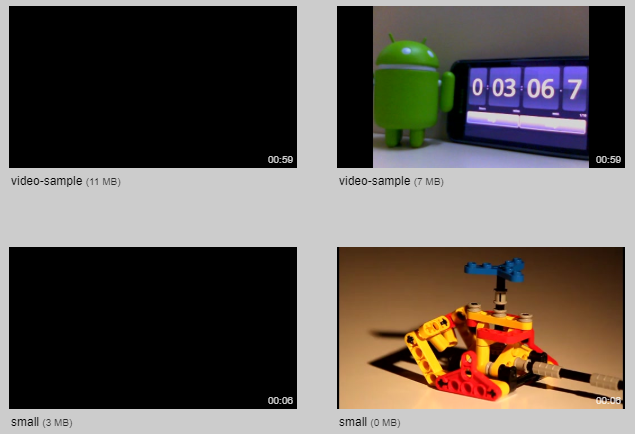
Two videos you sent do not have screenshots (even though the length was correctly determined).
I'll console.log the screen extraction process to see what may be going wrong 🤞
whyboris
on 21 Jul 2020
Hey, still need help here?
 orkomlosh
on 18 Aug 2020
orkomlosh
on 18 Aug 2020
I'm still unsure. The above screenshot I posted has the two videos showing up black. But also, my video player couldn't open them 🤷 so I think it's not a problem if the app has trouble with it.
I guess this issue is a _catch-all_ for any time videos do not have screenshots extracted.
I'm afraid it happens sometimes still, but out of my entire collection of videos, I think it happened on fewer than 10 (maybe only on 5 in total) 🤷
I'll revisit this issue sometime - re-run the app against all the videos that fail for me and see if I can improve it. But it's also rather likely that I might release 3.0.0 without adding any code changes to address this issue 😓
File types like .flv or .3gp failing isn't a big issue I think -- I suspect they might not have consistent encoding.
The priority is having all .mp4 videos work. A challenging video format is .mkv - but on the few video files I have with the extension, screenshot extraction works :trollface:
whyboris
on 18 Aug 2020
Ok let me know if you want me to take a look. Share the problematic videos. If you think it's a waste of time that's also ok.
orkomlosh
on 18 Aug 2020
I think I have fixed the problem 😭
See: #539 😎 - no images would display if there were parentheses in the file path leading to .vha2 file 😓
@krisu5 -- sorry took so long to figure it out -- I suspect the problem was the same as the linked ticket 😅
whyboris
on 1 Oct 2020
I intend to close this issue when I merge #537 🚀
If you think there is some unfinished business feel free to comment below, or perhaps better yet start a new issue (and just link to a comment that you think is relevant) 🤝
whyboris
on 1 Oct 2020
Related issues
 cal2195
·
5Comments
cal2195
·
6Comments
cal2195
·
6Comments
cal2195
·
6Comments
whyboris
·
5Comments
cal2195
·
5Comments
cal2195
·
6Comments
cal2195
·
6Comments
cal2195
·
6Comments
whyboris
·
5Comments
Most helpful comment
@whyboris I just did a quick testing with some problematic files I've got this issue with and thought I'd feedback my findings.
The
-show_formatffprobe option does give the correct duration for the video file. The duration for those videos inside the app are however incorrect. I checked inside the app json for the file and the duration for them is set to 0I did a quick test with the output of
ffprobe -of json -select_streams v -show_format -show_streams file.ext. This was using ffprobe on both Ubuntu on WSL command line and the latest ffprobe-installer binaries on Windows.Output:
The getFileDuration(metadata) function behaves as expected with the metadata for both working & non-working files.
Interestingly both tested non-working files (mkv and flv) container formats do not have a stream duration (as indicated in ffprobe docs). I also noticed that I don't have any working flv or mkv files. I downloaded some samples from https://standaloneinstaller.com/blog/big-list-of-sample-videos-for-testers-124.html for flv, mkv and webm and I don't get the correct duration/thumbs/filmstrip for any of them in the app when importing into a Video Hub App library.
I hope this is of some help! 😄