Victory-native: Crash: removedChildren count (0) was not what we expected (1) on iOS
The Problem
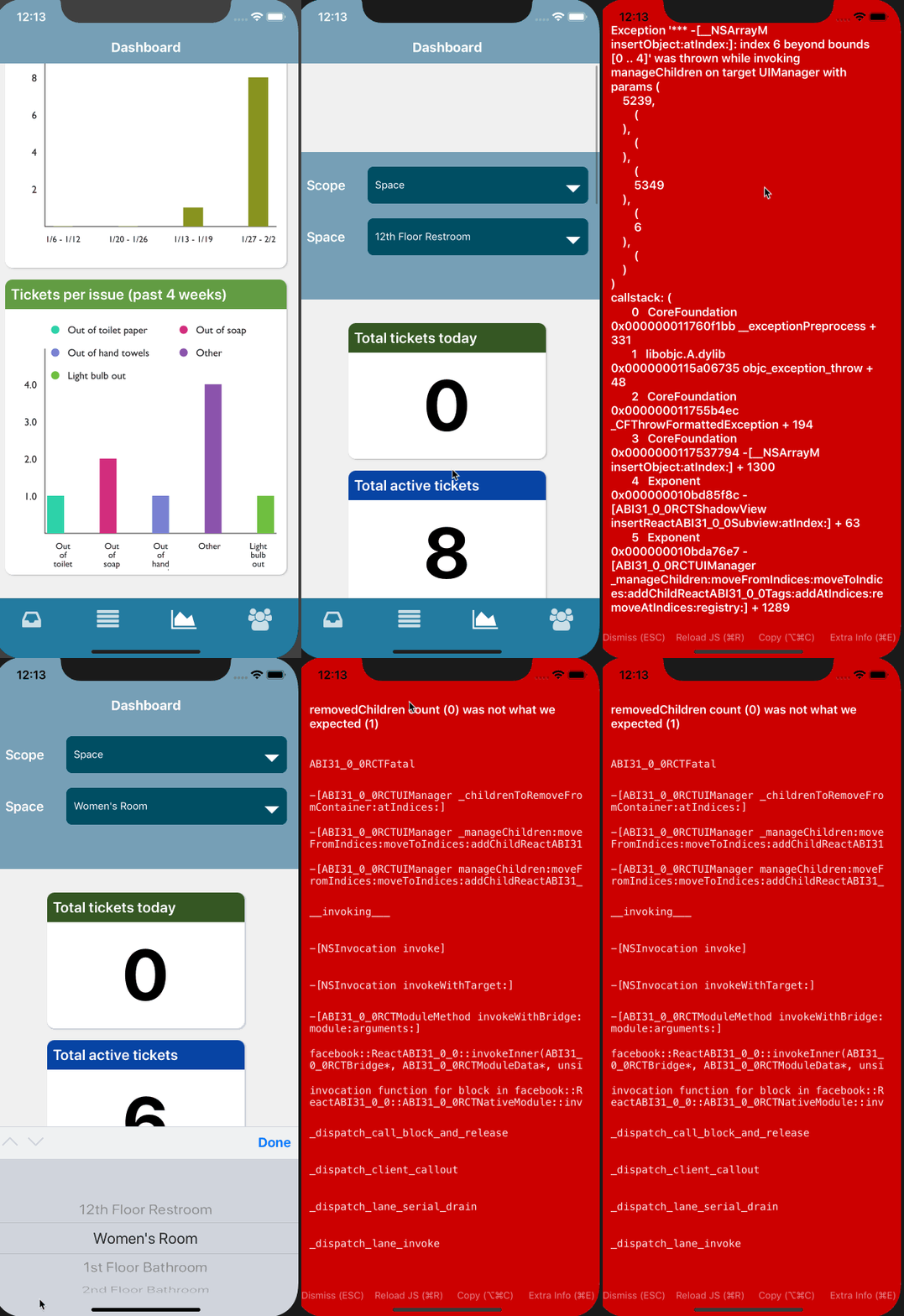
On iOS, changing the data of a VictoryBar component results in the application crashing with the error message: removedChildren count (0) was not what we expected (1) on iOS. This only happens on iOS when reusing a VictoryBar and changing the length of the data being passed in. Reusing the VictoryBar component and passing in different data values but the same length does not result in a crash.

Description/ Reproduction
I have a BarChart component which is a simple wrapper around a <VictoryGroup />
const BarChart = ({
  data,
  dimensions = {},
  xAxisTickFormat,
  yAxisTickFormat,
  xAxisTickValues,
  yAxisTickValues,
}: Props) => {
  const offset = data.length <= 1 ? 15 : 5
  return (
    <Container>
      <VictoryChart
        {...dimensions}
        domainPadding={{ y: 50, x: 25 }}
        containerComponent={<VictoryZoomContainer allowZoom={false} />}
      >
        <VictoryLegend x={50} y={10} orientation="horizontal" gutter={20} itemsPerRow={2} data={parseLabels(data)} />
        <VictoryAxis
          tickFormat={xAxisTickFormat}
          xAxisTickValues={xAxisTickValues}
          style={{
            tickLabels: { fontSize: fontSizes.small },
          }}
        />
        <VictoryAxis dependentAxis tickFormat={yAxisTickFormat} yAxisTickValues={yAxisTickValues} />

        <VictoryGroup
          offset={offset}
          colorScale={parseLabelColors(data)}
          animate={{ duration: 2000, onLoad: { duration: 1000 } }}
        >
          {data.map(dataSet => (
            <VictoryBar key={dataSet.key} data={dataSet.values} />
          ))}
        </VictoryGroup>
      </VictoryChart>
    </Container>
  )
}
In turn, this component is wrapped by another layer of abstraction, which handles rendering an AreaChart or BarChart based on a type prop:
const getComponentFromType = (type) => {
  switch (type) {
    case 'Bar':
      return BarChart
    case 'Area':
      return AreaChart

    default:
      return null
  }
}

const ChartCard = ({
  type, color, title, data, yAxisTickFormat, xAxisTickFormat,
}: Props) => {
  const ChartComponent = getComponentFromType(type)
  return (
    <CardContainer>
      <BannerCard
        bannerColor={color}
        primaryHeaderText={title}
        backgroundColor={colors.white}
        contentContainerStyle={{ padding: 4, justifyContent: 'center' }}
      >
        {data == null ? (
          <ActivityIndicator size="large" color={colors.dashboardGrey} />
        ) : (
          <ScrollContainer horizontal nestedScrollEnabled>
            <ChartComponent
              dimensions={{ height: 350 }}
              data={data}
              yAxisTickFormat={yAxisTickFormat}
              xAxisTickFormat={xAxisTickFormat}
            />
          </ScrollContainer>
        )}
      </BannerCard>
    </CardContainer>
  )
}
This ChartCard has a data prop, which gets passed down to the underlying VictoryGroup to render multiple <VictoryBar />. The data prop is in the following shape:
type Data = Array<{
    key: string
    color: string,
    name: string,
    values: [
      {
        x: string,
        y: number,
      },
    ],
  }>
When the length of data changes and the component re-renders, the crash occurs with the message removedChildren count (0) was not what we expected (1). Additionally, when switching back to the prior set of data, the app crashes with another, seemingly related error Exception '*** -[__NSArrayM insertObject:atIndex:]: index 6 beyond bounds [0 .. 4]' was thrown while invoking manageChildren on target UIManager...:

NOTE: I have tested this on Android. No problems!
GIF of Error
The error happens in the "Tickets per issue" chart
Packages
"react-native": "https://github.com/expo/react-native/archive/sdk-31.0.1.tar.gz" (v 0.57)
"victory-native": "^31.0.0"
"react-native-svg": "8.0.8" (supported by Expo v31)
Remediation Steps
I have tried several things so far.
- I thought it might be an animation problem so I removed animations. No luck
- I transformed the data so that it was the same size every time (adding fake entries to "pad" the data so they are all the same length). This appears to solve the issue. It only seems to occur with different lengths of data.
- Did some research and found almost identical issues within react-native charting libraries and
react-native-svg.
- https://github.com/indiespirit/react-native-chart-kit/issues/62
- https://github.com/react-native-community/react-native-svg/issues/258
This comment in particular seems helpful: https://github.com/react-native-community/react-native-svg/issues/258#issuecomment-438956136
I finally figured out this issue.
It was caused by rendering multiple svg components with map function without wrapping it.
Here is the code that caused an error:
...
The solution was to wrap the bunch of Lines with a parent component...
In this case, the author just wrapped the lines in a <G>. I tried this, but couldn't find where to put it within victory-native.
There is another example of a similar problem and a fix here: https://github.com/msand/react-native-svg-charts/commit/e8b0baa6080778cb01474f46a29e601fffee26e7
Any help would be greatly appreciated as this is a major blocker for us. Thank you!
Checklist
[X] This is a
victory-nativespecific issue. (Issues that _also_ appear invictoryshould be opened here). As far as I can tell...[X] I have read through the FAQ and Guides before asking a question
[X] I am using the latest version of
victory-native[X] I have checked to make sure that my versions of
react-nativeandreact-native-svgare compatible with this version ofvictory-native. Read about version requirements[X] I've searched open issues to make sure I'm not opening a duplicate issue
 jpandl19
All 18 comments
This is an annoying bug. It can be worked around, to an extent. The part you need to work around is data.map(...
I think you can possibly accomplish this by forcing a re-render of the whole chart, maybe replacing the chart with a loading indicator, and then replacing that with the new chart with the new number of bar charts.
 JulianKingman
on 30 Jan 2019
JulianKingman
on 30 Jan 2019
@JulianKingman Interesting idea... Are you suggesting using something like getDerivedStateFromProps to check and see if data.length has changed and then temporarily rendering some other component or null? I just tried implementing that and it does seem to resolve the issue. Super hacky and ugly but it might work for now. I'd still like to know if anyone has some idea around why this is happening at a low level. Thanks for the suggestion though! Here is my (apparently) working code:
class ChartCard extends React.Component<Props> {
  static getDerivedStateFromProps(props, state) {
    // https://github.com/FormidableLabs/victory-native/issues/432
    // We are doing this due to a weird issue in victory-native / react-native-svg where changing the
    // length of the data without a full re-render results in a crash on ios. Checkout the issue for more details.
    if (Platform.OS !== 'ios') return {}
    // When the data length changes update the state so that we can force a full re-render of the
    // chart
    if (props.data && props.data.length !== state.prevPropsDataLength) {
      return {
        didDataLengthChange: true,
        prevPropsDataLength: props.data.length,
      }
    }
    return {
      didDataLengthChange: false,
      prevPropsDataLength: (props.data || []).length,
    }
  }

  state = { didDataLengthChange: false, prevPropsDataLength: 0 }

  componentDidMount() {
    if (this.state.didDataLengthChange) {
      this.setState({ didDataLengthChange: false })
    }
  }

  componentDidUpdate() {
    if (this.state.didDataLengthChange) {
      this.setState({ didDataLengthChange: false })
    }
  }
  render() {
    const {
      type, color, title, data, yAxisTickFormat, xAxisTickFormat,
    } = this.props
    const ChartComponent = getComponentFromType(type)
    return (
      <CardContainer>
        <BannerCard
          bannerColor={color}
          primaryHeaderText={title}
          backgroundColor={colors.white}
          contentContainerStyle={{ padding: 4, justifyContent: 'center' }}
        >
          {this.state.didDataLengthChange || data == null ? (
            <ActivityIndicator size="large" color={colors.dashboardGrey} />
          ) : (
            <ScrollContainer horizontal nestedScrollEnabled>
              <ChartComponent
                dimensions={{ height: 350 }}
                data={data}
                yAxisTickFormat={yAxisTickFormat}
                xAxisTickFormat={xAxisTickFormat}
              />
            </ScrollContainer>
          )}
        </BannerCard>
      </CardContainer>
    )
  }
}
export default ChartCard
That's more or less it. I tried diving into the code, but haven't gotten farther than the source of the error code (https://github.com/facebook/react-native/blob/70826dbafcb00c08e0038c5066e33848141be77b/React/Modules/RCTUIManager.m#L692)
JulianKingman
on 31 Jan 2019
That's where I ended up too 😕
jpandl19
on 4 Feb 2019
Tried to get the code here to run, and started removing code until it worked, and then kept making the change smaller to isolate what made it work. Seems if I remove the containerComponent prop from the VictoryChart, then I don't get the exception. So it seems to be an interaction between them somehow.
import React, { Component } from 'react';
import { View, ActivityIndicator, ScrollView } from 'react-native';

import {
    VictoryChart,
    VictoryBar,
    VictoryLegend,
    VictoryAxis,
    VictoryGroup,
    VictoryZoomContainer,
} from 'victory-native';

const BarChart = ({
    data,
    dimensions = {},
    xAxisTickFormat,
    yAxisTickFormat,
    xAxisTickValues,
    yAxisTickValues,
}) => {
    const offset = data.length <= 1 ? 15 : 5;
    return (
        <View>
            <VictoryChart
                {...dimensions}
                domainPadding={{ y: 50, x: 25 }}
                containerComponent={<VictoryZoomContainer allowZoom={false} />}
            >
                <VictoryLegend
                    x={50}
                    y={10}
                    orientation="horizontal"
                    gutter={20}
                    itemsPerRow={2}
                    data={data}
                />
                <VictoryAxis
                    tickFormat={xAxisTickFormat}
                    xAxisTickValues={xAxisTickValues}
                    style={{
                        tickLabels: { fontSize: 14 },
                    }}
                />
                <VictoryAxis
                    dependentAxis
                    tickFormat={yAxisTickFormat}
                    yAxisTickValues={yAxisTickValues}
                />

                <VictoryGroup
                    offset={offset}
                    animate={{ duration: 2000, onLoad: { duration: 1000 } }}
                >
                    {data.map(dataSet => (
                        <VictoryBar key={dataSet.key} data={dataSet.values} />
                    ))}
                </VictoryGroup>
            </VictoryChart>
        </View>
    );
};

const ChartCard = ({
    color,
    title,
    data,
    yAxisTickFormat,
    xAxisTickFormat,
}) => {
    return (
        <View>
            {data == null ? (
                <ActivityIndicator size="large" />
            ) : (
                <ScrollView horizontal nestedScrollEnabled>
                    <BarChart
                        dimensions={{ height: 350 }}
                        data={data}
                        yAxisTickFormat={yAxisTickFormat}
                        xAxisTickFormat={xAxisTickFormat}
                    />
                </ScrollView>
            )}
        </View>
    );
};

class Chart extends Component {
    state = { length: 1 };
    componentDidMount() {
        setTimeout(() => {
            this.setState({ length: 2 });
        }, 10000);
    }
    render() {
        return (
            <ChartCard
                {...{
                    color: 'black',
                    title: 'Test',
                    data: Array.from(this.state).map((_, i) => ({
                        key: i,
                        name: i,
                        values: [
                            {
                                x: 1,
                                y: 1 + i,
                            },
                            {
                                x: 2,
                                y: 2 + i,
                            },
                        ],
                    })),
                    yAxisTickFormat: ({ x }) => x,
                    xAxisTickFormat: ({ y }) => y,
                }}
            />
        );
    }
}
export default Chart;
Digging a bit deeper, I found that replacing this line of code: https://github.com/FormidableLabs/victory/blob/7aa02aa0d7462e64f186e5a318a4e8d4299c29ca/packages/victory-core/src/victory-clip-container/victory-clip-container.js#L78
With:
React.cloneElement(groupComponent, {}, children)
Allows react to avoid the key collisions, or whatever is actually going on with the exception. Haven't analyzed more than this as of now.
 msand
on 8 Feb 2019
msand
on 8 Feb 2019
I suspect it might be that the keys have been adapted such that they expect to be inside specific parents, but are then placed together in a different parent, and at some point the mapping breaks down or causes collisions of some sort.
msand
on 8 Feb 2019
It seems enough to switch the order of clipComponent and ...React.Children.toArray(children) or add a .reverse() statement. Not sure why this would make any difference. This probably belongs in the issues of the react-native repo. As it fails on ios but android works fine, I would assume that react is behaving correctly, but the child management on ios is broken.
msand
on 8 Feb 2019
Here's a workaround which doesn't require any changes in any dependencies if anyone needs it:
import React, { Component } from 'react';
import { View, ActivityIndicator, ScrollView } from 'react-native';

import {
    VictoryChart,
    VictoryBar,
    VictoryLegend,
    VictoryAxis,
    VictoryGroup,
    VictoryZoomContainer,
    VictoryClipContainer,
} from 'victory-native';

class FixedVictoryClipContainer extends VictoryClipContainer {
    renderClippedGroup(props, clipId) {
        const {
            style,
            events,
            transform,
            children,
            className,
            groupComponent,
        } = props;
        const clipComponent = this.renderClipComponent(props, clipId);
        const groupProps = {
            className,
            style,
            transform,
            key: `clipped-group-${clipId}`,
            clipPath: `url(#${clipId})`,
            events,
        };
        return React.cloneElement(groupComponent, groupProps, [
            ...React.Children.toArray(children),
            clipComponent,
        ]);
    }
}

class BrokenVictoryClipContainer extends VictoryClipContainer {
    renderClippedGroup(props, clipId) {
        const {
            style,
            events,
            transform,
            children,
            className,
            groupComponent,
        } = props;
        const clipComponent = this.renderClipComponent(props, clipId);
        const groupProps = {
            className,
            style,
            transform,
            key: `clipped-group-${clipId}`,
            clipPath: `url(#${clipId})`,
            events,
        };
        return React.cloneElement(groupComponent, groupProps, [
            clipComponent,
            ...React.Children.toArray(children),
        ]);
    }
}

const BarChart = ({
    data,
    dimensions = {},
    xAxisTickFormat,
    yAxisTickFormat,
    xAxisTickValues,
    yAxisTickValues,
}) => {
    const offset = data.length <= 1 ? 15 : 5;
    return (
        <View>
            <VictoryChart
                {...dimensions}
                domainPadding={{ y: 50, x: 25 }}
                containerComponent={
                    <VictoryZoomContainer
                        clipContainerComponent={<FixedVictoryClipContainer />}
                        allowZoom={false}
                    />
                }
            >
                <VictoryLegend
                    x={50}
                    y={10}
                    orientation="horizontal"
                    gutter={20}
                    itemsPerRow={2}
                    data={data}
                />
                <VictoryAxis
                    tickFormat={xAxisTickFormat}
                    xAxisTickValues={xAxisTickValues}
                    style={{
                        tickLabels: { fontSize: 14 },
                    }}
                />
                <VictoryAxis
                    dependentAxis
                    tickFormat={yAxisTickFormat}
                    yAxisTickValues={yAxisTickValues}
                />

                <VictoryGroup
                    offset={offset}
                    animate={{ duration: 2000, onLoad: { duration: 1000 } }}
                >
                    {data.map(dataSet => (
                        <VictoryBar key={dataSet.key} data={dataSet.values} />
                    ))}
                </VictoryGroup>
            </VictoryChart>
        </View>
    );
};

const ChartCard = ({
    color,
    title,
    data,
    yAxisTickFormat,
    xAxisTickFormat,
}) => {
    return (
        <View>
            {data == null ? (
                <ActivityIndicator size="large" />
            ) : (
                <ScrollView horizontal nestedScrollEnabled>
                    <BarChart
                        dimensions={{ height: 350 }}
                        data={data}
                        yAxisTickFormat={yAxisTickFormat}
                        xAxisTickFormat={xAxisTickFormat}
                    />
                </ScrollView>
            )}
        </View>
    );
};

class Chart extends Component {
    state = { length: 1 };
    componentDidMount() {
        setTimeout(() => {
            this.setState({ length: 2 });
        }, 2000);
    }
    render() {
        return (
            <ChartCard
                {...{
                    color: 'black',
                    title: 'Test',
                    data: Array.from(this.state).map((_, i) => ({
                        key: i,
                        name: i.toString(),
                        values: [
                            {
                                x: 1,
                                y: 1 + i,
                            },
                            {
                                x: 2,
                                y: 2 + i,
                            },
                        ],
                    })),
                    yAxisTickFormat: ({ x }) => x,
                    xAxisTickFormat: ({ y }) => y,
                }}
            />
        );
    }
}
export default Chart;
I've published a fix in v9.2.4 of react-native-svg, can you try with that?
msand
on 9 Feb 2019
So, the root cause of this comes from having a Defs element as a sibling to a dynamic number of elements, and the Defs element comes before the changing elements inside the parent.
The ViewManager for Defs elements didn't return any shadowView, causing the RCTUIManager to misalign the indices when managing children.
This means that the smallest and most efficient workaround for react-native-svg v7.0.0 - v9.2.3 is to wrap all Defs elements within a G element, and make sure that the number of siblings stay the same. Or to ensure that all the Defs elements come last, such that the indices of the dynamic children which have shadowViews aren't affected by having siblings without shadowViews.
msand
on 9 Feb 2019
Hey @msand , I want to try your fix but I don't think me or the reporter will have any success. Expo's version docs state that version 31 which is what the reporter is using and also me :) is using 0.57.1 of react-native. That's problematic I think bc react-native-svg's docs show that to use anything above version 8 (you're saying the fix lives in 9.2.4) requires the use of react-native >=0.57.4. So I don't think the reporter or I can use your fix with version 31 or 32 (the latest at this time) of expo bc it's capped at the use of 0.57.1 of react-native. I will be overjoyed if I am wrong and I can use your suggested fix or if you have an alternate suggestion!
 jSkrills
on 23 Feb 2019
jSkrills
on 23 Feb 2019
Yeah you either need to use a vanilla react-native project, eject from expo, or apply the workaround of isolating all Defs elements into a G element. So if you want to stay with expo and the old version they have, then you simply need to use the workaround.
msand
on 24 Feb 2019
Here's a workaround which doesn't require any changes in any dependencies if anyone needs it:
What would be the equivalent for my array of line charts, which is a child of a VictoryChart? I tried to mimick your adjustments within VictoryContainer but got lost fairly quickly.
<VictoryChart
              padding={{ left: 16, right: 16, top: 0, bottom: 20 }}
              width={370}
              height={150}
              domain={{ x: [1, 31] }}
              domainPadding={{ x: 7, y: [0, 1] }}
              fillInMissingData={false}
            >
{linesArray.map((value, index) => (
                <VictoryLine
                  key={value}
                  textAnchor="end"
                  style={{
                    data: { stroke: '#172B4D', strokeWidth: 1, opacity: 0.3 / (index + 1) },
                    labels: {
                      angle: 0,
                      fill: '#172B4D',
                      fontSize: 14,
                      opacity: 0.6 / (index + 1),
                      fontFamily: fontSelection,
                      fontWeight: '600',
                      letterSpacing: '0.6px',
                    },
                  }}
                  labels={[value]}
                  labelComponent={<VictoryLabel x={40} dy={26} />}
                  y={() => value * 100}
                />
              ))}
</VictoryChart>
 evanheckert
on 24 Mar 2019
evanheckert
on 24 Mar 2019
@evanheckert Try wrapping this in a G element: https://github.com/FormidableLabs/victory-native/blob/a68172ab3859b361ad125acd717b18f17143ec71/lib/components/victory-primitives/clip-path.js#L17-L21
msand
on 24 Mar 2019
@msand Insane how much time I've spent trying to fix this, and it was that simple. Wow, thank you! Is there a straightforward way to save that in src and have it override the node_modules version? I work from multiple machines and sync with github and yarn install, etc. Not the end of the world though, I'm so relieved! Thanks again!
evanheckert
on 24 Mar 2019
@evanheckert You can use e.g. https://www.npmjs.com/package/patch-package
I also made a pull request now: #452
You can probably use that fork as well: https://github.com/msand/victory-native/tree/patch-1
https://github.com/msand/victory-native/commit/98e4f81437cd3949b604861076a4dd52c5228c1e
msand
on 24 Mar 2019
Note that if you're supplying a clip container, for example groupComponent={<VictoryClipContainer />}, you can fix apply the workaround like this: groupComponent={<G><VictoryClipContainer /></G>}
Ignore the above, if you wrap a VictoryClipContainer in G, it won't work as originally intended. You need to create a "fixed" clip container, like below, at least until pr 452 is merged.
// SomeGraph.js
<VictoryScatter
  groupComponent={<VictoryClipContainer clipPathComponent={<FixedClipContainer />}
  data=[...]
/>

// FixedClipContainer.js
import React from 'react';
import PropTypes from 'prop-types';
import { Defs, ClipPath, G } from 'react-native-svg';

export default class VClipPath extends React.Component {
  static propTypes = {
    children: PropTypes.oneOfType([
      PropTypes.arrayOf(PropTypes.node),
      PropTypes.node,
    ]),
    clipId: PropTypes.oneOfType([PropTypes.number, PropTypes.string]),
  };

  render() {
    const { children, clipId } = this.props;
    // Added <G> below
    return (
      <G>
        <Defs>
          <ClipPath id={clipId}>{children}</ClipPath>
        </Defs>
      </G>
    );
  }
}
In case someone faces this, I was facing the same issue of getting the exception of index beyond bonds, even though I created the bar chart the same way I did before, even if I put the data that I used to render my other bar chart, it wouldn't work. The difference was, my previous bar chart was a group chart (VictoryGroup) containing two VictoryBars inside and the second bar chart was just a single bar chart without the VictoryGroup. Apparently, Adding a VictoryGroup outside of just a single bar chart solved this issue.
Hope it helps!
 engineerdeep
on 11 May 2019
engineerdeep
on 11 May 2019
Related issues
 kkemple
·
6Comments
kkemple
·
6Comments
 udfalkso
·
4Comments
udfalkso
·
4Comments
 safaiyeh
·
6Comments
safaiyeh
·
6Comments
 samuelltk
·
3Comments
samuelltk
·
3Comments
 xkawi
·
4Comments
xkawi
·
4Comments
Most helpful comment
@evanheckert Try wrapping this in a G element: https://github.com/FormidableLabs/victory-native/blob/a68172ab3859b361ad125acd717b18f17143ec71/lib/components/victory-primitives/clip-path.js#L17-L21