Victory-native: onPress events not working on VictoryScatter chart data
The Problem
Event not fired in this situation. I've tried onPress instead of onPressIn. I've also tried putting events in VictoryChart and targeting child. None of them work.
Code Example
          <VictoryChart
            domain={this.getEntireDomain(this.props)}
            width={430}
            scale={{ x: 'time' }}
            theme={VictoryTheme.material}
            domainPadding={{ y: 20 }}
            containerComponent={
              <VictoryZoomContainer
                zoomDimension="x"
                downsample
                minimumZoom={{ x: moment.duration(1, 'hours').asMilliseconds() }}
              />
            }
          >
            <VictoryAxis
              tickFormat={t => moment(t).format('HH:mm')}
              style={{ grid: { stroke: 'none' } }}
            />
            <VictoryAxis
              dependentAxis
              tickFormat={() => ''}
              style={{
                ticks: { stroke: 'none' },
                axis: { stroke: 'none' },
                grid: { strokeDasharray: 2, stroke: '#c7c8ca', strokeWidth: 1 },
              }}
            />
            <VictoryScatter
              data={this.props.activityData}
              size={8}
              style={{
                data: {
                  fill: ({ y }) => this.activityLegend[y - 1].color.normal,
                  opacity: 0.8,
                },
              }}
              events={[
                {
                  target: 'data',
                  eventHandlers: {
                    onPressIn: () => {
                      return {
                        target: 'data',
                        mutation: alert('testing'),
                      };
                    },
                  },
                },
              ]}
            />
          </VictoryChart>
 dominictwlee
All 13 comments
Did this in a much simpler demo app, no events fired.
import React, { Component } from 'react';

import { VictoryScatter } from 'victory-native';

class App extends Component {
  render() {
    return (
      <VictoryScatter
        data={[
          { x: 1, y: 2, symbol: 'star', size: 5 },
          { x: 2, y: 3, symbol: 'square', size: 7 },
          { x: 3, y: 5, symbol: 'diamond', size: 3 },
          { x: 4, y: 4, symbol: 'circle', size: 8 },
          { x: 5, y: 6, symbol: 'triangleUp', size: 4 },
        ]}
        events={[
          {
            target: 'data',
            eventHandlers: {
              onPress: props => alert('boom'),
            },
          },
        ]}
      />
    );
  }
}
I'm facing the same issue on Android only :(
 MujtabaFR
on 17 Aug 2018
MujtabaFR
on 17 Aug 2018
@MujtabaFR
same problem with me as well.
Did you find any solution?
 manjuy124
on 17 Aug 2018
manjuy124
on 17 Aug 2018
@manjuy124
Yes, my problem was the same as this issue
Solved using the suggested workaround
If you wrap your chart in an
<Svg>...</Svg>fromreact-native-svg, and set thestandalone={false}prop on your<VictoryChart/>, then it should work as expected.
MujtabaFR
on 17 Aug 2018
@MujtabaFR
Yes bro. It's working. Thanks for quick reply.
manjuy124
on 17 Aug 2018
@MujtabaFR
I think adding the same is creating zooming issues at my end.
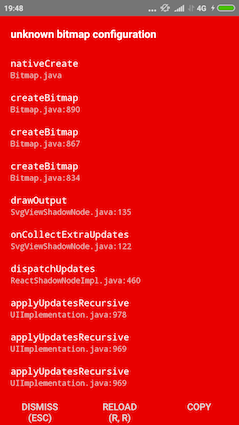
- Setting standalone property to false working fine for events but restricting the Zooming work
- Setting the same to true causing "unknown bitmap configuration" error.
(only in android)
Did you faced this issue?
manjuy124
on 17 Aug 2018
@manjuy124
Actually I didn't need zoom in my chart .. so the suggested workaround was enough for me ..
But at the end I moved to react-native-pure-chart for much better performence and simplicity
Hope u can find a solution for ur issue
MujtabaFR
on 17 Aug 2018
@manjuy124 i got the same error when wrapping my chart in <Svg> on android only
 waltermvp
on 26 Sep 2018
waltermvp
on 26 Sep 2018
@dominictwlee any workaround found for the issue affecting both iOS and android?
waltermvp
on 27 Sep 2018
@waltermvp Sorry for the delayed response. Currently i couldn't find any workarounds for this issue. Because of short timeframe, I moved to react-native-charts-wrapper.
manjuy124
on 28 Sep 2018
@manjuy124 @waltermvp I recently added an option disableContainerEvents that you can add to VictoryContainer to turn off all the panResponder stuff that could potentially interfere. Hopefully that helps.
Changelog: https://github.com/FormidableLabs/victory-native/blob/master/CHANGELOG.md#3040-2018-08-24
 boygirl
on 3 Oct 2018
boygirl
on 3 Oct 2018
onPress not working on android device
 sureshMuthu1991
on 22 Dec 2018
sureshMuthu1991
on 22 Dec 2018
Is working if i wrapp the VictoryChart inside the SVG tag:
<Svg width={chart_width} height={chart_height}>
                        <VictoryChart
                            horizontal
                            width={chart_width}
                            height={chart_height}
                            animate={{
                                duration: 2000,
                                onLoad: {duration: 1000}
                            }}
                            padding={{
                                top: 30,
                                bottom: 30,
                                left: 95,
                                right: 54
                            }}
                            domain={{y: [0, 100]}}>
                            <VictoryAxis
                                 style={{
                                     tickLabels: { fontSize: 12 },
                                     axis: { stroke: "none" }
                                 }}/>
                            <VictoryBar
                                data={this.state.data}
                                x={"name"}
                                y={"percentage"}
                                cornerRadius={6}
                                barWidth={14}
                                events={[{
                                      target: "data",
                                      eventHandlers: {
                                          onPress: () => {
                                                return [
                                                     {
                                                         target: "data",
                                                         mutation: (props) => {
                                                                // Selected data
                                                               let pressed_data = this.state.data[props.index];
                                                          }
                                                     }
                                                ];
                                       }
                               }
                    }]}/>
           </VictoryChart>
</Svg>
 hyper750
on 5 Nov 2019
hyper750
on 5 Nov 2019
Related issues
 safaiyeh
·
6Comments
safaiyeh
·
6Comments
 samuelltk
·
3Comments
samuelltk
·
3Comments
 yvonne6344
·
4Comments
yvonne6344
·
4Comments
 ChrisGatzo
·
3Comments
ChrisGatzo
·
3Comments
 ararog
·
4Comments
ararog
·
4Comments
Most helpful comment
@manjuy124
Yes, my problem was the same as this issue
Solved using the suggested workaround