Victory-native: Can't render emoji characters as text
Bugs and Questions
Checklist
[x ] This is a
victory-nativespecific issue. (Issues that _also_ appear invictoryshould be opened here)[ X] I have read through the FAQ and Guides before asking a question
[ X] I am using the latest version of
victory-native[ X] I have checked to make sure that my versions of
react-nativeandreact-native-svgare compatible with this version ofvictory-native. Read about version requirements[X ] I've searched open issues to make sure I'm not opening a duplicate issue
The Problem
When attempting to use the CatPoint example class as dataComponent on a scatter grpah there are no points visible. When i comment out the dataComponent code it works well.
Reproduction
Please check that your issue is specific to victory-native. If you're unsure, a good way to check is by trying your code in a sandbox. You can fork this sandbox to get started. Issues that are not specific to victory-native should be reported here.
"react-native-svg": "^6.3.1",
"victory-core": "^24.0.1",
"victory-native": "^0.18.2"
When the dataComponent line is commented out it renders fine. If it is not commented then the scatter points are not visible.
import React, { Component } from "react";
import { StyleSheet, View } from "react-native";
import { Text } from "react-native-svg";
import {
  VictoryLine,
  VictoryBar,
  VictoryChart,
  VictoryTheme,
  VictoryScatter
} from "victory-native";
import { blue } from "../lib/StyleConstants";

const data = [
  { weekDay: "Mon", drinks: 3 },
  { weekDay: "Tues", drinks: 5 },
  { weekDay: "Wed", drinks: 3 },
  { weekDay: "Thur", drinks: 4 },
  { weekDay: "Fri", drinks: 3 },
  { weekDay: "Sat", drinks: 2 },
  { weekDay: "Sun", drinks: 2 }
];
const data1 = [
  { x: "Mon", y: 5 },
  { x: "Tues", y: 5 },
  { x: "Wed", y: 4 },
  { x: "Thur", y: 4 },
  { x: "Fri", y: 3 },
  { x: "Sat", y: 3 },
  { x: "Sun", y: 2 }
];

class CatPoint extends React.Component {
  render() {
    const { x, y, datum } = this.props;
    console.log(datum._y);
    const cat = datum._y >= 0 ? "😻" : "😹";
    return (
      <Text x={x} y={y} fontSize={30}>
        {cat}
      </Text>
    );
  }
}

class StatsGraphs extends Component {
  constructor(props) {
    super(props);
    this.state = {};
  }
  /*
  adding animate to VictoryLine breaks the drawing of the line chart so we add animate to bar only (for now)
  https://github.com/FormidableLabs/victory-native/issues/299
  */
  render() {
    return (
      <View style={styles.container}>
        <VictoryChart theme={VictoryTheme.material}>
          <VictoryBar
            animate
            style={{
              data: { fill: blue, opacity: 0.7 }
            }}
            data={data}
            x="weekDay"
            y="drinks"
          />
          <VictoryScatter
            animate
            style={{
              data: {
                fill: d => (d.x > 2 ? "blue" : "grey"),
                stroke: d => (d.y < 6 ? "yellow" : "black"),
                strokeWidth: 2
              }
            }}
            symbol={d => (d.x > 1 ? "plus" : "square")}
            size={d => d.y + 2}
            data={[
              { x: 1, y: 3 },
              { x: 2, y: 5 },
              { x: 3, y: 3 },
              { x: 4, y: 4 },
              { x: 5, y: 3 },
              { x: 6, y: 2 },
              { x: 7, y: 2 }
            ]}
            // dataComponent={<CatPoint />}
          />

          <VictoryLine
            style={{
              data: { stroke: "red" },
              parent: { border: "1px solid #ccc" }
            }}
            data={data1.map(point => {
              var copy = Object.assign(point);
              copy.y = point.y - 2;
              return copy;
            })}
            x="x"
            y="y"
          />
        </VictoryChart>
      </View>
    );
  }
}
const styles = StyleSheet.create({
  container: {
    flex: 1,
    justifyContent: "center",
    alignItems: "center",
    backgroundColor: "#f5fcff"
  }
});

export default StatsGraphs;
 waltermvp
All 27 comments
@waltermvp What an interesting bug. It turns out this isn't an issue with all custom dataComponents. It's an issue with the higher number unicode characters. I reproduced your issue with cat = String.fromCodePoint(0x1F63B) and I can confirm that nothing is rendered. cat = String.fromCodePoint(42) renders an asterisk as expected. I expect this is an issue with react-native-svg. I'm going to edit the title of this issue and open a linked issue in their repository.
 boygirl
on 4 Jul 2018
boygirl
on 4 Jul 2018
https://github.com/react-native-community/react-native-svg/issues/329
Here's the pre-existing issue. It looks like a wontfix.
boygirl
on 4 Jul 2018
@boygirl got it thanks for the clarification, any obvious workarounds?
also do you have an example of loading from an image svg file to pass in as a dataComponent?
waltermvp
on 4 Jul 2018
@boygirl @waltermvp Can you try this? https://github.com/react-native-community/react-native-svg/pull/746
 msand
on 30 Jul 2018
msand
on 30 Jul 2018
@msand yes, I'll give it a try today :)
boygirl
on 31 Jul 2018
@boygirl let me know i can help with testing :)
waltermvp
on 31 Jul 2018
@waltermvp please do!
boygirl
on 31 Jul 2018
@msand apologies for the delay: this is rendering _something_ but not correct emoji:
I have each point rendering:
<Text x={x} y={y} fontSize={30}>
  {String.fromCodePoint(0x1F63B)}
</Text>
which results in:
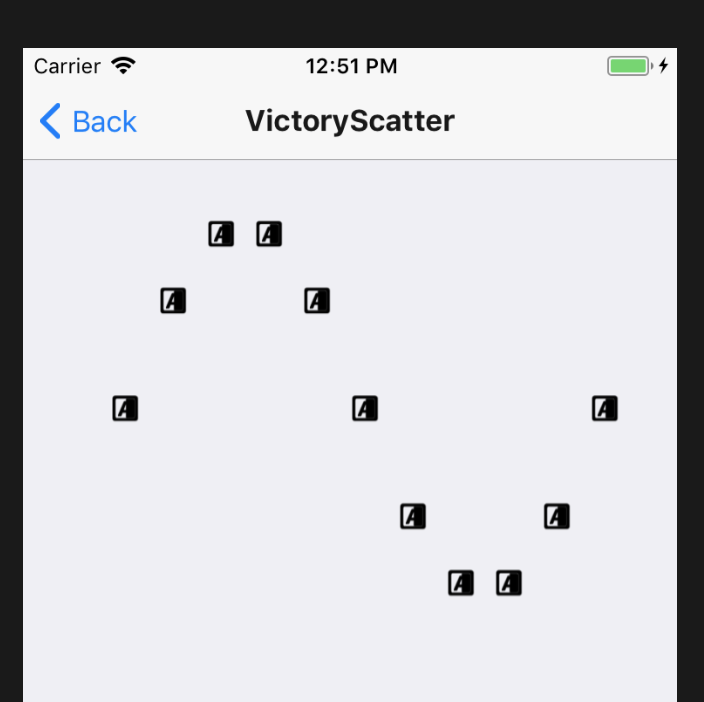
Same result with something like:
<Text x={x} y={y} fontSize={30}>
  {"😻"}
</Text>
@boygirl how can i help test your changes?
waltermvp
on 1 Aug 2018
@waltermvp you can change your react-native-svg dep to: "react-native-svg": "git://github.com/msand/react-native-svg#emoji" in package.json. You will probably want to re-link and build your project, too. I tested in iOS. Can you give it a go in Android?
boygirl
on 1 Aug 2018
@boygirl sure
waltermvp
on 1 Aug 2018
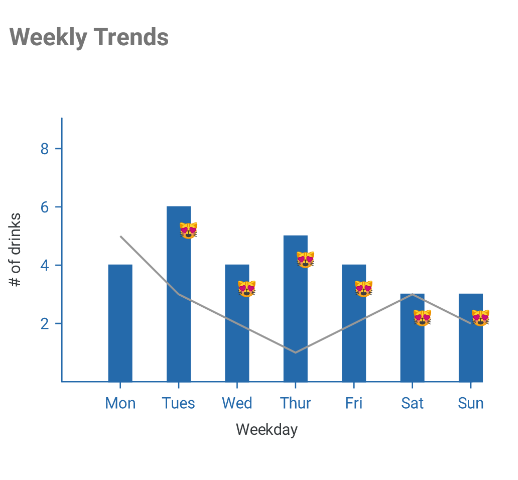
@boygirl sorry for the delay haven't compiled android in a bit. This is a simulator screenshot API27. Looks good. Ill have a device screenshot tomorrow
waltermvp
on 2 Aug 2018
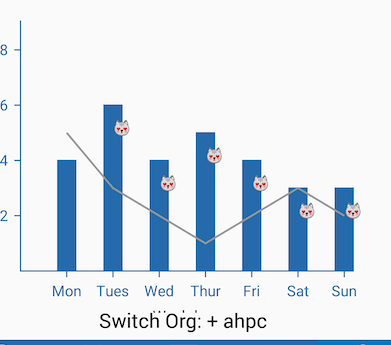
and on device Galaxy S7
waltermvp
on 2 Aug 2018
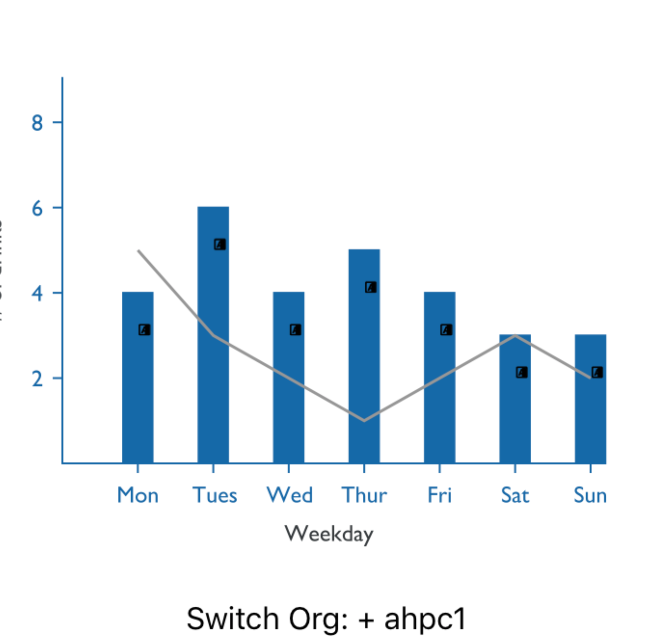
I get the same results as you do on iOS
waltermvp
on 2 Aug 2018
@waltermvp @boygirl I've pushed another attempt to fix rendering on ios, can you test it?
import React from 'react';
import Svg, { G, Text, TSpan } from 'svgs';
export default ({ width }) => (
<Svg width={width} height={width} viewBox="0 0 960 500">
<G fill="black" stroke="black" fontSize="60px">
<Text x="10" y="70">
(☃☃💁🔂🍿🙀🙋👍🏿)
<TSpan x="10" y="140" rotate="-10,-20,-30,-40" fill="orange">
(🙀🙋👍🏿💥🙌✨💝🐼(☺)
</TSpan>
<TSpan x="10" y="210">🇨🇦👨👨👧👧👾👩❤️👩🖌💥🙌✨💝🐼(☺+)</TSpan>
</Text>
</G>
</Svg>
);
@msand Awesome! I'll try it today :)
boygirl
on 9 Aug 2018
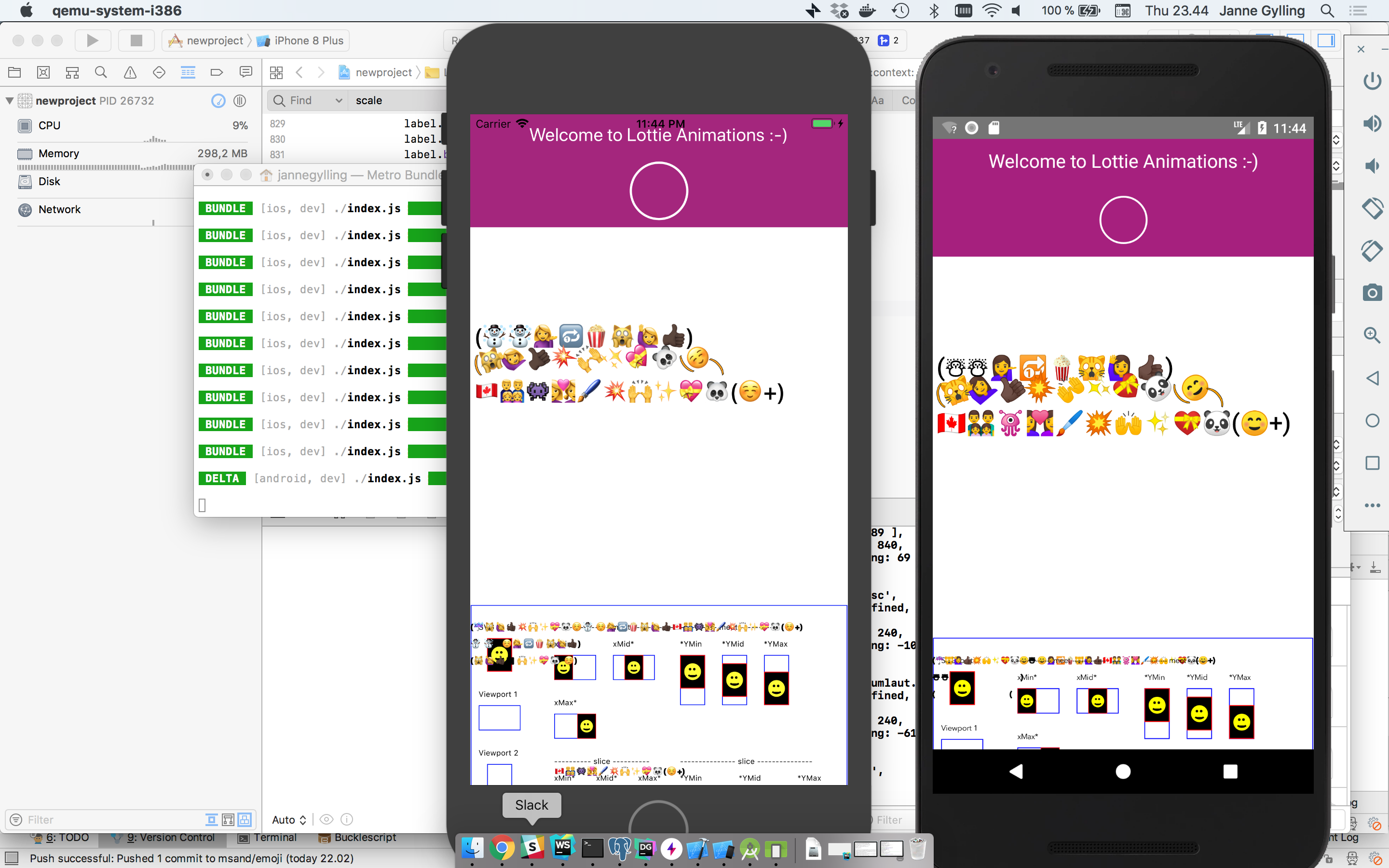
Some more patches available, to fix size / layout on ios, and emoji modifiers on android.
msand
on 9 Aug 2018
Off by one bug fixed, now the 😻😹emoji render correctly as well.
msand
on 10 Aug 2018
@msand i get the same weird symbols for ios
waltermvp
on 10 Aug 2018
@waltermvp Can you try
yarn add react-native-svg@msand/react-native-svg#e613efa
or
npm i react-native-svg@msand/react-native-svg#e613efa
to make sure you're using the latest commit from the emoji branch: https://github.com/msand/react-native-svg/tree/emoji
msand
on 10 Aug 2018
ios works :)
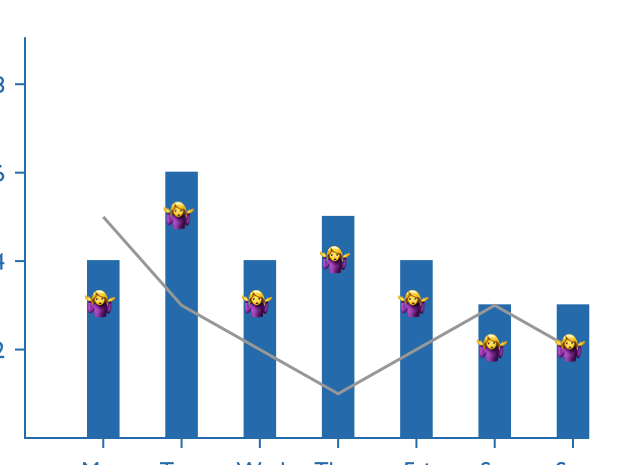
waltermvp
on 10 Aug 2018
Managed to get android working with a small workaround:
import React, { Component } from 'react';
import { StyleSheet, View } from 'react-native';
import { Text } from 'react-native-svg';
import {
  VictoryLine,
  VictoryBar,
  VictoryChart,
  VictoryTheme,
  VictoryScatter,
} from 'victory-native';

const data = [
  { weekDay: 'Mon', drinks: 3 },
  { weekDay: 'Tues', drinks: 5 },
  { weekDay: 'Wed', drinks: 3 },
  { weekDay: 'Thur', drinks: 4 },
  { weekDay: 'Fri', drinks: 3 },
  { weekDay: 'Sat', drinks: 2 },
  { weekDay: 'Sun', drinks: 2 },
];
const data1 = [
  { x: 'Mon', y: 5 },
  { x: 'Tues', y: 5 },
  { x: 'Wed', y: 4 },
  { x: 'Thur', y: 4 },
  { x: 'Fri', y: 3 },
  { x: 'Sat', y: 3 },
  { x: 'Sun', y: 2 },
];

class CatPoint extends React.Component {
  render() {
    const { x, y, datum } = this.props;
    const cat = datum._y >= 3 ? '😻' : '😹';
    return (
      <Text x={x} y={y} fontSize={30}>
        {cat}
      </Text>
    );
  }
}

class StatsGraphs extends Component {
  constructor(props) {
    super(props);
    this.state = {};
  }
  /*
  adding animate to VictoryLine breaks the drawing of the line chart so we add animate to bar only (for now)
  https://github.com/FormidableLabs/victory-native/issues/299
  */
  render() {
    return (
      <View style={styles.container}>
        <VictoryChart theme={VictoryTheme.material}>
          <VictoryBar
            animate
            style={{
              data: { fill: 'blue', opacity: 0.7 },
            }}
            data={data}
            x="weekDay"
            y="drinks"
          />
          <VictoryScatter
            style={{
              data: {
                fill: d => (d.x > 2 ? 'blue' : 'grey'),
                stroke: d => (d.y < 6 ? 'yellow' : 'black'),
                strokeWidth: 2,
              },
            }}
            symbol={d => (d.x > 1 ? 'plus' : 'square')}
            size={d => d.y + 2}
            data={[
              // Repeat first datum to fix android rendering issue
              { x: 1, y: 3 },
              { x: 1, y: 3 },
              { x: 2, y: 5 },
              { x: 3, y: 3 },
              { x: 4, y: 4 },
              { x: 5, y: 3 },
              { x: 6, y: 2 },
              { x: 7, y: 2 },
            ]}
            dataComponent={<CatPoint />}
          />

          <VictoryLine
            style={{
              data: { stroke: 'red' },
              parent: { border: '1px solid #ccc' },
            }}
            data={data1.map(point => {
              var copy = Object.assign(point);
              copy.y = point.y - 2;
              return copy;
            })}
            x="x"
            y="y"
          />
        </VictoryChart>
      </View>
    );
  }
}
const styles = StyleSheet.create({
  container: {
    flex: 1,
    justifyContent: 'center',
    alignItems: 'center',
    backgroundColor: '#f5fcff',
  },
});

export default StatsGraphs;
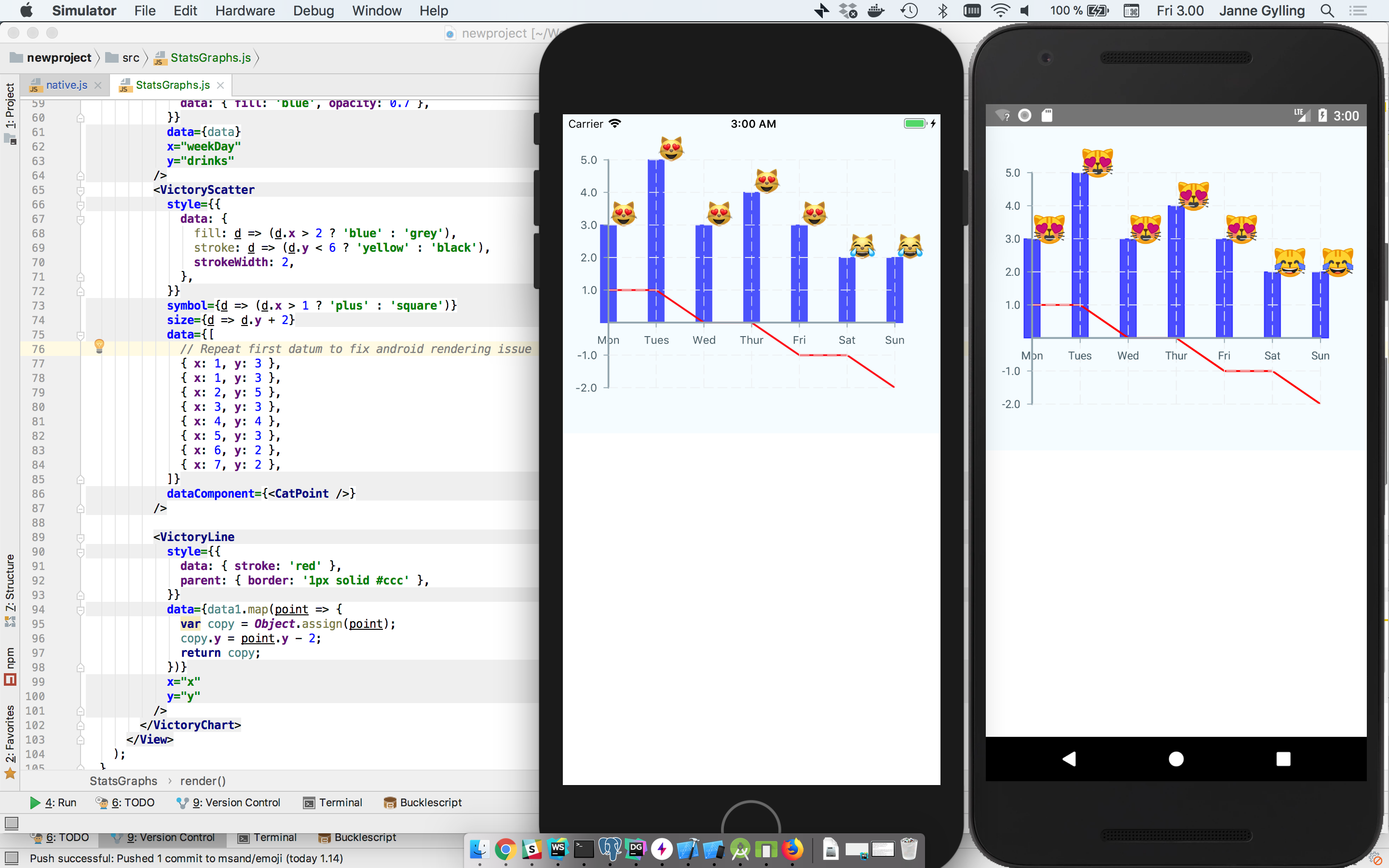
msand
on 10 Aug 2018
@msand what is the workaround?
 omorhefere
on 13 Aug 2018
omorhefere
on 13 Aug 2018
@omorhefere In this case, one of the emoji wasn't rendering, so I repeated the data point twice. Strange behavior, not sure what could cause it.
msand
on 13 Aug 2018
@msand will this be merged to master soon?
waltermvp
on 27 Sep 2018
@waltermvp It should be available in v7 of react-native-svg
msand
on 27 Sep 2018
@msand ah right I always get confused the fix is in SVG-Repo thanks
waltermvp
on 27 Sep 2018
Related issues
 phunkren
·
5Comments
phunkren
·
5Comments
 ericschaal
·
4Comments
ericschaal
·
4Comments
 ararog
·
4Comments
ararog
·
4Comments
 jlo1
·
3Comments
jlo1
·
3Comments
 ChrisGatzo
·
3Comments
ChrisGatzo
·
3Comments