Victory-native: Preselect slice on a VictoryPie
I need the VictoryPie component to have a pre-selected data point (slice) on screen load.
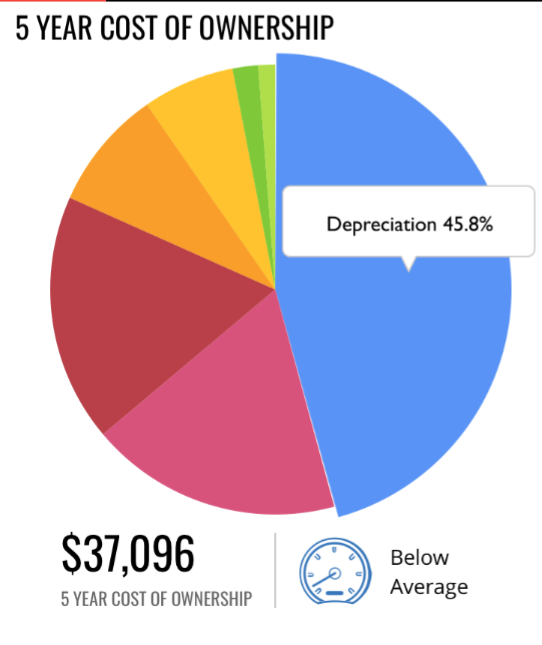
Is there a way to have the props.events have an onLoad event?
 whoisjordangarcia
All 9 comments
@arickho
It isn't currently possible to have one slice of the pie with a larger radius like that, out of the box. You could alter the dataComponent to have a scale transform, though.
As for activating a tooltip, the active prop on VictoryTooltip takes a function so you could do something like labelComponent={<VictoryTooltip active={(datum) => datum.x === "Deprecation" }/>
You would also want to add an event to your parent element that removes that, or it wont go away.
something like
events={[{
  target: parent,
  eventHandlers: {
    onMouseOver: () => {
      return [{
         target: "labels",
         eventKey: "all",
         mutation: () => ({ active: false })
      }]
    }
}
 boygirl
on 24 Aug 2017
boygirl
on 24 Aug 2017
@boygirl any chance you could add an example on how to accomplish this: You could alter the dataComponent to have a scale transform. ?
Edit: reading about it here: https://formidable.com/open-source/victory/docs/common-props/#datacomponent
 thm-design
on 8 Nov 2018
thm-design
on 8 Nov 2018
@thm-design fun timing! I'm actually currently working on an improvement that will make it much easier to get the popped out slice effect I think you're after (one slice of the pie with a larger radius than the others). I expect this work to land tomorrow or Monday :)
boygirl
on 8 Nov 2018
Wow awesome! thanks for your reply will be watching for that to drop then!
thm-design
on 8 Nov 2018
@boygirl is it ready? How can we use it? :)
 bear-junior
on 13 Nov 2018
bear-junior
on 13 Nov 2018
@thm-design @bear-junior sorry the docs are lagging. As of version 31.0.0 you can define radius as a function like radius={(datum, active) => active ? 150 : 100}. You can read more about the changes in the changelog
We have some other docs changes in the works, so those are a bit delayed, but let me know if there's any confusion and I will try to help clear it up with examples
boygirl
on 16 Nov 2018
@boygirl oh snap awesome, I'm on 30.2.0. Updating and trying this now! Cheers for the update.
thm-design
on 16 Nov 2018
@boygirl just realized this is for the victory-native repo, is this behavior available in the victory library for web? I updated to 31.0.0 and tried the following, active is always undefined.
            <VictoryPie
              name="pie"
              radius={(datum, active) => {
                 return active ? 150 : 100;
              }}
               ...
            <VictoryPie
              name="pie"
              dataComponent={
                <Slice
                  radius={(datum, active) => {
                    return active ? 150 : 100;
                  }}
                />
              }
              ...
Nevermind, sorry for the noise: this explains it for me:mhttps://github.com/FormidableLabs/victory/issues/1136
Thanks for your work @boygirl
thm-design
on 16 Nov 2018
Related issues
 isabel-thx
·
5Comments
isabel-thx
·
5Comments
 UtkarshPramodGupta
·
5Comments
UtkarshPramodGupta
·
5Comments
 safaiyeh
·
6Comments
safaiyeh
·
6Comments
 yvonne6344
·
4Comments
yvonne6344
·
4Comments
 JeremyBradshaw7
·
4Comments
JeremyBradshaw7
·
4Comments
Most helpful comment
@thm-design @bear-junior sorry the docs are lagging. As of version
31.0.0you can defineradiusas a function likeradius={(datum, active) => active ? 150 : 100}. You can read more about the changes in the changelogWe have some other docs changes in the works, so those are a bit delayed, but let me know if there's any confusion and I will try to help clear it up with examples