Victory-native: Press events not firing on Android
_Maintainer note: this is a react-native-svg issue and is tracked in https://github.com/react-native-community/react-native-svg/issues/363_
On a <VictoryPie/> component in my application, press events will not fire on Android.
I modified the victory-native-demo application to reproduce the issue.
Modified Code:
<VictoryPie
  innerRadius={75}
  labelRadius={125}
  style={{ labels: { fontSize: 20 }}}
  data={this.state.randomData}
  animate={{duration: 1500}}
  events={[
    {
      target: "data",
      eventHandlers: {
         onPressIn: alert
      }
    }
  ]}
/>
The above code works on iOS, but not Android.
Please let me know if I can provide more details. Thanks for all the hard work so far!
 nickbreaton
All 47 comments
I have the same issue.
 GeeWee
on 2 Jun 2017
GeeWee
on 2 Jun 2017
Upon further investigation I noticed that not only are the pieces unpressable, but they also prevent the user from scrolling if the component is placed on a ScrollView.
nickbreaton
on 3 Jun 2017
Sorry to keep commenting, but I would just like to provide as much data as possible to make it easier to track down the issue.
It seems that this issue does not only effect just VictoryPie, but all press events on all charts I have tested.
I have however found a __workaround__ that should solve this for most people. If you wrap your chart in an <Svg>...</Svg> from react-native-svg, and set the standalone={false} prop on your <VictoryPie/>, then it should work as expected.
@GeeWee ^
In the above example I provided, the fix would look as follows:
import Svg from 'react-native-svg';

...

<Svg width={400} height={400} viewBox="0 0 400 400" style={{ width: "100%", height: "auto" }}>
  <VictoryPie
    standalone={false}
    innerRadius={75}
    labelRadius={125}
    style={{ labels: { fontSize: 20 }}}
    data={this.state.randomData}
    animate={{duration: 1500}}
    events={[
      {
        target: "data",
        eventHandlers: {
           onPressIn: alert
        }
      }
    ]}
  />
</Svg>
Oh that's really awesome @nickbreaton - thanks for the workaround!
Does this also fix #25 or is onPress still buggy when wrapping in an svg?
GeeWee
on 4 Jun 2017
+1 and thanks for the hard work! any plans on getting this fixed, so that we don't need the workaround to wrap it around an Svg and set standalone to false? Trying to use VoronoiContainer while still listening to events on children, but wrapping that with an Svg component won't render the VoronoiContainer.
 jlo1
on 9 Jun 2017
jlo1
on 9 Jun 2017
hey all! one of the victory-native maintainers here - i can confirm that I see the behavior, too, on [email protected]. For some annoying reasons* I can't test on Android using [email protected], the latest VN release.
Could one of you test on that release? Maybe @jlo1, @nickbreaton, @GeeWee? This isn't just a stalling tactic :) There are two primary reasons I'd like to test on [email protected]:
react-native-svgwas upgraded in the new version; many single-platform bugs can be traced toreact-native-svg, as victory-native has no native modules of its own nor any platform-specific handling, besides in the demo.- the VictoryContainer was altered, and I think this bug may reside in VictoryContainer if it's in
victory-chartand notreact-native-svg
*on my machine I can't get Expo and React-Native to cooperate for [email protected], which the latest victory-native release needs
 chrisbolin
on 9 Jun 2017
chrisbolin
on 9 Jun 2017
Thanks for following up @chrisbolin ! I'm on the latest VN version 0.10.0, and have upgraded both react-native-svg and react-native packages to the latest, but still seeing this issue.
jlo1
on 9 Jun 2017
bingo. thanks @jlo1! that's really helpful, as it helps narrow the search 🔎
chrisbolin
on 9 Jun 2017
and @jlo1, does it work if you follow nickbreaton's suggestion above of wrapping in an
chrisbolin
on 9 Jun 2017
I've traced down the root of the problem to the use of react-native's View in victory-native's VictoryContainer: https://github.com/FormidableLabs/victory-native/blob/master/lib/components/victory-container.js#L81
The View is used to catch events for the more "interesting" containers (VictoryVoronoiContainer, VictoryZoomContainer, etc). If we simply removed it from VictoryContainer we would fix this issue, but of course we'd break the other containers. The biggest question for me is _why does this work on iOS but not Android?_ Either there is a bug in View for Android, or they need to be used in slightly different ways on the platforms. Or I am misunderstanding something (probably this). I'll keep digging over the next few days. Chime in if you have thoughts. 👍
chrisbolin
on 9 Jun 2017
This looks to be an issue between react-native-svg event handling and react-native PanResponder.
So the open question is still what's going on here? Is this a bug in one of those two libraries? Is this an improper use of PanResponder, and it's simply a fluke that this works at all on iOS?
Here is the reproduction using just those two libraries (i.e. no Victory). I just placed no-ops for the PanResponder events, for simplicity.
Left: iOS (working correctly), Right: Android (bug)
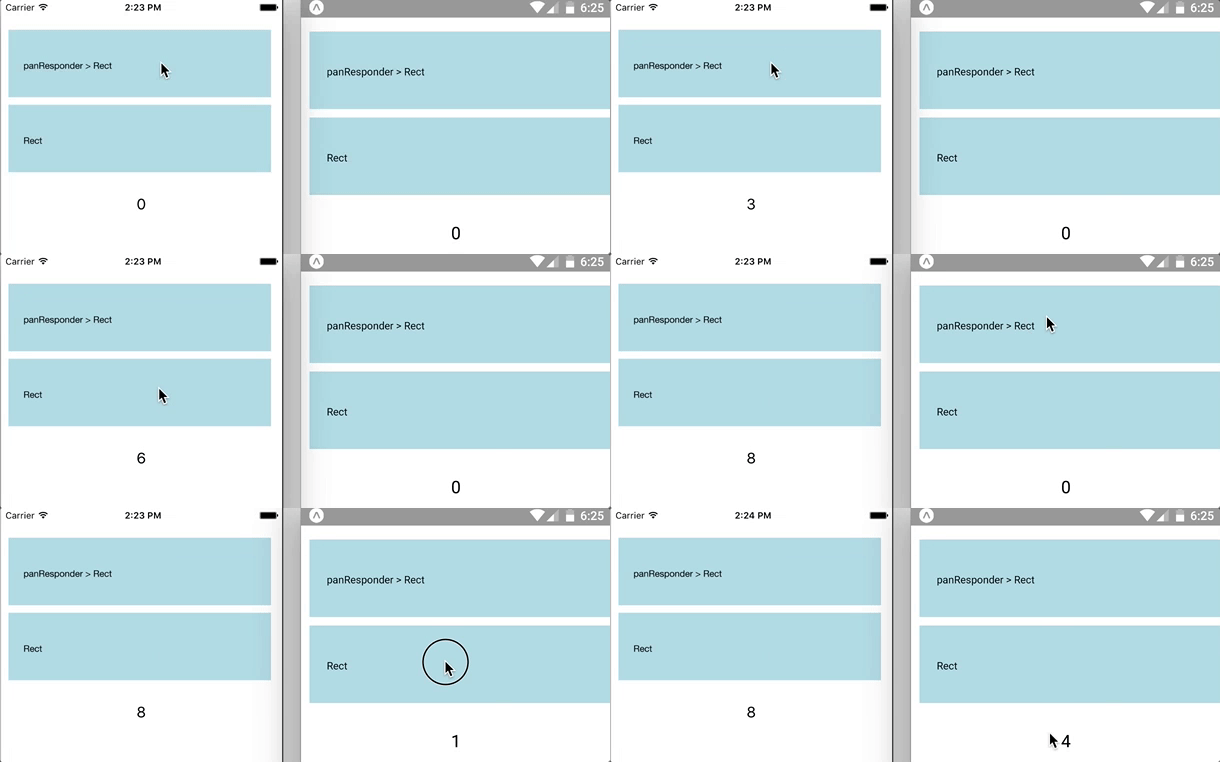
import React, { Component } from "react";
import { PanResponder, View, Text } from "react-native";
import { Svg, Rect, Text as SvgText } from "react-native-svg";

class PanResponderWrapper extends Component {
  constructor(props) {
    super(props);
    this.panResponder = this.getResponder();
  }
  getResponder() {
    const yes = () => true;
    const no = () => false;
    const noop = () => null;
    return PanResponder.create({
      onStartShouldSetPanResponder: yes,
      onStartShouldSetPanResponderCapture: no,
      onMoveShouldSetPanResponder: yes,
      onMoveShouldSetPanResponderCapture: yes,
      onShouldBlockNativeResponder: yes,
      onPanResponderTerminationRequest: yes,
      onPanResponderGrant: noop,
      onPanResponderMove: noop,
      onPanResponderRelease: noop,
      onPanResponderTerminate: noop,
    });
  }
  render() {
    return (
      <View {...this.panResponder.panHandlers}>
        {this.props.children}
      </View>
    );
  }
}

const Box = ({ onPressIn, label }) => (
  <Svg width={400} height={100} viewBox="0 0 400 100" style={{ width: "100%", paddingTop: 10 }}>
    <Rect onPressIn={onPressIn} fill="lightblue" x="10" y="10" width="350" height="90" />
    <SvgText x="30" y="50">{label}</SvgText>
  </Svg>
);

export default class App extends Component {
  constructor(props) {
    super(props);
    this.state = { count: 0 };
  }
  countUp() {
    this.setState({ count: this.state.count + 1 });
  }
  render() {
    return (
      <View style={{ paddingTop: 30 }}>
        <PanResponderWrapper>
          <Box label="panResponder > Rect" onPressIn={() => this.countUp()} />
        </PanResponderWrapper>

        <Box label="Rect" onPressIn={() => this.countUp()} />

        <Text style={{fontSize: 20, textAlign: "center", padding: 30}}>{this.state.count}</Text>
      </View>
    );
  }
}
code available at https://github.com/FormidableLabs/victory-native-demo/blob/vn-96-reproduction/App.js
chrisbolin
on 10 Jun 2017
edit: i've now reproduced this on Android with the latest versions of all packages: [email protected] and [email protected]
chrisbolin
on 10 Jun 2017
@chrisbolin I really appreciate you looking into this so much. I guess the next step would be to open an issue with react-native-svg?
nickbreaton
on 10 Jun 2017
@nickbreaton for sure -- I can take care of that. I just wanted to consult with some people beforehand to get some more perspective on the behavior
chrisbolin
on 12 Jun 2017
After some more research I filed https://github.com/react-native-community/react-native-svg/issues/363. Someone pointed out that even react-native's Button works in a PanResponder configured this way. Therefore it really does seem like an Android issue with react-native-svg
chrisbolin
on 12 Jun 2017
@nickbreaton
This is very retarded hack, but it works nevertheless. It adds a transparent view on top of the svgs to trickle down the scroll to the ScrollView.
<ScrollView>
  <VictoryChart />
  <VictoryChart />
  <View style={styles.pseudoScrollView} />
</ScrollView>

const style =StyleSheet.create({
  pseudoScrollView: {
    backgroundColor: 'black',
    opacity: 0,
    position: 'absolute',
    top: 0,
    bottom: 0,
    right: 0,
    left: 0
})
 anandmani
on 16 Oct 2017
anandmani
on 16 Oct 2017
What's the current recommended workaround to get events working on both IOS and Android? Coding events per the documentation works for IOS but not Android - at least for bar chart.
 mobitinker
on 1 Nov 2017
mobitinker
on 1 Nov 2017
@mobitinker i haven't tried @anandmani's workaround above, but it's worth a shot.
chrisbolin
on 6 Nov 2017
@anandmani:
I don't know why View cannot fixed for me, but I change from View to Image, render an transparent image to overlap chart => and It works @@
 ghost
on 13 Nov 2017
ghost
on 13 Nov 2017
Workaround by @nickbreaton works for me if I use an image as suggested by @QuangPB.
<ScrollView>
 <VictoryPie
  innerRadius={75}
  labelRadius={125}
  style={{ labels: { fontSize: 20 }}}
  data={this.state.randomData}
  animate={{duration: 1500}}
  events={[
    {
      target: "data",
      eventHandlers: {
         onPressIn: alert
      }
    }
  ]}
  />

  <Image style={styles.pseudoScrollView} source={require('./blank.jpg')} />
</ScrollView>

const style = StyleSheet.create({
  pseudoScrollView: {
    opacity: 0,
    position: 'absolute',
    top: 0,
    left: 0,
    width:"100%",
    height:"100%"
})
 niallobrien80
on 8 Dec 2017
niallobrien80
on 8 Dec 2017
None of the solutions proposed worked for me on 0.16.1 and [email protected], I managed to find a workaround however:
<View pointerEvents="none">
  <VictoryPie />
</View>
 sonaye
on 17 Dec 2017
sonaye
on 17 Dec 2017
@sonaye Thanks, your solution saved my life. :)
 jswxwxf
on 4 Jan 2018
jswxwxf
on 4 Jan 2018
@sonaye It's working perfectly!
 thibautguedou3
on 12 Jan 2018
thibautguedou3
on 12 Jan 2018
If I wrapped
 KabeerShaikh
on 1 Mar 2018
KabeerShaikh
on 1 Mar 2018
If I wrapped <VictoryChart>in <Svg> then
KabeerShaikh
on 1 Mar 2018
If I wrapped <VictoryChart>in <Svg> then <ZoomContainer> is not working. Any Solution for this ??
KabeerShaikh
on 1 Mar 2018
@sonaye I get the error
Error while updating property 'padding' in shadow node of type RCTView
TypeError: expected dynamic type 'double' but had type 'object'
The only thing I added was the
<View pointerEvents="none">
    <VictoryPie  {...victoryPieProps} />
</View>
Any idea what might be going on?
 wkwyatt
on 9 Mar 2018
wkwyatt
on 9 Mar 2018
@wkwyatt Can you share the full code? it seems that you are supplying invalid values in your victoryPieProps.
sonaye
on 10 Mar 2018
@sonaye
<View pointerEvents="none">
    <VictoryChart>
        <VictoryPie
            height={300}
            width={300}
            colorScale={["orange"]}
            data={[1]}
         />
    </VictoryChart>
</View>
@wkwyatt Try something like
data={[
  { x: 1, y: 10, label: 'foo' },
  { x: 2, y: 7, label: 'bar' },
  { x: 3, y: 3, label: 'baz' }
]}
Does it work?
sonaye
on 10 Mar 2018
@wkwyatt: I remember I already read an issue said that if data array had only one value, it will throw error. So, I think you should try to add more values to data attribute
ghost
on 10 Mar 2018
It still isn't working @sonaye, but this is exactly what I'm running on the Android emulator
versions ->
"react-native": "0.49.3",
"react-native-svg": "^5.5.1",
"victory-native": "^0.16.1"
And I used your input data @sonaye. Thank you for all your help @sonaye & @QuangPB, and everyone else!
                <View style={{padding: 20}} pointerEvents="none">
                    <VictoryChart>
                        <VictoryArea
                            data={[
                                { x: 1, y: 10, label: 'foo' },
                                { x: 2, y: 7, label: 'bar' },
                                { x: 3, y: 3, label: 'baz' }
                            ]}
                            style={{
                                data: {
                                    fill: 'red',
                                    stroke: 'orange',
                                    strokeWidth: 2,
                                }
                            }}
                            events={[
                                {
                                    target: "data",
                                    eventHandlers: {
                                        onPress: () => {
                                            return [{
                                                target: "data",
                                                eventKey: "all",
                                                mutation: (props) => {
                                                    console.log('WORK PLEASE');
                                                    Alert.alert('chart touched');
                                                    return null
                                                }
                                            }];
                                        }
                                    }
                                }
                            ]}
                            interpolation='linear'
                        />
                    </VictoryChart>
                </View>
@wkwyatt I tested your code, it is not working on my side too. I also tested the example provided in the docs and it is not working as well. I don't think this is related to pointerEvents or the main issue discussed here, most likely it's a bug in the library itself, consider opening a new issue so that the maintainers are notified.
sonaye
on 11 Mar 2018
https://github.com/react-native-community/react-native-svg/issues/363
https://github.com/react-native-community/react-native-svg/issues/592
https://github.com/FormidableLabs/victory-native/issues/25
https://github.com/FormidableLabs/victory-native/issues/254
Seems like it's a bug.
sonaye
on 11 Mar 2018
Has there been any update on this?
I am just trying to get the onPressIn to work in ios this works no issue. Below is the code that i am using. The above fixes did not work for me.
                      <VictoryChart
                      style={{ parent: { maxWidth: "50%" } }}
                                  domain={{ y: [0, domainMax] }} >
                                    <VictoryAxis
                                        style={{ axis: { stroke: 'none' }, tickLabels: { fill: '#fff' } }}
                                    />
                                    <VictoryBar
                                       standalone={false}
                                        style={{ data: { fill: '#fff' }, labels: { fill: '#fff' } }}
                                        barRatio={0.95}
                                        data={this.state.chartDisplaying === 'Amount' ? this.state.amountGraphData : this.state.countGraphData}
                                        labels={(datum) => datum.y}
                                        events={[
                                            {
                                                target: "data",
                                                eventHandlers: {
                                                    onPressIn: () => {
                                                        return [{
                                                            mutation: (props) => {
                                                                console.log('PRESSED1')
                                                                 })
                                                            }
                                                        }];
                                                    },
                                                  )
                                                            }
                                                        }];
                                                    }
                                                }
                                            }]}
                                    />


                                </VictoryChart>
 dahudson88
on 12 Apr 2018
dahudson88
on 12 Apr 2018
The solutions from @sonaye and @nickbreaton only caused errors about updating shadow props just as @wkwyatt pointed out. This issue is old here and on RN SVG has their been any progress? My solution requires tooltips and without touch events I cannot use victory-native.
@chrisbolin Do the touch events on the other containers work on Android? If not the 'View' wrapper reportedly causing this issue could be moved down to those views only and you could have at least a better solution for Android in standard containers.
 alburdette619
on 19 Jul 2018
alburdette619
on 19 Jul 2018
Can confirm however @chrisbolin that if I remove {...this.panResponder.panHandlers} from this line in victory-container the tooltips work fine on Android. What exactly would I not be able to do with this solution? And could we not move those pan responder handlers down repeating the code across those levels?
alburdette619
on 19 Jul 2018
Okay so I loaded up the demo project to answer my question about what would be lost. It looks like many of the containers are affected. Specifically none of these function properly:
- VictoryCursorContainer
- VictoryBrushContainer
- VictorySelectionContainer
- VictoryZoomContainer
- VictoryVoronoiContainer
I cannot get the demo project to run on Android to verify that they worked properly in the first place. I get an error saying React Native version mismatch. JavaScript version: 0.51.1. Native version 0.53.0. I'll take a quick crack at that and report back if possible that any of these containers work on Android in the first place.
alburdette619
on 19 Jul 2018
Sorry for the barrage, just really trying to understand this issue in the context of victory-native and give ppl info. I couldn't get the demo to work on Android but I ran with the examples from the docs and they all do work on Android. So by moving down the pan responder logic couldn't we eliminate the issue for at least the standard container?
alburdette619
on 19 Jul 2018
@KabeerShaikh
Did you find any solution for zoomcontainer problem?
 manjuy124
on 28 Aug 2018
manjuy124
on 28 Aug 2018
Can also confirm that @alburdette619's fix worked for us. We don't use any of the other containers, so we might just use a forked version of victory with that change for a while
 gavin-brown
on 13 Sep 2018
gavin-brown
on 13 Sep 2018
I think this is fixed in the latest version. And can probably be closed for now. Please comment if you're still experiencing issues.
 msand
on 10 Dec 2018
msand
on 10 Dec 2018
@msand I just updated our demos to [email protected] from ^6.5.0 and I'm seeing new issues with target areas for events:
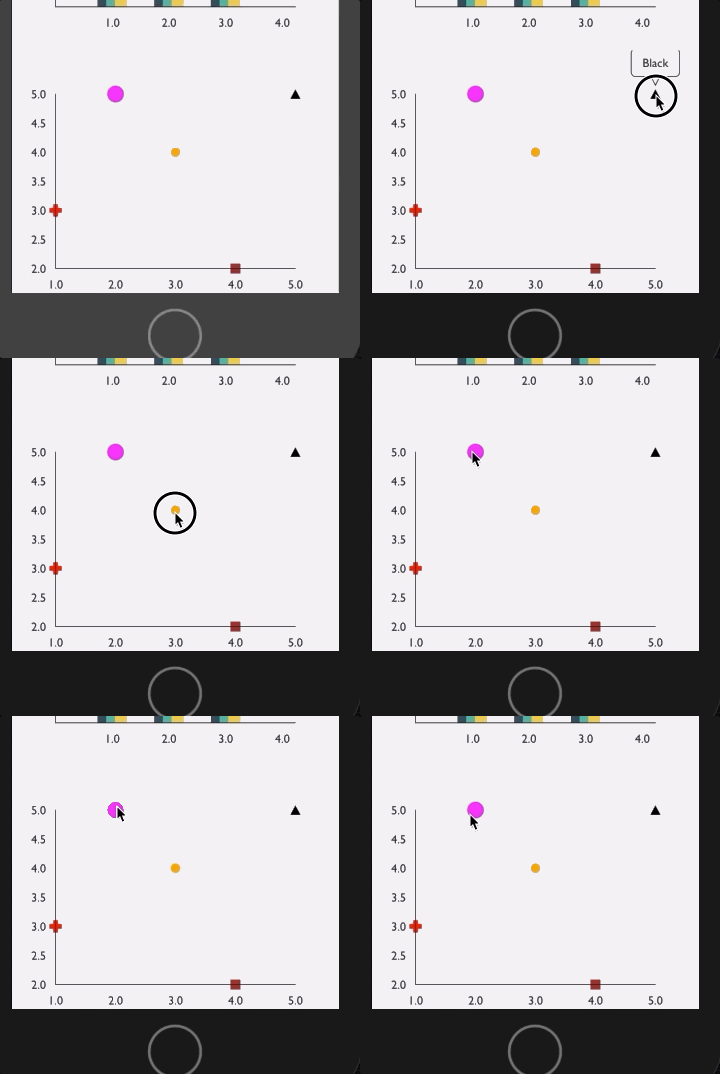
Any ideas?
 boygirl
on 11 Dec 2018
boygirl
on 11 Dec 2018
Still not fixed on android. None of the upvoted solutions above worked for me (I tried them all). It works fine on IOS though.
My package:
"react-native-svg": "^8.0.9",
"victory-native": "^31.0.0",
<Svg width={400} height={400} viewBox="0 0 400 400"
    style={{width: "100%", height: "auto"}}>
    <VictoryPie
        standalone={false}
        innerRadius={moderateScale(115)}
        colorScale={victoryPieColor}
        data={victoryPieData}
        width={400}
        height={400}
        animate={{duration: 1500}}
        events={[{
            target: "data",
                 eventHandlers: {
                     onPressIn: (event, data) => {
                         console.log("herro", data.datum.x);
                     }
                 }
             }]}
         />
     </Svg>
Although, there's a small touchable portion on the top left of the pie chart, but not on the pie chart itself. It outputs the first index data. Not sure if that helps.
EDIT: Latest "react-native-svg": "8.1.0" fixes this to those who have the same problem
 conradjonp
on 11 Dec 2018
conradjonp
on 11 Dec 2018
@conradjonp's edit fixed the issue for us as well (except the latest version of react-native-svg is 8.0.10, not 8.1.0).
 FoxShaunR
on 9 Jan 2019
FoxShaunR
on 9 Jan 2019
I have the same issue on Android ... events are not fired on VictoryBar chart 😢. Any solutions ?
None of above solutions works.
 costel21d
on 4 Jan 2021
costel21d
on 4 Jan 2021
For the VictoryBar chart, the solutions above worked with some caveats:
const renderGraph = () => {
    return (
        <VictoryChart name='chart-week' height={chartHeight}
                      domainPadding={{x: [16, 10], y: [150, 0]}}
                      theme={chartTheme}
                      width={layout.window.width}
                      standalone={platform.isIos}
                      events={[{target: 'parent', eventHandlers: {onPressIn: handleBarPressIn}}]}
                      {...extraProps}>
            .....
            .....
            ..... my code for the chart ....
            .....
            .....
        </VictoryChart>
    )
}

if (platform.isAndroid) {
    return (
        // Super hacky workaround to make the tap work on Android.
        <Svg width={layout.window.width} height={chartHeight} style={{width: "100%", height: "auto"}}>
            {renderGraph()}
        </Svg>
    )
} else {
    return renderGraph();
}
Basically, if it's Android I apply a SVG wrapper around it, and the standalone prop in the VictoryChart component set to false. For iOS, I leave the default behaviour.
I hope this helps!
 jespejoh
on 12 Jan 2021
jespejoh
on 12 Jan 2021
Related issues
 yvonne6344
·
4Comments
yvonne6344
·
4Comments
 WhyX
·
6Comments
WhyX
·
6Comments
 ChrisGatzo
·
3Comments
ChrisGatzo
·
3Comments
 safaiyeh
·
6Comments
safaiyeh
·
6Comments
 matejkriz
·
3Comments
matejkriz
·
3Comments
Most helpful comment
Sorry to keep commenting, but I would just like to provide as much data as possible to make it easier to track down the issue.
It seems that this issue does not only effect just
VictoryPie, but all press events on all charts I have tested.I have however found a __workaround__ that should solve this for most people. If you wrap your chart in an
<Svg>...</Svg>fromreact-native-svg, and set thestandalone={false}prop on your<VictoryPie/>, then it should work as expected.@GeeWee ^
In the above example I provided, the fix would look as follows: