Victoriametrics: vmselect: ability to set connect / response timeout from storage nodes
When one or more storage nodes under vmselect became unavailable, or begins to respond slowly due to high load, every request to vmselect start executing slowly. Obviously, vmselect waiting for each storage endpoint to generate a responce.
My suggestion is add ability to specify connect and response timeouts from storage endpoints. In that case we can tune up connect timeouts to smaller value (<1s for example), and the temporary loss of some storage nodes, which has HA-pairs, which are still available, will no longer be a problem for users.
 wf1nder
All 14 comments
The commit 9793008734a95bb590ca98c8f536668e66051018 adds -search.storageTimeout command-line flag to vmselect, which limits query execution time on every -storageNode. Note that -search.denyPartialResponse flag must be disabled, otherwise errors will be returned instead of partial responses. It is expected that -search.storageTimeout is smaller than -search.maxQueryDuration - otherwise timeout exceeded error is returned even if a part of vmstorage nodes already return results to vmselect.
@wf1nder , try building cluster components from the commit 9793008734a95bb590ca98c8f536668e66051018 and verifying whether -search.storageTimeout command-line flag works as expected for your case. See build instructions.
 valyala
on 16 Sep 2020
valyala
on 16 Sep 2020
Unfortunately this didn't work in my case.
I started vmselect, builded today from master, with couple of -storageNode targets, some of them do not responding right now (which I filtered by ip6tables -A INPUT -s <vmstorage_host> -j DROP. I set -search.storageTimeout to 1s, and didn't specify -search.maxQueryDuration, so it uses default value 30s.
As a result, vmselect responds to queries with varying success. Sometimes it responds, but with a delay of 1-10 seconds. At that moment it writes to log following warnings:
2020-09-17T08:48:44.758Z warn app/vmselect/main.go:150 remoteAddr: "[<addr>]:60090"; cannot handle more than 16 concurrent search requests during 10s; possible solutions: increase `-search.maxQueueDuration`, increase `-search.maxConcurrentRequests`, increase server capacity
Sometimes after 10 seconds request to vmselect failing with following error in grafana:
remoteAddr: "[<addr>]:55104", X-Forwarded-For: "<addr>, <addr>, <addr>"; cannot handle more than 16 concurrent search requests during 10s; possible solutions: increase `-search.maxQueueDuration`, increase `-search.maxConcurrentRequests`, increase server capacity
And following warn in vmselect log:
2020-09-17T08:42:05.527Z warn app/vmselect/main.go:150 remoteAddr: "[<addr>]:46848", X-Forwarded-For: "<addr>, <addr>, <addr>"; cannot handle more than 16 concurrent search requests during 10s; possible solutions: increase `-search.maxQueueDuration`, increase `-search.maxConcurrentRequests`, increase server capacity
Also, a couple of times I've seen these errors:
2020-09-17T08:51:40.455Z error lib/netutil/tcplistener.go:69 temporary error when listening for TCP addr "[::]:8481": accept tcp [::]:8481: accept4: too many open files
When I removed ip6tables rule, and all -storageNode targets became available, it started to respond instantly and withour errors.
wf1nder
on 17 Sep 2020
It looks like you hit the limit for concurrently executed queries, which can be adjusted with -search.maxConcurrentRequests command-line flag. If the limit is reached, then vmselect puts incoming requests in a wait queue until free slots are available for query processing. Requests may wait in the queue for up to -search.maxQueueDuration. After that vmselect logs the cannot handle more than ... concurrent search requests warning. Default value for -search.maxQueueDuration is 10 seconds.
Why requests may wait for 10 seconds in the queue if every request duration is limited by -search.storageTimeout=1s? Let's look at the following sequence:
-search.maxConcurrentRequests=16concurrent requests hitvmselect. All of them wait for-search.storageTimeout=1sdue to the slowvmstoragenode.- Additional requests arrived while the first 16 requests are waiting for response from slow
vmstoragenode. They are put in the wait queue. If these requests arrive at rate higher thansearch.maxConcurrentRequests / search.storageTimeout, i.e. 16 req/s for the case above, then the queue will constantly grow. This means that the majority of incoming requests will never reachvmstoragebecause they will be timed out in the wait queue.
How to deal with the issue for the given constant requests rate? Either increase search.maxConcurrentRequests or decrease search.storageTimeout.
The commit 69eb9783e6f5e7398faa1a5daad1765f9d5ed769 should partially address the issue by limiting max wait time in the queue to min(search.maxQueryTimeout, search.storageTimeout), so now all the requests must be finished in -search.storageTimeout.
valyala
on 22 Sep 2020
Note that too big values for search.maxConcurrentRequests may result in vmstorage overload and trashing. So this config must be adjusted carefully.
valyala
on 22 Sep 2020
Sorry for the late reply.
Ok, I think I more or less understood this logic. I builded vmselect from fresh master, and checked it, varying settings -search.maxConcurrentRequests, -search.storageTimeout and -search.maxQueueDuration. Unfortunately, I was not able to get the desired behavior.
If I understand correctly, option -search.storageTimeout defines the whole timeout for request, starting from connect, and ending with getting reply from vmstorage. The problem is that we have graphs with heavy requests, which execution can usually take long time, 10+ seconds. So, decreasing value of -search.storageTimeout breaks those graphs. And vice versa, increasing this setting means we are waiting too much time when one or move vmstorage nodes currently offline.
It may be worth adding the ability to set connection timeout separately the whole query execution timeout? Then we would be able to cut off earlier and not wait for offline nodes.
wf1nder
on 30 Sep 2020
Another suggestion is to implement something like health checks on vmselect side to vmstorage nodes. On vmselect periodically (each n seconds) "ping" vmstorage nodes, and mark as "offline" ones, which is not responding, till next check. And exclude "offline" nodes when executing queries from clients.
wf1nder
on 16 Nov 2020
@wf1nder , could build vmselect from the commit 85eecf5801d723c18631e5ac5e9bc563ba53bc59 and pass -replicationFactor=N command-line flag to it, where N equals to -replicationFactor used at vminsert nodes? This commit instructs vmselectto return response as soon as vmstorage_nodes_count - replicationFactor + 1 vmstorage nodes successfully return responses. This number of responses from vmstorage nodes is enough for constructing full response. This should fix the original issue described in the first message above.
valyala
on 23 Nov 2020
oops, there was a typo in the commit mentioned above, which resulted in a panic during vmselect startup. The typo has been fixed in 1dcb438c3bae6e5a36170103120e1030bc8e8385 .
valyala
on 23 Nov 2020
There was a data race, which could result in panic if -replicationFactor command-line flag at vmselect is set to value higher than 1. It has been fixed in 25a57ced6c4b15ef817165f9a59d67c3377093a0 . @wf1nder , could you build vmselect from the latest commit in cluster branch (currently this is 2cc288c02376fca1b7ae9fe7d511c0e473c5f6dc ) and verify whether it properly handles queries when a part of vmstorage nodes are slow or unavailable?
valyala
on 23 Nov 2020
FYI, vmselect starts supporting -replicationFactor command-line flag as described above starting from v1.49.0.
valyala
on 26 Nov 2020
I builded and checked vmselect from current master, and it seems works as you described: it doesn't dies when one of vmstorage shards became offline. And this is a big improvement!
But it is not ideal :)
If I understand correctly, now vmselect can wait for part of vmstorage shards answers, and construct response based on fastest responded vmstorage nodes.
But there might be situation, when some currently available nodes have no full set of data. For example, some vmstorage node was offline last couple of hours for some reason, and now became available. It responds now, but it have no data for some period.
As a result, vmselect can use it to construct respond, and not use some other vmstorage node, which have all set of data, but which responded a little slower.
In this case a good solution would be to use the answers of all currently available vmstorage nodes to construct responce to client.
Yes, I want to get rid of promxy :)
wf1nder
on 28 Nov 2020
Ok, it is not the best example when one of vmstorage shard became offline, because vminsert can route writes to its neighbours, and there is no data loss. But there may be a situation when all shards in location became unavailable. So there may be gap of data in this location generally.
wf1nder
on 28 Nov 2020
But there may be a situation when all shards in location became unavailable. So there may be gap of data in this location generally.
Yes. But in this case gaps remain even if vmselect fetches data from all the vmstorage nodes.
valyala
on 29 Nov 2020
But why? :)
Our desired architecture (simplified):
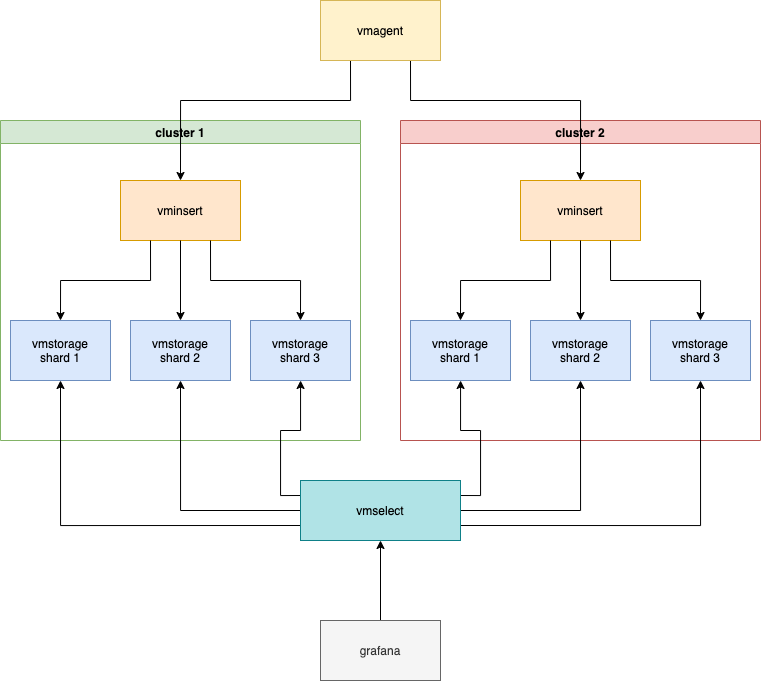
vmselect is enough 3 vmstorage shards to work and properly serve requests, because we can lost one of two VM clusters, and we need that the VM works in this case.
Let's imagine that cluster 2 was offline last couple of hours. All this time full set of metrics was delivering via cluster 1, so there is no any gaps on graphs.
Then cluster 2 back online. It doesn't have data for last hours, but it responds faster for some reason, so vmselect will construct responses based on data from it. All graphs will have gaps for last couple of hours despite the fact that cluster 1 still have full set of data without gaps.
Actually now we using promxy to workaround this issue:
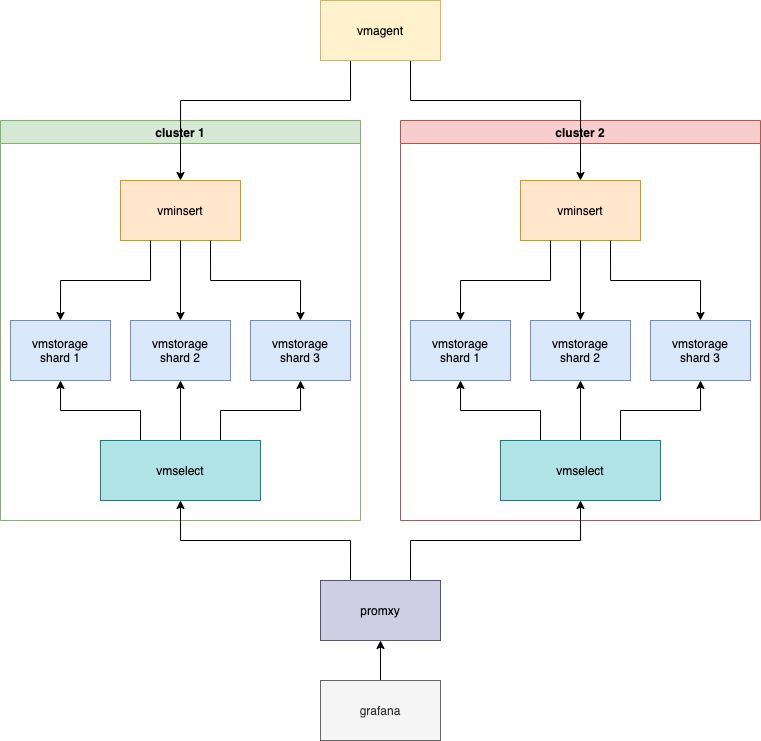
With enabled -search.denyPartialResponse on vmselect's. But it turns out not the most concise architecture with multiple vmselects, and some promxy-specific issues in addition.
wf1nder
on 8 Dec 2020
Related issues
 dima-vm
·
3Comments
dima-vm
·
3Comments
 EricAntoni
·
3Comments
valyala
·
4Comments
EricAntoni
·
3Comments
valyala
·
4Comments
 jelmd
·
3Comments
jelmd
·
3Comments
 localpref
·
3Comments
localpref
·
3Comments