Hi!
I'm wondering if there is any possibility to set color on particular accidentals.
I see that I can do something like
notes[0][2].setStyle({fillStyle: "blue", strokeStyle: "blue"})
but this is setting color also on note head and stem
 jkopyto
All 5 comments
It doesn't seem to be possible currently.
I've tried using setStyle on an Accidental, but it doesn't do anything.
(Accidental extends Modifier which extends Element which has setStyle)
It seems like Vexflow should check the style of a modifier and store it to context before drawing (then restore).
sample:
https://jsfiddle.net/njyfs5xv/
 sschmidTU
on 23 Jan 2020
sschmidTU
on 23 Jan 2020
Hi!
https://jsfiddle.net/njyfs5xv/ with the current master branch, the modifier style is applied at render time (#693) as follows:
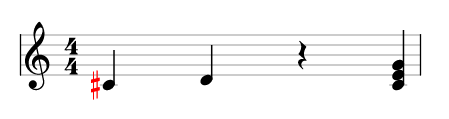
But last release binaries does not contains #693. orz...
 h-sug1no
on 24 Jan 2020
h-sug1no
on 24 Jan 2020
But last release binaries does not contains #693. orz...
so we should release!
 mscuthbert
on 24 Jan 2020
mscuthbert
on 24 Jan 2020
@mscuthbert @0xfe did you see the comment i made about how to give npm release permissions? @mscuthbert you'd just have to give 0xfe your npmjs user name.
https://github.com/0xfe/vexflow/pull/721#issuecomment-577751363
(a minute before i wrote this 0xfe did answer there ^^)
sschmidTU
on 24 Jan 2020
Okay, version 1.2.90 released from master.
 0xfe
on 25 Jan 2020
0xfe
on 25 Jan 2020
Related issues
 sug1no
·
6Comments
sug1no
·
7Comments
sug1no
·
6Comments
sug1no
·
7Comments
 amitgur
·
4Comments
amitgur
·
4Comments
 graciano
·
4Comments
graciano
·
4Comments
 Silverwolf90
·
4Comments
Silverwolf90
·
4Comments
Most helpful comment
Hi!
https://jsfiddle.net/njyfs5xv/ with the current master branch, the modifier style is applied at render time (#693) as follows:

But last release binaries does not contains #693. orz...