Vexflow: Certain note heads not implemented
All 18 comments
I started looking at this and there is a bit more work to be done. I am not certain whether to open it up so that you could specify any glyph to be used (keys: ["g/5/x2"] => keys: ["g/5/v3e"]) or stick with what is done with the diamond, cross and triangle so far. Will the latter allow transformation in the font file so that the head meet the stems better, or can that be done with shift_?? for each individual note?
 PieterHartzer
on 21 Aug 2018
PieterHartzer
on 21 Aug 2018
This would be very nice to have.
I'm not sure how we could get a (dynamic) transformation in the font file, and for now i find the second method simpler anyways, handling these note heads like diamond, cross and triangle in tables.js.
Of course it would be nice to be able to specify any glyph, but more complex, and we would still need to check and probably define the x and y shift relative to the stem.
The shift seems to be note-independent, just a general shift relative to the stem position and glyph offset/alignment.
So, we could just add something like this to tables.js/Flow.keyProperties.note_glyph:
  /* Diamond  */ // [this already exists in tables.js]
  'D0': { code: 'v27', shift_right: -0.5 },

/* Square */
'Sq': { code: 'v31', shift_right: -0.5, shift_y: 0 }, // shift values TBD
// (i hope we can use more than one letter, Sq = Square, Sl = Slash)

/* Slash (consisting of a diagonal line only) */
'Sl': { code: 'v74', shift_right: -0.5, shift_y: 0 }, // shift values TBD
// ('s' stands for a slash through a normal note head right now)
See glyphs.html in src/ (need to compile with grunt)
Unfortunately we don't have a non-filled square or slash in the glyphs, but that's a minor issue.
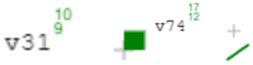
Then, we can draw e.g. a square-shaped note head on a G with ["g/4/Sl"].
We can already draw e.g. a non-filled (half note) diamond-shaped note head on a G with ["g/4/D1"],
and all of this (except slash&square):

(while we're at it, fix the circle-x positioning, shift a bit to the left. also make clear that X3 is circleX)
'X3': { code: 'v3b', shift_right: -2 }, // maybe -2.1?
This is how it looks in Musescore:

(The rotation of triangle and diamond is a matter of taste; The first note head is a 'Do' in MuseScore)
MusicXML supports some more note head shapes, but MuseScore doesn't and VexFlow doesn't have glyphs for them yet, so this would be lower priority.
 sschmidTU
on 21 Aug 2018
sschmidTU
on 21 Aug 2018
@sschmidTU Looking at the stavenote tests, there is already a slash.
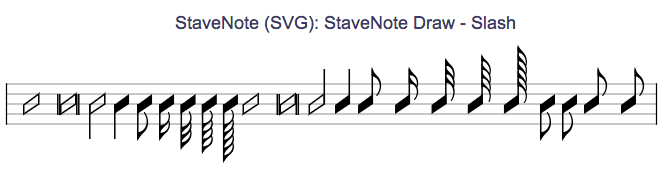
You create it by specifying an 's' after the duration, for example
{ keys: ['b/4'], duration: '16s', stem_direction: -1 }
It is drawn in notehead.js in a function called drawSlashNoteHead because a glyph does not exist for it.
It looks different to MuseScore, but similar to Wikipedia. Will this suffice? Glyph v74 is for Tremolo but can be re-used I guess.
PieterHartzer
on 21 Aug 2018
After struggling for a couple of evenings I decided to create my own glyphs in vexflow_font.js for these heads instead of manipulating the code into displaying the glyph differently depending on it's use. It just appear to be less of a hack.
Also, this way we can have filled and not filled note heads. _Ignore the codes, they will change._
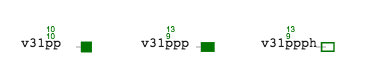
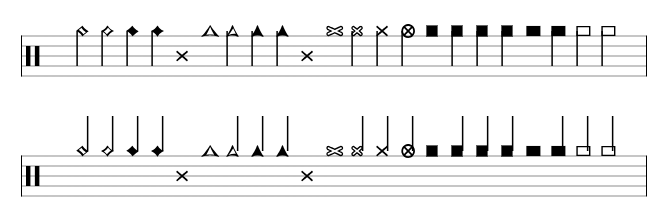
There are some issues with the stem connections which I will look into later.
Is there any objection going down this route instead? Also, is there an editor for creating these glyps?
PieterHartzer
on 24 Aug 2018
Your glyphs look great, I think indeed it might be a better idea and less of a hack.
As for the glyph editor, would any font editor do the work ? I know a friend of mine who uses FontForge a lot (which is Open-Source), though it's made for creating actual fontfaces, I don't know if it would be a good software for drawing such special glyphs.
 ghost
on 24 Aug 2018
ghost
on 24 Aug 2018
@Insomgla Thank you for the suggestion of FontForge. The fonts are stored as json in what appears to be a vector format, but I cannot work out yet what exact format it is.
"v31":{"x_min":0,"x_max":386.5625,"ha":394,"o":"m 0 173 l 0 347 l 193 347 l 386 347 l 386 173 l 386 0 l 193 0 l 0 0 l 0 173 "},
I will spend more time to try and work out exactly what's going on here. Here is a link to a discussion regarding the fonts and it suggests the use of opentype.
PieterHartzer
on 24 Aug 2018
@PieterHartzer These seem to be SVG properties. For instance, the o property seems to be a SVG path.
ghost
on 24 Aug 2018
@Insomgla Agreed, and that's how I did the noteheads so far, but manually typing it out. I don't know what vector format it is in to find an app to export it instead of manually hacking at it.
PieterHartzer
on 24 Aug 2018
@PieterHartzer I think that if you open a SVG (drawn with whatever software you want, Inkscape for instance) with a text editor, you'll see the SVG path(s).
ghost
on 24 Aug 2018
@Insomgla I tried that but the format is different and doesn't work.
SVG: d="M1124 0h-236l-405 573q-93 -51 -111 -206l-43 -367h-198l43 367q30 256 208 346l-134 188h-188v565h190v-405h120l340 -475q62 41 87 95.5t38 166.5l25 213h198l-24 -219q-17 -156 -71 -243.5t-157 -149.5z"
PieterHartzer
on 24 Aug 2018
@PieterHartzer That's what I get from your SVG path: http://jsfiddle.net/jm4drf09/
Would be indeed nice to know what this format actually consists of. I'll look at other musical fonts, and at how Lilypond works when it comes to fonts.
ghost
on 24 Aug 2018
@Insomgla Apologies, I should have mentioned that it is only an excerpt to highlight the differences and not the whole SVG file.
I will look at different options and formats this weekend, thanks.
PieterHartzer
on 24 Aug 2018
Hi folks, just quickly chiming in to explain the font file format. I used a quick script many years ago to convert the vectors in the Goneville TTF into the JSON file in fonts/.
Each character in the font is indexed by it's code (e.g., "v0"). The structure consists of the following fields:
x_min: left-most x valuex_max: right-most x value- "o": a list of outlines to draw
You can get the width of the character by x_max - x_min.
Then there are the outlines in the o field, each effectively representing a draw operation:
m=MoveTo(x,y)l=LineTo(x,y)q=QuadraticCurveTo(cpx, cpy, x, y)b=BeizerCurveTo(cp1x, cp1y, cp2x, cp2y, x, y)
The cp* parameters are coordinates to control points for the curves. All coordinates are scaled (multiplied) by the factor point_size * 72 / (Vex.Flow.Font.resolution * 100).
You can look up the horrendously ugly implementation in src/glyph.js (method processOutline) for the gory details.
 0xfe
on 24 Aug 2018
0xfe
on 24 Aug 2018
@0xfe Thank you so much! That helps a ton. What is the "ha" for? It doesn't appear to be used in glyph.js
PieterHartzer
on 24 Aug 2018
Good question -- I can't remember :-/
0xfe
on 24 Aug 2018
Just a guess from the letters... is it the height of the ascender?
 gristow
on 24 Aug 2018
gristow
on 24 Aug 2018
That is very likely it, and probably why it's unused. Good find.
On Fri, Aug 24, 2018 at 1:16 PM Gregory Ristow notifications@github.com
wrote:
Just a guess from the letters... is it the height of the ascender
https://typedecon.com/blogs/type-glossary/ascender/?—
You are receiving this because you were mentioned.
Reply to this email directly, view it on GitHub
https://github.com/0xfe/vexflow/issues/642#issuecomment-415823943, or mute
the thread
https://github.com/notifications/unsubscribe-auth/AAOuk9faCHYP4de57LAKclq396Vd-hMnks5uUDTugaJpZM4WExoA
.
--
Mohit Muthanna [mohit (at) muthanna (uhuh) com]
0xfe
on 24 Aug 2018
Merged in #645
PieterHartzer
on 19 Sep 2018
Related issues
gristow
·
5Comments
 aemion
·
3Comments
aemion
·
3Comments
 sug1no
·
6Comments
sug1no
·
6Comments
 dinukadesilva
·
5Comments
dinukadesilva
·
5Comments
 devboell
·
6Comments
devboell
·
6Comments
Most helpful comment
Hi folks, just quickly chiming in to explain the font file format. I used a quick script many years ago to convert the vectors in the Goneville TTF into the JSON file in
fonts/.Each character in the font is indexed by it's code (e.g., "v0"). The structure consists of the following fields:
x_min: left-most x valuex_max: right-most x valueYou can get the width of the character by
x_max - x_min.Then there are the outlines in the
ofield, each effectively representing a draw operation:m=MoveTo(x,y)l=LineTo(x,y)q=QuadraticCurveTo(cpx, cpy, x, y)b=BeizerCurveTo(cp1x, cp1y, cp2x, cp2y, x, y)The
cp*parameters are coordinates to control points for the curves. All coordinates are scaled (multiplied) by the factorpoint_size * 72 / (Vex.Flow.Font.resolution * 100).You can look up the horrendously ugly implementation in
src/glyph.js(methodprocessOutline) for the gory details.