Hi, I'm trying to set up Now for my static frontend, but am struggling with my config because I have a monorepo with a separate backend.
My git repo:
-front/
-back/
How can I set up now to auto-deploy my front dir, which is a standard Angular app?
Thank!
 kertof
All 107 comments
Hey @kertof, thanks for letting us know.
This is not possible currently without requiring a bit of configuration. However, we are shortly released a feature that will allow you to set a path to your frontend folder - I'll let you know when it's available!
 mcsdevv
on 8 Jan 2020
mcsdevv
on 8 Jan 2020
Awesome thank you.
Do you have an estimated date for the feature?
We use monorepos, so this is blocking our adoption of Zeit for our client work.
Thanks!
kertof
on 8 Jan 2020
@msweeneydev Have similar needs and trying to plan a new hosting strategy now... I know this is a hard question, but I've seen "new feature coming shortly" in a few threads on monorepos... any idea if that means days, weeks, months, or still undecided? I understand if that can't be answered yet!
Also, do you know if this new feature enables multiple deployments to different projects more easily? We have three front-end apps in our monorepo. We only host 2 on zeit now but would love to use it for everything. Currently doing some crazy build scripts to generate dynamic .nowignore during deploy time as we target the two different zeit projects.
Thanks for any information, appreciate all the progress.
 StephenHaney
on 13 Jan 2020
StephenHaney
on 13 Jan 2020
@StephenHaney we have a similar monorepo setup with three different Zeit now projects. We deploy our projects with the now cli command. Unfortunately, now cli doesn't provide an option to set projectId and orgId as a cli parameter. As a workaround, we have modified our deploy commands to dynamically create .now/project.json with the corresponding projectId and orgId. The .now/*.json files are encrypted with git secret.
Scripts example from package.json
"scripts": {
        "site:project1:projectsetup": "cp .now/project1.json .now/project.json; ln -sf sites/project1/.env .env; ln -sf .env .env.build;",
        "site project1:dev": "yarn site: project1:projectsetup; now -A now-project1.json dev",
        "site: project1:deploy:staging": "yarn site project1:projectsetup; now -A now-site-project1.json --target staging",
        "site:project1:deploy:prod": "yarn site: project1:projectsetup; now -A now-site-project1.json --prod",
}
 michaelbirchler
on 13 Feb 2020
michaelbirchler
on 13 Feb 2020
Thanks @michaelbirchler we're doing something very similar for the moment as well. It actually works quite well, but it's just another layer of build scripts to maintain.
I emailed zeit support and they mentioned they expect a built-in solution to hit beta as early as this week and to keep an eye on the blog. Looking forward to that!
StephenHaney
on 13 Feb 2020
We also doing some crazy scripts for our monorepo, but we have not figured out a way to have a production and a staging environment. We use --target, but each time we deploy to production it breaks staging as its aliasing the staging url, with a production deployment that uses production environment. If you got some tips, please let me know @michaelbirchler
Hopefully we can drop our scripts and use a built in solution soon!
 cyrus-za
on 17 Feb 2020
cyrus-za
on 17 Feb 2020
Just an update for everyone on this, an update is planned soon to bring much improved monorepo support - we'll let you know when it's released!
mcsdevv
on 17 Feb 2020
Folks using the script-based approach today - do preview deployment features for PRs work using this approach (https://zeit.co/docs/v2/platform/deployments#preview)?
 SpainTrain
on 13 Mar 2020
SpainTrain
on 13 Mar 2020
@msweeneydev I know you said a planned update. But just chiming in on this.
I got a project with a client, two simple backends hosted in cloud run and one google function. All under the same repo.
I would love to be able to just say, if changes on this folder, do your crazyness.
This is super simple on Google build, and some CIs, not CircleCI(just for information).
So it would be great with some support on this in Zeit as well.
I do guess now, is directly showcased in the zeit dashboard?
 vongohren
on 15 Mar 2020
vongohren
on 15 Mar 2020
Hey @vongohren, I'm not quite understanding your use case, can you elaborate a little further please?
mcsdevv
on 24 Mar 2020
@msweeneydev ah yes ofcourse :)
In now, it would be great to say, if there is changes to this specific fileset, using regex or whatever, then run the planned now setup.
Right now, since the repo is consisted of 4 different infrastructure pieces. It will run everytime I do any changes to the repo. Meaning that the code that affects the hosting on now, is technically unchanged.
In google cloud I can say, if changes to this path, do this action.
I think this should be possible in now aswell, as you guys connect directly to githubrepo :)
Did it make more sense?
vongohren
on 25 Mar 2020
Just an update for everyone on this, an update is planned soon to bring much improved monorepo support - we'll let you know when it's released!
Hey @msweeneydev, where can I look out for this?
 pudgereyem
on 3 Apr 2020
pudgereyem
on 3 Apr 2020
Hey @pudgereyem, this is available under a feature flag and being tested internally right now. We're aiming for a release very shortly.
@vongohren this will be part of the full monorepo support planned shortly (not long after environment variables) - you'll be able to import multiple projects from the same repository, and only files used by that project will be considered when redeploying.
mcsdevv
on 5 Apr 2020
Any way we can opt-in to the feature flag? I've got a monorepo I'm trying to deploy to prod right now, but can't because of the issues mentioned above.
If I can't, I'll have to change my repo tooling setup, splitting things out into their own repositories so I can be sure a deployment will work.
 jesstelford
on 8 Apr 2020
jesstelford
on 8 Apr 2020
@jesstelford https://zeit.co/_flags is where publicly exposed flags are available for opt-in. I do not see one for this feature yet, though.
SpainTrain
on 11 Apr 2020
@msweeneydev
Does the feature allow deployments of each package to different projects? I'm using lerna to manage my monorepo, and currently I'm not linking my project to my github repo for automatic deployment yet because I'm not sure how Now works with monorepo.
Please let me know when we have this so that I can no longer deploy from CLI. :)
 ralphilius
on 21 Apr 2020
ralphilius
on 21 Apr 2020
@msweeneydev
Does the feature allow deployments of each package to different projects? I'm usinglernato manage my monorepo, and currently I'm not linking my project to my github repo for automatic deployment yet because I'm not sure how Now works with monorepo.Please let me know when we have this so that I can no longer deploy from CLI. :)
Hey @ralphilius, when ready this will be exactly what it does, allowing you to import a repository multiple times to create multiple projects.
mcsdevv
on 22 Apr 2020
@mcsdevv Congratulations on the Series A!
I just want to quickly ask if you got a timeline for this? I've patiently been waiting since January when you commented that you will "shortly" release a feature allowing this.
Are we talking about days, weeks or months here?
cyrus-za
on 26 Apr 2020
Thanks, @cyrus-za! I wouldn't want to commit to a timeline on this but it's still in the realm of "shortly". There's a couple of things that we needed to beforehand and those are nearly done. We want to release a solution that works for a broad range of use cases and we are laying the groundwork to do so.
Sorry I can't give you too many specifics just yet, it remains a big priority and isn't too far off.
mcsdevv
on 29 Apr 2020
Are we talking Summer 2020?
cyrus-za
on 15 May 2020
Hello. Thank you for looking into this issue! Are there any temporary workarounds other than breaking up our monorepo?
 glenmcrae
on 26 May 2020
glenmcrae
on 26 May 2020
@glenmcrae you can use now --prod from the directory
 obedm503
on 26 May 2020
obedm503
on 26 May 2020
If you want it automated, you could also use github actions. Here's a project I have setup that uses an nx monorepo and deploys. Here's an example that I use to deploy my monorepo on PR and merge to master. It has two apps named dashboard and api which get built into the /dist/apps folder
{
  "version": 2,
  "github": {
    "enabled": true
  },
  "builds": [
    {
      "src": "/dist/apps/api/main.js",
      "use": "@now/node"
    },
    {
      "src": "/dist/apps/dashboard/*",
      "use": "@now/static"
    }
  ],
  "routes": [
    { "src": "/api/(.*)", "dest": "/dist/apps/api/main.js" },
    { "handle": "filesystem" },
    { "src": "/assets/(.*)", "dest": "/dist/apps/dashboard/assets/$1" },
    { "src": "/(.*).(js|css|ico)", "dest": "/dist/apps/dashboard/$1.$2" },
    { "src": "/(.*)", "dest": "/dist/apps/dashboard/index.html" }
  ]
}
_vercel.json_
# Monorepo deploy vercel
name: Deploy Vercel
on:
  push:
    branches: [master]
  pull_request:
    branches: [master]

jobs:
  deploy:
    runs-on: ubuntu-latest
    steps:
      # Checkout and install
      - name: checkout
        uses: actions/checkout@v2
      - name: Get yarn cache directory path
        id: yarn-cache-dir-path
        run: echo "::set-output name=dir::$(yarn cache dir)"
      - uses: actions/cache@v1
        id: yarn-cache
        with:
          path: ${{ steps.yarn-cache-dir-path.outputs.dir }}
          key: ${{ runner.os }}-yarn-${{ hashFiles('**/yarn.lock') }}
          restore-keys: |
            ${{ runner.os }}-yarn-
      # Build and deploy
      - name: build
        run: |
          yarn install
          npm run build
      - name: deploy staging
        uses: amondnet/vercel-action@v19
        id: vercel-action-staging
        if: github.event_name == 'pull_request'
        with:
          github-token: ${{ secrets.GITHUB_TOKEN }}
          vercel-token: ${{ secrets.VERCEL_TOKEN }}
          vercel-org-id: ${{ secrets.VERCEL_ORG_ID }}
          vercel-project-id: ${{ secrets.VERCEL_PROJECT_ID }}
      - name: deploy production
        uses: amondnet/vercel-action@v19
        id: vercel-action-production
        if: github.event_name == 'push'
        with:
          github-token: ${{ secrets.GITHUB_TOKEN }}
          vercel-token: ${{ secrets.VERCEL_TOKEN }}
          vercel-org-id: ${{ secrets.VERCEL_ORG_ID }}
          vercel-project-id: ${{ secrets.VERCEL_PROJECT_ID }}
          vercel-args: '--prod '
_.github/workflows/deploy-vercel.yml_
 chrismclarke
on 26 May 2020
chrismclarke
on 26 May 2020
I also can't figure out how to run Flask (Python) and Nuxt on the same repo.
My repository is like this:
- src/
- app.py: Flask API
- docs/ : Nuxt app
- package.json
- ...
now.json:
{
  "version": 2,
  "public": false,
  "builds": [
    {
      "src": "src/app.py",
      "use": "@now/python"
    }
  ],
  "routes": [
    { "src": "/(.*)", "dest": "src/app.py" }
  ]
}
I don't know how to run the Nuxt app with now.json. I'd like it to be hosted on /docs. The nuxt builder was not working. It threw this error: Error: EPERM: operation not permitted, unlink)
Does anyone know how to do this?
 ninest
on 26 May 2020
ninest
on 26 May 2020
Hi,
We started using Yarn workspaces in our organization to maintain set of shared libraries and a few different apps. I've been doing some research on how to deploy them, but I can't find a way to deploy different apps in a monorepo into different domains.
In our case, each app is a domain and an entity by itself. In Vercel is easy to configure the build command which would allow us to build the given app and then configure the root of directory. That works, and I could link that to a particular domain.
Then I tried to Import a new project form Git, and trying to add the same repository as then we would be able to configure a different domain with a different root directory. But this is not possible, you can only import a repository once.
I've seen your suggestions on how to have multiple apps, but this ones are served under the same domain and then you simply proxy them. This doesn't work in our case.
Has anyone configured a similar monorepo with multiple domains? How can this be achieved?
Thank you!
 ipalaus
on 28 May 2020
ipalaus
on 28 May 2020
For anyone looking at reusing the same codebase and deploy multiple client apps, each on a different custom domain, take a look at NRN. We've implemented such behaviour, which we named "MST" (Multiple Single Tenants), which is similar to "monorepo" design somehow.
https://github.com/UnlyEd/next-right-now
Demo:
- Customer 1: https://nrn-v2-mst-aptd-gcms-lcz-sty-c1.now.sh
- Customer 2: https://nrn-v2-mst-aptd-gcms-lcz-sty-c2.now.sh
@ipalaus Seems to be exactly what you're looking for.
NRN is a boilerplate which has reached v2 milestone today, and provides everything a today Next.js app needs. SSG-first, hybrid SSG/SSR (per page), monitoring, analytics and even GraphQL and proper i18n support.
 Vadorequest
on 30 May 2020
Vadorequest
on 30 May 2020
Hi @Vadorequest, thank you for your answer!
While your example is similar to what we have, seems that you have an app code shared between different different tenants. Our case might be a bit different, we really need to have a structure where is like:
- packages/libs/
- packages/app1/
- packages/app2/
- packages/app3/
While they might be sharing a lot of stuff between them, they are really single entities as they'll have their configuration, their different APIs, databases, etc.
We went with this approach as some of the pages will be shared, and it's easier to have them coded once in a shared space, think of libs/pages/authors.tsx which later gets imported in:
- packages/app1/pages/authors.tsx
- packages/app2/pages/authors.tsx
- packages/app3/pages/authors.tsx
Probably the app4 will have a slightly different authors page, and we would actually just build it for that client specific.
If we were able to re-import the same Git project multiple times, we could actually figure out a way around... but I also, I think I understand that you need the now files in the root of the repository and not the root of the apps, so we might have a conflict there too.
ipalaus
on 2 Jun 2020
There are several valid ways of doing it, and it eventually depends on your business requirements and limitations/concerns.
Reading through the whole topic, people seems to express two very different needs about "monorepo":
- the one where you have very different apps (front/back) and want to package/deploy them together - _I don't have any clue about how to do that_
- the one where you have a shared base code and want to deploy/manage multiple apps that are (more or less) slightly different - _This is where the above NRN mentioned design help, with what we named "SaaS B2B Multi Single Tenancy" design_
Vadorequest
on 2 Jun 2020
If we were able to re-import the same Git project multiple times, we could actually figure out a way around... but I also, I think I understand that you need the now files in the root of the repository and not the root of the apps, so we might have a conflict there too.
I was also going to take this approach, but creating multiple projects using the same repo and was disappointed to find out. Seems like until we get an update, it's multiple repos, or writing some awful build/routes configurations.
 sheldonj
on 4 Jun 2020
sheldonj
on 4 Jun 2020
I have been looking into this as well. I did end up getting a build deploying and working for a single yarn V2 workspace with pnp enabled(it is enabled by default with V2).
Things I had to do:
- use the vercel@canary cli package(it has a update that fixes the yarn install step) per this issue
- override default next.js build command to
yarn workspace @company/workspaceName buildin the project settings. - add
distDir: "../../.next" in next.config.js
But this obviously only works for a single application, and I plan on having multiple web apps in the same repo.
Im sure there are a million things needed to make this work:
- multiple projects per repo
- CLI tool needs to be able to work with multiple projectIds in a single vercel.json? or perhaps take a "rootDir" configuration option and keep the vercel.json local to the project/workspace.
something like:
{"projectId":"string","orgId":"string", rootDir: "../../"}
important to leave flexibility in that path because technically the workspace could be any amount of directories down. Probably a better way of doing this. Ideally you would be able to do something like vc deploy projectIdentifier(ideally not the id, project name maybe?) from the root of the repo. as well as just a vc deploy if you are at the root of a workspace(not the root of the repo).
root of repo(vercel.json)
{
  projects: [
    {
      projectId: string,
      orgId: string,
      projectPath: string, (absolute path to workspace) i.e (packages/workspaceName)
    }
  ]
}
- UI changes for git integration and options to add/link several vercel projects to a single repo.
- CI triggers based on paths & branches instead of just branches. (maybe not needed right away)
- understanding where the distDir ends up by default in a monoRepo(local to the workspace/project...which probably means changes to now-next
Keep us posted Vercel Team and thanks for the great tool!
cc @mcsdevv @styfle
 dalinarkholin
on 4 Jun 2020
dalinarkholin
on 4 Jun 2020
Hi Vercel team and all,
Just chiming in that we're also waiting for this feature :).
Our current setup involves 3 repos, one end user facing front-end (nextjs on vercel), one admin front-end (nextjs on vercel), and one firebase repo to handle firebase functions and firestore.
Ideally, we would move to a monorepo setup with lerna, and once pushed vercel could identify if the package changed and publish it. The advantages of going monorepo are getting more attractive by the day (type sharing, end-to-end testing, etc), and handling mutli-repo set up is becoming a pain.
Thanks again to the vercel team for the great quality work, looking forward to implementing this feature, sure hope it comes out soon :)
 dsegovia90
on 17 Jun 2020
dsegovia90
on 17 Jun 2020
Here's how I worked around lack of monorepo support in case it's helpful to others. My monorepo looks like:
├── frontend
└── packages
frontend is a standard Next.js project. The packages folder contains standard NPM packages, which were consumed from frontend via simple NPM relative file path (which just symlinks under the hood). I use Typescript, so each package does need to undergo it's own build step before next build.
Excerpt from frontend/package.json:
"dependencies": {
  "my-local-package": "file:../packages/my-local-package"
}
If you use a different package linking approach (Lerna, etc), the below approach should still work.
Initial attempt
I initially tried creating a vercel.json at the root. My goal was to upload all necessary source code as-is, then customize the @vercel/next builder (which is annoyingly undocumented BTW, please add a README!) to point at frontend/package.json. Here's how it looked:
{
  "version": 2,
  "builds": [{
    "src": "frontend/package.json",
    "use": "@vercel/next",
    "config": {
      "zeroConfig": true,
      "framework": "nextjs",
      "buildCommand": "npm run now-build"
    }
  }]
}
In frontend/package.json now-build looked like:
"build:dependencies": "cd ../packages/my-local-package && npm run build",
"now-build": "npm run build:dependencies && next build"
Running vercel deploy from my monorepo root built successfully. The problem was that the output folder structure mirrored the monorepro — I had to use https://<deployment>.vercel.sh/frontend/ instead of https://<deployment>.vercel.sh. Perhaps this could be fixed with routes or rewrites, but I'm not familiar with those so I elected to abandon this approach.
Side note: I expected setting vercel.json's builds[].config.outputDir: "frontend/.next" to fix this, but the config is relative to the src specified. Maybe changing this behavior would be a good fix for this issue?
Working solution
In any case, here's the solution I ended up going with. I have a simple bash script that copies my source files into a tmp folder that has the packages under the frontend, then it rewrite's the frontend's package*.json files to fix the relative file:../packages/... paths:
#!/bin/sh

# Copy all of frontend/ to dist/
rsync -a --exclude="node_modules" --exclude=".next" ../../../frontend/ dist

# Copy packages/ into dist/
mkdir dist/packages/
rsync -a --exclude="node_modules" ../../../packages/

# Rewrite package*.json paths for local packages
sed -i '' -e 's/\.\.\/packages\//\.\/packages\//g' dist/package.json
sed -i '' -e 's/\.\.\/packages\//\.\/packages\//g' dist/package-lock.json
You can now vercel deploy dist (you might want to copy over your .vercelignore as well). You'll be prompted to create the dist/.vercel/ folder that links the folder to a Vercel project. I chose to cache .vercel/ and copy it into dist so I didn't have to relink every deployment.
 WestonThayer
on 21 Jun 2020
WestonThayer
on 21 Jun 2020
Honestly I gave up and went with Netlify and was up and running in less
than 30 min
On Sat, Jun 20, 2020 at 8:34 PM Weston Thayer notifications@github.com
wrote:
Here's how I worked around lack of monorepo support in case it's helpful
to others. My monorepo looks like:├── frontend
└── packages
frontend is a standard Next.js project. The packages folder contains
standard NPM packages, which were consumed from frontend via simple NPM
relative file path (which just symlinks under the hood). I use Typescript,
so each package does need to undergo it's own build step before next build
.Excerpt from frontend/package.json:
"dependencies": {
"my-local-package": "file:../packages/my-local-package"
}
If you use a different package linking approach (Lerna, etc), the below
approach should still work.
Initial attemptI initially tried creating a vercel.json at the root. My goal was to
upload all necessary source code as-is, then customize the @vercel/next
https://github.com/vercel/vercel/tree/master/packages/now-next builder
(which is annoyingly undocumented BTW, please add a README!) to point at
frontend/package.json. Here's how it looked:{
"version": 2,
"builds": [{
"src": "frontend/package.json",

"use": "@vercel/next",

"config": {

  "zeroConfig": true,

  "framework": "nextjs",

  "buildCommand": "npm run now-build"

}
}]
}
In frontend/package.json now-build looked like:
"build:dependencies": "cd ../packages/my-local-package && npm run build",
"now-build": "npm run build:dependencies && next build"
Running vercel deploy from my monorepo root built successfully. The
problem was that the output folder structure mirrored the monorepro — I had
to use https://.vercel.sh/frontend/ instead of https://
.vercel.sh. Perhaps this could be fixed with routes
https://vercel.com/docs/configuration#project/routes or rewrites, but
I'm not familiar with those so I elected to abandon this approach.Side note: I expected setting vercel.json's builds[].config.outputDir:
"frontend/.next" to fix this, but the config is relative to the src
specified. Maybe changing this behavior would be a good fix for this issue?
Working solutionIn any case, here's the solution I ended up going with. I have a simple
bash script that copies my source files into a tmp folder that has the
packages under the frontend, then it rewrite's the frontend's
package*.json files to fix the relative file:../packages/... paths:!/bin/sh
Copy all of frontend/ to dist/
rsync -a --exclude="node_modules" --exclude=".next" ../../../frontend/ dist
Copy packages/ into dist/
mkdir dist/packages/
rsync -a --exclude="node_modules" ../../../packages/
Rewrite package*.json paths for local packages
sed -i '' -e 's/..\/packages\//.\/packages\//g' dist/package.json
sed -i '' -e 's/..\/packages\//.\/packages\//g' dist/package-lock.json
You can now vercel deploy dist (you might want to copy over your
.vercelignore as well). You'll be prompted to create the dist/.vercel/
folder that links the folder to a Vercel project. I chose to cache
.vercel/ and copy it into dist so I didn't have to relink every
deployment.—
You are receiving this because you are subscribed to this thread.
Reply to this email directly, view it on GitHub
https://github.com/vercel/vercel/issues/3547#issuecomment-647061941, or
unsubscribe
https://github.com/notifications/unsubscribe-auth/ACJSWQYY2V26NGR35N7CWE3RXVISHANCNFSM4KFIDWQQ
.>
Philippe Léger
-
UX Designer & Front End Developer
[email protected]
 phil-lgr
on 21 Jun 2020
phil-lgr
on 21 Jun 2020
Chiming in with another perhaps relatively weird use-case
We would like to deploy multiple projects from a single git as well - the catch is that it's not a multi package monorepo, but literally one nextjs project which generates different build outputs based on a env variable. It's multiple distinct applications though - not just prod/dev/preview. For us this would be solved if we could just import the same git repo multiple times.
 sakulstra
on 22 Jun 2020
sakulstra
on 22 Jun 2020
Chiming in with another perhaps relatively weird use-case
We would like to deploy multiple projects from a single git as well - the catch is that it's not a multi package monorepo, but literally one nextjs project which generates different build outputs based on a env variable. It's multiple distinct applications though - not just prod/dev/preview. For us this would be solved if we could just import the same git repo multiple times.
@sakulstra
Same here. I thought it should be possible but minutes ago I just found it is not..... I expected to create multiple projects with single mono repo and use different settings for each project.
 juuyan
on 22 Jun 2020
juuyan
on 22 Jun 2020
@sakulstra @juuyan If you want to build something similar to this:
Demo:
- Customer 1: https://nrn-v2-mst-aptd-gcms-lcz-sty-c1.now.sh
- Customer 2: https://nrn-v2-mst-aptd-gcms-lcz-sty-c2.now.sh
Then check out https://github.com/UnlyEd/next-right-now, and more specifically https://unlyed.github.io/next-right-now/available-presets/v2-mst-aptd-gcms-lcz-sty
Vadorequest
on 22 Jun 2020
Chiming in with another perhaps relatively weird use-case
We would like to deploy multiple projects from a single git as well - the catch is that it's not a multi package monorepo, but literally one nextjs project which generates different build outputs based on a env variable. It's multiple distinct applications though - not just prod/dev/preview. For us this would be solved if we could just import the same git repo multiple times.
I don't think that this is that uncommon. We've been doing this on netlify for a while and it makes switching to vercel kinda hard.
 djfarly
on 23 Jun 2020
djfarly
on 23 Jun 2020
I have a monorepo with lerna, literally all I need is yarn build && yarn start and I can't get it working with Vercel.
 thisismydesign
on 23 Jun 2020
thisismydesign
on 23 Jun 2020
@sakulstra Having this issue too. We have a monorepo with multiple Next.js apps -- it'd be nice if you could create multiple projects from one GitHub repo so that we can deploy them all through Vercel.
 colinricardo
on 29 Jun 2020
colinricardo
on 29 Jun 2020
There's a new github import UI that should work with monorepo. You guys should check it out.
ralphilius
on 1 Jul 2020
@ralphilius do i have to activate it somehow? I just tried, but when importing a github project already imported i just get redirected to that project instead of creating a new one.
sakulstra
on 1 Jul 2020
@ralphilius do i have to activate it somehow? I just tried, but when importing a github project already imported i just get redirected to that project instead of creating a new one.
Can you try with a new repo? Or configure old project to a different repo and try again?
ralphilius
on 1 Jul 2020
Error:The repository "xyz" is already linked to the project "foobar".
doesn't seem to work
sakulstra
on 1 Jul 2020
Error:The repository "xyz" is already linked to the project "foobar".
doesn't seem to work
Yeah.. nvm then. Maybe it’s some upgrade to import UI. But I think it’s pretty close to the actual process where they need to handle redirect to existing project.
ralphilius
on 1 Jul 2020
Hello all, this feature has been in active development and I’m hoping to share it here under a feature flag very shortly for you all to test and provide feedback on.
mcsdevv
on 2 Jul 2020
Hello all, this feature has been in active development and I’m hoping to share it here under a feature flag very shortly for you all to test and provide feedback on.
Hi @mcsdevv, is the flag available now?
ralphilius
on 5 Jul 2020
Great to hear this is something that's almost ready. I have a similar use case as @sakulstra. All though for me it would be to be able to setup Test and Production environments that both use the master branch, but connect with test and production databases respectively. Or maybe this can already be done? To be honest, being used to Netlify, I'm struggling a bit with the user interface of Vercel.
 dasblitz
on 6 Jul 2020
dasblitz
on 6 Jul 2020
@dasblitz I think https://vercel.com/docs/v2/build-step#environment-variables does what you're describing.
WestonThayer
on 6 Jul 2020
@WestonThayer Thank you for trying to help me :) I've looked into it, but it's not the same. That way I can only set feature branches against a test database which might lead to an invalid preview. For instance when certain values exist in the database on Test but not on Production (or the other way around). We don't control the syncing.
Our setup is a bit convoluted as we're merging our headless setup using NEXT.js in a webshop that was build using python/jinja by a third party that uses a more traditional Test/Acceptance/Production environments approach. During the transition we're using CloudFlare to direct traffic on certain urls to the new NEXT.js generated pages, where others will continue to serve the python/jinja pages. Having dedicated projects and url's for each of their env's will make our lives a bit easier I think.
dasblitz
on 6 Jul 2020
Hello all, this feature has been in active development and I’m hoping to share it here under a feature flag very shortly for you all to test and provide feedback on.
@mcsdevv Any news about this?
 alimoosavi15
on 14 Jul 2020
alimoosavi15
on 14 Jul 2020
Yes any news ? important to us
 belgattitude
on 14 Jul 2020
belgattitude
on 14 Jul 2020
We would like to deploy multiple projects from a single git as well - the catch is that it's not a multi package monorepo, but literally one nextjs project which generates different build outputs based on a env variable. It's multiple distinct applications though - not just prod/dev/preview. For us this would be solved if we could just import the same git repo multiple times.
Similar setup here. We'd like to build multiple static versions of the same app (one per language), and serve them under different domains. Language is being selected via env variable, so all we need to be able to deploy multiple Vercel projects from the same Github repo, and to configure them independenly.
 morhekil
on 20 Jul 2020
morhekil
on 20 Jul 2020
Similarly I want to create multiple projects from one GitHub repository. Since I can't do that right now, I have GitHub integration turned off so I can't use the useful integration features.
If I can link a single GitHub repository to multiple projects, the goal is accomplished with the current state where each sub directory has a ".vercel" directory.
 yoshiko-pg
on 29 Jul 2020
yoshiko-pg
on 29 Jul 2020
where others will continue to serve the python/jinja pages.
@dasblitz check out next 9.5 changelog. https://nextjs.org/blog/next-9-5#support-for-rewrites-redirects-and-headers
You can now redirect a catch-all to your python app.
cyrus-za
on 30 Jul 2020
any news with this issue?
 hungcrush
on 3 Aug 2020
hungcrush
on 3 Aug 2020
@mcsdevv could you provide an update, please ?
 elvenking
on 4 Aug 2020
elvenking
on 4 Aug 2020
@elvenking being tested internally, not far off at all!
mcsdevv
on 4 Aug 2020
hey @mcsdevv , just joined this discussion, but is there any semi optimistic ETA? In ballpark mode?
Even if with an experimental / unstable flag?
I would love to see how this would work and implement with some clients
 itstheandre
on 5 Aug 2020
itstheandre
on 5 Aug 2020
August? September? October? 2022?
cyrus-za
on 13 Aug 2020
Hey @cyrus-za (and all following!), if you take a look under vercel.com/_flags you'll find monorepo support as an experimental option.
It's currently only available for GitHub and as mentioned, experimental. Any and all feedback is appreciated via the support form.
mcsdevv
on 13 Aug 2020
Is there any documentation available? I have this flag enabled but I have no idea how to actually use it.
 klapec
on 13 Aug 2020
klapec
on 13 Aug 2020
@klapec no documentation available just yet but a PR is pending, although it is likely to change. The short version is that you can now import the same repository more than once.
mcsdevv
on 13 Aug 2020
@mcsdevv Any chance it is going to be available for GitLab ?
elvenking
on 14 Aug 2020
@mcsdevv
Will it be possible now to manually deploy with vercelCLI to different projects from the monorepo repository?
 rodilo
on 14 Aug 2020
rodilo
on 14 Aug 2020
@elvenking, we're just finishing up GitLab and Bitbucket support now 👍
I don't believe any changes are planned for this, @rodilo.
mcsdevv
on 14 Aug 2020
Thank you for experimental monorepo support.
I gave it a try. Generally, Next.js deployment is a success! But, when I use extends in tsconfig, I get an error.
tsconfig.json
Next.js default tsconfig.json
https://github.com/vercel/next.js/blob/1b4d463cc8037be7725f8a2bb8e2b32bd1600f96/packages/next/lib/typescript/writeConfigurationDefaults.ts#L18
packages/testProject/tsconfig.json
{
  "extends": "../../tsconfig.json",
}
Vercel Build Logs
error TS5083: Cannot read file '/tsconfig.json'.
 matamatanot
on 14 Aug 2020
matamatanot
on 14 Aug 2020
Great! I just tried it out and it seems to work well 🎉 This is really useful and will help me to convince people on my team to move to vercel, thanks :)
Btw, we're using Next.js without any custom server.
Now if only the pricing for putting (preview) urls behind a password would be a bit less steep. Compared to Netlify this costs an extra $150 per month, per project. Well, I guess I'll have to convince my manager on Monday ;)
dasblitz
on 14 Aug 2020
@mcsdevv It works, thanks! :) Is it possible, though, to have Vercel deploy pages depending on which files have changed?
My repository consists of three apps: main next.js app, storybook and docusaurus-based docs app. While I could have docs moved to a separate repo and have it configured in Vercel separately, I need to have storybook within the same repo as the main app - as storybook imports React components.
Now each pull request fires deployments to three separate pages - so, say, if I bump a storybook-related dependency, both the main next.js app and the docusaurus app get deployed which is a waste of time/CPU cycles/bandwidth/etc.
klapec
on 14 Aug 2020
Thanks so much @mcsdevv
This is exactly what we needed! The wait was worth it!
cyrus-za
on 17 Aug 2020
we're just finishing up GitLab and Bitbucket support now 👍
hiya @mcsdevv thanks for all this. Curious if you have an update on when we can check back in for the GitLab support for this?
Thanks!
 webshaman
on 18 Aug 2020
webshaman
on 18 Aug 2020
@mcsdevv Looks promising... I saw the docs are merged: https://docs-git-monorepo.vercel.now.sh/docs/git-integrations#monorepos and I've enabled monorepo support in https://vercel.com/_flags.
Few questions:
- Does framework detection supports 2 levels of nesting (common with yarn workspaces) ?
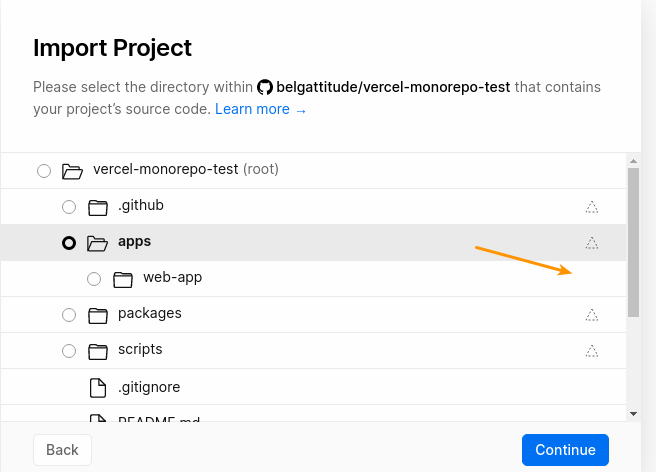
- Would it still be possible to transpile packages (located from project root) ?
I've set a up a test project here: https://github.com/belgattitude/vercel-monorepo-test
Unfortunately I was not able to make it work...
belgattitude
on 18 Aug 2020
@belgattitude I am running into a similar problem. I got a graphql server with nexus which has it's schema.graphql file generated and then I got several nextjs apps consuming that schema to further generate code (react hooks, typings, etc.) using graphql-codegen. The problem is that these generated files are in gitignore as we have issues with large files being linted. So prior to this monorepo support, we did not have git integration for our monorepo (ofc) and rather used manual deployments after running a set of scripts to generate these files. The problem is that our nextjs apps do not have access to the sibling server's files to install yarn packages and compile the schema for it (nor would we want each app to recompile these files).
We're looking at ways to host these files somewhere and update them per branch, but got no time to tell vercel to wait before building and looking for these files to already exist.
I'm not sure on a solution yet. We're tempted to just add these generated files back to source control. Any advice would be appreciated.
cyrus-za
on 18 Aug 2020
@belgattitude I am running into a similar problem. I got a graphql server with nexus which has it's
schema.graphqlfile generated and then I got several nextjs apps consuming that schema to further generate code (react hooks, typings, etc.) using graphql-codegen. The problem is that these generated files are in gitignore as we have issues with large files being linted. So prior to this monorepo support, we did not have git integration for our monorepo (ofc) and rather used manual deployments after running a set of scripts to generate these files. The problem is that our nextjs apps do not have access to the sibling server's files to install yarn packages and compile the schema for it (nor would we want each app to recompile these files).We're looking at ways to host these files somewhere and update them per branch, but got no time to tell vercel to wait before building and looking for these files to already exist.
I'm not sure on a solution yet. We're tempted to just add these generated files back to source control. Any advice would be appreciated.
Would a simple solution be to point the source directory to the root folder, and have a separate build script for each project.
”scripts": {
  "build": "your dependency building code",
  "deploy": "next build ./${PROJECT_DIRECTORY} && next start ./${PROJECT_DIRECTORY}"
}
This would bundle all your dependencies in every build but only boot next in the sub directory PROJECT_DIRECTORY. You can set this environment variable in each of your vercel apps which are connected to the git repo.
Perhaps this works for your use case?
 simonireilly
on 18 Aug 2020
simonireilly
on 18 Aug 2020
@simonireilly I did think of that, but it slows down the entire build as each of our services need to have yarn packages installed and typescript built and it just does not scale.
I found a potential solution getting me closer to the success.
I changed my codegen.yml file to point to the graphql server rather than a schema file
schema:
  - ${SERVER_URL}/graphql:
      headers:
        Authorization: Basic ${SERVICE_TOKEN}
The problem I can see (before even trying it yet) is that vercel will immediately start building all our projects in parallel on each new commit to a branch and even if I could somehow find the PREVIEW_URL for the server (in the nextjs app's build context), it would be pointing to a server that is not yet up and running. If I could set the server project up as a dependency for all the nextjs apps and only let them start building once the server is up and running, it would work. I am, however, not aware of any way to specify a dependency tree.
cyrus-za
on 18 Aug 2020
Some answers to questions raised:
Does framework detection supports 2 levels of nesting (common with yarn workspaces) ?
It does not, there are no firm plans to support this currently but we may do in the future.
Would it still be possible to transpile packages (located from project root) ?
You cannot depend on artifacts that are generated at build time of other directories – but you can depend on source files of other directories.
Is it possible, though, to have Vercel deploy pages depending on which files have changed?
Not yet. We're looking to potentially support that in the future.
mcsdevv
on 18 Aug 2020
Thanks @mcsdevv for the answers. Any way to find the PREVIEW_URL of a sibling project? (edit: by sibling I mean same repo, different vercel project and directory)
e.g. if I got a apollo server called MyServer and a nextjs app call MyApp is there a way (during build time) for MyApp to get the VERCEL_URL of MyServer for that specific commit/branch?
cyrus-za
on 18 Aug 2020
I'm testing out the monorepo support and overall it works pretty good. I sent in my feedback to support but I will post here too. I found 3 issues:
- Vercel isn't able to resolve a tsconfig extend where the config file is in the project root. I'm able to workaround this by duplicating my tsconfig into the Next projects.
- Next.js isn’t able to transpile Typescript outside of the Next project folder (even though the project root tsconfig has a baseUrl specified for entire project). I'm able to get this working using the updates mentioned in this RFC: https://github.com/vercel/next.js/discussions/15327.
- tsconfig paths cannot be used when deploying from a subfolder (path alias imports will fail). Haven't found a workaround yet.
 jasonbarone
on 18 Aug 2020
jasonbarone
on 18 Aug 2020
Some further updates.
We ended up adding back our generated files to github so that they are accessible at build time on vercel. We dealing with the linting issue outside of github workflow.
The issue we're running into now is that we got around 8 projects in the same monorepo tagged and from a small 10-man team we are seeing delays of up to 3 hours in the queue (github actions errors after 45min). This is partly due to us using bors which creates multiple branches during its merge transition, but even after turning that off, we're still experiencing some delays. If we push a commit to a branch which changed a single line in 1 of our 8 services, it will trigger a build for all 8 services. This obviously does not scale. It would be great if only the projects/services that have changed (based on their root directory configured on the vc dashboard) trigger builds and not all of them
cyrus-za
on 18 Aug 2020
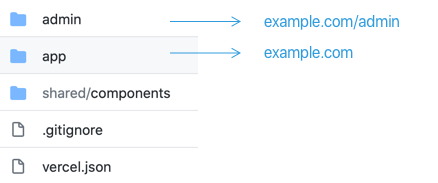
So, I get the fact that this new feature can deploy a monorepo into two separate projects, but can I achieve this?
 cfofiu
on 18 Aug 2020
cfofiu
on 18 Aug 2020
Not that I am aware of but you can setup admin.example.com for admin folder and you can use nextjs 9.5's new redirect feature to redirect example.com/admin to admin.example.com
cyrus-za
on 18 Aug 2020
@cfofiu is that a single Git repo containing two apps that you want to deploy to the same Vercel project/domain and serve under different URLs?
 cascandaliato
on 19 Aug 2020
cascandaliato
on 19 Aug 2020
@casca That is correct. One Git repo, two apps sharing some components and styles to deploy to the same project/domain.
cfofiu
on 19 Aug 2020
@cfofiu that is actually achievable if you have a vercel.json file at the root. Just specify builds and rewrites.
ie
{
  "builds": [
    { "src": "packages/www/package.json", "use": "@now/next" },
    {
      "src": "packages/admin/package.json",
      "use": "@now/static-build"
    }
  ],
  "rewrites": [
    {
      "source": "/admin/(.*)",
      "destination": "/packages/admin/index.html"
    },
    {
      "source": "/(.*)",
      "destination": "/packages/www/$1"
    }
  ]
}
 adamsoffer
on 21 Aug 2020
adamsoffer
on 21 Aug 2020
@adamsoffer Thanks for the tips! I saw a similar example, but I haven't really tried it. The documentation says:
NOTE: We recommend against using this property. and was wondering if this may be deprecated soon?!
cfofiu
on 21 Aug 2020
oh good to know! I'll have to check out that new functions property.
adamsoffer
on 21 Aug 2020
Maybe a bit of a tangent but I'm confused about the feature flags. Do they only apply to my user and whatever I deploy via my own CLI?
Besides my personal account, I am also part of a team account and https://vercel.com/_flags doesn't give me any indication for who I'm setting those flags.
 0x80
on 23 Aug 2020
0x80
on 23 Aug 2020
I am unsure if I have run into a bug or perhaps I am using this incorrectly, but where should the Vercel project file (.vercel/project.json) be set up relative to the code?
I would have imagined it would be
Folder Structure:
<Repo Root>/frontend/.vercel/project.json
<Repo Root>/frontend/package.json
<Repo Root>/frontend/pages
...
and
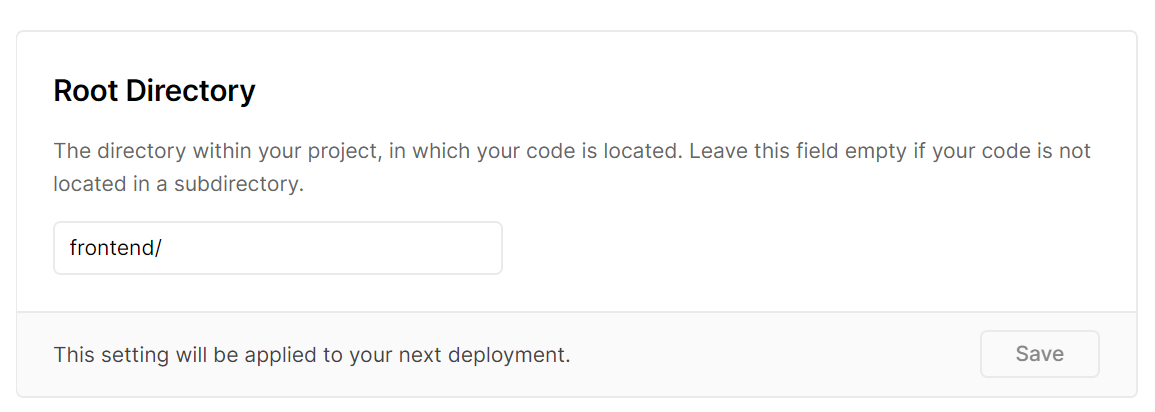
but when running vercel dev I get:
Vercel CLI 19.2.0 dev (beta) — https://vercel.com/feedback
Error! /home/user/Code/blog/frontend/frontend/ doesn't exist
Which would lead me to believe the .vercel/project.json should be at the root of the repo, though how would that be possible if you have multiple projects which need to be linked
 Compulsed
on 24 Aug 2020
Compulsed
on 24 Aug 2020
https://github.com/vercel/vercel/issues/3547#issuecomment-674127800
Is it possible, though, to have Vercel deploy pages depending on which files have changed?
My repository consists of three apps: main next.js app, storybook and docusaurus-based docs app. While I could have docs moved to a separate repo and have it configured in Vercel separately, I need to have storybook within the same repo as the main app - as storybook imports React components.
Now each pull request fires deployments to three separate pages - so, say, if I bump a storybook-related dependency, both the main next.js app and the docusaurus app get deployed which is a waste of time/CPU cycles/bandwidth/etc.
I have the same problem.
It would be perfect if I could specify an associated directory for each vercel project and only preview deployment when there are changes to that directory.
In my case, the relevant directory would be the same as the existing root directory configuration.
yoshiko-pg
on 25 Aug 2020
I've got a lerna monorepo using yarn workspaces and my deploy can't find local/shared dependencies from the packages folder. Instead it looks for them on the yarn registry.
An unexpected error occurred: "https://registry.yarnpkg.com/my-local-package: Not found".
Anyone had experience with this?
 meandillar
on 26 Aug 2020
meandillar
on 26 Aug 2020
I've got a lerna monorepo using yarn workspaces and my deploy can't find local/shared dependencies from the packages folder. Instead it looks for them on the yarn registry.
An unexpected error occurred: "https://registry.yarnpkg.com/my-local-package: Not found".Anyone had experience with this?
I have the same issue.
I would also like to know how to accomplish this without having to publish the package and just reading it locally.
 hanselabreu
on 26 Aug 2020
hanselabreu
on 26 Aug 2020
I've got a lerna monorepo using yarn workspaces and my deploy can't find local/shared dependencies from the packages folder. Instead it looks for them on the yarn registry.
An unexpected error occurred: "https://registry.yarnpkg.com/my-local-package: Not found".Anyone had experience with this?
Same issue here. I can't make it work with yarn workspaces.
 SelvinM
on 26 Aug 2020
SelvinM
on 26 Aug 2020
@SelvinM @hanselabreu @meandillar
I've got something working with yarn workspaces, typescript and the latest @jeantil improvements in nextjs 9.5.2. Not sure if you're using typescript, but it looks your problem is linked to 'Root directory'. You must leave it blank for yarn workspace to link the packages:
UPDATED This seems not necessary anymore. NextJS will be detected in nested directories, see https://github.com/vercel/vercel/issues/3547#issuecomment-683340482
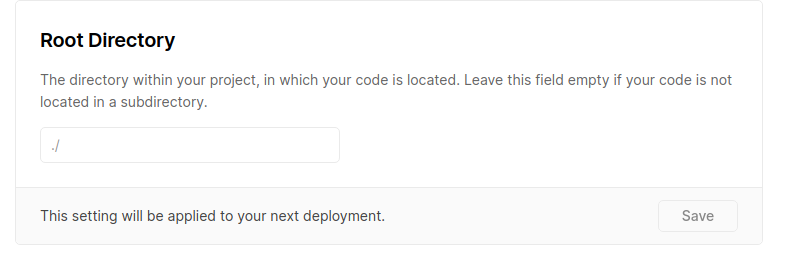
But define your build & development settings +/- like this:
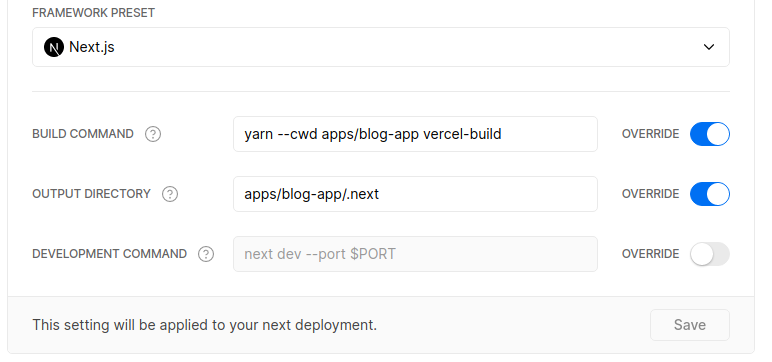
If you want to see a working example and doc, I did a quick POC here:
- https://github.com/belgattitude/vercel-monorepo-test
- And see an example of P/R sandbox: https://github.com/belgattitude/vercel-monorepo-test/pull/4
Hope it helps.
belgattitude
on 26 Aug 2020
@belgattitude thanks for the workaround!
EDIT: Deploy succeeds but I get directory listings / 404 pages
EDIT2: I'm using dynamic routes and getStaticPaths with fallback: 'unstable_blocking' so it might be a special case
meandillar
on 26 Aug 2020
@belgattitude Thanks!
It looks like there is some trouble with static assets, as vercel is looking for the public folder on root (and not in packages/blog-app) Do you know if there is a workaround for that as well?
 iverds
on 27 Aug 2020
iverds
on 27 Aug 2020
@meandillar for ssg, my intuition would be to try with Ouput Directory=apps/my-app/out. You might have to tune the build target as well (see https://github.com/belgattitude/vercel-monorepo-test/blob/master/apps/web-app/package.json#L9)
belgattitude
on 27 Aug 2020
@iverds That's a big issue, let me try this weekend. In my example, I tried to avoid having a vercel.json (in which we can set rewrites), I used that solution in the past but I would avoid it. I'll experiment this week-end.
@mcsdevv could you please have a look to this attempt (https://github.com/vercel/vercel/issues/3547#issuecomment-680780444) and let me know if it's a valid use case for vercel monorepos ? And if yes how can we set the public directory.
Thanks
belgattitude
on 27 Aug 2020
I am unsure if I have run into a bug or perhaps I am using this incorrectly, but where should the Vercel project file (
.vercel/project.json) be set up relative to the code?I would have imagined it would be
Folder Structure:
<Repo Root>/frontend/.vercel/project.json
<Repo Root>/frontend/package.json
<Repo Root>/frontend/pages
...
and
but when running
vercel devI get:Vercel CLI 19.2.0 dev (beta) — https://vercel.com/feedback Error! /home/user/Code/blog/frontend/frontend/ doesn't existWhich would lead me to believe the
.vercel/project.jsonshould be at the root of the repo, though how would that be possible if you have multiple projects which need to be linked
I'm having the same problem as yours. Have you got a chance to resolve this?
@mcsdevv Is this a known issue?
ralphilius
on 27 Aug 2020
I'm having the same problem as yours. Have you got a chance to resolve this?
Haven't resolved this just yet, I rightfully or wrongfully just pulled the .vercel file into the root of the mono-repo. This is not a massive problem just yet as:
- I only have 1 frontend within the project, though I would imagine it could cause difficulties later on as more are added
- I just run vercel in the root of the directory and use the vercel executable from within the project
./frontend/node_modules/.bin/vercel dev
Compulsed
on 28 Aug 2020
I have setup my own monorepo example to demonstrate a different bug:
- the source code is at https://github.com/jeantil/next-9-ts-aliases-workspaces
- deployment at https://vercel.com/jeantil/next-9-ts-aliases-workspaces/kwnde0edv
- settings

- vercel.json
 jeantil
on 28 Aug 2020
jeantil
on 28 Aug 2020
I've got a lerna monorepo using yarn workspaces and my deploy can't find local/shared dependencies from the packages folder. Instead it looks for them on the yarn registry.
An unexpected error occurred: "https://registry.yarnpkg.com/my-local-package: Not found".Anyone had experience with this?
I think this new checkbox solves it @meandillar
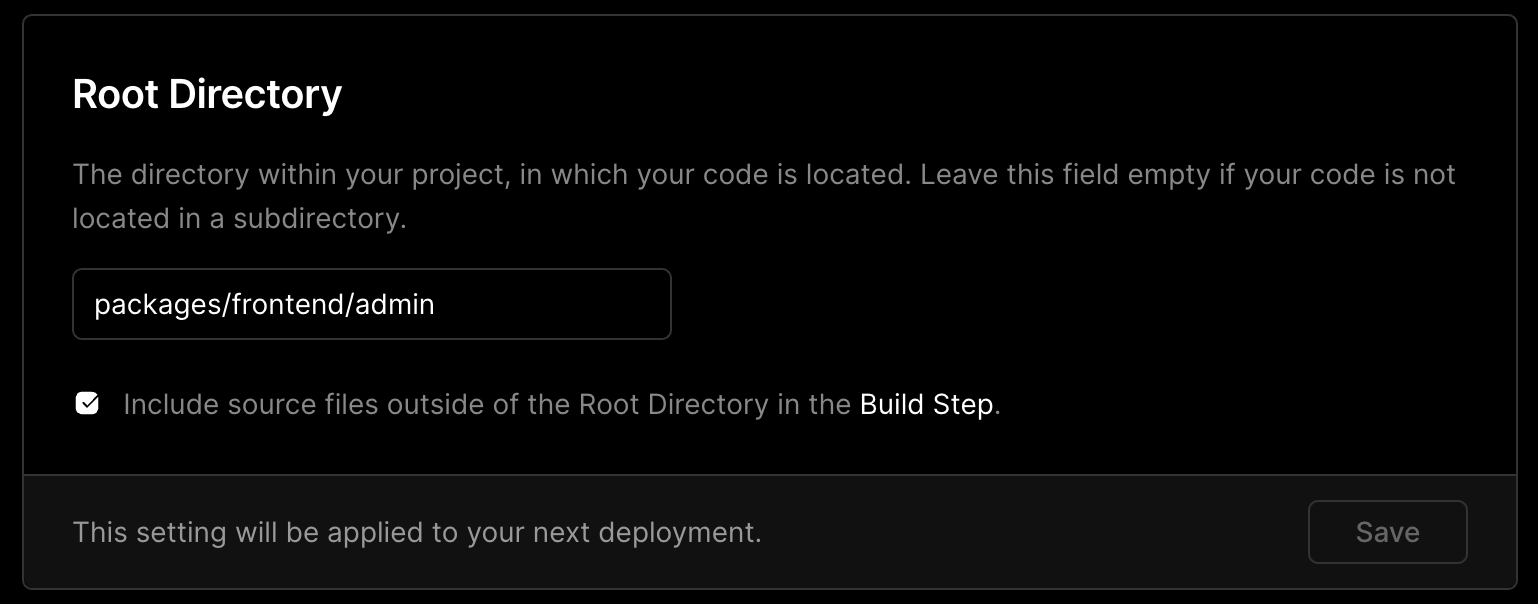
I just tried it and it's working for our setup
 lucas-janon
on 29 Aug 2020
lucas-janon
on 29 Aug 2020
@lucas-janon yes it looks as of today it's by default... seems Vercel is working fast on issues. Wow !
@iverds
It looks like there is some trouble with static assets, as vercel is looking for the public folder on root (and not in packages/blog-app)
Looks fixed. I've updated examples here: https://github.com/belgattitude/vercel-monorepo-test
I still have a bug with api pages, they don't load: https://vercel-monorepo-test-web-app.vercel.app/

belgattitude
on 29 Aug 2020
Looks like the support for monorepos is now official 🎉
lucas-janon
on 29 Aug 2020
@ralphilius
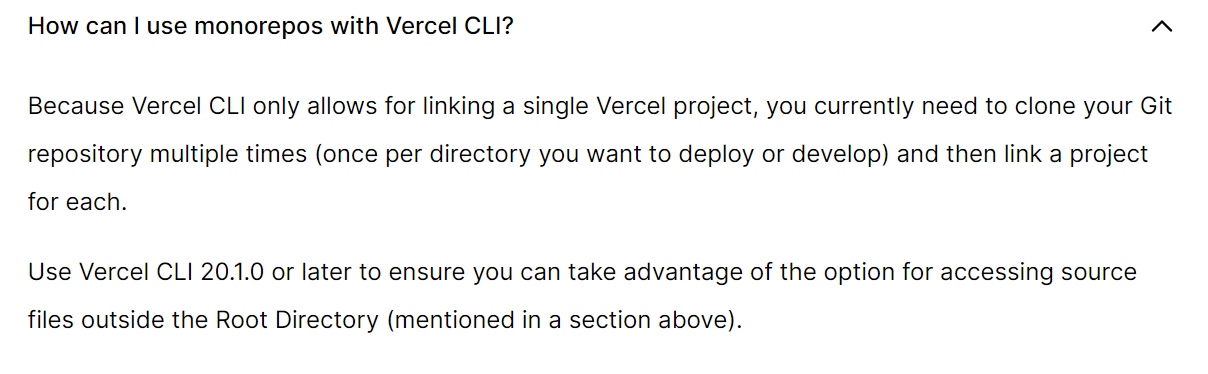
Answers our question, you have to clone the repo down multiple times -- which kind of defeats the purpose of a monorepo to some degree. Though I'd hope that this is just a current limitation.
Compulsed
on 30 Aug 2020
@ralphilius
Answers our question, you have to clone the repo down multiple times -- which kind of defeats the purpose of a monorepo to some degree. Though I'd hope that this is just a current limitation.
Yeah. I think I would make dev script for each package which copy content of .vercel folder to root before running vercel dev.
ralphilius
on 30 Aug 2020
@belgattitude
I still have a bug with api pages, they don't load: https://vercel-monorepo-test-web-app.vercel.app/
we have the same problem in our yarn workspace environment, everything works smoothly now except the api pages.
I found a issue that could be related https://github.com/vercel/next.js/issues/16667
michaelbirchler
on 31 Aug 2020
Thanks @michaelbirchler I contacted support and added a comment in the issue for reproduction https://github.com/vercel/next.js/issues/16667#issuecomment-683642207
belgattitude
on 31 Aug 2020
Hey all, given the monorepo support allows you to import a repository multiple times, I no longer feel there is a need for an example here.
For all feedback or questions regarding the monorepo support, please create a Discussion and we'll be glad to help out.
mcsdevv
on 8 Sep 2020
Related issues
 jberglinds
·
59Comments
jberglinds
·
59Comments
 mathiasbynens
·
28Comments
mathiasbynens
·
28Comments
 remy
·
42Comments
remy
·
42Comments
 Betree
·
27Comments
Betree
·
27Comments
 Warchant
·
27Comments
Warchant
·
27Comments
Most helpful comment
Hello all, this feature has been in active development and I’m hoping to share it here under a feature flag very shortly for you all to test and provide feedback on.