Vendure: Error initialising server: Query error (TypeORM)
Describe the bug
When the server start up throw an error in the database (by TypeORM) causing fails in the Order's mutations (removeOrderLine, addItemToOrder and adjustOrderLine)
To Reproduce
Steps to reproduce the behavior:
- run
yarn start - I get this error:
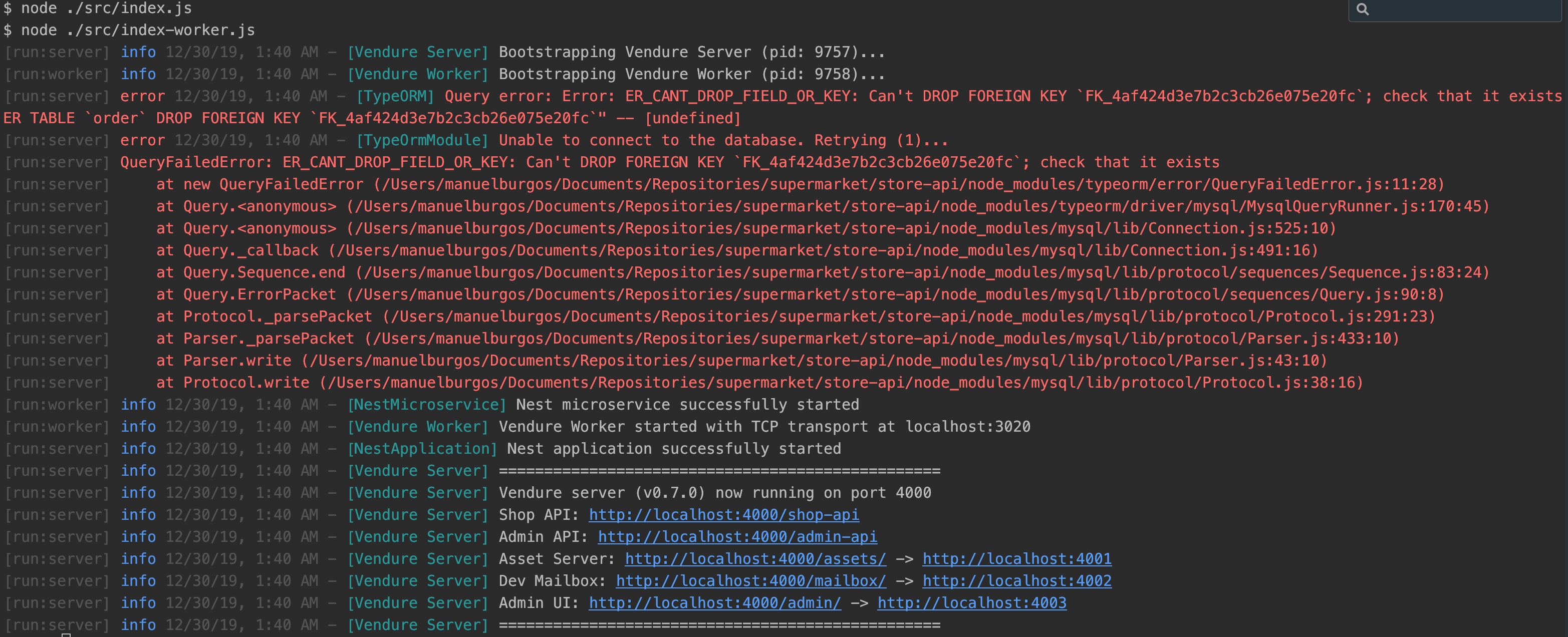
- After that the backend works, but fail in the
removeOrderLine,addItemToOrderandadjustOrderLinemutations.. i.e:
mutation {
  addItemToOrder(productVariantId:1, quantity: 2){
    id
    code
    lines {
      productVariant {
        name
        price
      }
    }
  }
}
I get the error below, but the item is added to the Order,
{
  "errors": [
    {
      "message": "Cannot read property 'id' of null",
      "locations": [
        {
          "line": 2,
          "column": 3
        }
      ],
      "path": [
        "addItemToOrder"
      ]
    }
  ],
  "data": {
    "addItemToOrder": null
  }
}
For removeOrderLine I'm getting similar error and doesn't work, the line is not removed.
For adjustOrderLine when the quantity is 0, the method return back the order without that line but if I try access to the order using admin ui, the app just crash ( white screen)
Expected behavior
A clear and concise description of what you expected to happen.
Environment:
- @vendure/core version: 0.7.0
- Nodejs version: v10.16.3
- Database (mysql/postgres etc): MariaDB
Additional context
- I'm running the MariaDB in Docker (with docker-compose)
version: "3"
services:
  mariadb:
    image: mariadb
    container_name: "store-api-db"
    ports:
          - "3306:3306"
    restart: always
    environment:
#      MYSQL_USER: store-api-user
      MYSQL_ROOT_PASSWORD: store-api-pass
      MYSQL_DATABASE: store-api-db
    volumes:
            - ./.docker/mariadb:/var/lib/mysql
- vendure-config.js:
const config = {
  authOptions: {
    sessionSecret: 's9f3a242jv',
    tokenMethod: 'bearer',
    requireVerification: false,
  },
  port: 4000,
  adminApiPath: 'admin-api',
  shopApiPath: 'shop-api',
  dbConnectionOptions: {
    type: 'mysql',
    synchronize: true, // turn this off for production
    logging: false,
    database: 'store-api-db',
    host: 'localhost',
    port: 3306,
    username: 'root',
    password: 'store-api-pass',
    migrations: [path.join(__dirname, '../migrations/*.ts')],
  },
  paymentOptions: {
    paymentMethodHandlers: [examplePaymentHandler],
  },
  customFields: {},
  plugins: [
    ...
  ],
};
 aleBurgos
All 10 comments
Hi,
Thanks for the report. Did this happen after upgrading an existing project to 0.7.0?
 michaelbromley
on 30 Dec 2019
michaelbromley
on 30 Dec 2019
Hi @michaelbromley that is correct, this happened after upgrade the project to 0.70
aleBurgos
on 4 Jan 2020
@michaelbromley I was debugging this problem, but I'm not able to find what produces it.
I'm no getting the database error anymore but the errors in the different Order operations still persist.
I tried using different LogLevels and putting breakpoints everywhere even in ExceptionLoggerFilter but nothing, I can't catch it.
Is the possible to show the full stack trace? I think the problem is the graphql server but I'm not sure.
thanks in advance!
aleBurgos
on 6 Jan 2020
What I think might be happening is that the DB schema migration failed (as in your original issue). In 0.7.0 a new column was added to the Order table (see https://github.com/vendure-ecommerce/vendure/blob/master/CHANGELOG.md#breaking-change). This likely is why the order-related operations are failing.
Re the full stack trace in the graphql error response, I'm not totally sure why it does not get included, it used to be that way but perhaps an update to a dependency might have removed it by default.
michaelbromley
on 7 Jan 2020
I just checked the database and the Order table has the column taxZoneId. Which data is mandatory to start using the shop-api? because for example, to use importProducts mutation is mandatory to have a tax category beforehand because if not the mutation doesn't work.
aleBurgos
on 7 Jan 2020
OK. So regarding catching the error, does your debugger support breaking on thrown errors? In Webstorm I use this feature when I can't otherwise find where to break.
Off the top of my head I think you'll need to have some zones, tax categories and tax rates set up.
FYI I am away on vacation at the moment so can't dedicate the usual amount of time to investigate issues for the next 2 weeks.
michaelbromley
on 7 Jan 2020
@aleBurgos Try setting 'Default tax zone' and 'Default shipping zone' in admin page> Settings> Channels.
 ironynet
on 7 Jan 2020
ironynet
on 7 Jan 2020
Thanks @michaelbromley and @ironynet !
I pre-fill the necessary data, but to add the zone I have done it directly in the database because I couldn't find the way to do it in admin panel, Now works Thanks!
aleBurgos
on 7 Jan 2020
Could we reopen this issue?
Or mention somewhere that seed of zones are necessary and can't be set via admin UI.
 fentas
on 28 Mar 2020
fentas
on 28 Mar 2020
@fentas see #288
michaelbromley
on 30 Mar 2020
Related issues
michaelbromley
·
3Comments
 jonyw4
·
6Comments
michaelbromley
·
5Comments
jonyw4
·
6Comments
michaelbromley
·
5Comments
 lsimone
·
7Comments
lsimone
·
7Comments
 hendrik-advantitge
·
6Comments
hendrik-advantitge
·
6Comments