Vee-validate: v-validate does not work with JSX.
Versions
- vee-validate: 2.1.4
- vue: 2.5.19
Describe the bug
v-model does not work when JSX is used. This was debugged by Vue core developers to be down to the use of model.expression.
More info is here:
https://github.com/vuejs/jsx/issues/20
To reproduce
Steps to reproduce the behavior:
Do you have a JSX codepen?
Expected behavior
v-model should bind and v-validate should work as expected.
Demo link
TBA
 DM2489
All 18 comments
No, unfortunately there's not and there is not even a published working version of @vue/jsx but the production version will not have model.expression, is there a way to make it work without requiring it?
 nickmessing
on 10 Dec 2018
nickmessing
on 10 Dec 2018
Sorry for taking a while to respond to this issue. I'm using the expression to be able to use the $watch API instead of event listeners, to make this work with JSX I would have to add a specific code path that either adds an additional listener or patches the generated one if possible (to avoid locking the input value due to very fast DOM updates).
Wouldn't the ValidationComponents be a workaround? they should work fine as they use the value instead of the expression, and generally playes nice with the Vue render API.
 logaretm
on 18 Dec 2018
logaretm
on 18 Dec 2018
@logaretm Thank you for looking into it.
To be honest, I'm confused.The Validation Components docs state that v-model directive is still required, which is what is breaking in JSX, so I don't know how it could work.
What is supposed to happen currently if something is not watchable? I've had a look through the source code but I'm not intimate enough with it to understand it in detail.
@nickmessing Do you have any further comments/ideas?
DM2489
on 18 Dec 2018
@DM2489, it's not v-model that's breaking in JSX, it's a combination of runtime v-validate implementation and compile-time v-model difference between JSX and Vue Template, so, if runtime for ValidationComponents is different and doesn't use model.expression - it should work fine.
nickmessing
on 19 Dec 2018
@DM2489 Like Nick mentioned, the combination is bugged. Validation Components only uses v-model.value which should be compatible as far as I can tell.
I will try to implement a fix for the v-validate directive soon, but I suggest you take the opportunity to use the new components for your apps since they are a lot better in every aspect than the directive.
logaretm
on 19 Dec 2018
@nickmessing @logaretm Thank you both for further explaining. I'll ready through the ValidationComponents documentation have a play with some of the examples. I'll report back whether or not ValidationComponents work with JSX.
DM2489
on 20 Dec 2018
Any update on this? A recent Vue CLI change looks like it breaks compatibility with v-validate (because of model.expression as discussed above).
 Dylan-Chapman
on 11 Jan 2019
Dylan-Chapman
on 11 Jan 2019
So, I finally got around to updating my JSX dependencies and looking into ValidationComponents as a workaround.
Unfortunately, I can't see ValidationComponents being a viable solution. I've ran into several issues while trying to get this working.
The biggest issue I've encountered so far is accessing generated errors. The components don't write to the global ErrorBag, so sharing validation logic between components is difficult. I've tried using the ValidationObserver, but because this is a scoped component, it's impossible to use values of the observer in another named slot (for example a Bootstrap modal (https://bootstrap-vue.js.org/docs/components/modal). I can't even use the ref, as this is not populated until rendered.
Here's a 'reduced' example of what I am trying to show:
<b-modal title="Modal Title">
    <VeeValidate.ValidationObserver ref="observer">
        {
            (observerScope) => {
                console.log('observerScope', observerScope);
                return (
                    <b-form>
                        <VeeValidate.ValidationProvider rules="required">
                            {
                                (providerScope) => {
                                    console.log('providerScope', providerScope);
                                    return (
                                        <div>
                                            <input v-model={this.test} name="Test (name)" data-vv-as="'Test (data-vv-as)'" type="text" />
                                            <span>{providerScope.errors[0]}</span>
                                        </div>
                                    );
                                }
                            }
                        </VeeValidate.ValidationProvider>
                    </b-form>
                );
            }
        }
    </VeeValidate.ValidationObserver>
    <div slot="modal-footer">
        <b-btn
            type="submit"
            disabled={!this.$refs.observer.invalid || !this.$refs.observer.validated}>
        </b-btn>
    </div>
</b-modal>
Additionally:
- This is significantly more verbose than the
v-validatedirective due to how JSX has to match the Vue CLI. This has gone from 2 lines of code to 20+, properly formatted. - It doesn't appear to get the name of the field correctly in the error message. The error text is
The {field} field is required.
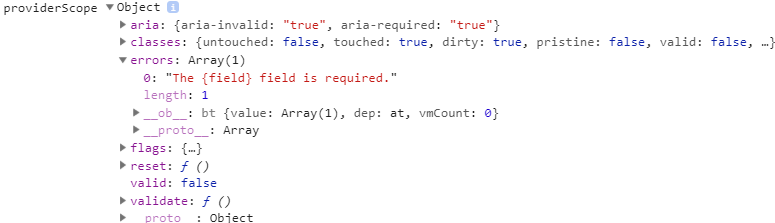
- The
ValidationObserver.errorsarray doesn't have the name of the field in (unlike theErrorBag), so in cases where you'd like to manually manipulate the display of the errors based in the fieldname, it's impossible. - This also seems to ditch
this.$validator, so yet more code would need to be moved to theValidationObserver.
Overall, I don't think this is a good solution to getting Vee-Validate to work with JSX, and anyone using JSX is going to have a hard time getting to grips with this implementation. If a solution can be found to the model.expression issue, that would be highly preferable.
DM2489
on 3 Feb 2019
@DM2489 I'm working on a re-write for the directive which will be similar to how ValidationProvider works internally. So it will solve your issue. But I'm having a hard time finding a good amount of time to work on this at the moment due to the mandatory army service (only a couple of weeks left). As I can only close minor issues every day.
ValidationProvideris certainly more verbose if not refactored properly which is mentioned in the docs, this is one of its downsides but I believe its worth it. The idea is that those components allow you to create "self-validating" input components which are impossible with the directive.ValidationProviderdoes not inspect the input node to find its name, you have to provide a prop on the provider itself to assign a name to the field.
<ValidationProvider rules="required" name="myName">
  <VTextField slot-scope="{ errors }" v-model="value" :error-messages="errors" />
</ValidationProvider>
- They also abstract away the
$validatorAPI as they provide the validation state to your fields. - They are renderless meaning you can place the tags wherever you want and it won't affect rendering, so you might want to put the scope of the observer to cover all the areas in the template where its needed.
Here is an example of your code:
https://codesandbox.io/s/rjjm76kx4p
Overall I would say they are a different pattern than the directive and certainly requires some boilerplate to make it productive, but once they are set up as intended they are more productive than the directive by a long shot. The docs are currently lacking at the moment to show how well can they be used properly, I will take care of that soon after I'm done with the army service thing.
Anyways you don't have to use this API, The directive will be still an integral part of vee-validate.
logaretm
on 6 Feb 2019
@logaretm Thanks for taking the time to reply, and for providing the example. I realise that maintaining OSS is difficult when having to do military service.
I've just found your article on medium, which has helped me to understand the concepts behind the ValidationProvider better.
I'll have another go with the ValidationProvider over the next few days, then see how I can refactor my components to come up with something less verbose when using JSX.
P.s. Good luck completing your military service.
DM2489
on 7 Feb 2019
@logaretm What would your recommendation be for adding errors that have been returned from the server to a ValidationProver? I'm assuming it's as simple as setting a ref, then adding the error to the errors array on the ValidationProvider using the ref?
Or is there a better way?
DM2489
on 14 Feb 2019
@DM2489 yep, just add a ref to the provider and push your errors on the messages array, there is no errors prop.
this.$refs.nameVProvider.messages.push('error string here.');
@logaretm Cheers!
Sorry - another question...
Is there a reason that the ValidationObserver doesn't expose the messages array in the public API when being used as a ref? I can see that validate() and reset() methods are exposed, but not the messages array.
I was expecting to be able to do something like:
computed: {
    observerHasMessages() {
        return Object.values(this.$refs.VObserver.messages).some(messages => messages.length > 0);
    }
}
The observer does not actually hold any messages on its own, its errors slot prop is a computed prop that collects all errors from child providers, so mutating it is not useful. Same thing for all the flags provided in its slot props.
The same case is for the validate and reset. They are shortcut methods that conveniently call the validate and reset methods on each child provider, also tidies up the result in a single promise so you do have to do it manually for each provider. You can think of the ValidationObserver, as a ... well, an observer. It does not have state, and it doesn't do anything the Providers cannot do on their own.
Still, you could access the errors on the ctx computed prop.
// this is an object containing error arrays for each provider.
this.$refs.observer.ctx.errors
Ah, I see. I hadn't intended to mutate the messages on the observer directly, more just thinking about how to access those messages to determine state outside of the observer scope itself when accessing the observer by ref.
It does make sense though - you wouldn't want people trying to mutate the observer when they need to mutate the provider instead.
Still, you could access the errors on the
ctxcomputed prop.// this is an object containing error arrays for each provider. this.$refs.observer.ctx.errors
I'll bear this in mind - no doubt I'll need to do this at some point. Thanks again for the hint!
DM2489
on 15 Feb 2019
Just to update on this - We've pretty much migrated everything away from the v-validate directive and solely use the ValidationComponents now.
This is fine for us going forwards, but others may benefit from some documentation regarding compatability with JSX and the workaround, on the website itself.
DM2489
on 28 Mar 2019
@DM2489 Thanks for the update, do you have a suggestion where would it be put so that it can be reached easily? Maybe the concepts section?
logaretm
on 29 Mar 2019
Closing, it is addressed in the next major release.
logaretm
on 24 Apr 2019
Related issues
 Shchepotin
·
3Comments
Shchepotin
·
3Comments
 saintplay
·
3Comments
saintplay
·
3Comments
 MeltedFreddo
·
3Comments
MeltedFreddo
·
3Comments
 MaxMilton
·
3Comments
MaxMilton
·
3Comments
 kidox
·
3Comments
kidox
·
3Comments