Vee-validate: Most basic example not working
Versions:
- VueJs: 2.5.13
- Vee-Validate: 2.0.0 and 2.0.0-beta.17
Description:
The first example from the tutorial is not working
<template>
<div>
   <div class="column is-12">
          <label class="label" for="email">Email</label>
          <p :class="{ 'control': true }">
            <input v-validate="'required|email'" :class="{'input': true, 'is-danger': errors.has('email') }" name="email" type="text" placeholder="Email">
            <span v-show="errors.has('email')" class="help is-danger">{{ errors.first('email') }}</span>
          </p>
     </div>
     <pre>{{errors}}</pre>
<div>
</template>
<script>
export default {
  name: 'hello',
  data () {
    return {
      msg: 'Welcome to Your Vue.js App',
      email: null
    }
  }
}
</script>
In main.js
import VeeValidate from 'vee-validate';
Vue.use(VeeValidate);
Steps To Reproduce:
Just click in the input then click elsewhere, nothing happens, no error, no log to the console.
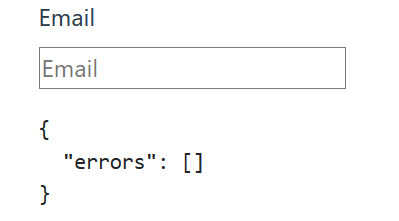
It seems that the events are not detected I guess. Any ideas ?
 Overdrivr
All 8 comments
@Overdrivr
Please try this https://jsfiddle.net/o0mp0uo6/
 rousos87
on 5 Jan 2018
rousos87
on 5 Jan 2018
The fiddle works, is it using the exact same versions ?
Overdrivr
on 5 Jan 2018
@Overdrivr
Yes, Vuejs 2.5.13 and vee-validate 2.0.0.Please try to delete the node_modules folder and npm install again.
rousos87
on 5 Jan 2018
Clearing the node_modules folder worked. I'm not sure what went wrong in the first place. Thanks for your help !
Overdrivr
on 5 Jan 2018
You are welcome.Glad to be able to help.
rousos87
on 5 Jan 2018
i'm remove my node_modules and install it again. But vee-validate not work properly. It only work when i type any in my input.
 phamVanLac
on 24 Jul 2018
phamVanLac
on 24 Jul 2018
Hmmm... I hope it can help a little
Vue.use(VeeValidate, {
  events: 'blur'
});
phamVanLac
on 24 Jul 2018
Hmmm... I hope it can help a little
Vue.use(VeeValidate, {
  events: 'blur'
});
This solved the issue for me.
 gsauzande
on 7 Jan 2019
gsauzande
on 7 Jan 2019
Related issues
 HunterJS-bit
·
3Comments
HunterJS-bit
·
3Comments
 parweb
·
3Comments
parweb
·
3Comments
 YamenSharaf
·
3Comments
YamenSharaf
·
3Comments
 saintplay
·
3Comments
saintplay
·
3Comments
 Shchepotin
·
3Comments
Shchepotin
·
3Comments
Most helpful comment
Hmmm... I hope it can help a little
Vue.use(VeeValidate, { events: 'blur' });