Vee-validate: Same validation forms behave different in Chrome/FF
Versions:
- VueJs: 2.5.9
- Vee-Validate: 2.0.0-rc.25
Description:
I'm using vee-validate in one of my projects. With the new Firefox update, my form behaves completely different, but only in the new Firefox (57.0.1). In Chrome, it works as usual.
Chrome | Firefox Quantum

Steps To Reproduce:
None by now. Sorry for that :| Can't get it reproduced
 manniL
All 17 comments
I'm using FireFox quantum as my main browser and haven't found any issues yet, can you add the code snippet?
 logaretm
on 5 Dec 2017
logaretm
on 5 Dec 2017
@logaretm Will do. I tried to repo it through a JSFiddle, but this didn't work as well. I can link you the page where this happens and will try to extract the code soon!
https://hochschulinitiative-deutschland.de/angebote/Aachen/12/#registration-form-mandatory
manniL
on 5 Dec 2017
I have the same problem, don't know sure when this is happening
it's working fine before
Left: Firefox 57.0.1 (64-bit)
Right: Chromium Version 63.0.3239.84
Even for my simple login page this behave like this, especially (for my case) with the alpha_spaces/numeric rule

Update:
@logaretm After the error shown up if i manually validate with validateAll the error gone
 nsetyo
on 28 Dec 2017
nsetyo
on 28 Dec 2017
I have the same issues with Firefox (v58):
Numeric and email validation fails and shows error when the input field loses its focus.
Submitting the form works fine and all data is submitted as well --> submit will get checked onclick via this.$validator.validateAll()
Any idea why FF is behaving differently?
I was quite surprised that IE11 on Win10 was behaving as expected :)
 blattmann
on 27 Feb 2018
blattmann
on 27 Feb 2018
Also having this problem on Firefox 59.0.2
On opening a form it displays all the inputs as invalid by default.
 luisskeeled
on 20 Apr 2018
luisskeeled
on 20 Apr 2018
I've kind of solved it when the form is inside an Expansion Panel, just attaching a listener to when the panel expands and reseting the validator.
But I have the same problem in another page where the form is inside an v-if and the invalid triggers at the moment the form is displayed.
luisskeeled
on 20 Apr 2018
Same problem :( Any ideas on how to fix it ?
UPD:
after a small workaround, figured that the issue is showing only when we have data-vv-delay param. When I delete it, everything works like a charm.
 Aterr
on 20 Apr 2018
Aterr
on 20 Apr 2018
I'm having a similar issue. Firefox 59.0.2 and Vee-validate 2.0.8.
On Firefox, even without data-vv-validate-on="blur", numeric and email validated fields error on blur. The example below shows me clicking off the field after it correctly validated an email address.
v-validate="'required|email'".

 alex-bowers
on 30 Apr 2018
alex-bowers
on 30 Apr 2018
I have the same problem as @alex-bowers above!
 Pixney-William
on 29 May 2018
Pixney-William
on 29 May 2018
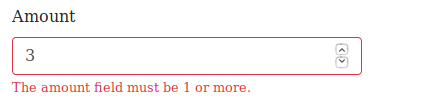
I have the same error with vee-validate v2.0.9 using Firefox Quantum 60.0.2 on Ubuntu 18.04.
Everything works fine on Chrome and IE (wat?) but every rule seems to fail on FF...
<input
  v-validate="'required|min_value:1'"
  :class="{ 'is-invalid': errors.has('amount') }"
  type="number"
  min="1"
  step="any"
  class="form-control"
  name="amount">
<div class="invalid-feedback">{{ errors.first('amount') }}</div>
 abeMedia
on 20 Jun 2018
abeMedia
on 20 Jun 2018
Try updating to latest version $ npm install vee-validate@latest --save
 huberom
on 25 Aug 2018
huberom
on 25 Aug 2018
After updating to the latest pre-release (2.1.0-beta.8) I created the same test as before. There was a different result but it's still not working. While typing there were no errors. Only when the input was no longer focused did the error first appear.

alex-bowers
on 28 Aug 2018
@alex-bowers could you provide a reproduction repository for @logaretm ? :relaxed:
manniL
on 31 Aug 2018
@manniL @logaretm Sure thing. I've spent quite a bit of time going through my project, checking each feature to see how it affects vee-validate in Firefox.
I found that trying to create a global event bus window.Event = new Vue(); causes the issue. In the example below, you should be able to test this by removing the line from main.js. Hope this helps.
alex-bowers
on 3 Sep 2018
@alex-bowers Thanks for the reproduction and the insight, overriding global JavaScript namespace is not a good practice IMO, you may end up polluting or overwriting native objects that other libraries depend on.
For example vee-validate tells the difference between a native event and vue event by checking the first parameter type, which should be instance of the Event global object. When you overwrite that object/consturctor, vee-validate would treat it as a Vue event, which is not the case, causing a false validation error or success depending on the rule used.
This came up before, I believe using an app container to store your depenedencies may be a better choice here, for example:
window.$app = {};
window.$app.dispatcher = new Vue();
I do not think this is the cause of the main issue, can be a coincidence.
logaretm
on 3 Sep 2018
Thanks @logaretm. You're right. It's not good practice. I've updated how we do things and this has meant that validation for Firefox works again.
I'm interested to hear if anyone else from this issue has found something similar.
alex-bowers
on 6 Sep 2018
After updating to the latest pre-release (2.1.0-beta.8) I created the same test as before. There was a different result but it's still not working. While typing there were no errors. Only when the input was no longer focused did the error first appear.
How can we do same thing in vee-validate version 3.1.3?
 vyasishanatc194
on 26 Mar 2020
vyasishanatc194
on 26 Mar 2020
Related issues
 Etheryte
·
3Comments
Etheryte
·
3Comments
 MeltedFreddo
·
3Comments
MeltedFreddo
·
3Comments
 schel4ok
·
3Comments
schel4ok
·
3Comments
 kidox
·
3Comments
kidox
·
3Comments
 parweb
·
3Comments
parweb
·
3Comments
Most helpful comment
I'm having a similar issue. Firefox 59.0.2 and Vee-validate 2.0.8.
On Firefox, even without
data-vv-validate-on="blur", numeric and email validated fields error on blur. The example below shows me clicking off the field after it correctly validated an email address.v-validate="'required|email'".