Hi Marco,
Hi have a quick question.
Is it possible to apply a transform, as specified by a matrix, to all objects shown in a Plotter?
This is not just a matter of moving the camera around, the idea would be to mirror all objects along one dimension for instance.
I know I could probably do it with Mesh.points(), but I was hoping that there was a way to just do it once for all things being rendered.
Is there a way to do this in vedo?
 FedeClaudi
All 10 comments
yep! it's called applyTransform()
the only thing is that I just slightly modified it in my local, so once i release the behavior might change.
 marcomusy
on 1 Sep 2020
marcomusy
on 1 Sep 2020
Oh cool!
How do I use it? Looking for examples in the repo didn't bring up much.
Is it just a matter of doin mesh.applyTransform, or Plotter.applyTransform?
FedeClaudi
on 1 Sep 2020
sorry maybe i didnt read carefully - no you have to apply it to each individual object, so, mesh.applyTransform().
There is also mirror() which can do the job. True that the documentation for this is lacking!
Or else, you can transplant this (for testing) in vedo/pointcloud.py:
    def applyTransform(self, transformation, reset=False):
        """
        Apply a linear or non-linear transformation to the mesh polygonal data.

        :param transformation: a ``vtkTransform``, ``vtkMatrix4x4``
            or a 4x4 numpy array object.

        :param bool reset: if True reset the current transformation matrix
            to identity after having moved the object, otherwise the internal
            matrix will stay the same (to only affect visualization).
            It the input transformation has no internal defined matrix (ie. non linear)
            then reset will be assumed as True.
        """
        if isinstance(transformation, vtk.vtkMatrix4x4):
            tr = vtk.vtkTransform()
            tr.SetMatrix(transformation)
            transformation = tr
        elif utils.isSequence(transformation):
            M = vtk.vtkMatrix4x4()
            for i in [0,1,2,3]:
                for j in [0,1,2,3]:
                    M.SetElement(i, j, transformation[i][j])
            tr = vtk.vtkTransform()
            tr.SetMatrix(M)
            transformation = tr
        if reset or not hasattr(transformation, 'GetMatrix'):
            tf = vtk.vtkTransformPolyDataFilter()
            tf.SetTransform(transformation)
            tf.SetInputData(self.polydata())
            tf.Update()
            self.PokeMatrix(vtk.vtkMatrix4x4())  # reset to identity
            return self._update(tf.GetOutput())
        else:
            self.SetUserMatrix(transformation.GetMatrix())
            return self
Test:
from vedo import Cube
Cube().applyTransform([[1,2,0,0],
                       [0,1,0,0],
                       [0,0,1,0],
                       [0,0,0,1],
                      ]).show(axes=1)
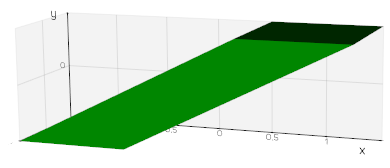
caveat: for transformations that flip the handedness you need to apply mesh.reverse() to invert the faces.
marcomusy
on 1 Sep 2020
awesome, thank you so much!
FedeClaudi
on 1 Sep 2020
Sorry to jump on this @marcomusy but there is no way of setting a transformation to something like the "root scene" so that everything get transformed? I got the impression that such thing could happen in vtk
 vigji
on 1 Sep 2020
vigji
on 1 Sep 2020
hi Luigi, no.. the "root scene" transformation is indeed the Identity :)
besides, if you transform (with det(T)>0) everything rigidly it wouldn't be much different from moving the camera i guess.
marcomusy
on 1 Sep 2020
no, it could flip left-right
edit: (ok, det < 0 but it is exactly the problem we're having there)
vigji
on 1 Sep 2020
I see. I'm afraid you have to flip each object separately.
marcomusy
on 1 Sep 2020
Thanks for the help Marco.
The version of applyTransform you've posted above works perfectly. Looking forward to the next update with this and the updated Ruler class, as always vedo makes it so nice to implement stuff :)
FedeClaudi
on 2 Sep 2020
I think we can close this for now Marco, thank's again for the help :)
FedeClaudi
on 3 Sep 2020
Related issues
 vianamp
·
3Comments
vigji
·
3Comments
vianamp
·
3Comments
vigji
·
3Comments
 DeepaMahm
·
5Comments
DeepaMahm
·
5Comments
 CMengich
·
5Comments
CMengich
·
5Comments
 Jesse0818
·
4Comments
Jesse0818
·
4Comments
Most helpful comment
I think we can close this for now Marco, thank's again for the help :)