Vedo: vectorized/parallel version of IntersectWithLine for ray casting
Hi @marcomusy, I was checking on your example here and I was wondering whether it is possible to apply ray casting with multiple rays at once, without a for loop. For example if I have an origin point at p1: [0,0,0] and then multiple rays at different directions pnts: [[0,0,1], [0.25, 1, 0.5], [0.5, 1, 0.25]], how to get intersection points with a surface at once.
I was checking also whether I could maybe use intersectWithLine() with numpy.vectorize() or numpy.apply_along_axis(), but I am not sure how to do it.
 ttsesm
All 10 comments
Hi @ttsesm
I initially thought of using surfaceIntersection() to avoid the loop ... but it ends up being slower than intersectWithLine().
Also surfaceIntersection needs a triangular mesh to work and this makes it unprecise.
Consider that internally a vtkOBBTree is built and cached, so the loop is _not_ redoing the same amount of work every time.
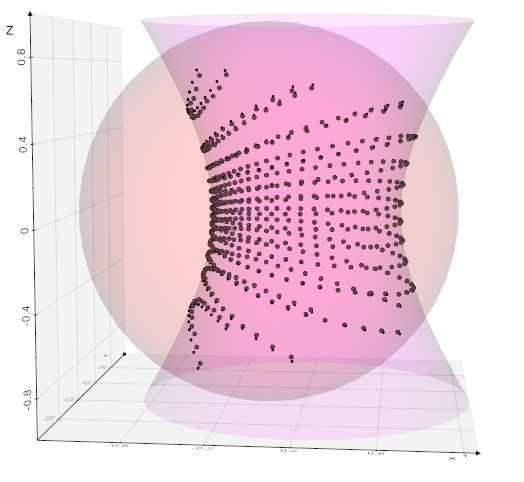
from vtkplotter import *

s = Sphere().alpha(0.1)
h = Hyperboloid().x(0.2).alpha(0.1)

sp = s.points()
orig = [[0,0,0]]*len(sp)

print('with surfaceIntersection')
lns = Lines(orig, sp).extrude(zshift=0.001)
isec = surfaceIntersection(lns, h).pointSize(3)

print('with looping')
pins=[]
for p in sp:
    pin = h.intersectWithLine([0,0,0], p)
    if len(pin):
        pins.append(pin[0])

print('show')
show(s, h,
     isec,
     Points(pins),
     axes=1,
     )
 marcomusy
on 3 Jun 2020
marcomusy
on 3 Jun 2020
I see, thanks for the example. I also tried to vectorize with numpy the intersectWithLine() like
v_pin = np.vectorize(h.intersectWithLine)
pin = v_pin([0,0,0], sp)
but I am getting the following error {TypeError}IntersectWithLine argument %Id: %V any idea if I could bypass it somehow?
ttsesm
on 3 Jun 2020
I don't think you can vectorize any arbitrary function (?). Even if you wrap it:
def vfunc(p):
    print(p)
    pin = h.intersectWithLine([0,0,0], p)
    if len(pin):
        return np.array(pin[0])
    return np.array([0,0,0])

v_pin = np.vectorize(vfunc)

pins = v_pin(sp)
it still won't work because of the numpy broadcasting the function is called passing the vector components not the [x,y,z] vector.
Even if it worked I actually doubt that you might get any better performance - because the loop per se is not the bottleneck.
On my system - quite average one - it can process ~10k hits per second.. if need more speed maybe you can run it in parallel..
N.B.: from the documentation _Notes
The vectorize function is provided primarily for convenience, not for performance. The implementation is essentially a for loop._
marcomusy
on 4 Jun 2020
I see, interesting. Thanks for the feedback @marcomusy.
I might check on another lib then until vtk adds any accelerated ray casting version, for example I was checking and trimesh seems to provide a ray casting implementation based on embree.
ttsesm
on 4 Jun 2020
oh yes trimesh!
vtkplotter supports trimesh and there is an example using ray casting:
https://github.com/marcomusy/vtkplotter/blob/master/vtkplotter/examples/other/trimesh/ray.py
marcomusy
on 4 Jun 2020
perfect thanks for the link
then I think I will close this issue
I hope it helps others as well ;-)
ttsesm
on 4 Jun 2020
I hope it helps others as well ;-)
sure! let us know if you found a faster method with trimesh or with some other library,
thanks for the feedback
marcomusy
on 4 Jun 2020
Sure, actually I can already provide some info from some research that I was doing yesterday.
VTK related, I found the following discussion. They mention different things except the old vtk ray casting tutorials, and for what I understood more related to a ray tracing renderer. To be honest honest though, I did not really get much and how to use any of these mentioned libs.
The above link also led me to find the classvtkGPUVolumeRayCastMapper class in the vtk api. However, did not find any way to use it for ray casting, but afaik these two are related to some aspect. In any case, also the examples did not help much. From what I understood they use it for rendering, rather for casting or something else. Btw it is accessible from python as well.
Then I found the plotoptix (https://plotoptix.rnd.team/) library directly from nvidia which is also for ray tracing related projects. I was checking whether I could use if for ray casting, but afaik I could not find anything again. If someone more experienced could help with this, I think it would be really interesting.
Finally I found a pycuda implementation of the Möller–Trumbore intersection algorithm in the thesis of this guy https://pdfs.semanticscholar.org/577a/514012bbf17dd98218d5fb80f7ff259daf03.pdf#page=40 which seems quite interesting and I was thinking to modify and use it. I need to apply some reading though first since I haven't use any cuda programming before and I am not sure whether applying some straight forward changes, e.g. the variable names, input arguments, etc. would be enough.
The trimesh and their ray casting solution was the last thing I came upon, and which it seems to be the easiest to adapt for my needs for now.
ttsesm
on 4 Jun 2020
thanks for sharing this findings.. my guess is that if you really need one or more orders of magnitude increase in speed you should go for the pycuda implementation, although just looking at the c++ Möller–Trumbore intersection algorithm implementation it seems to me that it could be vectorizable in numpy..
this is not vectorized, just a translation of the above Möller–Trumbore algo:
import numpy as np
from vtkplotter import *

def rayIntersectsTriangle(rayOrigin,
                          rayVector,
                          inTriangle):
    EPSILON = 0.0000001
    vertex0, vertex1, vertex2  = inTriangle
    edge1 = vertex1 - vertex0
    edge2 = vertex2 - vertex0
    h = np.cross(rayVector, edge2)
    a = np.dot(edge1, h)
    if abs(a) < EPSILON:
        return False   # This ray is parallel to this triangle.
    f = 1.0/a
    s = rayOrigin - vertex0
    u = f * np.dot(s, h)
    if u < 0.0 or u > 1.0:
        return False
    q = np.cross(s, edge1)
    v = f * np.dot(rayVector, q)
    if v < 0.0 or u + v > 1.0:
        return False
    #At this stage we can compute t to find out where the intersection point is on the line.
    t = f * np.dot(edge2, q)
    if t > EPSILON: # ray intersection
        return rayOrigin + rayVector * t
    else: # This means that there is a line intersection but not a ray intersection.
        return False

s = Sphere().alpha(0.1)
h = Hyperboloid(res=10).smoothWSinc().x(0.2).alpha(0.1).lw(0.1)

sp = s.points()
hp = h.points()
hfaces= h.faces()
orig = np.array([0,0,0])

tri = hp[hfaces[187]]

tcenter = np.mean(tri, axis=0)
#tcenter= np.array([0,0,1]) # not hitting

inters_pt = rayIntersectsTriangle(orig, tcenter, tri)

atri = Points(tri)
ray = Line(orig, tcenter*2, c='blue')
hit = None
if inters_pt is not False:
    hit = Point(inters_pt)

show(h, atri, ray, hit, axes=1)

marcomusy
on 6 Jun 2020
Yes, it should be easy to vectorize it. But for now I think that the accelerated solution from trimesh should be fine for my needs.
Once I find some free time I will try to port it to pycuda. I think it would be a nice opportunity to get my hands dirty with cuda programming.
Thanks for your time :-)
ttsesm
on 6 Jun 2020
Related issues
 vianamp
·
3Comments
vianamp
·
3Comments
 m-albert
·
7Comments
m-albert
·
7Comments
 jby1993
·
6Comments
jby1993
·
6Comments
 RubendeBruin
·
3Comments
RubendeBruin
·
3Comments
 hmralavi
·
7Comments
hmralavi
·
7Comments