Vedo: can't interact with show and mouse
Hello,
Very nice job, I am struggling with interacting with 3d window (on windows, python)
I tried :
vp = Plotter(bg='black')
show both Volume and Mesh
vp.show(vol1,vol2,interactive=0)
vp.interactor.Render()
vp.interactor.Start()
and onmy show with interactive=True but everytime I click in the window it's closing....
I guess I missed something
Best,
Arnaud
 cyrenaique
All 36 comments
Hi Arnaud,
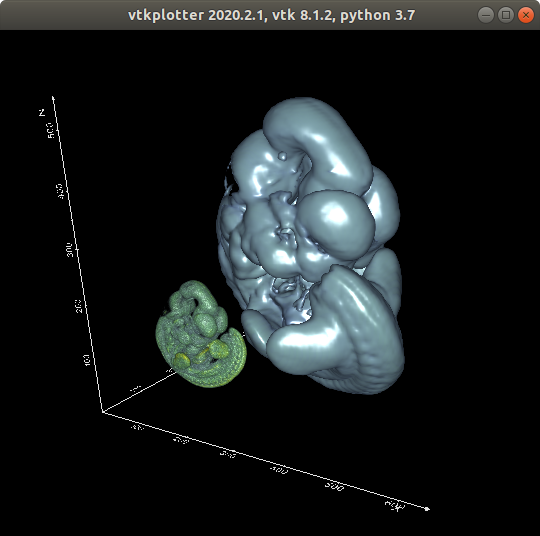
thanks for your interest, can you reproduce this minimal example:
from vtkplotter import *

vol1 = load(datadir+'embryo.tif').scale(0.05)
vol2 = load(datadir+'embryo.slc')

show(vol1, vol2, bg='black', axes=1)
 marcomusy
on 11 Mar 2020
marcomusy
on 11 Mar 2020
Thanks for the quick answer,
I do see volumes but can not rotate or move anything, the window just close.
Best,
cyrenaique
on 11 Mar 2020
Is is only related to volumes or it's the same with meshes?
from vtkplotter import *

vol1 = load(datadir+'embryo.tif').scale(0.05)
sph = Sphere()

show(vol1, sph)
Or, can you run this?
https://lorensen.github.io/VTKExamples/site/Python/GeometricObjects/Cone/
marcomusy
on 11 Mar 2020
the vtk runs and works well, trying to find embryo.tif now...
cyrenaique
on 11 Mar 2020
ok I didn't install the examples, doing it now
cyrenaique
on 11 Mar 2020
doesn' work with examples, same behaviour, the window closed as soon as I try to interact with it
cyrenaique
on 11 Mar 2020
Sorry, I can't help u, I don't have any log or debug info, running on dell laptop, python 3.7 ,nvidia gtx1050 +intel gpu, vtk visualisation works and interact well, but show() renders but no interaction with mouse, keyboard ok for what I succeeded to test
cyrenaique
on 11 Mar 2020
OK, thanks for reporting this, I'll give it a try on a windows system to see if i can reproduce the issue!
marcomusy
on 11 Mar 2020
Which VTK version are you using?
 RubendeBruin
on 11 Mar 2020
RubendeBruin
on 11 Mar 2020
...also, what happens if you add:
```python.
Allow to interact with scene during interactor.Start() execution
settings.allowInteraction = False
```
marcomusy
on 12 Mar 2020
I can not reproduce the issue on Windows 10 with vtk 8.2.0
Some of the keys presses do cause the renderer to crash, but that is a known problem of vtk and has been solved on the master branch of vtk.
RubendeBruin
on 12 Mar 2020
settings.allowInteraction = False, doesn't change anything, I use vtk 8.1.0, I will try to update to vtk 8.2
cyrenaique
on 12 Mar 2020
I have vtk 8.1.2 actually
cyrenaique
on 12 Mar 2020
is it correct ?
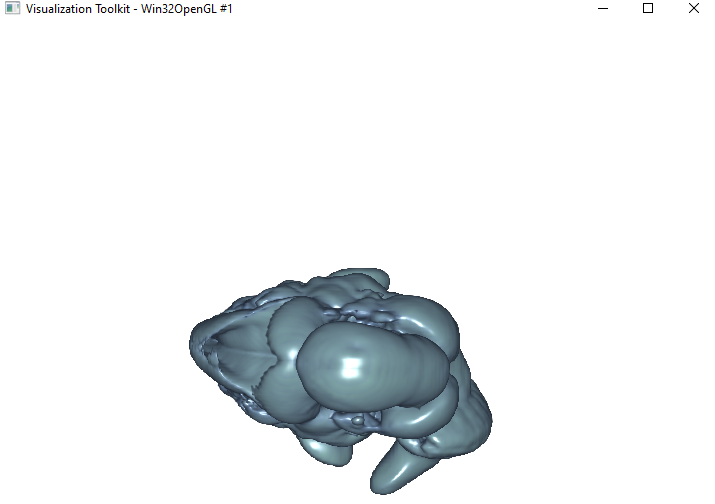
win32OpenGL?
cyrenaique
on 12 Mar 2020
Also, in Scripts I have vtkplotter not vtkplotter.exe when I modify the name and run it:
This version of Anaconda3\Scripts\vtkplotter.exe is not compatible with the version of Windows you're running.
Compatibily mode doesn' change anything.
version installed : Successfully installed vtkplotter-2020.2.1
strange...
cyrenaique
on 12 Mar 2020
On windows it looks like that the window title is ignored..
you should not change vtkplotter to vtkplotter.exe because the file is a python script, you should rather run it with command
python vtkplotter
Does this work for you?
import vtk
from vtkplotter import load, datadir

vol = load(datadir+'embryo.tif')

ren = vtk.vtkRenderer()
ren.AddActor(vol)

renWin = vtk.vtkRenderWindow()
renWin.AddRenderer(ren)

iren = vtk.vtkRenderWindowInteractor()
iren.SetRenderWindow(renWin)
iren.Initialize()
iren.Start()
This one works well, my bad for vtkplotter, vtkplotter is working well also. only problem with show....
cyrenaique
on 12 Mar 2020
OK. Next step:
from vtkplotter import load, datadir, Plotter

vol = load(datadir+'embryo.tif')

vp = Plotter()

ren = vp.renderer
iren = vp.interactor

ren.AddActor(vol)

iren.Initialize()
iren.Start()
this one crash
cyrenaique
on 12 Mar 2020
show(datadir+'embryo.tif'), this also crash
cyrenaique
on 12 Mar 2020
OK, but does it render an image? Any crashing message?
Next:
import vtk
from vtkplotter import load, datadir, Plotter, settings

settings.allowInteraction=False # try both

vol = load(datadir+'embryo.tif')

vp = Plotter()

ren = vp.renderer
iren = vp.interactor
renWin = vp.window

ren.AddActor(vol)

iren = vtk.vtkRenderWindowInteractor()
iren.SetRenderWindow(renWin)
iren.Initialize()
iren.Start()
they all render images, no message, and this last one works (rendering, interact). when I say crash its for interaction
cyrenaique
on 12 Mar 2020
True and False are working
cyrenaique
on 12 Mar 2020
next:
import vtk
from vtkplotter import load, datadir, Plotter, settings, Sphere

settings.allowInteraction=False

sph = Sphere().lw(0.1)

vp = Plotter()

ren = vp.renderer
ren.AddActor(sph)

iren = vtk.vtkRenderWindowInteractor()
iren.SetRenderWindow(vp.window)

iren.AddObserver("LeftButtonPressEvent", vp._mouseleft)
iren.AddObserver("RightButtonPressEvent", vp._mouseright)
iren.AddObserver("MiddleButtonPressEvent", vp._mousemiddle)
iren.AddObserver("KeyPressEvent", vp._keypress)

vsty = vtk.vtkInteractorStyleTrackballCamera()
iren.SetInteractorStyle(vsty)
iren.Initialize()
iren.Start()
try interact, press h
marcomusy
on 12 Mar 2020
works, h gives the help
cyrenaique
on 12 Mar 2020
STOP!! import vtk
from vtkplotter import load, datadir, Plotter, settings, Sphere,show
settings.allowInteraction=False
sph = Sphere().lw(0.1)
show(sph)
this works....
cyrenaique
on 12 Mar 2020
..and the Volume can also be visualized and interacted with?
marcomusy
on 12 Mar 2020
Yes, but any datadir volume crash...:
from vtkplotter import load, datadir, settings, Sphere,show
settings.allowInteraction=True
vol1 = load(datadir+'embryo.tif').scale(0.05)
sph = Sphere().lw(0.1)
show(vol1)
crash, sphere is working well
cyrenaique
on 12 Mar 2020
True or False doesn't change anything
cyrenaique
on 12 Mar 2020
Ok, this points to a gpu problem, the show() seems unrelated.
Try
from vtkplotter import datadir, settings, Sphere, Volume, show
from vtkplotter.vtkio import loadImageData

settings.allowInteraction=True

img = loadImageData(datadir+'embryo.tif') # loads a vtkImageData obj

# mapper types are: gpu, opengl_gpu, smart, fixed, tetra, unstr
vol = Volume(img, mapperType='smart')

show(vol)
crash, I am not sure which gpu card I am using with python, with vtk sure it uses the nvidia geforce, maybe show uses the intel for any reasons
cyrenaique
on 12 Mar 2020
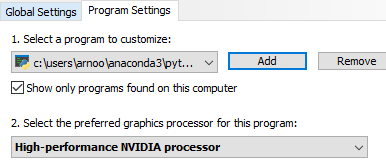
I was right, I force python to use geforce and it works now... so sorry for these troubles:
cyrenaique
on 12 Mar 2020
And huge thanks to you for your help, hope it can help others
cyrenaique
on 12 Mar 2020
Fixed in less than 24h :)
23h33minutes
cyrenaique
on 12 Mar 2020
Indeed it should not crash with 'smart' mapper type... anyway,
thanks for your patience in testing and debugging the issue
marcomusy
on 12 Mar 2020
well, that was in my interest :)
cyrenaique
on 12 Mar 2020
Related issues
 MarkusRosen
·
3Comments
MarkusRosen
·
3Comments
 Jesse0818
·
4Comments
Jesse0818
·
4Comments
 vianamp
·
3Comments
RubendeBruin
·
3Comments
vianamp
·
3Comments
RubendeBruin
·
3Comments
 CMengich
·
5Comments
CMengich
·
5Comments