Vedo: Cannot show Volume on Plotter in qtwindow
I am following the code given in the examples but i could not get the volume view in qtwindow. I get a blank screen when i try to show Volume derived from ndarray but works fine on predefined shapes.
import sys
from PyQt5 import Qt
import numpy as np
from vtk.qt.QVTKRenderWindowInteractor import QVTKRenderWindowInteractor
from vtkplotter import Plotter, Volume, Cube, Sphere

class MainWindow(Qt.QMainWindow):
    def __init__(self, parent=None):

        Qt.QMainWindow.__init__(self, parent)
        self.frame = Qt.QFrame()
        self.vl = Qt.QVBoxLayout()
        self.vtkWidget = QVTKRenderWindowInteractor(self.frame)
        self.vl.addWidget(self.vtkWidget)

        vp = Plotter(qtWidget=self.vtkWidget, bg='black')

        c = Cube(side=30)
        s = Sphere(r=15)
        X, Y, Z = np.mgrid[:30, :30, :30]
        scalar_field = ((X-15)**2 + (Y-15)**2 + (Z-15)**2)/225
        vol = Volume(scalar_field)
        vol.alpha([0, 0, 0.4, 0.9, 0.9])

        # vp.show(c)
        # vp.show(s)
        vp.show(vol)

        self.frame.setLayout(self.vl)
        self.setCentralWidget(self.frame)

        self.show()    # <--- show the Qt Window

    def onClose(self):
        print("Disable the interactor before closing to prevent it from trying to act on a already deleted items")
        self.vtkWidget.close()


if __name__ == "__main__":
    app = Qt.QApplication(sys.argv)
    window = MainWindow()
    app.aboutToQuit.connect(window.onClose) # <-- connect the onClose event
    app.exec_()
The same Volume can be rendered without Plotter
import numpy as np
from vtkplotter import Volume

def main():
    X, Y, Z = np.mgrid[:30, :30, :30]
    scalar_field = ((X-15)**2 + (Y-15)**2 + (Z-15)**2)/225
    vol = Volume(scalar_field)
    vol.alpha([0, 0, 0.4, 0.9, 0.9])
    vol.show(bg="black")

if __name__ == '__main__':
    main()
 pasha009
All 8 comments
Uhmm that is strange because your first script works perfectly for me:
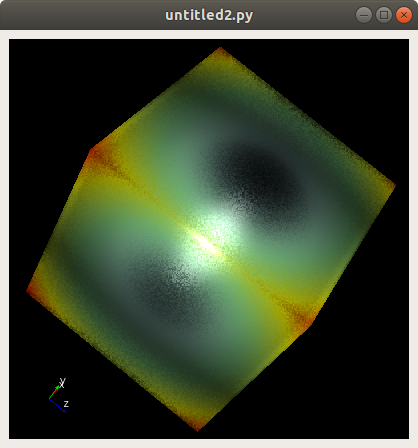
what python/vtk/vtkplotter version are you using?
 marcomusy
on 3 Dec 2019
marcomusy
on 3 Dec 2019
vtkplotter 2019.4.11 | vtk 8.1.2 | python 3.6
and pyqt version = 5.13.1
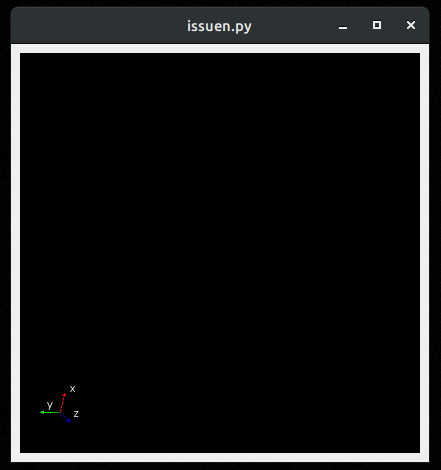
pasha009
on 3 Dec 2019
Same vtk and vtkplotter here, so I guess it's due to pyqt..
I've got python 3.7 from the latest anaconda which apparently comes with PYQT_VERSION_STR 5.9.2
What if you try:
        # vp.show(c)
        # vp.show(s)
        vp.show(vol, interactive=0)
        vp.interactor.Render()
        vp.interactor.Start()
No, still a blank view. I also downgraded to pyqt 5.9.2 and python 3.7 but couldn't get the view.
pasha009
on 3 Dec 2019
Can you run the following:
(adapetd from here)
import sys
import vtk
from PyQt5 import Qt
from vtk.qt.QVTKRenderWindowInteractor import QVTKRenderWindowInteractor

from vtkplotter import load, datadir
vol = load(datadir+'embryo.tif')

class MainWindow(Qt.QMainWindow):

    def __init__(self, parent=None):
        Qt.QMainWindow.__init__(self, parent)

        self.frame = Qt.QFrame()

        self.vl = Qt.QVBoxLayout()
        self.vtkWidget = QVTKRenderWindowInteractor(self.frame)
        self.vl.addWidget(self.vtkWidget)

        self.ren = vtk.vtkRenderer()
        self.vtkWidget.GetRenderWindow().AddRenderer(self.ren)
        self.iren = self.vtkWidget.GetRenderWindow().GetInteractor()

        # Create source
        source = vtk.vtkSphereSource()
        source.SetCenter(0, 0, 0)
        source.SetRadius(1000.0)

        # Create a mapper
        mapper = vtk.vtkPolyDataMapper()
        mapper.SetInputConnection(source.GetOutputPort())

        # Create an actor
        actor = vtk.vtkActor()
        actor.SetMapper(mapper)

        self.ren.AddActor(actor)
        self.ren.AddVolume(vol)

        self.ren.ResetCamera()

        self.frame.setLayout(self.vl)
        self.setCentralWidget(self.frame)

        self.show()
        self.iren.Initialize()


if __name__ == "__main__":

    app = Qt.QApplication(sys.argv)

    window = MainWindow()

    sys.exit(app.exec_())
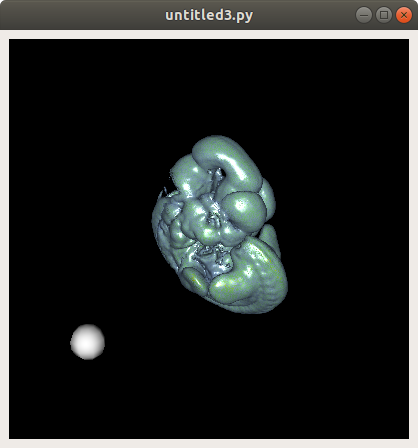
marcomusy
on 3 Dec 2019
Weird i cannot see the embryo when i run the above code. The ball comes fine.
pasha009
on 3 Dec 2019
This workaround is functioning for me. But no idea why.
Just added
import vtk.qt
vtk.qt.QVTKRWIBase = "QGLWidget"
before any vtk imports
pasha009
on 3 Dec 2019
Thanks @pasha009 ! I will add a comment in the example.
marcomusy
on 4 Dec 2019
Related issues
 FedeClaudi
·
6Comments
FedeClaudi
·
6Comments
 vigji
·
3Comments
vigji
·
3Comments
 mahendra-ramajayam
·
3Comments
mahendra-ramajayam
·
3Comments
 MarkusRosen
·
5Comments
MarkusRosen
·
5Comments
 Yoorthiziri
·
7Comments
Yoorthiziri
·
7Comments