Vanilla-lazyload: Endless loop, canceled images
Describe the bug
On one of my pages it happens that the lazy load script causes endless requests of canceled images. This happens only to images which are out of viewport.
To Reproduce
Unluckily i cant provide a lot of informations, the only difference to other pages (where it is working pefectly) is im using a bigger amount of images(~60) and multiple Magnific Popup (https://dimsemenov.com/plugins/magnific-popup/) Gallery's (but i disabled that plugin and the problem still occurs). Disabling lazyload is fixing the problem, aswell using a lazyload version below 17.0.0.
Code looks like that:
<div class="popup-gallery">
    <h2>...</h2>
    <a href="'xx.jpg" title="xx"><img alt="xx" class="lazyfast" data-src="'xx-x150.jpg" width="150" height="113"></a>
    <a href="'xx.jpg" title="xx"><img alt="xx" class="lazyfast" data-src="'xx-x150.jpg" width="150" height="110"></a>
</div>

var lazyLoadInstance2 = new LazyLoad({
    elements_selector: "img.lazyfast",
});
But i try to answer to specific questions.
LazyLoad version
This problem only happens in versions starting with 17.x.x, i tried 17.3.0, 17.2.0, 17.1.0 (not working), but working on all versions below like 16.1.0, 16.0.0 perfectly.
Desktop (please complete the following information):
- OS: [Windows]
- Browser [Chrome] (probably working on Firefox, need to do further tests tomorrow)
- Version [Version 87.0.4280.88 64bit]
Screenshots
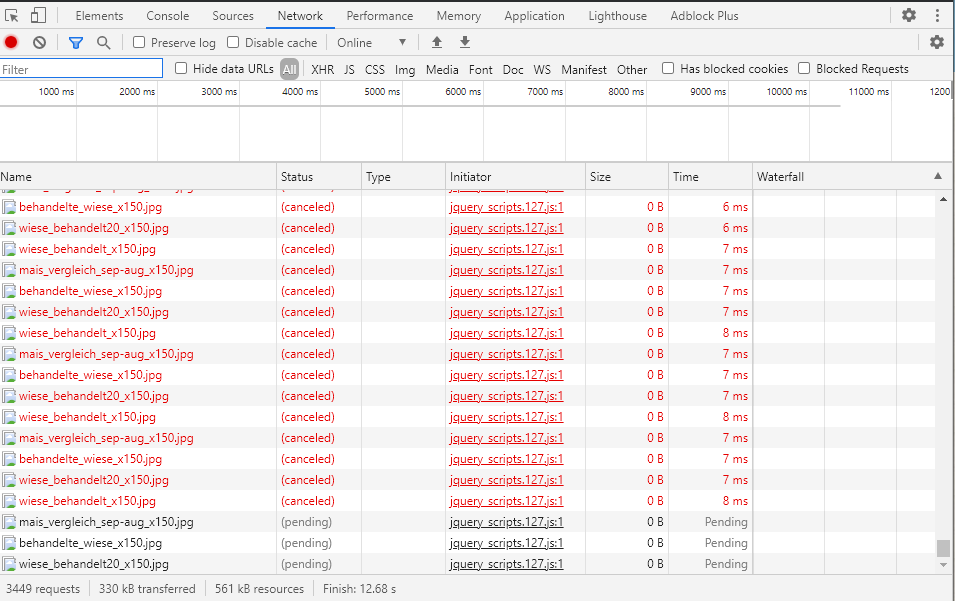
I am lately running a Service worker, but still if disabled the error occurs. On Firefox maybe the service worker fixes the problem(testing tomorrow).
 Deam94
All 10 comments
Hey @Deam94,
the cancelled requests are the result of a feature recently introduced to make lazyload save bandwidth for users who scroll down fast, see the README file for more information.
I can hardly help you solve your specific issue since you're not giving me detailed information on your implementation, but I can suggest you the following:
Try turning off the feature setting the option cancel_on_exit to false.
This might do the trick.
Please tell me if it did.
I wish I could help you solving the issue in a more proper way and keeping this feature on, but if you want more help you should provide more detailed information.
 verlok
on 10 Dec 2020
verlok
on 10 Dec 2020
Hi Verlok,
thanks for your answer, i dont exactly know how this problem is triggered, else i could try providing a demo including the error (or whichever informations you need). But im trying now to reproduce it, in meantime if your interested i could share a live demo on my site through private message or somthing like this.
If i can use the option inside the initialization like that:
var lazyLoadInstance2 = new LazyLoad({
    elements_selector: "img.lazyfast",
    cancel_onexit: "false"
});
then its not working. The script still causes endless loop of requests.
I have implemented your script simply by hosting on my webspace.
Edit:
It appears, to stop the endless loop if i scroll down until all images are in viewport.
Deam94
on 11 Dec 2020
Hey @Deam94 ,
you're passing the false value as a string, instead of a Boolean.
Try removing the double quotes, so pass false instead of "false".
Let me know if that solved.
verlok
on 11 Dec 2020
And by the way the name of the options is wrong, che correct has one more underscore (my mistake in my previous message).
Final code here:
var lazyLoadInstance2 = new LazyLoad({
    elements_selector: "img.lazyfast",
    cancel_on_exit: false
});
Hi Verlok,
thanks again for your time and answer.
Yes
cancel_on_exit: false
seem to fixed the problem. Great.
I did not understood if this appear to be a problem caused by bad practice, caused by a mix with other scripts or a bug of the script itself. If last one i can try provide further informations to help with it, else im sorry i wasted your time ;D.
Deam94
on 11 Dec 2020
The cancel_on_exit setting triggers a feature to make your users save bandwidth when they scroll fast over the images: if the images exit the viewport and they haven't fully loaded yet, their downloads are cancelled to free some bandwidth for the newly entered images. And in long lists of images browsed on slow connections, this improves the images rendering speed by a lot.
Version 17 is out for a while now and you're the first to report such a bug so I was curious, I've watched the screencast you sent to me privately, and as I see from the network tab the problem seems to be originated by another script (jquery related).
My guess is that some other script is messing with the images coordinates, so there's an enter/exit situation, but it's only a guess, since I can't access the code.
If you are able to reproduce this issue in an environment I can reach and edit, such as codepen or codesandbox, I would love to take a look and point to the problem so we can solve it together.
verlok
on 11 Dec 2020
Is it possible that the instruction that creates a new instance of LazyLoad (that lazyLoadInstance2) is executed inside of a loop or a recurring portion of code? Try to put a console.log instruction there and see how many times it's executed.
verlok
on 11 Dec 2020
No the instance isnt looped in my code i just tested to be sure.
I was able to reproduce the problem and sent the preview private.
Thanks.
Deam94
on 11 Dec 2020
Hey @Deam94,
I’m glad you solved!
If you’re happy with my support, the documentation and the effort I’ve been putting on this project in the latest years, I hope you might want to buy me a coffee to show your appreciation. Or sponsor me, if you're a fan.
Open-source software is great for everyone, but it takes passion and time to grow and evolve.
Thank you for thinking about it.
Have a nice day!
verlok
on 12 Dec 2020
Note to self: check the Codepen @Deam94 sent over via email and fond out the cause of the loop.
verlok
on 13 Dec 2020
Related issues
 ghost
·
8Comments
ghost
·
8Comments
 starfishpatkhoo
·
6Comments
starfishpatkhoo
·
6Comments
 danielLee0721
·
3Comments
danielLee0721
·
3Comments
 wzhscript
·
8Comments
wzhscript
·
8Comments
 broguinn
·
6Comments
broguinn
·
6Comments