Vanilla-lazyload: Cannot read property 'class_loaded' of null
Describe the bug
Error when destroyed and loading was not finished
To Reproduce
Steps to reproduce the behavior:
- Go to here https://output.jsbin.com/nirokam/20;
- Open Chrome DevTools, disable cache, and switch to Slow 3G;
- Refresh page;
- See error in the console tab
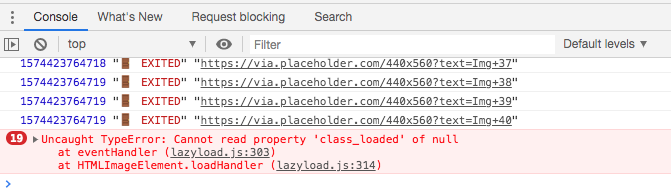
Expected behavior
when destroyed, loading should finish normally
LazyLoad version
Please report which version of LazyLoad you're using.
- Version 12.0.0
Additional context
The error is caused by this line of code , since the lazyload instance is destroyed before some images finish loading.
 wzhscript
All 8 comments
Mybe I can wait until all images are loaded, then call destroy(), like this:
function destroy() {
    if (lazyload._loadingCount === 0) {
        lazyload.destroy();
    }
    else {
        setTimeout(destroy, 100);
    }
}
setTimeout(destroy, 100);
But the _loadingCount is private, it would be perfect to have a public interface to check if some images are still loading.
wzhscript
on 2 Dec 2019
Another solution is to change the destroy method, comment out the following two lines:
{
    destroy: function() {
        if (this._observer) {
            this._elements.forEach(element => {
                this._observer.unobserve(element);
            });
            this._observer = null;
        }
        // this._elements = null;
        // this._settings = null;
    },
}
_elements and _settings should not be unset, since they are referenced in the handler of image load event.
wzhscript
on 2 Dec 2019
Hey @wzhscript,
thank you for opening this and for the ideas.
Can I ask you a question? Why do you need to destroy the LazyLoad instance if the loading is not finished yet? FYI the script already unsets the IntersectionObserver when the loading of all images has finished.
Anyway, the idea of making the _loadingCount property public is very good and I'll think about it.
 verlok
on 24 Feb 2020
verlok
on 24 Feb 2020
Hi @verlok! I think a good use case for destroying LazyLoad instances is SPA with a client-side routing an a quick navigation from one route to another. There is potential situation when images from the first route are not loaded yet and after transition to the second route respective image elements are destroyed but LazyLoad instances are not.
 eugene-stativka
on 24 Feb 2020
eugene-stativka
on 24 Feb 2020
You're 100% right. I'll see what I can do to solve this problem. Thanks.
verlok
on 24 Feb 2020
Released 12.5.0 with the public loadingCount property.
I also implemented a delayed destroy in the demos/destroy.html demo, like the following:
destroyButton.addEventListener("click", () => {
    destroyButton.disabled = true;
    destroyButton.innerText = "Waiting...";
    const destroyInterval = setInterval(() => {
        if (ll.loadingCount > 0) return; // EXIT CONDITION
        clearInterval(destroyInterval);
        ll.destroy();
        ll = null;
        destroyButton.innerText = "Destroyed";
    }, 250);
});
Seems like the issue is still there for SPAs. Uncaught TypeError: Cannot read property 'class_loaded' of null (this line). The same problem will occur in all places where instance.someProperty is used because all properties are nullable. Either we should check every property before using it OR we should find another solution. Maybe something like setting isDestroyed flag.
eugene-stativka
on 25 Feb 2020
@eugene-stativka
@verlok
Maybe something like setting isDestroyed flag.
I have SPA and the situation seems to be exactly what @eugene-stativka has described
Here you can test https://englishextra.github.io/app/
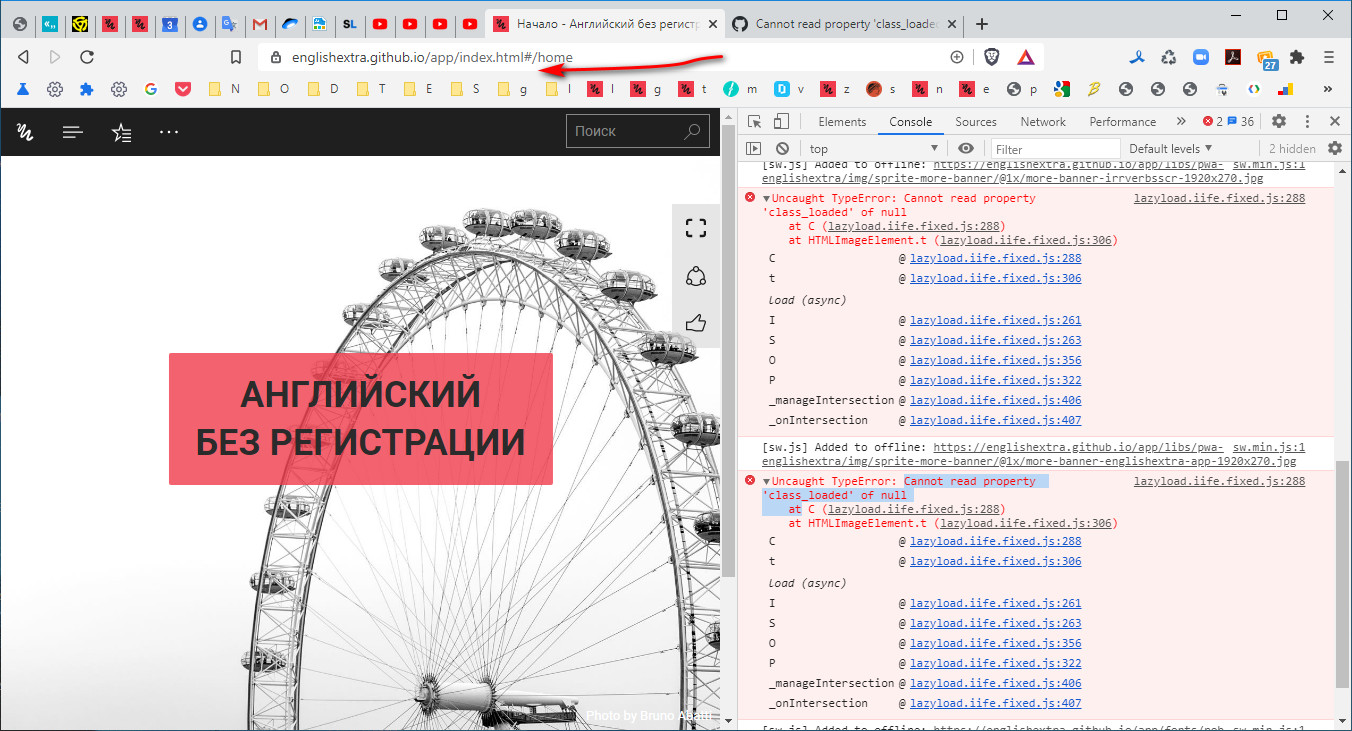
The error appears right after changing the hash route when the html contents with images is swallowed by a newly AJAX inserted html content.
In this case when navigating from here https://englishextra.github.io/app/index.html#/contents to here https://englishextra.github.io/app/index.html#/home
But not always.
Also I suspect service worker that creates offline cache for PWA may interfere somehow in this process
SPA and assigning addEventListeners has always been a nightmare, that's why you may notice
<img
src="./libs/pwa-englishextra/img/sprite-contents-banner/@1x/contents-banner-transcripts-640x336.jpg"
data-src="./libs/pwa-englishextra/img/sprite-contents-banner/@1x/contents-banner-transcripts-640x336.jpg"
class="data-src-img data-src-img--is-binded is-active loaded"
alt="Транскрипты - English Vocabulary for Business" data-was-processed="true">
where
loaded and data-was-processed come in with lazyload lib,
and
data-src-img--is-binded is my service class for the script
    /*!
     * manageDataSrcImgAll
     * @see {@link https://github.com/verlok/lazyload}
     */
    root.dataSrcImgClass = "data-src-img";
    root.lazyLoadDataSrcImgInstance = null;
    root.manageDataSrcImgAll = function (callback) {
        var cb = function () {
            return callback && "function" === typeof callback && callback();
        };
        var isActiveClass = "is-active";
        var dataSrcImgIsBindedClass = "data-src-img--is-binded";
        var images = getByClass(document, dataSrcImgClass) || "";
        var i = images.length;
        while (i--) {
            if (!hasClass(images[i], dataSrcImgIsBindedClass)) {
                addClass(images[i], dataSrcImgIsBindedClass);
                addClass(images[i], isActiveClass);
                addListener(images[i], "load", cb);
            }
        }
        i = null;
        if (root.LazyLoad) {
            if (root.lazyLoadDataSrcImgInstance) {
                root.lazyLoadDataSrcImgInstance.destroy();
            }
            root.lazyLoadDataSrcImgInstance = new LazyLoad({
                    elements_selector: "." + dataSrcImgClass
                });
        }
    };
The above init trick may not completely fix the error of this issue which appear in this use case only sometimes
It happens
lazyload.iife.fixed.js:288 Uncaught TypeError: Cannot read property 'class_loaded' of null
    at C (lazyload.iife.fixed.js:288)
    at HTMLImageElement.t (lazyload.iife.fixed.js:306)
When I clean Application storage in Devtools, and it throws the above error on once until next manual application storage cleaning, like here:

or updating offline caching service worker with new version
var cacheName = "englishextra.github.io-offline-v1548145099";
becomes
var cacheName = "englishextra.github.io-offline-v1548145100";
============
CONCLUSION
When SPAs came out on the scene, two major problems came up:
- Multiple assigning eventListeners to window/global object and to target elements like IFRAME or IMG, etc. - the library should set and check flags (classes or data attrubutes) - the library has it, but I guess something needs to look into.
if (!hasClass(images[i], dataSrcImgIsBindedClass)) {
- undestroyed previous instances of the library - the library should provide destroy method (which it has, but I haven't dug into its logic)
if (root.lazyLoadDataSrcImgInstance) {
                root.lazyLoadDataSrcImgInstance.destroy();
            }
            root.lazyLoadDataSrcImgInstance = new LazyLoad({
Anyway, the idea of making the _loadingCount property public is very good and I'll think about it.
I am afraid I can't agree here. It's none of the developer's business.
 englishextra
on 3 Oct 2020
englishextra
on 3 Oct 2020
Related issues
 Cyriltra
·
4Comments
Cyriltra
·
4Comments
 sendmenas
·
6Comments
sendmenas
·
6Comments
 starfishpatkhoo
·
6Comments
starfishpatkhoo
·
6Comments
 givsta
·
7Comments
givsta
·
7Comments
 tristanbes
·
3Comments
tristanbes
·
3Comments
Most helpful comment
Hi @verlok! I think a good use case for destroying LazyLoad instances is SPA with a client-side routing an a quick navigation from one route to another. There is potential situation when images from the first route are not loaded yet and after transition to the second route respective image elements are destroyed but LazyLoad instances are not.