Vamiga: Video Options Not Saved & Some Compatibility Tests
Awesome emulator, and the best video output / quality ever, on my machine.
Unfortunately video options are not saved (Preferences / Configure Virtual Machine / Video), and must be
configured again each time the emulator starts or a save state is loaded.
Some quick compatibility results:
E-Motion: working great
Gods: working great
IK+: plays at hyper speed (v-sync?)
Nitro: working great
Onslaught: working great
Plotting: working great
Rick Dangerous: working great
Rod Land: working great
Shufflepuck Cafe: working great
Speedball II: working great
Super Cars II: working great
Stunt Car Racer: working great
Switchblade: plays at hyper speed (v-sync?)
SWIV: plays at hyper speed (v-sync?)
The Amazing Spider-Man: working great
The Killing Game Show: working great
Turrican II: working great (some corrupted graphics at the title-screen, that quickly disappear)
X-Out: working great
Xenon 2: working great
Once again congrats for the great work!
JP
 joe-pillow
All 6 comments
for the cases of "plays at hyper speed" try to disable the "warp on loading" (or something like that) in the config
 emoon
on 20 Oct 2020
emoon
on 20 Oct 2020
This is the relevant option to get rid of the hyper-speed issue:
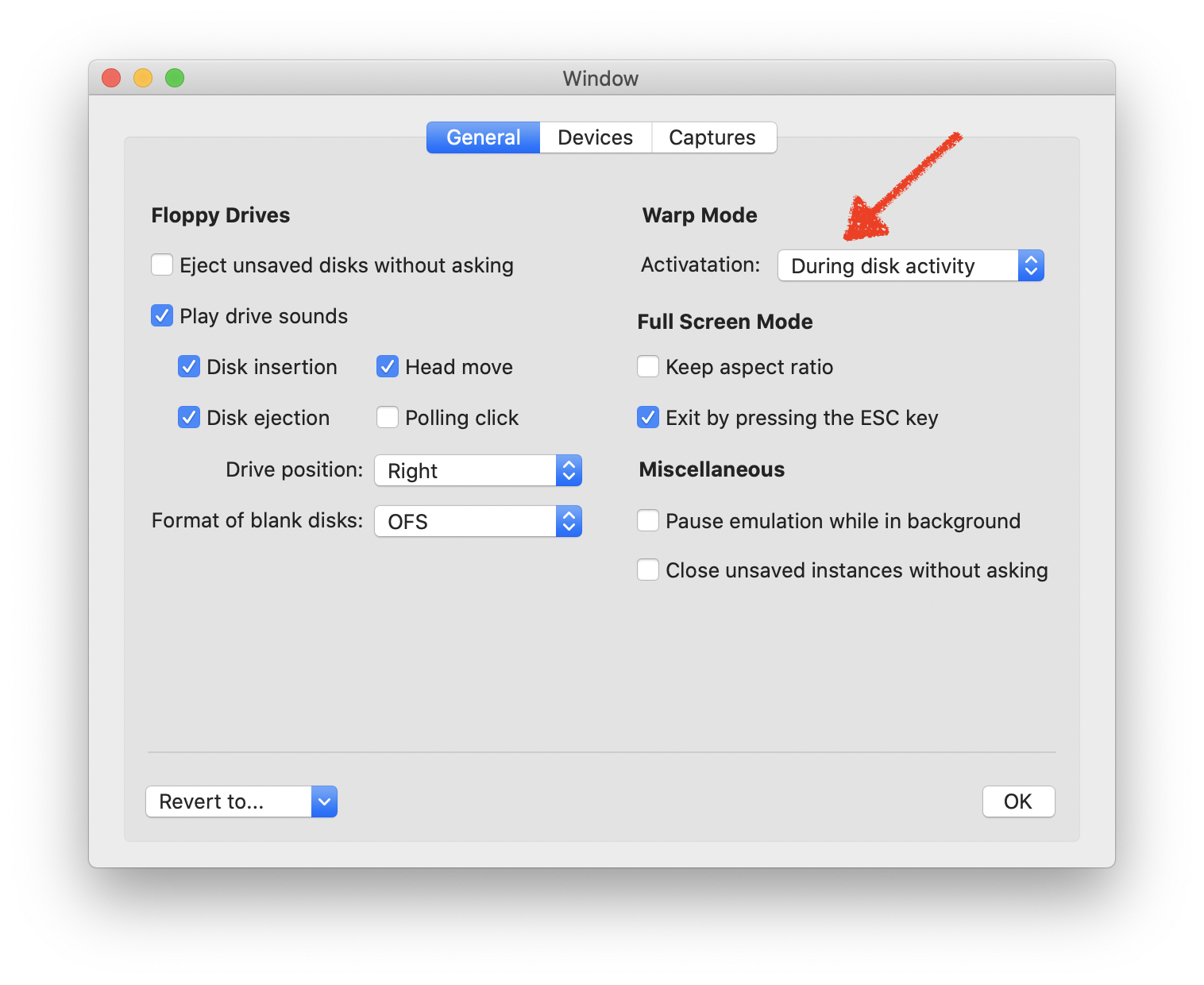
In auto warp mode, the emulator runs at warp speed as long as the disk drive motor is on. Some games don't stop the motor which causes the effect you've experienced. The fastest and easiest way to cope with it is to simply click on the hourglass button in the status bar:

I'll look into the option saving issue...
 dirkwhoffmann
on 20 Oct 2020
dirkwhoffmann
on 20 Oct 2020
The video configuration saving issue will be fixed in the next release.
There was a bug in saveVideoUserDefaults() which caused the method to stop processing:
Configuration.887::saveVideoUserDefaults()
2020-10-20 18:49:05.757703+0200 vAmiga[72180:11037128] [User Defaults] Attempt to set a non-property-list object __C.Palette as an NSUserDefaults/CFPreferences value for key VAMIGA_VID_Palette
The reason was that I tried to save an enum type into the user default storage and Swift is very strict about that (too strict in my opinion). The fix is easy though:
Old code:
func saveVideoUserDefaults() {
    let defaults = UserDefaults.standard
    defaults.set(palette, forKey: Keys.palette)
    ...
New code:
func saveVideoUserDefaults() {
    let defaults = UserDefaults.standard
    defaults.set(palette.rawValue, forKey: Keys.palette)
    ...
Side note: When a snapshot is loaded, the video settings are overwritten. This is intended behavior, because the video settings are part of a snapshot.
dirkwhoffmann
on 20 Oct 2020
Thank you for pointing out the warp mode and hourglass option!
Confirming all titles mentioned in my original post are now behaving normally (and also all, hem, cracktos, are playing at normal speed).
Thanks also for looking into the video configuration saving issue!
On a side note, may I ask if you're planning to have vAmiga as an OpenEmu core plugin as well? If I remember correctly VirtualC64 is available that way?
Cheers
JP
joe-pillow
on 22 Oct 2020
On a side note, may I ask if you're planning to have vAmiga as an OpenEmu core plugin as well? If I remember correctly VirtualC64 is available that way?
Yes, there is a VirtualC64 plugin for OpenEmu, but I wasn't involved. I always wanted to look into the OpenEmu project (which I think is a cool project) in more detail, but I never found the time to do so. If they decide to integrate vAmiga in form of a plugin, too, I would be happy about it.
dirkwhoffmann
on 22 Oct 2020
Fixed in v0.9.14
dirkwhoffmann
on 30 Oct 2020
Related issues
dirkwhoffmann
·
3Comments
dirkwhoffmann
·
4Comments
dirkwhoffmann
·
3Comments
dirkwhoffmann
·
3Comments
dirkwhoffmann
·
3Comments
Most helpful comment
for the cases of "plays at hyper speed" try to disable the "warp on loading" (or something like that) in the config