I am unsure about the following:
Retaining and releasing the mouse pointer
What is the best way to share the mouse pointer between the Mac and vAmiga? Right now, Cmd-i does the trick, but this causes issues. Firstly, this combination is unusual. Secondly, there is no way to get the mouse back if the Command keys are used in direct mapping mode.
ADF files and 5.25" drives
How should vAmiga react if the user tries to insert an ADF file into a 5.25" drive? One possibility would be to show an alert box:
"The capacity of df1 is too low. Only the first 40 cylinders will be converted." [OK, Cancel]
Or:
"df1 is a single-density drive. Only the first 40 cylinders will be converted." [OK, Cancel]
Does anybody know whether there is a special ADF format for 5.25" drives or 3.5" HD drives? Up to now, I've only seen standard ADF files representing 3.5" DD disks.
And finally, a really stupid question: Does anybody know how to type ":" in SAE or FsUAE on a German keyboard? I want to type "dir df1:" in a CLI window with df1: set to a 5.25" drive. The problem: In SAE, multiple keys result in "ü ö ä" and stuff, but I can't get ':' 🤨. In FsUAE I cannot even select 5.25" drives (at least I didn't find where 😖).
 dirkwhoffmann
All 3 comments
what about releasing the mouse with alt+cmd (the way fsuae does it)
: is shift+ö on a german mac keyboard in fsuae
the webversion of SAE does not seem to accept it.
 mithrendal
on 28 Apr 2019
mithrendal
on 28 Apr 2019
I did spend some time thinking about how to retain and release the mouse, because it heavily affects user-experience (which is vAmiga all about). The coolest thing would be to have vmWare like behaviour which seamlessly hands over the mouse from Windows to macOS and vice versa. However, this is hardly impossible to achieve, because a) I cannot know where the Amiga mouse is (except with nasty hacks that read sprite 0 coordinates or such stuff) and b) I have no reasonable means to move the mouse to a determined position inside the Amiga.
I therefore plan to offer the following options to the user:
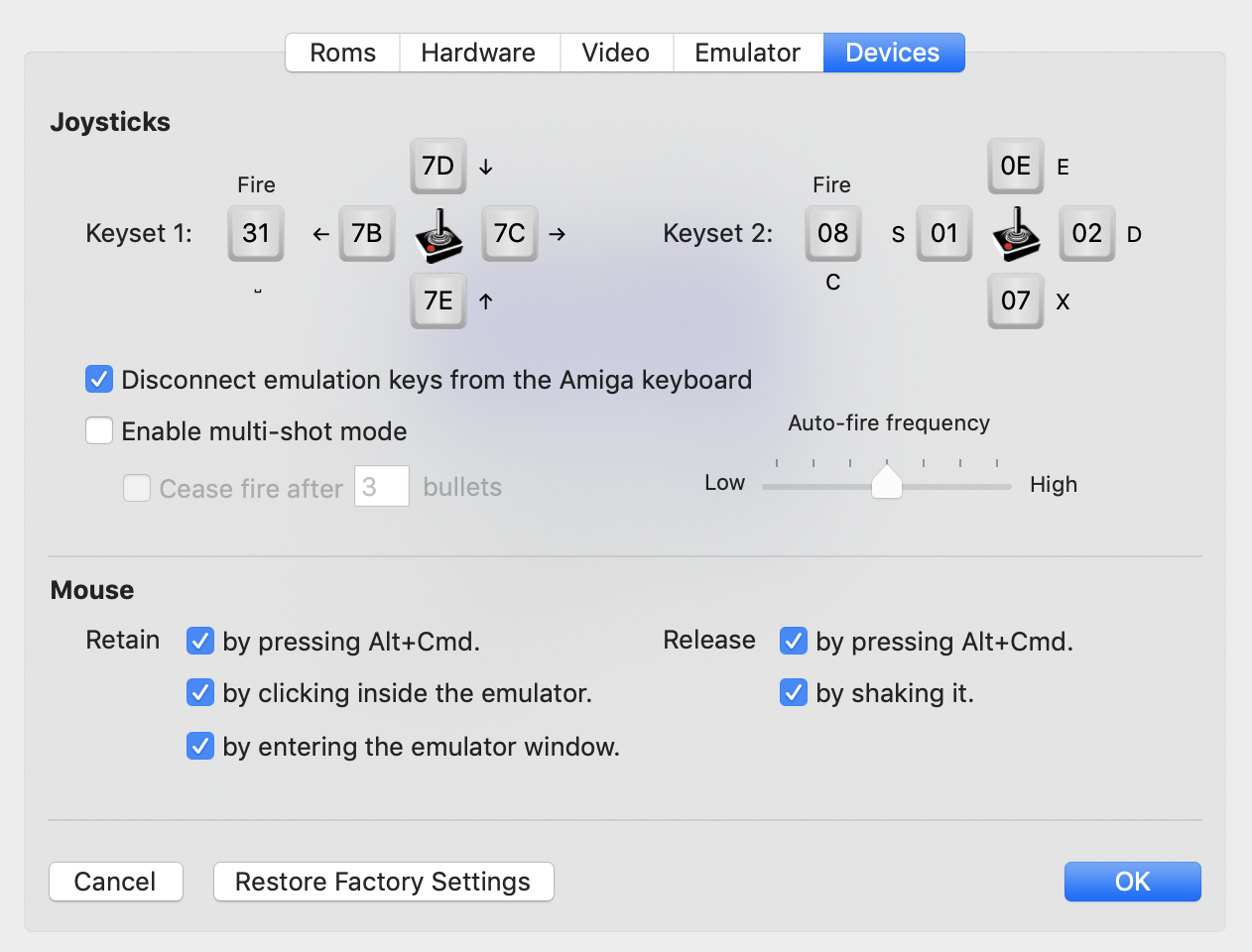
I already experimented a little with shaking detection and it seems to work pretty well. Personally, releasing the mouse this way is my favourite, because it reflects what I already do: Whenever the mouse gets lost, I usually start shaking it like an 🤭.
Unfortunately, it seems to be impossible to have access to Apple's already existing "Find my mouse by shaking it" feature (there is no notification message or such), so I had to implement my own solution (which is not as simple as it might sound in the first place).
dirkwhoffmann
on 1 May 2019
Could somebody try to get a 5.25" drive working in UAE with Kickstart 1.3? Commodore sold the 5.25 A1020 drive in 1985 in the US, so I guess it should be compatible with the old Amigas (Kickstart 1.2 or 1.3). However, it turned out that I am too stupid to get this thing going in UAE. When I configure Df1: as a 5.25" drive (with a disk inserted) and boot the workbench, I don't see an icon for the disk in Df1: . Selecting a 3.5" DD drive instead works flawlessly.
dirkwhoffmann
on 3 May 2019
Related issues
dirkwhoffmann
·
3Comments
dirkwhoffmann
·
3Comments
dirkwhoffmann
·
3Comments
dirkwhoffmann
·
3Comments
 Gianmarco72
·
4Comments
Gianmarco72
·
4Comments
Most helpful comment
I did spend some time thinking about how to retain and release the mouse, because it heavily affects user-experience (which is vAmiga all about). The coolest thing would be to have vmWare like behaviour which seamlessly hands over the mouse from Windows to macOS and vice versa. However, this is hardly impossible to achieve, because a) I cannot know where the Amiga mouse is (except with nasty hacks that read sprite 0 coordinates or such stuff) and b) I have no reasonable means to move the mouse to a determined position inside the Amiga.
I therefore plan to offer the following options to the user:
I already experimented a little with shaking detection and it seems to work pretty well. Personally, releasing the mouse this way is my favourite, because it reflects what I already do: Whenever the mouse gets lost, I usually start shaking it like an 🤭.
Unfortunately, it seems to be impossible to have access to Apple's already existing "Find my mouse by shaking it" feature (there is no notification message or such), so I had to implement my own solution (which is not as simple as it might sound in the first place).