Anyone who played two-player Lemmings back in the day might be wondering/hoping for the same thing as me: is there any chance of having two mice supported?
To clarify: Lemmings (and at least one other great game, the arcade port "Ramparts") would allow another standard mouse to be plugged into the 2nd joystick port. The 2nd mouse wouldn't do anything normally, but in certain games like Lemmings/Ramparts the 2nd player would have their own mouse pointer.
 KenDFish
All 9 comments
I like the idea of having two mice connected (one in each port), but I think it’s difficult. I’ve just run a small test to see if I can get access to „pointing devices“ inside vAmiga's HID GamePad controller. When I add „pointing devices“ to the filter mask, my callback is executed two times on startup. One time for my Magic Mouse and another time for the built-in trackpad. When I plug-in an external USB mouse, the callback gets executed a third time. This is good so far. However, macOS refuses me to „open“ any of those pointing devices. The open call succeeds for all devices such as joysticks or game pads, but fails for mice.
There is a small library called manyMouse. I’ve looked at the code, but the author essentially does the same thing. Development seems to have stopped in 2013, so it might have worked for older macOS revisions, only (I cannot tell for sure, because I didn’t try to compile it on Catalina). Of course, there is always the possibility that I did a simple mistake somewhere.
BTW, there is a nice postmortem talk on Youtube about Lemmings:
https://www.youtube.com/watch?v=ybs5FR-uUNI
Coincidentally, I watched this video just two days ago. There is also a talk about Marble Madness which is even better.
 dirkwhoffmann
on 10 May 2020
dirkwhoffmann
on 10 May 2020
If it helps, I managed to get two mice working in FS-UAE - not sure if there's something in that code that would give any clues.
I used to work just around the corner from DMA Design (creators of Lemmings), in Dundee, Scotland. At a client site one day, I fell into conversation with a lady, and told her where our offices were. She said "oh, my son works near there - a computer games company. Have you heard of a game, I think it's called 'Lemmings'? They needed someone to act out some of the game noises, and he recorded my voice. I don't know if they used it or not".
So yes, I met the woman who was the "Oh no!" Lemmings sound effect.
KenDFish
on 10 May 2020
Was it this one? The guy from the postmortem talk showed that picture...

dirkwhoffmann
on 11 May 2020
That was their old office, close to the centre of Dundee, about 2km from their final office in the new "Technology Park" and where I worked. I never met any of them in person, although I must have walked past a few of them in the car park - if only I could turn back time :)
KenDFish
on 11 May 2020
If it helps, I managed to get two mice working in FS-UAE
Yes, that helps! I can spot "manymouse.c" in the source folder 🧐.
However, macOS refuses me to „open“ any of those pointing devices.
I've found out that special permissions are required on Catalina to open pointing devices. When I grant permission to vAmiga in the system preferences, all pointing devices can be opened. Plugging in a USB mouse now results in three recognized pointing devices: Magic Mouse, internal trackpad, and USB mouse. Now, I need to find out how the external USB mouse can be filtered out of that list.
dirkwhoffmann
on 28 Jun 2020
Here are the details of my three pointing devices:
Transport: USB
VendorID: 1452
ProductID: 832
Manufacturer: Apple Inc.
Product: Apple Internal Keyboard / Trackpad
PrimaryUsage: 2
PrimaryUsagePage: 1
Built-In: 1

Transport: Bluetooth
VendorID: 1452
ProductID: 781
Manufacturer: Apple
Product: Maus
PrimaryUsage: 2
PrimaryUsagePage: 1
Built-In: 1

Transport: USB
VendorID: 1133
ProductID: 49250
Manufacturer: Logitech
Product: USB Laser Mouse
PrimaryUsage: 2
PrimaryUsagePage: 1
Built-In: 0
HID key kIOHIDBuiltInKey can be used to distinguish between external and internal devices.
dirkwhoffmann
on 28 Jun 2020
Although I am able to open pointing devices now, it's still difficult. My plan was to do the following:
- Catch MouseMove events for the first mouse (because catching these events doesn't require extra permissions)
- Catch HID events for the second mouse (user has to grant extra permissions)
The problem is that the second mouse creates both HID and MouseMove events. Now image a two player Lemmings game where player one uses the first mouse and player two the second. Whereas everything works fine for player 1, player 2 would control player 1 as well.
Maybe I can catch mouse events with a CGEventTap as I did for the command keys... 🤔
dirkwhoffmann
on 28 Jun 2020
v0.9.8.3 comes with experimental support for a second mouse.
The good: It works (even without extra permissions) 😃
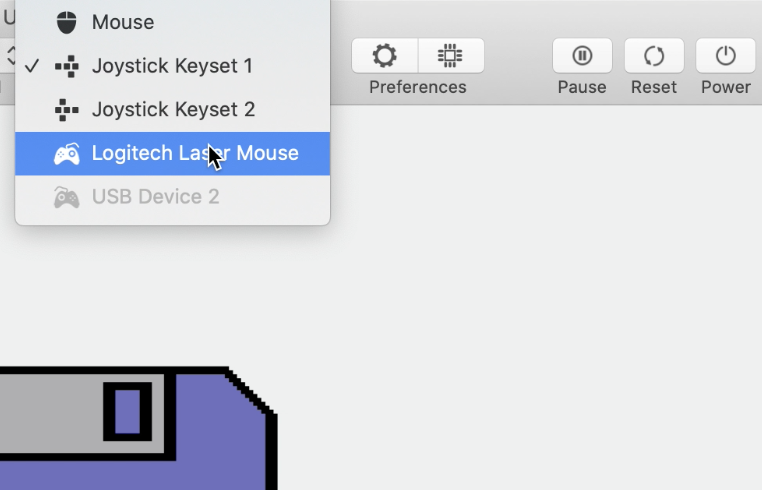
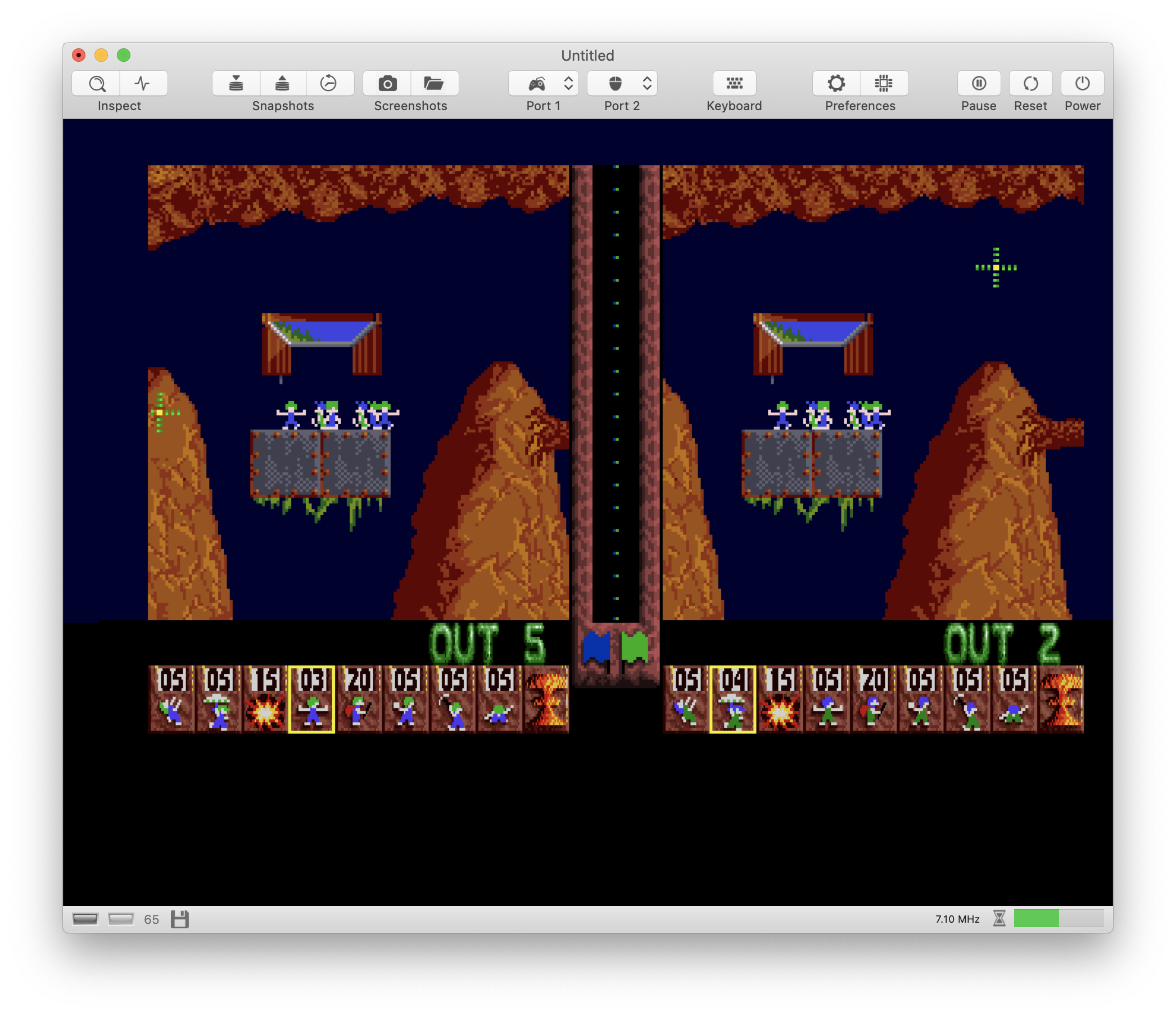
The bad: It might not work with all external mice and it might break with later macOS revisions 🙄
To make a long story short: The current implementation is a hack, because it reads a field called deviceID which is part of any Cocoa event. On my machine, the Magic Mouse and the trackpad return a very large number in this field whereas my external mouse returns 0 (simple Logitech two-button mouse with a scroll wheel). By reading this field, I can filter mouse events and forward them to the correct receiver.
The ugly: There is no clean solution to the problem, because macOS hasn't been designed to support more than one mouse. One approach to work around the obstacles is to use the HID API which allows us to talk directly to the USB devices (in theory). However, this approach, which is taken by ManyMouse, has several drawbacks: It requires the user to grant extra permission to the app, the API ignores the mouse speed settings in System Preferences, and it's difficult to support hot-plugging. The code would be full of ugly work-arounds if we went this way.
dirkwhoffmann
on 29 Jun 2020
Just to confirm: I've tested it with Lemmings on my Macbook Pro (running Mojave 10.14.6), with the trackpad and a generic no-brand USB mouse. It works beautifully; much better than FS-UAE, where the second mouse had different acceleration settings and I could never get to work quite as good as the standard mouse. Thank you!
KenDFish
on 5 Jul 2020
Related issues
dirkwhoffmann
·
3Comments
dirkwhoffmann
·
5Comments
dirkwhoffmann
·
3Comments
dirkwhoffmann
·
3Comments
dirkwhoffmann
·
3Comments
Most helpful comment
Just to confirm: I've tested it with Lemmings on my Macbook Pro (running Mojave 10.14.6), with the trackpad and a generic no-brand USB mouse. It works beautifully; much better than FS-UAE, where the second mouse had different acceleration settings and I could never get to work quite as good as the standard mouse. Thank you!