Vamiga: Compiling the core to WASM
Hi Dirk,
After getting the Moira testrunner itself working out of the box in a browser this morning without any hicups ... I was so self confident 💪🏾 that I just tried to get the core of vAmiga compiling to WASM. I just like to play around with it and with virtual C64 but if it is not so difficult maybe I can make it run somehow in a browser 😍.
After other minor difficulties I am at a strange point now. I have this problem for the vC64 and vAmiga Core.
The compilers clang, gcc, emcc don't like the log methods of the super.super class. That is strange. In code I see that
Amiga derives from HardwareComponent which drives from AmigaObject
C64 derives from VirtualComponent which derives from VC64Object
Compilers give me this output... do you have a clue what is missing ?
Foundation/AmigaObject.h:78:10: note: candidate function not viable: no known
      conversion from 'Amiga' to 'AmigaObject' for object argument
    void debug(const char *fmt, ...);

Amiga.cpp:274:17: error: cannot initialize object parameter of type
      'AmigaObject' with an expression of type 'Amiga'
                warn("Invalid Chip Ram size: %d\n", value);
                ^~~~
/VC64Object.h:102:10: note: candidate function not viable: no known
      conversion from 'C64' to 'VC64Object' for object argument
    void debug(int level, const char *fmt, ...);
 mithrendal
All 51 comments
Maybe I can make it run somehow in a browser
You are bringing vAmiga to the web 🤤. Great news!!!!
Compilers give me this output... do you have a clue what is missing ?
The compiler messages are strange though. I just tried to compile Amiga.cpp (without linking) from the command line. clang compiles it without issues:
hoff$ g++ -v
Configured with: --prefix=/Applications/Xcode.app/Contents/Developer/usr --with-gxx-include-dir=/Library/Developer/CommandLineTools/SDKs/MacOSX.sdk/usr/include/c++/4.2.1
Apple clang version 11.0.0 (clang-1100.0.33.17)
Target: x86_64-apple-darwin18.7.0
Thread model: posix
InstalledDir: /Applications/Xcode.app/Contents/Developer/Toolchains/XcodeDefault.xctoolchain/usr/bin
hoff$ g++ -IFoundation -I. -IAgnus -ICPU -ICIA -IDenise -IFiles -IDrive -IPaula -IPeripherals -IRTC -IMemory -IComputer/Moira -IExpansion -std=c++17 -c Amiga.cpp
How did you call the compiler? Did you use the -std=c++17option?
BTW, did you install gcc manually? Does it run side by side with clang?
 dirkwhoffmann
on 2 Mar 2020
dirkwhoffmann
on 2 Mar 2020
I found the problem I commented out this line
#include <mach/mach_time.h>
in AmigaUtils.h because that include was unknown in emcc. Now it compiles without the error in g++ and clang. So great !!🤓
Predictably emcc now complains with
Foundation/AmigaUtils.h:15:10: fatal error: 'mach/mach_time.h' file not found
#include <mach/mach_time.h>
^~~~~~~~~~~~~~~~~~
But at least I understand this error now ...
BTW, did you install gcc manually? Does it run side by side with clang?
I don‘t remember that I installed it manually. The OS installation is from 2011 so probably gcc came onto it somewhen... but yes it runs both g++ gcc and clang
mithrendal
on 2 Mar 2020
Now it compiles without the error in g++ and clang.
🥳🥳🥳
I am still curious though. Did you use a built-script? A Makefile? There are so many files that I would have guessed it's difficult to compile the emulator outside an IDE.
The OS installation is from 2011 so probably gcc came onto it somewhen... but yes it runs both g++ gcc and clang
On my macOS installation, gcc and g++ are aliases which map to clang. gcc -v tells you if you the real gcc is invoked.
dirkwhoffmann
on 2 Mar 2020
Oh yes on my machine it is the same, all aliases to clang ...
I am using a makefile but as I learned now that this is not really necessary. Still the makefile is fine. It very simple, and no linking yet (-c option) as I have not yet a main function in the emscripten SDL wrapper.
here it is
OBJECTS = Amiga.o
CC = clang
INCLUDE = -I. -IFoundation -IAgnus -ICPU -ICIA -IDenise -IDrive -IFiles -IPeripherals -IMemory -IPaula -IRTC -IComputer/Moira -IExpansion
WARNINGS = -Wall -Wno-unused-variable
STD = -std=c++17
OPTIMIZE = -flto -O3
CFLAGS = $(INCLUDE) $(WARNINGS) $(STD) $(OPTIMIZE)
.PHONY: all clean
all: $(OBJECTS)
clean:
rm -f *.o
$(OBJECTS): %.o: %.cpp
$(CC) -c $(CFLAGS) $<
Before I can do the wrapper I will have to find replacements for some parts of the code which are unknown for the emcc environment ...
mithrendal
on 2 Mar 2020
as I have not yet a main function
For testing, I suggest to add a simple main function that instantiates an Amiga object and calls run() on it. It'll refuse to start, because there is no Rom, but it'll dump out some debug messages. Once emcc can link it, the debug messages should come out in Chrome's debug console. Once that works, a Rom needs to be added somehow. The emulator would then start generation texture data that had to be displayed in the browser window. I would really be surprises if that worked, but it would be super exciting 🤤.
dirkwhoffmann
on 2 Mar 2020
first I will try the C64 after that the vAmiga.
In the C64 Core emcc reported a problem in C64/Drive/Disk.h line 171
I outcommented
typedef struct {
size_t begin;
size_t end;
std::string msg;
} TrackInfoError;
emcc complained about it as an anonymous member, and it is right I think because I only saw the typedef and there is no member property which uses it. Clang likes it but emcc seems very picky.
After faking all occurences of the mach_time functions emcc now completely compiles the C64 core. 😎
The other part to do is the correct replacement of the each mach_time functions. I found something which is known by the emcc toolchain. I plan to replace them as follows (I hope it is accurate enough).
//#include <mach/mach.h>
//#include <mach/mach_time.h>
#include <chrono>
//uint64_t now =mach_absolute_time();
uint64_t now = std::chrono::high_resolution_clock::now();
//mach_wait_until(kernelTargetTime - kernelEarlyWakeup);
std::this_thread::sleep_until (kernelTargetTime - kernelEarlyWakeup);
and so on ...
I outcommented ..
Good catch. This must be some old code that is no longer used. Don't remember what it was supposed to do. I've just removed the declaration in the code on the main branch.
I found something which is known by the emcc toolchain.
Very cool. I never looked at std::chrono 😎
Reading the specs now...
https://en.cppreference.com/w/cpp/chrono/high_resolution_clock
"The high_resolution_clock is not implemented consistently across different standard library implementations, and its use should be avoided."
Why do they offer it when it shouldn't be used 🤨. Anyways, aren't forbidden fruits the most tasty ones? Hence, yes, go for it!
Oh wait... 🤭
" It is often just an alias for std::chrono::steady_clock or std::chrono::system_clock, but which one it is depends on the library or configuration. When it is a system_clock, it is not monotonic (e.g., the time can go backwards)."
Time moving backwards??? 😲. This might open up an Einstein-Rosen bridge or something. Please be careful with that modded VirtualC64 core!!
dirkwhoffmann
on 3 Mar 2020
int main() {
printf("hello, C64!\n");
C64 *vm = new C64();
//vm->run();
return 0;
}
node a.out.js
hello, C64!
C64: Creating virtual C64[0x17e2a88]
SIDBridge: Setting clock frequency to 985249
ReSID: Setting clock frequency to 985249 cycles per second.
Drive1: Duration a CPU cycle is 10149 1/10 nsec.
Drive2: Duration a CPU cycle is 10149 1/10 nsec.
C64: Resetting virtual C64[0x17e2a88]
C64: Setting PC to FCE2
wasm version of Virtual C64 just said hello to me 😍
So happy that it speaks to me. I don't dare to call run() today. Maybe dangerous 😱? I will call run() on the modded core tomorrow ...
mithrendal
on 5 Mar 2020
wasm version of Virtual C64 just said hello to me
Mithrendal brings VirtualC64 to the Web. Awesome! 🥳
I don't dare to call run() today.
😬 Yes, that would be too bold. BTW, don't forget to put on a protective suit before calling it tomorrow. The emulator might be mad, because you put it inside a browser sandbox and took away the GUI.
Also, you might want to register a callback function as a listener to the emulator. Otherwise it cannot send you the (rude) MSG_ROM_MISSING message. Do you have an idea how a Rom could be loaded in? 🤔 I think it might be difficult because of all those sandboxing and security stuff browsers do. It must work though, because SAE does it, too.
dirkwhoffmann
on 5 Mar 2020
Protective suits are sold out 😵
Anyway I am strong and I am going to call run now.... hang on...
After calling run nothing special happened 👀.
Hmmm...
Also, you might want to register a callback function as a listener to the emulator.
Yes that was a good hint.
I registered me as a fan of VirtualC64 and that I am particulary interested in all about his current state, life, messages and so on...
It seems that it tells me now what is missing 🤗...
node a.out.js
constructing C64 ...
C64: Creating virtual C64[0x17e3698]
SIDBridge: Setting clock frequency to 985249
ReSID: Setting clock frequency to 985249 cycles per second.
Drive1: Duration a CPU cycle is 10149 1/10 nsec.
Drive2: Duration a CPU cycle is 10149 1/10 nsec.
C64: Resetting virtual C64[0x17e3698]
C64: Setting PC to FCE2
adding listener to Virtual C64 message queue ...
incoming message=MSG_PAL, data=0
incoming message=MSG_VC1541_ATTACHED_SOUND, data=1
incoming message=MSG_VC1541_ATTACHED, data=1
incoming message=MSG_VC1541_RED_LED_OFF, data=1
incoming message=MSG_VC1541_MOTOR_OFF, data=1
incoming message=MSG_VC1541_NO_DISK, data=1
incoming message=MSG_DISK_SAVED, data=1
incoming message=MSG_PAL, data=0
incoming message=MSG_NO_CARTRIDGE, data=0
incoming message=MSG_CART_SWITCH, data=0
incoming message=MSG_IEC_BUS_IDLE, data=0
incoming message=MSG_VC1541_ATTACHED, data=1
incoming message=MSG_VC1541_RED_LED_OFF, data=1
incoming message=MSG_VC1541_MOTOR_OFF, data=1
incoming message=MSG_VC1541_NO_DISK, data=1
incoming message=MSG_DISK_SAVED, data=1
incoming message=MSG_VC1541_DETACHED, data=2
incoming message=MSG_VC1541_RED_LED_OFF, data=2
incoming message=MSG_VC1541_MOTOR_OFF, data=2
incoming message=MSG_VC1541_NO_DISK, data=2
incoming message=MSG_DISK_SAVED, data=2
incoming message=MSG_VC1530_NO_TAPE, data=0
incoming message=MSG_VC1530_PROGRESS, data=0
incoming message=MSG_WARP_OFF, data=0
incoming message=MSG_ALWAYS_WARP_OFF, data=0
wrapper calls run on c64->run() method
incoming message=MSG_ROM_MISSING, data=0
after run ...
BTW: I think the messages are not rude at all, maybe a bit 🤖 robotesque. Especially I don't understand the data value it is 0, 1 and sometimes 2....
mithrendal
on 6 Mar 2020
Protective suits are sold out
OK, at least wear a protection mask 😷. Oh no, those are all sold out these days, too 🤭.
It seems that it tells me now what is missing
I still can’t believe that VirtualC64 is running in a browser. That's sooo cool 🤤.
The next natural step would be to call
bool C64::loadRom(const char *filename)
But the filename thing will not work in a browser…
With little effort, I could extend the API by a function
bool C64::loadRom(uint8_t *buffer, size_t bufferSize)
that loads a Rom from a buffer. Would that help? 🤔 Can we tell the browser to load a file and provide us with a pointer into memory where the loaded data resides?
Especially I don't understand the data value it is 0, 1 and sometimes 2....
Most messages are atomic (meaning there is no data attached. In that case, data equals 0). The drive messages are different as they provide the drive number in the data field. 1 is the first drive (drive 8) and 2 the second (drive 9). Your log tells me that your C64 has two disk drives attached. So greedy 😮.
dirkwhoffmann
on 6 Mar 2020
With little effort, I could extend the API by a function
That will be great for arbitary disks, but for the rom I like to go with the preloading feature of emscripten. As I just read, I just have to include the rom file at linking stage and then the file will be available to the std fopen functions...
like so
emcc *.o -o C64.html --preload-file dir_with_the_rom_inside
Do you still know which exact file name I have to preload ?
EDIT:
I have found a dir called roms with these files in it
1541-II.251968-03.bin characters.901225-01.bin
1541-II.355640-01.bin kernal.901227-03.bin
basic.901226-01.bin
I have linked them to the wasm with
$(CC) $(CFLAGS) -o vC64.html -s TOTAL_MEMORY=32MB *.o --preload-file roms
which generates the following files
120 -rw-r--r-- 1 staff 59396 7 Mär 19:49 vC64.data
184 -rw-r--r-- 1 staff 93714 7 Mär 19:49 vC64.html
168 -rw-r--r-- 1 staff 82233 7 Mär 19:49 vC64.js
640 -rw-r--r-- 1 staff 293073 7 Mär 19:49 vC64.wasm
the file vC64.data is supposed to contain all files in the rom dir
mithrendal
on 7 Mar 2020
🙈
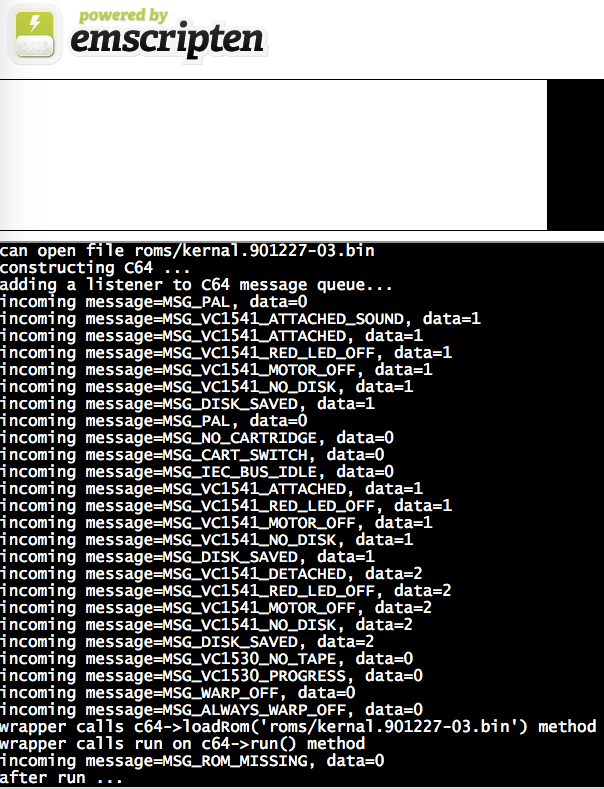
strange ... the rom files are in place I tested it with this test at the very beginning with
FILE *file = fopen("roms/kernal.901227-03.bin", "rb");
if (!file) {
printf("cannot open file\n");
return 1;
}
else
{
printf("can open file roms/kernal.901227-03.bin\n");
}
look at the first line of the log ... it can open the kernal file...
what is the bool C64::loadRom(const char *filename) expecting here?
I tried another file
wrapper calls c64->loadRom('roms/basic.901226-01.bin') method
wrapper calls run on c64->run() method
incoming message=MSG_ROM_MISSING, data=0
also no success.
I tried to output the first 32 bytes of the basic.901226-01.bin file before I call the c64->loadrom...
for (int i = 0; i <32 && !feof(file); i++) {
char c = fgetc(file);
if (c != EOF) {
putchar(c);
}
}
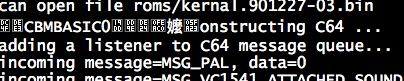
it definitely loads something ...
Maybe vC64 is upset because it feels like a victim in a mad experiment ? 😬
mithrendal
on 7 Mar 2020
also no success.
You're doing the right thing. VirtualC64 responds with the MSG_ROM_MISSING message as long as there is a missing Rom. Try to load all four Roms. When the last Rom has been loaded, you'll be rewarded with a MSG_READY_TO_RUN message 🤤.
dirkwhoffmann
on 7 Mar 2020
As I just read, I just have to include the rom file at linking stage
I think this solution is okay for the moment, but it is be worth knowing if there would be another way. Maybe I am thinking too far ahead, but I do spot potential here... a VirtualC64 Web edition 😋. This would require the Roms to be excluded though (copyright infringement).
dirkwhoffmann
on 7 Mar 2020
👍🏻Yes success 😎
wrapper calls 4x c64->loadRom(...) method
incoming message=MSG_READY_TO_RUN, data=0
wrapper calls run on c64->run() method
after run ...
mithrendal
on 7 Mar 2020
nothing special happens when I call run...
C64::run()
{
if (isHalted()) {
// Check for ROM images
if (!isRunnable()) {
putMessage(MSG_ROM_MISSING);
return;
}
// Power up sub components
sid.run();
// Start execution thread
pthread_create(&p, NULL, runThread, (void *)this);
}
}
Oh I see threads....
have to use emcc compiler option
-s USE_PTHREADS=1
mithrendal
on 7 Mar 2020
pthread_create(&p, NULL, runThread, (void *)this);
Yes, this is where it becomes scary. "It" awakens here... 😬.
dirkwhoffmann
on 7 Mar 2020

dirkwhoffmann
on 7 Mar 2020
It seems they are stopping us at this point ... currently only experimental pthread_create() support in browser. Currently disabled in browsers due to spectre, zombie_load, etc... Soon they are going to renable it ... _Due to the recent Spectre vulnerabilities, browsers other than Chrome have disabled SharedArrayBuffer by default. Eventually that should get fixed, but meanwhile you must enable pthreads manually to test, and probably should not do that in a non-test environment._ I am working with firefox not chrome 😳...
see here
https://github.com/emscripten-core/emscripten/wiki/Pthreads-with-WebAssembly
maybe have to check that with chrome 🙄...
mithrendal
on 7 Mar 2020
maybe have to check that with chrome
Definitely!!! For normal browsing, I use Safari, but I have to admit that there is nothing better than Chrome when it comes to any kind of development. Pressing F12 in Chrome opens up the debug console which is superb. I used it a lot in combination with SAE. Also it has great capabilities for debugging CSS stuff for example.
dirkwhoffmann
on 7 Mar 2020
red alert ... DEFCON2 ... captain they do have security problems with intel processors 😷 Chrome will maybe not work either see here...
_Firefox has recently added restrictions on WebAssembly.Memory objects shared between webworkers. (see here). Chrome is also planning on adding that in the near future.
Unfortunately this means that pthreads builds no longer work with Firefox, and will soon start failing in Chrome._
see here
https://github.com/emscripten-core/emscripten/issues/10014
mithrendal
on 7 Mar 2020
and will soon start failing in Chrome.
😮 ... 😟 ... 😢
So the horse is dead before we even got on it. So sad. Seems like the only way to get VirtualC64web to live is to translate everything to JavaScript 🥵.
Oh, wait... why not copy the thread body code into the main program 🤔. Since we have no GUI, there is no need for a separate emulator thread. The main program could be that thread.
Somewhere in the threading code, there is a call to the mach timer to put the thread to sleep. This is the place where the texture should be grabbed and displayed in the browser window.
dirkwhoffmann
on 7 Mar 2020
The main program could be that thread.
Ay capitain 🙋🏽
mithrendal
on 7 Mar 2020
lets run it on main thread🙉 then ...
it runs 🐣!!!
... and it wants more memory 🙈
incoming message=MSG_READY_TO_RUN, data=0
wrapper calls run on c64->run() method
incoming message=MSG_RUN, data=0
incoming message=MSG_IEC_BUS_BUSY, data=0
incoming message=MSG_IEC_BUS_IDLE, data=0
incoming message=MSG_VC1541_RED_LED_ON, data=1
incoming message=MSG_VC1541_MOTOR_ON, data=1
incoming message=MSG_VC1541_HEAD_DOWN, data=1
incoming message=MSG_VC1541_RED_LED_OFF, data=1
incoming message=MSG_VC1541_MOTOR_OFF, data=1
incoming message=MSG_IEC_BUS_BUSY, data=0
incoming message=MSG_IEC_BUS_IDLE, data=0
incoming message=MSG_SNAPSHOT_TAKEN, data=0
incoming message=MSG_SNAPSHOT_TAKEN, data=0
Cannot enlarge memory arrays to size 34295808 bytes (OOM). Either (1) compile with -s TOTAL_MEMORY=X with X higher than the current value 33554432, (2) compile with -s ALLOW_MEMORY_GROWTH=1 which allows increasing the size at runtime, or (3) if you want malloc to return NULL (0) instead of this abort, compile with -s ABORTING_MALLOC=0
Ok lets give Godzilla some good amount of memory to eat !!!
mithrendal
on 8 Mar 2020
compile with -s TOTAL_MEMORY=X
What could X be in our case... 🤔.
(3) if you want malloc to return NULL (0)
VirtualC64 would be very upset if that happens 😲.
(2) compile with -s ALLOW_MEMORY_GROWTH=1
Seems to be the way to go 😎.
dirkwhoffmann
on 8 Mar 2020
I guess now the hungry beast is got his memory and if I don't stop it, it likes to run endless until the batteries of my macbook are 0% ... 😎
constructing C64 ... vC64.html:1:356
C64: Creating virtual C64[0x17e38c8] vC64.html:1:516
SIDBridge: Setting clock frequency to 985249 vC64.html:1:516
ReSID: Setting clock frequency to 985249 cycles per second. vC64.html:1:516
Drive1: Duration a CPU cycle is 10149 1/10 nsec. vC64.html:1:516
Drive2: Duration a CPU cycle is 10149 1/10 nsec. vC64.html:1:516
C64: Resetting virtual C64[0x17e38c8] vC64.html:1:516
C64: Setting PC to FCE2 vC64.html:1:516
adding a listener to C64 message queue... vC64.html:1:356
incoming message=MSG_PAL, data=0 vC64.html:1:356
incoming message=MSG_VC1541_ATTACHED_SOUND, data=1 vC64.html:1:356
incoming message=MSG_VC1541_ATTACHED, data=1 vC64.html:1:356
incoming message=MSG_VC1541_RED_LED_OFF, data=1 vC64.html:1:356
incoming message=MSG_VC1541_MOTOR_OFF, data=1 vC64.html:1:356
incoming message=MSG_VC1541_NO_DISK, data=1 vC64.html:1:356
incoming message=MSG_DISK_SAVED, data=1 vC64.html:1:356
incoming message=MSG_PAL, data=0 vC64.html:1:356
incoming message=MSG_NO_CARTRIDGE, data=0 vC64.html:1:356
incoming message=MSG_CART_SWITCH, data=0 vC64.html:1:356
incoming message=MSG_IEC_BUS_IDLE, data=0 vC64.html:1:356
incoming message=MSG_VC1541_ATTACHED, data=1 vC64.html:1:356
incoming message=MSG_VC1541_RED_LED_OFF, data=1 vC64.html:1:356
incoming message=MSG_VC1541_MOTOR_OFF, data=1 vC64.html:1:356
incoming message=MSG_VC1541_NO_DISK, data=1 vC64.html:1:356
incoming message=MSG_DISK_SAVED, data=1 vC64.html:1:356
incoming message=MSG_VC1541_DETACHED, data=2 vC64.html:1:356
incoming message=MSG_VC1541_RED_LED_OFF, data=2 vC64.html:1:356
incoming message=MSG_VC1541_MOTOR_OFF, data=2 vC64.html:1:356
incoming message=MSG_VC1541_NO_DISK, data=2 vC64.html:1:356
incoming message=MSG_DISK_SAVED, data=2 vC64.html:1:356
incoming message=MSG_VC1530_NO_TAPE, data=0 vC64.html:1:356
incoming message=MSG_VC1530_PROGRESS, data=0 vC64.html:1:356
incoming message=MSG_WARP_OFF, data=0 vC64.html:1:356
incoming message=MSG_ALWAYS_WARP_OFF, data=0 vC64.html:1:356
wrapper calls 4x c64->loadRom(...) method vC64.html:1:356
ROMFile: File roms/kernal.901227-03.bin read successfully vC64.html:1:516
ROMFile: File roms/basic.901226-01.bin read successfully vC64.html:1:516
ROMFile: File roms/characters.901225-01.bin read successfully vC64.html:1:516
ROMFile: File roms/1541-II.251968-03.bin read successfully vC64.html:1:516
incoming message=MSG_READY_TO_RUN, data=0 vC64.html:1:356
wrapper calls run on c64->run() method vC64.html:1:356
incoming message=MSG_RUN, data=0 vC64.html:1:356
incoming message=MSG_IEC_BUS_BUSY, data=0 vC64.html:1:356
incoming message=MSG_IEC_BUS_IDLE, data=0 vC64.html:1:356
incoming message=MSG_VC1541_RED_LED_ON, data=1 vC64.html:1:356
incoming message=MSG_VC1541_MOTOR_ON, data=1 vC64.html:1:356
incoming message=MSG_VC1541_HEAD_DOWN, data=1 vC64.html:1:356
incoming message=MSG_VC1541_RED_LED_OFF, data=1 vC64.html:1:356
incoming message=MSG_VC1541_MOTOR_OFF, data=1 vC64.html:1:356
incoming message=MSG_IEC_BUS_BUSY, data=0 vC64.html:1:356
incoming message=MSG_IEC_BUS_IDLE, data=0 vC64.html:1:356
incoming message=MSG_SNAPSHOT_TAKEN, data=0 vC64.html:1:356
SIDBridge: Changing sample rate from 44100 to 44100 vC64.html:1:516
ReSID: Setting sample rate to 44100 samples per second. vC64.html:1:516
FastSID: Setting sample rate to 44100 vC64.html:1:516
incoming message=MSG_SNAPSHOT_TAKEN, data=0 3 vC64.html:1:356
SIDBridge: Changing sample rate from 44100 to 44100 vC64.html:1:516
ReSID: Setting sample rate to 44100 samples per second. vC64.html:1:516
FastSID: Setting sample rate to 44100 vC64.html:1:516
incoming message=MSG_SNAPSHOT_TAKEN, data=0 3 vC64.html:1:356
SIDBridge: Changing sample rate from 44100 to 44100 vC64.html:1:516
ReSID: Setting sample rate to 44100 samples per second. vC64.html:1:516
FastSID: Setting sample rate to 44100 vC64.html:1:516
incoming message=MSG_SNAPSHOT_TAKEN, data=0 4 vC64.html:1:356
SIDBridge: Changing sample rate from 44100 to 44100 vC64.html:1:516
ReSID: Setting sample rate to 44100 samples per second. vC64.html:1:516
FastSID: Setting sample rate to 44100 vC64.html:1:516
incoming message=MSG_SNAPSHOT_TAKEN, data=0 3 vC64.html:1:356
SIDBridge: Changing sample rate from 44100 to 44100 vC64.html:1:516
ReSID: Setting sample rate to 44100 samples per second. vC64.html:1:516
FastSID: Setting sample rate to 44100 vC64.html:1:516
incoming message=MSG_SNAPSHOT_TAKEN, data=0 3 vC64.html:1:356
SIDBridge: Changing sample rate from 44100 to 44100 vC64.html:1:516
ReSID: Setting sample rate to 44100 samples per second. vC64.html:1:516
FastSID: Setting sample rate to 44100 vC64.html:1:516
incoming message=MSG_SNAPSHOT_TAKEN, data=0 3 vC64.html:1:356
SIDBridge: Changing sample rate from 44100 to 44100 vC64.html:1:516
ReSID: Setting sample rate to 44100 samples per second. vC64.html:1:516
FastSID: Setting sample rate to 44100 vC64.html:1:516
incoming message=MSG_SNAPSHOT_TAKEN, data=0 3 vC64.html:1:356
SIDBridge: Changing sample rate from 44100 to 44100 vC64.html:1:516
ReSID: Setting sample rate to 44100 samples per second. vC64.html:1:516
FastSID: Setting sample rate to 44100 vC64.html:1:516
incoming message=MSG_SNAPSHOT_TAKEN, data=0 3 vC64.html:1:356
SIDBridge: Changing sample rate from 44100 to 44100 vC64.html:1:516
ReSID: Setting sample rate to 44100 samples per second. vC64.html:1:516
FastSID: Setting sample rate to 44100 vC64.html:1:516
incoming message=MSG_SNAPSHOT_TAKEN, data=0 4 vC64.html:1:356
SIDBridge: Changing sample rate from 44100 to 44100 vC64.html:1:516
ReSID: Setting sample rate to 44100 samples per second. vC64.html:1:516
FastSID: Setting sample rate to 44100 vC64.html:1:516
incoming message=MSG_SNAPSHOT_TAKEN, data=0 3 vC64.html:1:356
SIDBridge: Changing sample rate from 44100 to 44100 vC64.html:1:516
ReSID: Setting sample rate to 44100 samples per second. vC64.html:1:516
FastSID: Setting sample rate to 44100 vC64.html:1:516
incoming message=MSG_SNAPSHOT_TAKEN, data=0 3 vC64.html:1:356
SIDBridge: Changing sample rate from 44100 to 44100 vC64.html:1:516
ReSID: Setting sample rate to 44100 samples per second. vC64.html:1:516
FastSID: Setting sample rate to 44100 vC64.html:1:516
incoming message=MSG_SNAPSHOT_TAKEN, data=0 2 vC64.html:1:356
SIDBridge: Changing sample rate from 44100 to 44100 vC64.html:1:516
ReSID: Setting sample rate to 44100 samples per second. vC64.html:1:516
FastSID: Setting sample rate to 44100 vC64.html:1:516
incoming message=MSG_SNAPSHOT_TAKEN, data=0 3 vC64.html:1:356
... and so on and so on ...
Next I will have to watch out for the screen buffer and copy that into the html canvas ...
mithrendal
on 8 Mar 2020
ReSID: Setting sample rate to 44100 samples per second. vC64.html:1:516
😶 SID is mad about you, because you don't remove the sound samples from the audio buffer. He tries to cope with that by adjusting the sample rate.
incoming message=MSG_SNAPSHOT_TAKEN,
😎 Auto-snapshots are taken in the background, so it's definitely running.
Next I will have to watch out for the screen buffer and copy that into the html canvas ...
🤤 Yes yes yes
dirkwhoffmann
on 8 Mar 2020
Use this function to get the screen buffer:
void *
VIC::screenBuffer() {
if (currentScreenBuffer == screenBuffer1) {
return screenBuffer2;
} else {
return screenBuffer1;
}
}
The buffer contains the pixel information in RGBA format (4 bytes per pixel).
dirkwhoffmann
on 8 Mar 2020
Here is how the Swift GUI gets the data:
func updateTexture() {
let buf = controller.c64.vic.screenBuffer()
precondition(buf != nil)
let pixelSize = 4
let width = Int(NTSC_PIXELS)
let height = Int(PAL_RASTERLINES)
let rowBytes = width * pixelSize
let imageBytes = rowBytes * height
let region = MTLRegionMake2D(0, 0, width, height)
emulatorTexture.replace(region: region,
mipmapLevel: 0,
slice: 0,
withBytes: buf!,
bytesPerRow: rowBytes,
bytesPerImage: imageBytes)
}
Texture size is PAL_RASTERLINES * NTSC_PIXELS. Sounds strange, but the dimensions have been chose to provide enough space for both NTSC and PAL screens (NTSC has more horizontal pixels whereas PAL has more raster lines).
dirkwhoffmann
on 8 Mar 2020
I am not there. I have first to get in touch with the WASM SDL to canvas interface. It already draws a beautiful colored screen
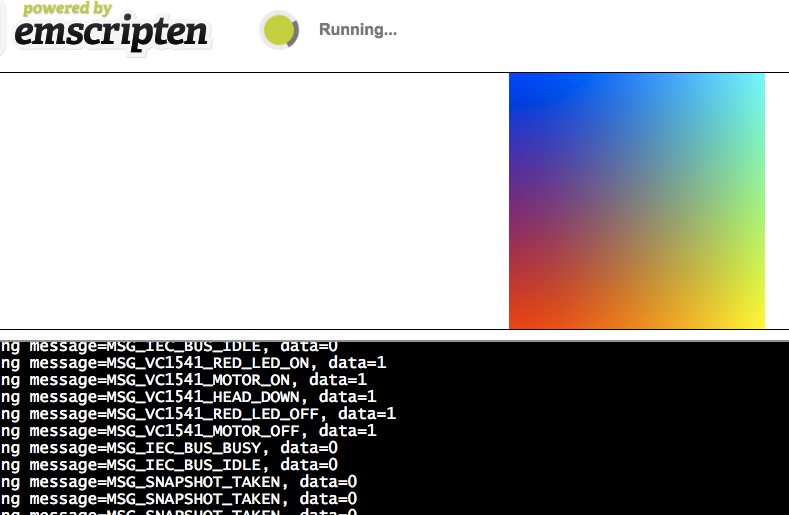
but it does so only if i stop the whole thing. It seems to me that the c64->runthread() blocks somehow the mainthread which has also the task to draw the SDL stuffs.
Before I can get the screenbuffer I will have to play around and study the SDL to Canvas API first...🤓
void drawToCanvas()
{
SDL_Init(SDL_INIT_VIDEO);
SDL_Surface *screen = SDL_SetVideoMode(256, 256, 32, SDL_SWSURFACE);
#ifdef TEST_SDL_LOCK_OPTS
EM_ASM("SDL.defaults.copyOnLock = false; SDL.defaults.discardOnLock = true; SDL.defaults.opaqueFrontBuffer = false;");
#endif
if (SDL_MUSTLOCK(screen)) SDL_LockSurface(screen);
for (int i = 0; i < 256; i++) {
for (int j = 0; j < 256; j++) {
#ifdef TEST_SDL_LOCK_OPTS
// Alpha behaves like in the browser, so write proper opaque pixels.
int alpha = 255;
#else
// To emulate native behavior with blitting to screen, alpha component is ignored. Test that it is so by outputting
// data (and testing that it does get discarded)
int alpha = (i+j) % 255;
#endif
*((Uint32*)screen->pixels + i * 256 + j) = SDL_MapRGBA(screen->format, i, j, 255-i, alpha);
}
}
if (SDL_MUSTLOCK(screen)) SDL_UnlockSurface(screen);
SDL_Flip(screen);
SDL_Quit();
}
int main() {
drawToCanvas();
C64Wrapper *wrapper= new C64Wrapper();
wrapper->run();
return 0;
}
int main() {
drawToCanvas();
C64Wrapper *wrapper= new C64Wrapper();
wrapper->run();
return 0;
}
I don't see any threading here. Isn't drawToCanvas(); just called once?
In drawToCanvas: SDL_Quit(); Is this intended?
dirkwhoffmann
on 8 Mar 2020
In drawToCanvas: SDL_Quit(); Is this intended?
to be honest I just copied some tutorial code that seems appropriate for us ... 😬
But I think the answer is here ...
https://emscripten.org/docs/getting_started/FAQ.html#faq-my-html-app-hangs
We are currently blocking the javascript main thread and we do not let the JS-Engine of the browser draw to the canvas while we aggressivly running our C64->runthread. We have to do as the emscripten team advises us to do in the link above ...
mithrendal
on 8 Mar 2020
"Apps that use an infinite main loop should be re-coded to put the actions for a single iteration of the loop into a single 'finite' function."
Even better for us. The "single 'finite' function" should draw a single C64 frame. This means that the sleep stuff is no longer done by VirtualC64. Instead of sleeping, the function returns and let's the SDL do the timing synchronisation.
dirkwhoffmann
on 8 Mar 2020
I did this modification to C64.cpp and now it draws to the canvas and runs the c64 in parallel.😎 No more blocking...
*runThread(void *thisC64) {
assert(thisC64 != NULL);
C64 *c64 = (C64 *)thisC64;
bool success = true;
c64->debug(2, "Execution thread started\n");
c64->putMessage(MSG_RUN);
// Configure thread properties...
pthread_setcancelstate(PTHREAD_CANCEL_ENABLE, NULL);
pthread_setcanceltype(PTHREAD_CANCEL_DEFERRED, NULL);
pthread_cleanup_push(threadCleanup, thisC64);
// Prepare to run...
c64->cpu.clearErrorState();
c64->drive1.cpu.clearErrorState();
c64->drive2.cpu.clearErrorState();
c64->restartTimer();
emscripten_set_main_loop_arg(draw_one_frame_into_SDL, thisC64, 0, 1);
//while (likely(success)) {
//pthread_testcancel();
// success = c64->executeOneFrame();
//}
pthread_cleanup_pop(1);
pthread_exit(NULL);
}
// The emscripten "main loop" replacement function.
void draw_one_frame_into_SDL(void *thisC64) {
C64 *c64 = (C64 *)thisC64;
c64->executeOneFrame();
}
I guess next step is to copy the screenbuffer over to SDL inside the new method draw_one_frame_into_SDL ? Right?
mithrendal
on 8 Mar 2020
I guess next step is to copy the screenbuffer over to SDL inside the new method draw_one_frame_into_SDL ? Right?
Yes, exactly 👍. Something like this:
void draw_one_frame_into_SDL(void *thisC64) {
C64 *c64 = (C64 *)thisC64;
c64->executeOneFrame();
void *texture = c64->vic.screenBuffer();
dearSDLPleaseDisplayMyTexture(texture);
}
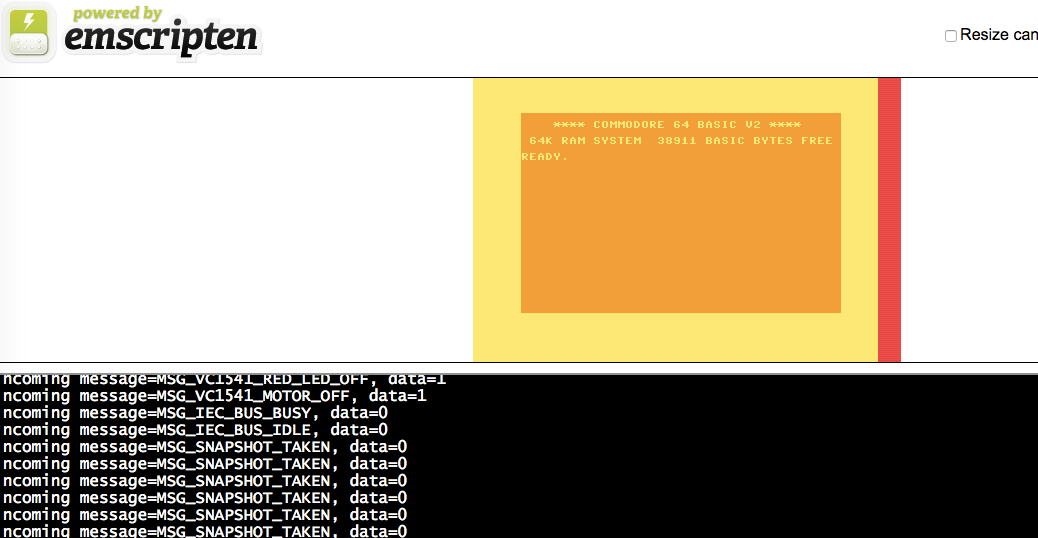
😎✋🏼 give me five bro!
The color is a bit strange 🙈I guess my dearSDLPleaseDisplayMyTexture part is still not optimal.
But hey today is the first day on which Virtual C64 runs in a browser !
What you can not see on the picture is ... the blinking cursor ... yes it does blink periodically ... Oh boy I bet someone has patented it in 1982...
look here is how I did it ...
// The emscripten "main loop" replacement function.
void draw_one_frame_into_SDL(void *thisC64) {
C64 *c64 = (C64 *)thisC64;
c64->executeOneFrame();
void *texture = c64->vic.screenBuffer();
int width = NTSC_PIXELS;
int height = PAL_RASTERLINES;
SDL_Init(SDL_INIT_VIDEO);
SDL_Surface *screen = SDL_SetVideoMode(width, height, 32, SDL_SWSURFACE);
#ifdef TEST_SDL_LOCK_OPTS
EM_ASM("SDL.defaults.copyOnLock = false; SDL.defaults.discardOnLock = true; SDL.defaults.opaqueFrontBuffer = false;");
#endif
if (SDL_MUSTLOCK(screen)) SDL_LockSurface(screen);
for (int row = 0; row < height; row++) {
for (int col = 0; col < width; col++) {
Uint32 rgba = *(((Uint32*)texture) + row * width + col);
int r= (rgba>>24) & 0xff;
int g= (rgba>>16) & 0xff;
int b= (rgba>>8) & 0xff;
int a= rgba & 0xff;
*((Uint32*)screen->pixels + row * width + col) = SDL_MapRGBA(screen->format, r, g, b, a);
}
}
if (SDL_MUSTLOCK(screen)) SDL_UnlockSurface(screen);
SDL_Flip(screen);
👏👏👏👏👏👏 That's freaking cool 😃.
The color is a bit strange
Oh yes. Now I notice it, too. 🤭
int r= (rgba>>24) & 0xff;
int g= (rgba>>16) & 0xff;
int b= (rgba>>8) & 0xff;
int a= rgba & 0xff;
Just turn that around and it should be blue.
BTW, can't you hand over the texture pointer directly to the SDL? I guess the current translation consumes half the overall CPU usage.
Next step will be to run PacMan 😎.
dirkwhoffmann
on 8 Mar 2020
Just turn that around and it should be blue.
yes, now it is blue ...
BTW, can't you hand over the texture pointer directly to the SDL? I guess the current translation consumes half the overall CPU usage.
studying SDL now to find a way to hand over the pointer ...
mithrendal
on 8 Mar 2020
yes, now it is blue ...
Great, so the product is ready. Let's ship it. We'll deliver the rest of the functionality in some future update.

dirkwhoffmann
on 8 Mar 2020
I am trying to lifting it to SDL2 and hope that I can use its SDL_updateTexture(...) thing, it sounds to me like the right replacement candidate for your swift emulatorTexture.replace(...)
mithrendal
on 8 Mar 2020
Have tested 3 different ways of SDL rendering.
SDL1 direct pixel manipulation pixel by pixel without webGL
SDL2 direct pixel manipulation pixel by pixel without webGL
SDL2 via textureUpdate with webGL
I was particulary interested in CPU load which I saw in the activity monitor ...
here are the results
2007 mac core2duo CPU with an old GPU, Firefox (latest)
77% Pixelbuffer SDL1
65% Pixelbuffer SDL2
70% TextureUpdate SDL2
2014 mac corei5 CPU Safari (latest)
35% Pixelbuffer SDL1
29% Pixelbuffer SDL2
19% TextureUpdate SDL2
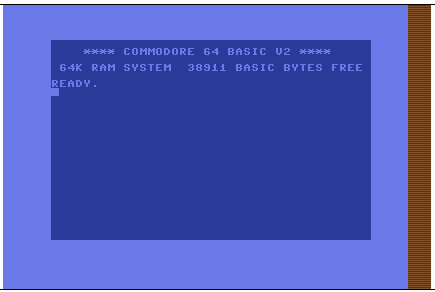
I just spotted the vertical bar on the right side ... it is red, maybe infectious 😷 ???
mithrendal
on 8 Mar 2020
19% TextureUpdate SDL2
That’s great news, because it tells us that a web version of VirtualC64 is indeed possible. With some effort, we could have something like SAE for the 8 bit world 🤤.
I usually measure performance with an Octopus, namely this one:
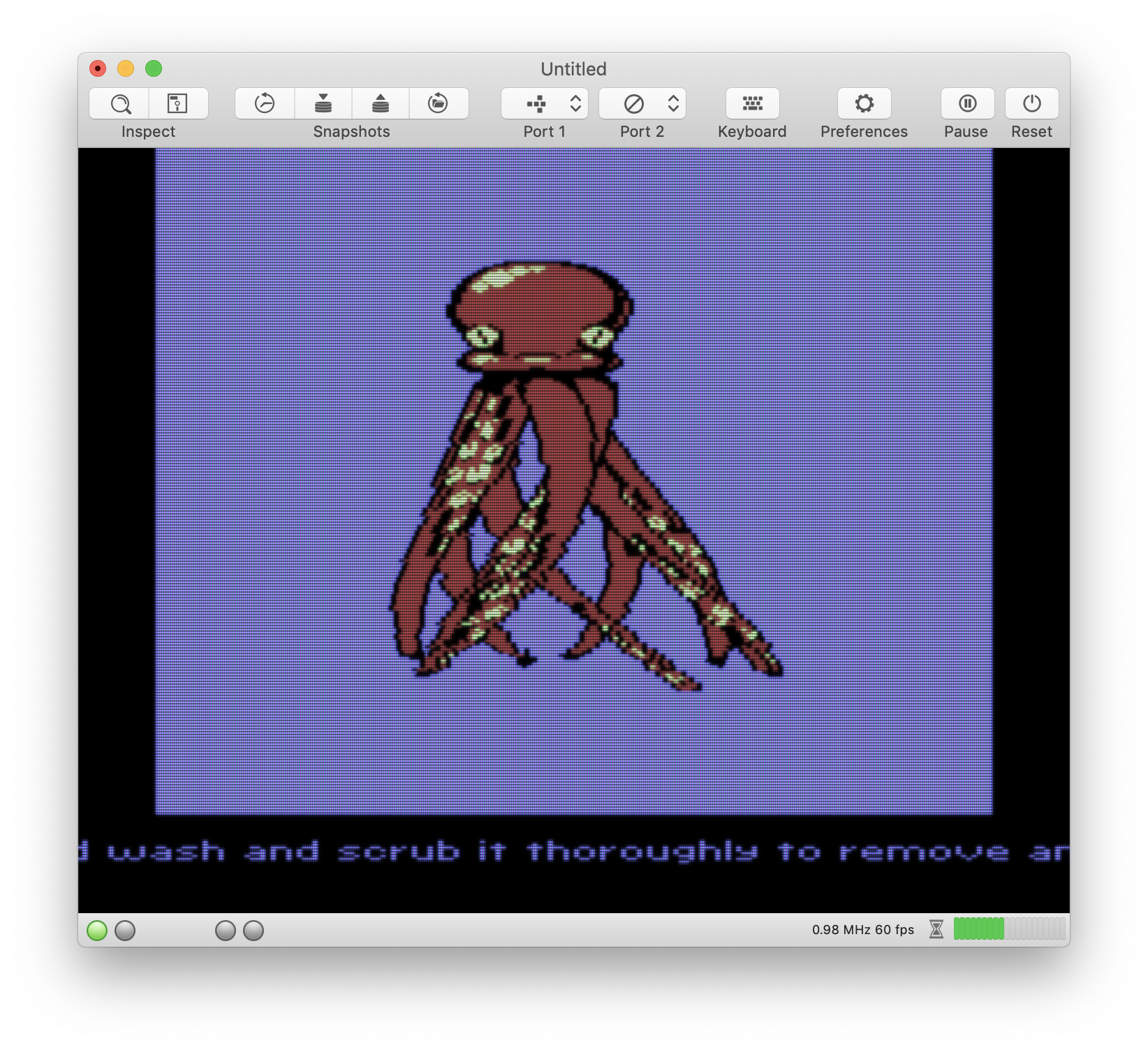
The Octopus is drawn solely with sprites and the demo is extremely performance hungry. On my MacBook Pro, VirtualC64 degrades to about 3.5 MHz in warp mode (whereas a freshly powered on C64 runs at approx. 9.5 MHz).
There are two ways to get an Octopus into a browser:
- Roll it out flat and glue it onto a floppy disk. After that, it'll fit into the drive.
- Flash it into memory.
- The disk approach:
The corresponding API method is this one:
void VC1541::insertDisk(AnyArchive *a)
As you can see, you need to create an Archive first. AnyArchive is the base class of all archive classes. From this class, D64File, PRGFile, etc., are derived. For the Octopus, you’ll need a PRGFile object. It’s easy to create with one of the following factory methods:
static PRGFile *makeWithBuffer(const uint8_t *buffer, size_t length);
static PRGFile *makeWithFile(const char *path);
If you link the Octopus into your executable at compile time, you can use the second method like you did with the Rom files.
- The flashing approach:
Instead of caging the Octopus inside the disk drive, you can also flash it into memory. In this case, you don’t have to struggle with disks. The corresponding API function is this one:
bool C64::flash(AnyArchive *file, unsigned item)
The first item has number 0.
There is one problem though. You need to type RUN inside the emulator to wake up the freshly flashed Octopus. The issue here is that auto-typing is done by the GUI which is no longer there. E.g., this happens when you double click the Octopus in the PRG dialog:
@IBAction func performDoubleClick(_ sender: Any!) {

        // Flash file into memory
        myController?.mydocument?.flashAttachmentIntoMemory()
        myController?.keyboardcontroller.type("RUN\n")
}
Function type eventually calls function _type:
func _type(keyList: [C64Key]) {

        for key in keyList {
            if key == .restore {
                controller.c64.keyboard.pressRestoreKey()
            } else {
                controller.c64.keyboard.pressKey(atRow: key.row, col: key.col)
            }
        }
        usleep(useconds_t(50000))

        for key in keyList {
            if key == .restore {
                controller.c64.keyboard.releaseRestoreKey()
            } else {
            controller.c64.keyboard.releaseKey(atRow: key.row, col: key.col)
            }
        }
    }
It gives you the idea what to do. From the C++ side, you can directly use the following two functions:
keyboard->pressKey(row, col);
keyboard->releaseKey(row, col);
Keys are specified in form of the row / col indices that are used by the C64 keyboard. It’s important to have a proper delay between pressing and releasing, because the C64 checks the keyboard matrix inside the interrupt handler and wouldn’t detect the key press if the key gets released immediately.
dirkwhoffmann
on 9 Mar 2020
I just spotted the vertical bar on the right side ...
On startup, the emulator texture is initialised with this pattern for debugging purposes (it makes it easy to spot unused texture area). There is unused space, because older graphic cards only support textures with a horizontal and vertical power-of-2-size.
it is red, maybe infectious 😷 ???
No, it's completely harmless. As I said, it's just a texture ... Oh no 😲

dirkwhoffmann
on 9 Mar 2020
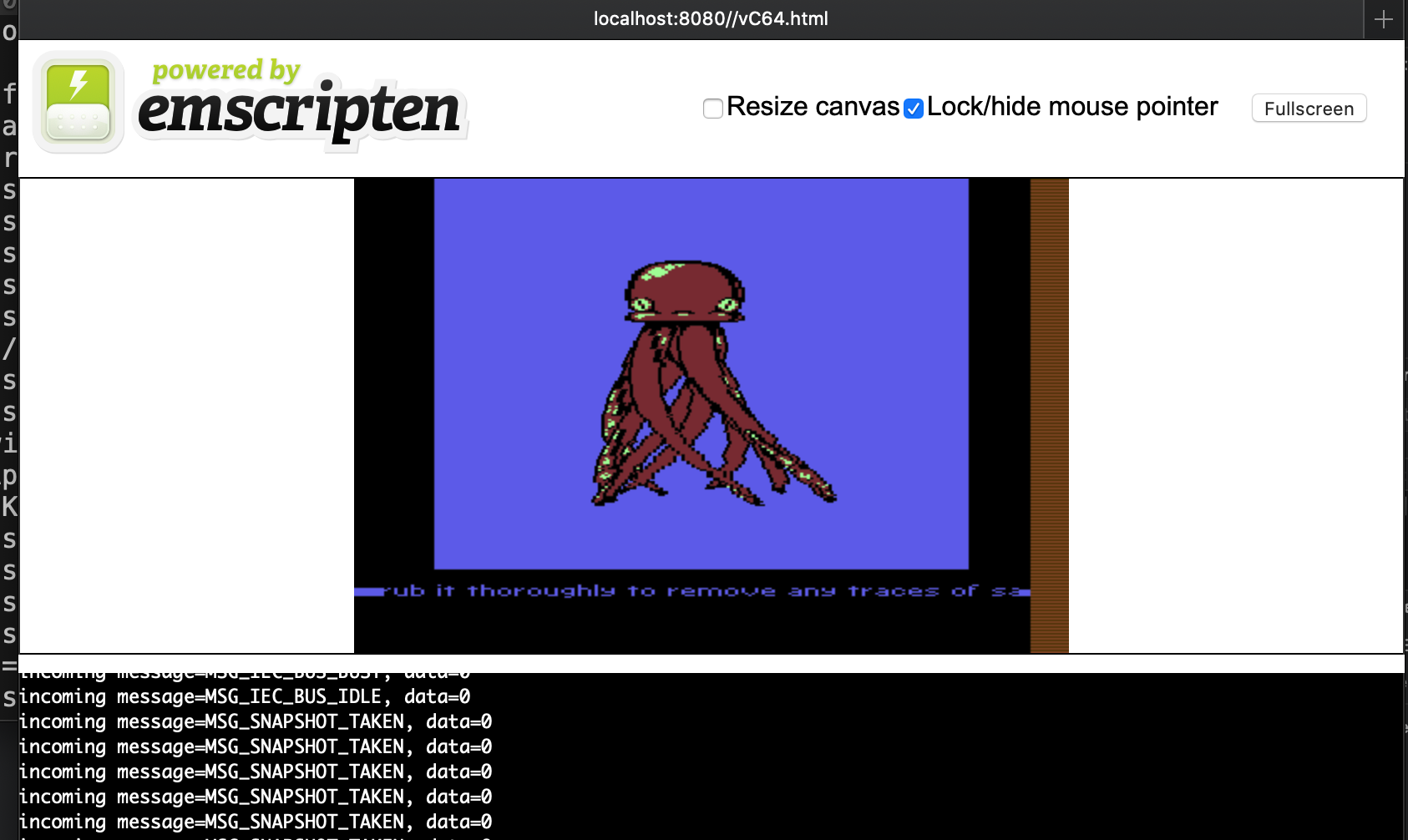

up from 19% to 25% CPU load on a mac mini 2014 i5 2.6GHz.
Still it runs very fluently , cool and without any fans spinning up.
It even runs fluently and well on the old historic macbook from 2007 but with fans going up slightly.
Virtual C64 runs so perfectly well, to be honest I did not expect so few obstacles !! Must have to do with your clean programming approach ...
but wait something is strange about the low CPU load in the wasm build ...
look here the CPU load of the virtualC64.app

how can it be that the load of the mac app is higher ? Nearly doubled. Maybe because we do not output any sound in the wasm built yet ?
mithrendal
on 9 Mar 2020
how can it be that the load of the mac app is higher ?
The VirtualC64 app includes the Swift GUI code. Maybe it's because of that. However, I didn't expect such a big difference.
The strangest thing for me is that running the Octopus demo only increases CPU load from 19% to 25% (whereas in the VirtualC64 app, performance drops from about 9 MHz to 3 MHz). Based on this number I did expect a CPU load increase form 19% to about 60%.
Nevertheless, the good news is that a VirtualC64 web edition seems to be possible and I think we should go for it.
There is just one possible show stopper left: We need to find a way to load Roms and disk files dynamically. I hope WASM allows us to do something similar than SAE does with JavaScript. I haven't looked at the SAE code yet and therefore don't know how SAE gets Roms and ADFs into the browser.
dirkwhoffmann
on 10 Mar 2020
Nevertheless, the good news is that a VirtualC64 web edition seems to be possible and I think we should go for it.
How should we organise it? 🤷🏼I have the feeling this thread will soon become too long ... 🙋🏽Maybe you like the idea of open a new repo "dirkwhoffmann/VirtualC64_web_edition_experiment..." with its own issues ? Then you can invite me as a collaborator. So that I can commit directly into it without to bother you with thousands of coming pull requests (make sound work, keyboard, joystick, make a basic web interface for it, to upload rom, disks, etc. )...We can learn from that experiment and after completing we do the "dirkwhoffmann/vAmiga_web_edition"🤤🤤🤤..
There is just one possible show stopper left: We need to find a way to load Roms and disk files dynamically. I hope WASM allows us to do something similar than SAE does with JavaScript. I haven't looked at the SAE code yet and therefore don't know how SAE gets Roms and ADFs into the browser.
🙋🏽
WASM offers a simple JS to WASM call interface for that:
Module.ccall('methodname', return_type , args)
We can upload disks into JS and pass them as byte buffer arrays from JS into the WASM.
Module.ccall takes three arguments, the first is a string containing the name of the function, the next gives the expected return type, the next is an array describing the types of the arguments the C function takes.
SID is mad about you, because you don't remove the sound samples from the audio buffer. He tries to cope with that by adjusting the sample rate.
🤭Can you give me some hints what to do to please SID ...
From the SDL side I propably have to do something like this... That is SDL periodically calls the C64wrapper and it returns an "_Uint8 *stream, int len_" sound buffer.
/*    Opening the audio device

    We need to have a callback function written which mixed your audio data and puts it in the audio stream. After that, choose your desired audio format and rate, and open the audio device.

    The audio won't actually start playing until you call SDL_PauseAudio(0), allowing you to perform other audio initialization as needed before your callback function is run. After you are done using the sound output, you should close it with the SDL_CloseAudio() function.
*/


#include "SDL.h"
#include "SDL_audio.h"
{
    extern void mixaudio(void *unused, Uint8 *stream, int len);
    SDL_AudioSpec fmt;

    /* Set 16-bit stereo audio at 22Khz */
    fmt.freq = 22050;
    fmt.format = AUDIO_S16;
    fmt.channels = 2;
    fmt.samples = 512;        /* A good value for games */
    fmt.callback = mixaudio;
    fmt.userdata = NULL;

    /* Open the audio device and start playing sound! */
    if ( SDL_OpenAudio(&fmt, NULL) < 0 ) {
        fprintf(stderr, "Unable to open audio: %s\n", SDL_GetError());
        exit(1);
    }
    SDL_PauseAudio(0);
    ...
    SDL_CloseAudio();
}
WASM offers a simple JS to WASM call interface for that:
That's great! This means that VirtualC64WE is possible!
Maybe you like the idea of open a new repo. Then you can invite me as a collaborator.
OK, let's do it this way. Because I cannot fork my own project, I would create an empty repo. Is this OK?
Can you give me some hints what to do to please SID ...
Sure thing. Information will follow in another post...
dirkwhoffmann
on 10 Mar 2020
OK, let's do it this way. Because I cannot fork my own project, I would create an empty repo. Is this OK?
Yes forking feels somehow wrong in this case for me... 🥴Maybe it feels strange because we only want to fork the half of virtualC64. Without the GUI which we would delete right away after forking. This is also the reason we probably never would make a pull request from the fork into the main repo because of so many deletions...
I feel the empty repo is probably better for us.
Can we prove that this is the way to go by a recursive induction ? 🧐
Lets think... 🤯
a) Something includes a copy of another thing. Which is general a good thing. Therefore true.
b) Another thing is also Something.
that means
vAmiga has a partial copy of Moira.
true
vAmigaWeb would include a partial copy of vAmiga which includes a partial copy of Moira...
also true
VirtualC64WE would include VirtualC64
also true, no?🥳
mithrendal
on 10 Mar 2020
Can you give me some hints what to do to please SID ...
Talking to SID is done via the SIDBridgeobject. This class contains a FastSID object and a ReSID object. Depending on the selected configuration (FastSID or ReSID), the bridge calls the appropriate function of the FastSID or the ReSID object.
Getting sound samples from VirtualC64 is pretty simple. If SDL needs a single stream (mono), you can call this function:
void SIDBridge::readMonoSamples(float *target, size_t n);
target is a pointer to the buffer where the samples should be written to and n is the number of sound samples.
In case SDL has two buffers (one for the left and one for the right channel), you can use this API function:
void SIDBridge::readStereoSamples(float *target1, float *target2, size_t n)
In case SDL has a single buffer with interleaved data for the left and right channel, you call this one:
void SIDBridge::readStereoSamples(float *target1, float *target2, size_t n)
If you are unsure about the differences of the three functions, just have a look at the source code. The top-level implementations are really simple. E.g., here is the stereo version:
SIDBridge::readStereoSamples(float *target1, float *target2, size_t n)
{
    // Check for buffer underflow
    if (samplesInBuffer() < n) {
        handleBufferUnderflow();
    }

    // Read samples
    for (unsigned i = 0; i < n; i++) {
        float value = readData();
        target1[i] = target2[i] = value;
    }
}
As you can see, the left and right channel are identical, because SID is mono.
Please note that the samples are floats, because macOS requires this format. If the SDL needs something else, this can to be changed in function SIDBridge::writeData(…):
SIDBridge::writeData(short *data, size_t count)
{
    …
    // Convert sound samples to floating point values and write into ringbuffer
    for (unsigned i = 0; i < count; i++) {
        ringBuffer[writePtr] = float(data[i]) * scale;
        advanceWritePtr();
    }
}
It’s important to avoid buffer underflows and overflows which means that you need to read the samples with approx. the same frequency as SID creates them. The main thing you need to do is to tell SID the sampling rate of the consumer (SDL). This is done via
void SIDBridge::setSampleRate(uint32_t rate)
Variable rate is the sampling frequency in Hz (the macOS version samples at 44100).
There is also a rampUp() function which is called when a GUI window gets active. It increases the volume step by step until the normal volume level has been reached. I am not sure at, if it has to be called. If the answer turns out to be yes, call it in your initialisation routine where you set the sample rate.
dirkwhoffmann
on 10 Mar 2020
In the beginning there was void 😶
dirkwhoffmann
on 10 Mar 2020
Related issues
 KenDFish
·
3Comments
dirkwhoffmann
·
3Comments
dirkwhoffmann
·
3Comments
dirkwhoffmann
·
4Comments
dirkwhoffmann
·
3Comments
KenDFish
·
3Comments
dirkwhoffmann
·
3Comments
dirkwhoffmann
·
3Comments
dirkwhoffmann
·
4Comments
dirkwhoffmann
·
3Comments
Most helpful comment
That’s great news, because it tells us that a web version of VirtualC64 is indeed possible. With some effort, we could have something like SAE for the 8 bit world 🤤.
I usually measure performance with an Octopus, namely this one:
octopusinredwine.prg.zip
The Octopus is drawn solely with sprites and the demo is extremely performance hungry. On my MacBook Pro, VirtualC64 degrades to about 3.5 MHz in warp mode (whereas a freshly powered on C64 runs at approx. 9.5 MHz).
There are two ways to get an Octopus into a browser:
The corresponding API method is this one:
As you can see, you need to create an Archive first. AnyArchive is the base class of all archive classes. From this class, D64File, PRGFile, etc., are derived. For the Octopus, you’ll need a PRGFile object. It’s easy to create with one of the following factory methods:
If you link the Octopus into your executable at compile time, you can use the second method like you did with the Rom files.
Instead of caging the Octopus inside the disk drive, you can also flash it into memory. In this case, you don’t have to struggle with disks. The corresponding API function is this one:
The first item has number 0.
There is one problem though. You need to type RUN inside the emulator to wake up the freshly flashed Octopus. The issue here is that auto-typing is done by the GUI which is no longer there. E.g., this happens when you double click the Octopus in the PRG dialog:
Function
typeeventually calls function_type:It gives you the idea what to do. From the C++ side, you can directly use the following two functions:
Keys are specified in form of the row / col indices that are used by the C64 keyboard. It’s important to have a proper delay between pressing and releasing, because the C64 checks the keyboard matrix inside the interrupt handler and wouldn’t detect the key press if the key gets released immediately.