Valkyrie: 2.2.004 - Synopsis does not word wrap
Description of Problem or Question
The Synopsis Field does not word wrap. It has a max of 100 characters that just get lost off the side of the box. It makes it hard to edit/find your place.
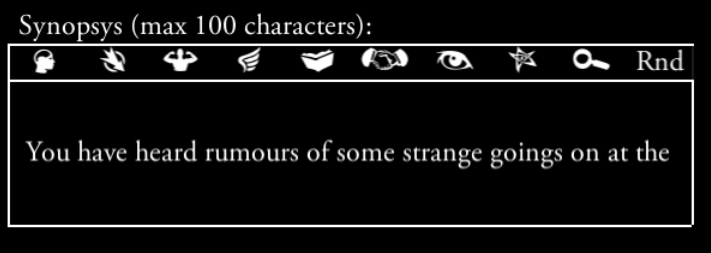
I would also recommend shortening the word limit as to avoid the text being cut off (or have the [...} be a button that gives the rest of the synopsis text).
It just looks messy and a bit confusing as it is:

Valkyrie Version
2.2.004
(I am liking the changes in the editor though, the colour changes are really helpful, so subtle but very helpful).
 scrubbless
All 4 comments
Lol.. i just screencaptured it myself to make a ticket only to find @scrubbless beat me to it :)
aditional enhancement: It would help if the editor would show the letter-count
Synopsis (Max 100 characters): #/100 <- where # is current length
 antontimmermans
on 2 Mar 2019
antontimmermans
on 2 Mar 2019
I like your idea, @antontimmermans!
@redwolf2, I think the thing that @scrubbless mentioned shouldn't be treated as an enhancement but rather as a bug as the thing worked in valkyrie-windows-2.2.03 but for some reason it got messed up.
About the ellipsis (...). The topic was mentioned by me in this issue https://github.com/NPBruce/valkyrie/issues/1067.
An ellipsis was added to SE to cope with too long texts. I personally think using a synopsis is fine as it's the usual way of dealing with the long texts problem and I wouldn't change it.
The problem lays somewhere else. As mentioned in https://github.com/NPBruce/valkyrie/issues/1067, the limit of 100 characters is not checked by any mean! You can write there whatever and however long you want! (this one I also consider a bug rather than an enhancement)
I totally get creating the ellipsis just for compatibility reasons for scenarios which already have a synopsis longer than 100 characters - it's fine. But for the new synopsis, the limit should be forced disallowing a user to write anything longer than the limit.
 chrismaliszewski
on 3 Mar 2019
chrismaliszewski
on 3 Mar 2019
The Synopsis Field does not word wrap. It has a max of 100 characters that just get lost off the side of the box. It makes it hard to edit/find your place.
I forced the synopsis field with the "one line" option to have the same limitation on editor and on scenario explorer.
It makes more sense for me, and it is still quite easy to edit the text : the focus is moving along with the text or you can just press begin/end button of keyboard.
I'm not sure I understand the issue here but I can still change it if you think it's best to word wrap.
I would also recommend shortening the word limit as to avoid the text being cut off (or have the [...} be a button that gives the rest of the synopsis text).
Yes I can set it to a lower value.
It's currently 105, and gets down to 100 with additional 5 characters '(...)'.
This is what I found out to be best after some tests but I guessed you faced some issues with this ?
What would you recommend?
aditional enhancement: It would help if the editor would show the letter-count
Synopsis (Max 100 characters): #/100 <- where # is current length
The problem lays somewhere else. As mentioned in #1067, the limit of 100 characters is not checked by any mean! You can write there whatever and however long you want! (this one I also consider a bug rather than an enhancement)
I totally get creating the ellipsis just for compatibility reasons for scenarios which already have a synopsis longer than 100 characters - it's fine. But for the new synopsis, the limit should be forced disallowing a user to write anything longer than the limit.
These are change requests and it should be opened in another ticket.
I don't want to push this aside, but any good text editor will give you the number of character on a line :)
There is currently no way to limit the number of character of an entry in the editor, so this is a new dev.
Also ellispsis is required for author editing the text files (almost all scenario writers I think).
 BenRQ
on 14 Mar 2019
BenRQ
on 14 Mar 2019
Fixed
- REVERT synopsys is not limited to 2 lines anymore
- NEW synopsys max characters set to 100 in editor
- NEW author short max characters set to 75 in editor
BenRQ
on 24 Mar 2019
Related issues
 cowistree
·
7Comments
chrismaliszewski
·
3Comments
cowistree
·
7Comments
chrismaliszewski
·
3Comments
 Rass1968
·
8Comments
Rass1968
·
8Comments
 EMILIPULIDO
·
8Comments
EMILIPULIDO
·
8Comments
 jlederer2
·
7Comments
jlederer2
·
7Comments
Most helpful comment
Lol.. i just screencaptured it myself to make a ticket only to find @scrubbless beat me to it :)
aditional enhancement: It would help if the editor would show the letter-count
Synopsis (Max 100 characters): #/100 <- where # is current length