Valkyrie: Scenario explorer new ideas
Original post: https://github.com/NPBruce/valkyrie/issues/1013#issuecomment-457702037
I find two bad behaviours regarding the current in-work version of the Scenario explorer:
- clicking a scenario name causes its downloading which leads to downloading scenarios by mistake/unwillingly if there is a menu-lag (and it happens often as for now),
- it's not possible to know what kind of story a scenario tells without a necessity of downloading it in advance.
I'd like to suggest possible solutions to the issues.
- @BenRQ in https://github.com/NPBruce/valkyrie/issues/1013#issuecomment-457723943 suggested that downloading a scenario by clicking on it is the current behaviour of the official version. Although it's true, it currently happens in a completely different part of the app, in the downloading scenarios list (DSL) one, while SEv1 was just a list of the downloaded scenarios.
SEv2 now has two major roles. It implements DSL and SEv1 into one module: presents a list of the downloaded scenarios and is the downloading scenarios list. The current SEv2 should have a different way of working if you compare it to SEv1 and DSL.
Therefore, I suggest clicking a scenario line be disabled and, instead, clicking the download button should fire the downloading event. Plain and simple.
- Is more complicated (as suggested @scrubbless in https://github.com/NPBruce/valkyrie/issues/1013#issuecomment-457733952). It'd be great if clicking a scenario line would open a splash screen which would display info about a scenario (title, image, description, etc.) and allow a user to either Start the scenario if it's downloaded or download it from here.
I can't agree with @scrubbless that downloading the whole scenario is necessary nor that redesigning the package files is required so there won't be backwards compatible problems. But it'd require some changes to the current concept as follows.
First of all, there should a separate space where information about all available scenarios is stored ('). From this very place the SEv3 would download the list of scenarios. The information stored here would contain only information for a splash screen and the list, nothing else.
To make this list backwards compatible, a script scanning Valkyries files must be created. It'd parse the files, take information needed and save it in the space. This way if in the future some other kind of information is needed, the system parses files as needed making the system backwards-proof, or I am wrong.
Finally, SE would require the last changes. There are two ways of handling the problem of 'downloading than playing a scenario':
A. SE uses separate files for a splash screen and scenarios; if it doesn't find a scenario file, it displays a Download button to download the scenario.
B. SE uses one file for a splash screen and a scenario; the difference between the kind 1st (not playable) and 2nd (playable) is within the file structure which SE must check as 1st will only contain a splash screen info and nothing else so there is no way playing the scenario and, therefore, the scenario must be downloaded first.
I think the A. method it might be easier to implement.
There is a drawback in the idea of mine. There might be a problem syncing data between (') and the scenario's location but it shouldn't be a big issue, I think.
Sorry for the long post. I don't expect both ideas to be implemented in v2.2. It'd be great if 1. would be implemented now and 2. in v2.3 as it requires more changes.
 chrismaliszewski
All 16 comments
How about just having a screen with the same info for the scenario as the main screen appear if the scenario is not up-to-date or has not been downloaded.
Then if the scenario is not up-to-date the user can choose to press either the cancel. download or play buttons.
If the scenario has not been downloaded, the play button is disabled.
 NicolaZee
on 27 Jan 2019
NicolaZee
on 27 Jan 2019
That's the point of 2.. With the current version of the SE, it's impossible to display the screen you're talking about as you need to download a whole scenario first. So some changes need to be done to the SE.
Regarding two other things you mentioned. I don't think forcing a user to download an updated version is a good thing. I think it should be done voluntarily, by a user's choice.
And there should not be two buttons, Play and Download. One is enough.
But... I don't know where the Update button appears in the current SEv2. @BenRQ, maybe you know?
chrismaliszewski
on 27 Jan 2019
Where is the text for the splash screen? Is that all inside the . Valkyrie? If so they'd have to be downloaded before playing.
The option for that would be to change the location or duplicate where the description, and author text are located. But that also means one for each translation.
 scrubbless
on 27 Jan 2019
scrubbless
on 27 Jan 2019
@scrubbless, that's my point: if changes are made to the system, a whole scenario doesn't need to be downloaded to display a splash screen.
And let's agree what 'splash screen' means, just in case I understand it in the other way than you do: it's a screen that is displayed after clicking a scenario name with basic information about the scenario.
Point 2. in short:
a. create a new location for storing small files with information which is displayed on splash screens; the information is taken from original .valkyrie scenario files,
b. download the small files while creating a list of scenarios (SEv2); the files have two purposes: 1. data for the list, 2. information for splash screens,
c. a user by clicking a scenario line is moved to a splash screen where he/she can read info about the scenario and, if he/she wants, download it.
So, yes, there will be a duplication of some information about a scenario: one will be in a small file, another in the .valkyrie file.
But not everything needs to be stored that way, only things that are really needed for a splash screen without a necessity to download the whole thing, especially if you even don't know if you are interested in a scenario because you don't know what it's about. +it'd be professional to do the things this way :).
chrismaliszewski
on 27 Jan 2019
My version of the splash screen would be - at this stage - just what is currently in the main menu.
Name of scenario, difficulty, main menu image. etc.
This would be just to get the current version released.
Then - at a later stage - store more in a new file to display more in the splash screen.
[Added]
The most important function of the splash screen is to give the user the option to download or not.
So the extra info (beyond what's in the main menu) is just icing on the cake.
[Added Yet More]
There are two issues:
- Forcing the user to download when they don't want to (or are not expecting it).
- Reading a summary about the scenario without downloading.
Issue 1 is fairly easy to deal with.
Issue 2 not so much.
NicolaZee
on 27 Jan 2019
@scrubbless, that's my point: if changes are made to the system, a whole scenario doesn't need to be downloaded to display a splash screen.
And let's agree what 'splash screen' means, just in case I understand it in the other way than you do: it's a screen that is displayed after clicking a scenario name with basic information about the scenario.
It would be nice to see. My worry is that pulling out too much text from the . Valkyrie will add to the amount of mandatory data to be downloaded (automatically without user interaction) on the scenario screen and make it slow and unresponsive.
In that data that has to be downloaded, there will be multiple paragraphs of the intro text (one for each translation) and the scenario icon. This will be duplicated for every scenario.
scrubbless
on 27 Jan 2019
IMO to fulfil Issue 2 the text for Quest.ini would have to be stored separately from the main Localization files. This is doable but at this stage of the release (especially considering the release is close to finished) a big change.
[EDIT FOR ISSUE 2: For backward compatibility, one possibility is the text for Quest.ini kept as is in the main Localization files but a duplicate copy made to new Quest text files on creating the package]
IMO issue 1 (which is really just an option to download or not) is a fairly easily change.
NicolaZee
on 27 Jan 2019
My opinion. The easiest thing to do is register scenario. That is, using a manifest of a more complex form than just a URL and a name. When a new game is pressed, the game checks / downloads the manifest. Next, it builds forms for all downloaded scenarios. Builds the forms for the scenarios from the manifest, but if the scenario name was used earlier, it skips. Manifestos can be made one for each language.
Now it works like this (if I'm correct):
Reg scenario: manifest.ini
Download info: ValkyrieMoMScenarios.ini
On the step between manifest.ini and ValkyrieMoMScenarios.ini add a script that once a day creates / updates the ValkyrieMoMScenarios.ini for each language on the links from manifest.ini.
As a result, we download only the necessary information about all scenarios and in the language that the application uses (If there is no translation, the script writes the default translation from scenario).
Negative points:
will need to organize the creation/update of the file ValkyrieMoMScenarios.ini for each language.
 Ssid113
on 27 Jan 2019
Ssid113
on 27 Jan 2019
Thank you all for the ideas here.
First a post to explain current system (for those interested).
Today, with version 2.1.5, there are three files generated and stored for each scenario: the .ini and the .valkyrie and the picture.
Example of ini : https://raw.githubusercontent.com/NPBruce/valkyrie-store/master/MoM/ExoticMaterial/ExoticMaterial.ini
I have created a Google script that runs every hour, it does the following:
- it gets the list of scenarios from existing Manifest.ini in Valkyrie store
- for each scenario, it downloads the .ini content
- it gets additional info (like package latest update date )
- it concatenates all .ini content + extra data and write everything in a Google file.
This google file is referenced in the scenario explorer v2 code.
(There are actually two files : one for Descent, one for MoM).
Regarding the .ini file of each scenario, you may have notice that it does not contain synopsis and author.
I had to modify the package generator to add those information to the .ini file.
So it will be available as soon as authors update their quest with 2.2, and add those informations (it will take some time for sure).
It can also be added manually in the .ini files for old scenario that will not be updated.
Regarding optimization, you have to know that all the content is downloaded, parsed and sorted by the Valkyrie app before you even click on the "start scenario" button.
There is one single download instead of many files.
The display time of the scenario list is due to the rendering of the UI element, no more.
That's why it takes 2 to 3 seconds instead of minutes as before.
You may have noticed that pictures are downloaded in asynchronous way so it does not delay the display of the scenario list.
 BenRQ
on 29 Jan 2019
BenRQ
on 29 Jan 2019
Now regarding the proposal for improvements, my thoughts below :
I agree current implementation is not perfect, and we can focus on easy improvements at this stage.
With the amount of (my) time available for development, every request should be considered closely :
- is it a "show blocker" or an improvement ?
- Considering other points, is it the most important thing to change at the moment ?
I would prefer to deliver something good, that is an improvement on previous version, rather than wait one month to have something perfect.
I summarize the ideas here :
1) Downloading a scenario by clicking on button only on not the full frame.
It's very easy to do, I will do that.
2) Clicking the frame should display more information, and not download directly.
Choice 1 : only display currently available information, in quest details screen.
It's a small development and could be added in 2.2 if we think there is enough value.
But keep in mind that most scenario don't have synopsis, author or description available yet.
So , but I'm not sure it brings a lot of value.Choice 2 : Add all information in the (existing) file with all quests list, and display it in quest details screen.
It could be done, and would be a lot nicer I agree.
But it will require some additional optimisation to keep the system efficient.
My reco for point 2) : no change on the current UI behaviour, but I will change the package generation so it already includes the description and author list.
And we keep this improvement for version 2.3 with all data already available.
BenRQ
on 29 Jan 2019
I personally think choise 2 would be the best,
Show all of the quest information (let me you do when you have it downloaded and click on it).
I do, however think your focus should be on fixing the bugs preventing 2.2 being released with its current functionality and add this quest screen option to the 2.3 list
scrubbless
on 29 Jan 2019
I agree with @scrubbless. Cut corners on how it is displayed ATM, but make sure you have all data available for future improvements.
 redwolf2
on 29 Jan 2019
redwolf2
on 29 Jan 2019
OK it's done :
- action play / download / update can only be done when clicking / pressing the button
- In the editor, creating a new package now also add description and authors in all languages for external .ini
I'm closing this issue as there are a lot of information going in many directions, and it's hard to see what is missing.
It means we will need another issue regarding the next step (for version 2.3)
If someone wants to do it, it would help :)
It would be great to have the expected behaviour and UI described precisely.
(No need to explain how the implementation should be done, this can be discussed in a second step).
BenRQ
on 30 Jan 2019
Ok, point taken - I thought it might be a good idea but, @antontimmermans, your arguments with the offical app functionality convinced me.
@antontimmermans, I still have a question for you (and others too). I agree that imitating the official app would be a good idea to start with. Later on, it could be even updated to something better.
Unfortunately... When you look at SE right now:
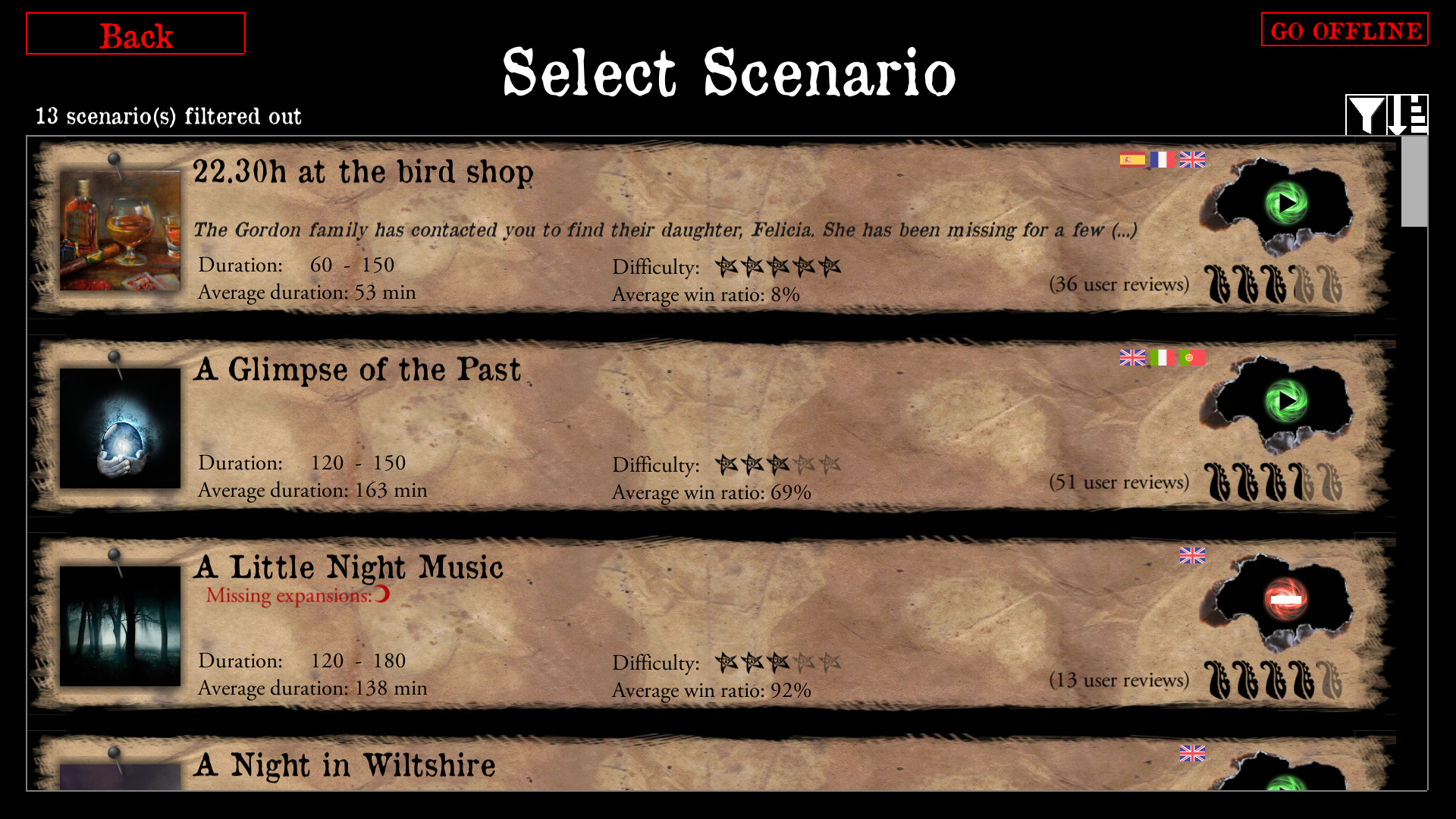
Only one scenario has a teaser text visible. The rest has a scenario's description visible only on a splash-screen after you download a scenario and then click a Play button:
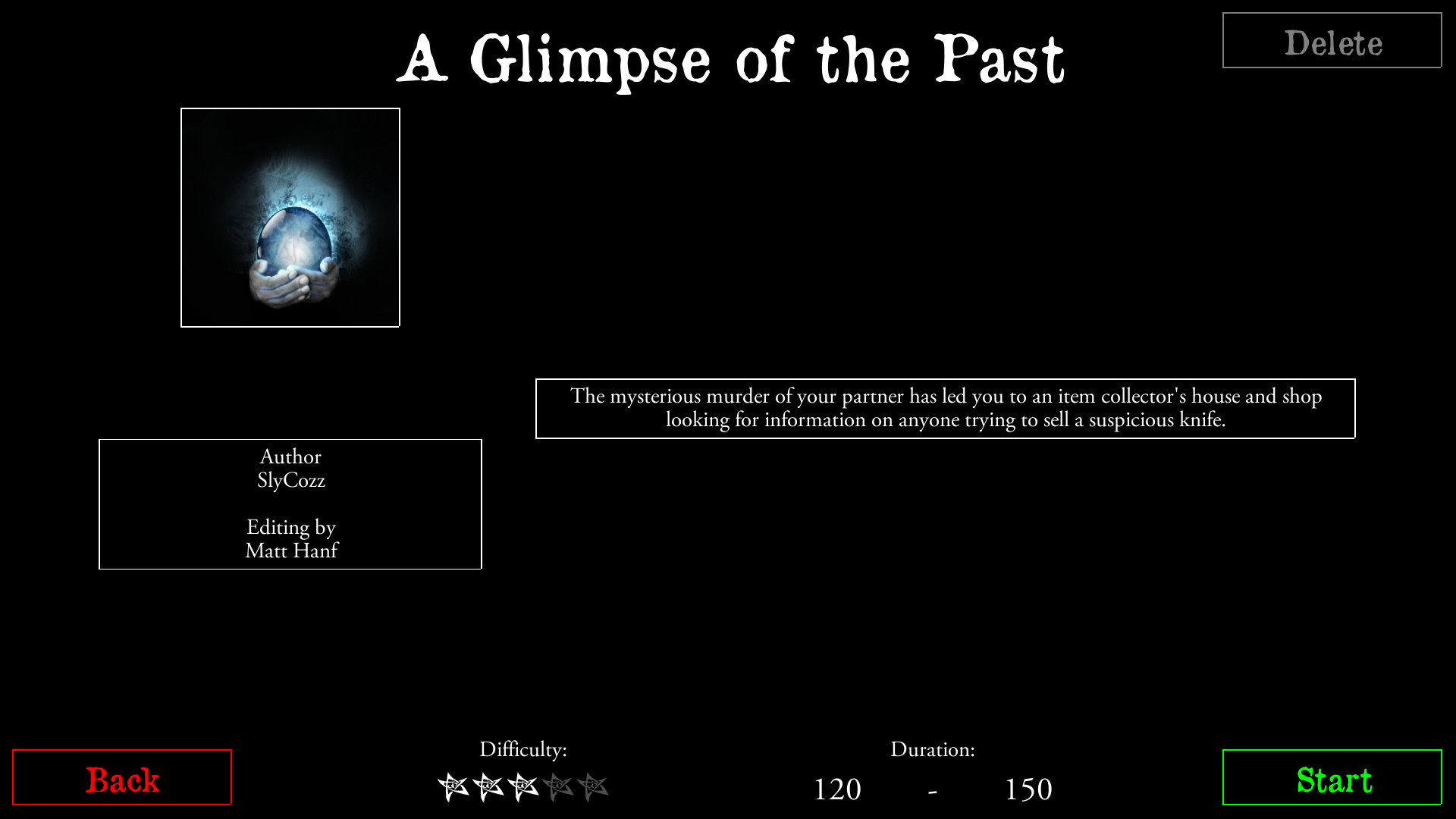
I am aware that lack of description is related to scenarios not having been updated yet but they also may never be.
A month ago I created issue https://github.com/NPBruce/valkyrie/issues/1020 which one part is related to creating a possibility to see a scenario's splash screen without a necessity to download a scenario in the first place. The conclusion for this part was: the current data format doesn't allow to do that as the data doesn't contain all information for a splash screen.
So again, I agree that imitating the official app would be good but I can't agree that the Valkyrie app mimics the behaviour of the official app nor that it works like it at this very moment. To mimic the official app behaviour a user should be able to see the whole teaser text, not just part of it, and without the necessity to download a scenario, don't you agree?
chrismaliszewski
on 27 Feb 2019
@chrismaliszewski You are completely right that the current app looks and behaves different then the official app. Remaking the official app will likely result in copyright issues or other nasty discussions.
So we will always need to find the right balance between "copy the behavior" and "create something new" which results in: "mimic the behavior". And finding the right balance does require us all to 'challenge' the current interface. So, thank you for that ;-)
On the subject of scenario selection screen:
The default scenario browser screen in FFC App shows more teaser text, but you can see only one scenario at a time. Unless you go to the scenario quick selection screen by hitting the top of the scenario image. There you can see an overview of scenarios but you cannot see any teaser text (nor any additional information).
Current Valkyrie scenario selection screen may therefor be better compared with the FFC app's Quick Selection screen but then including teaser text AND much more information to support scenario selection.
 antontimmermans
on 28 Feb 2019
antontimmermans
on 28 Feb 2019
The official app only has 20 scenarios or so. We have to be conscious that Valkyrie is likely to have double the amount of the official and there needs a more sophisticated interface in regards to download and selection.
The official app comes with the scenarios (I believe) pre-downloaded so they have an easier time referencing more source text. However we could duplicate the description text when generating the package and then use that for viewing the intro page before scenarios are downloaded?
scrubbless
on 28 Feb 2019
Related issues
chrismaliszewski
·
3Comments
 copytco
·
4Comments
chrismaliszewski
·
6Comments
copytco
·
4Comments
chrismaliszewski
·
6Comments
 EMILIPULIDO
·
8Comments
scrubbless
·
4Comments
EMILIPULIDO
·
8Comments
scrubbless
·
4Comments
Most helpful comment
Now regarding the proposal for improvements, my thoughts below :
I agree current implementation is not perfect, and we can focus on easy improvements at this stage.
With the amount of (my) time available for development, every request should be considered closely :
I would prefer to deliver something good, that is an improvement on previous version, rather than wait one month to have something perfect.
I summarize the ideas here :
1) Downloading a scenario by clicking on button only on not the full frame.
It's very easy to do, I will do that.
2) Clicking the frame should display more information, and not download directly.
Choice 1 : only display currently available information, in quest details screen.
It's a small development and could be added in 2.2 if we think there is enough value.
But keep in mind that most scenario don't have synopsis, author or description available yet.
So , but I'm not sure it brings a lot of value.
Choice 2 : Add all information in the (existing) file with all quests list, and display it in quest details screen.
It could be done, and would be a lot nicer I agree.
But it will require some additional optimisation to keep the system efficient.
My reco for point 2) : no change on the current UI behaviour, but I will change the package generation so it already includes the description and author list.
And we keep this improvement for version 2.3 with all data already available.