Valkyrie: Translations into Portuguese
Hello, I've just installed the latest valkirie for windows and noticed that just one scenario is available in Portuguese. So I'd like to translate the scenarios into Portuguese. Could you walk me through how should I proceed to create the translation? I'm not a developer, I'm actually a technical writer, but I know a lot of people in Brazil would use valkirie if we had more scenarios translated.
So, where could I find the text files in English? Can I edit them in a simple text editor, just translating into Portuguese? I appreciate a lot if you could guide me for my first translation.
 danielfrancelino
All 74 comments
Hi @danielfrancelino,
@nzocrato is working on a Portuguese translation of "Stress and Strain" and may have some tips for you.
I have added a section to my Valkyrie guide regarding translating scenarios (Page 130 onwards):
https://docs.google.com/document/d/1Gi5gTwKkw84Px0Lvk-bJ3Aml_vF3ZoljjB6a8FjWGt8/
You can do it directly in the editor (copy the localisation.english.txt and rename to the correct language) but be very careful not to change any of the event references. The localisation files reference other .ini files to allow for easier translating, if you break those links you'll break the scenario in that language.
Find and replace can be very dangerous as I have realised when trying to bulk change text and spelling errors, because there may be spelling mistakes in the event names, which cannot change without being done in the editor.
 scrubbless
on 29 Jul 2018
scrubbless
on 29 Jul 2018
Hi @danielfrancelino,
This is great i have started working to translate the scenarios for the same reason, i think once we have them published on portuguese the brazilian community will embrace valkyrie.
As @scrubbless have said im working on Stress and Strain, i think you will realize its pretty simple to translate following the guide, any questions u have just PM me and i'll be glad to help.
I'm doing the job working inside valkyrie to try to not corrupt any files, its not going fast and i don't have much time actually but i think it will be great, actually ill tell you its kind of a bitter sweet situation because i really want to play the scenario and doing the translation u kinda of know everything that can happen in the scenario so when i get to play it with my friends it will not be the same experience to me.
So im glad you will join me in the "Brazilian team" to translate all scenarios, this way i'll get to play some of them without spoilers. =)
Its really important to leave thread here and notify the creator and others, so we don't work on the same scenario at the same time.
You can get a notion of how the currently scenarios are rated here:
https://boardgamegeek.com/thread/1916430/fan-made-scenarios-reviews-valkyrie/page/1
You will see that i chose stress and strain because it had great reviews, so i suggest you pick In the dark?
It appears to be another great scenario.
That's it, take a look at the guide @scrubbless have provided, and any questions im here.
Thanks
 nzocrato
on 30 Jul 2018
nzocrato
on 30 Jul 2018
In the Dark would be a great choice, also the creator @NicolaZee is always very responsive and helpful if you reach out to her.
@nzocrato you seem to be fluent in English, you could always play the scenario 2 player on your own in before translating. Least then you will get a spoiler free view of the scenario. Also it might help you understand the narrative of the scenario.
I am translating Razon (10:30h at the Bird Shop), however I do not speak any spanish so I am translating that with Google Translate and tidying up the dialogue. So I won't get to play that spoiler free for sure :(.
I am using the editor too, this way I can read the events in sequence so I understand the narrative and the events leading up to any "badly google translated" dialogues, I can at least understand what lead to them, so I can try to work it out!
scrubbless
on 30 Jul 2018
It's a deal then! I'll start with In the Dark. As @scrubbless said, before I'll try this scenario in English, so I can have a better feeling before starting to translate.
@NicolaZee is it ok if I translate this scenario into Portuguese?
danielfrancelino
on 30 Jul 2018
Be my guest.
It's a very good idea to try it in English first as I will admit 'In the Dark' is not so forgiving or accessible as 'Stress and Strain'. It really is a 5 star difficulty. As James put it it's a mind-melter!
The good news is even after playing it many many times I still find difficulty working out the mystery!
As you will discover there is a lot going on beneath the surface.
 NicolaZee
on 30 Jul 2018
NicolaZee
on 30 Jul 2018
Hi all,
here is my personal method for translation, as I realize it is quite different.
Maybe it can benefit some of you.
I agree it's important to try the scenario first, and understand the flow of events.
But I find it quite hard to do the translations from the editor, or from a text file.
First of all, I think it takes a lot of time to rewrite all text, and to try to find the right translation, when you are not native speaker of the original text. So I use automatic translation, and I fix/improve 50% of the words.
(please note automatic translation quality is very dependant on the languages, and it is quite good for French, this may not apply to all languages).
With text files, you can't put comments, remarks, text color, mark questions while you are doing it.
Also you don't have saves / automatic versioning, if you do something wrong ^^
That's why I use an online editor like google sheet, with one cell per event text.
What I do:
1) I extract the text file into a excel / google sheet
2) I separate event name and text in two columns (this is a bit technical as you have a use regexp, but can be done very fast once you know how to do it)
3) translate all line via google translate or any other tool
4) put the translation in a third column, so it is easy to read both column at the same time
5) then I adapt / rewrite every line so it fits the meaning, and original writing style
6) finally, I make sure to keep the technical tag between { } intact, this may have been touched by the automatic translation.
Once it is done, extraction to a txt file is just a copy paste to a text editor, and a replace, to remove the 'tabs' between event and text.
I'm happy to help someone to show how I create the spreadsheet (it takes me 2 minutes to do), so feel free to ask.
 BenRQ
on 30 Jul 2018
BenRQ
on 30 Jul 2018
@BenRQ This sounds great, and apparently its faster than the inside translation. Can u give a walkthrough on how to separate the event name and text and create the spreadsheet?
Thanks!
nzocrato
on 30 Jul 2018
Hi @BenRQ !
That seems to be a very efficient process. Would you mind helping me to create the spreadsheet to In the Dark scenario?
Google has improved the Portuguese translation a lot. Although it still does to be 100% verified, it's much easier than rewriting everything.
danielfrancelino
on 30 Jul 2018
@BenRQ @danielfrancelino @scrubbless @NPBruce
I just thought that if this way really works and proves to be faster. We could great one google sheet for each scenario this way, and leave it open for translation into any language. Each column one different language, that would accelerate the process even more since we would be even able to work together in the same scenario, and of course look to how the sentence had been translate to other languages in the same spreadsheet.
Every new scenario we would just create the new spreadsheet and leave it open to translation into any language.
What do u guys think?
nzocrato
on 30 Jul 2018
@NPBruce seems great!!
And also would be easy to make corrections in future, in case somebody finds an issue in the translations (happens very often in my area of work).
danielfrancelino
on 30 Jul 2018
Sure let me prepare a step by step, while I'm doing it on the in the Dark scenario.
BenRQ
on 30 Jul 2018
@scrubbless you tutorial is really great.
The wiki is good, but this document would be a great addition to the existing documentation.
Is it available in the Wiki ?
It could even be listed in the main page of the GitHub as I guess a lot of person are looking for this kind of 'step by step' doc.
BenRQ
on 30 Jul 2018
It's under the tutorials section, we kept it in Google docs to maintain the jump links
scrubbless
on 30 Jul 2018
To create the spreadsheet:
1) Open the txt file in a txt editor, like Notepad++
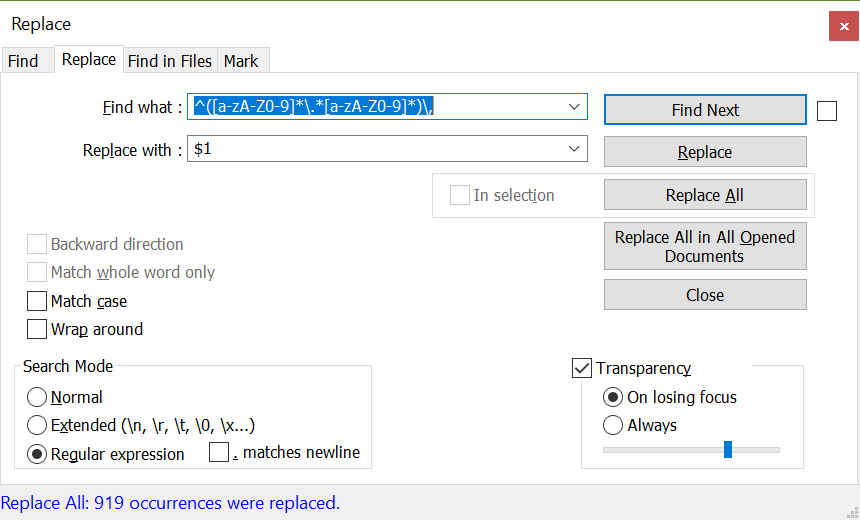
2) replace the ',' between event name and text, by a character that is not used anywhere else : I used 'tab' (as it is recognized by most tools to separate column in step 4).
Here is the regexp: ^([a-zA-Z0-9].[a-zA-Z0-9]*)\,
3) paste results in a google sheet / excel
4) use the function to separate text into column ( this is automatic with tabs in google sheet)
To translate:
1) Copy/paste column B in a text file
2) Use the text import option of google translate, and import this file
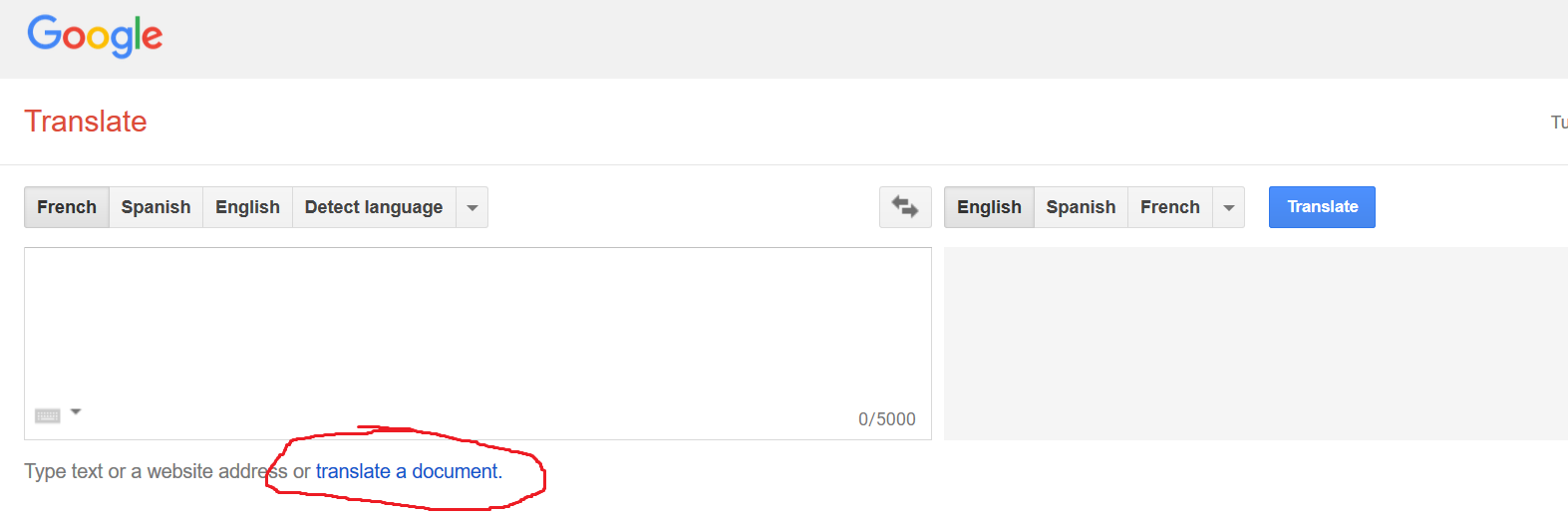
3) copy paste results in the spreadsheet in column C
-- Please note I had to do step 2 and 3, in a few steps google translate seems to have a maximum number of lines with Portuguese... Don't think it is the case with French
4) Now file is ready, but you should fix special technical tags with a few 'replace'
</ i> -> </i>
\ n -> \n
{pista} -> {clue}
{c:[space]  -> {c:
{qst:[space]  -> {qst:
{[space]  -> {
Et voilà
File is available, I would need an email to share it with you (you can delete the post after).
BenRQ
on 30 Jul 2018
Awesome! Mine is [email protected]
danielfrancelino
on 30 Jul 2018
I'll give this a shot for Razon, looks much easier.
scrubbless
on 30 Jul 2018
I'm just putting the final bug fixes in for "Strain of Reality" my next scenario. But it's mammoth task, 70,000 words in the localisation file at last count!
scrubbless
on 30 Jul 2018
I'm glad I could help :)
@nzocrato, @scrubbless tell me if you need help to create the doc.
@danielfrancelino, file is shared now, you can also share it yourself if you wish.
BenRQ
on 30 Jul 2018
Thanks a lot @benrq. Certainly made our job a lot easier.
danielfrancelino
on 30 Jul 2018
When saved with the current version of Valkyrie the language files should be csv compliant (in so far as that is a thing). Can you try just renaming to .csv and open directly?
Would it be better to change the default extension?
 NPBruce
on 31 Jul 2018
NPBruce
on 31 Jul 2018
This is where I have to tell you I'm feeling a little stupid. I don't have all expansions and I didn't realize that I needed the Suppressed Memories expansion for playing In the Dark. At this point, the only real problem is keeping consistency with the already translated tiles, cards and monsters for this expansion.
@nzocrato do you happen to have Memórias Reprimidas expansion? If so, is it too much to ask if you could take pictures of the contents? cards, monsters, etc. so I could check the Portuguese names already adopted by Galapagos? Pictures just good enough so I could read the names.
If I just translate the names, we are in risk of making incorrect references in the text.
Otherwize, I may just try translating another scenario.
danielfrancelino
on 31 Jul 2018
@danielfrancelino Hi Daniel. Guys im gonna answer this one in portuguese.
Oi Daniel, então esses elementos Cartas, peças de tabuleiro, monstros e tudo mais você não precisa traduzir, justamente para não causar esse tipo de falta de consistencia. O valkyrie extrai esses nomes da tradução original da Galapagos, quando ele extrai os dados do app oficial.
Quando você ta montando um mapa no valkyrie você referencia as coisas por exemplo {clue} esses elementos que você vai ver no texto eles se auto traduzem, {clue} no caso quando rodar o texto no valkyrie só de já estar marcado a lingua como portugues vai aparecer "pista". Assim como os nomes das cartas, monstros, etc. Esses elementos então você tem que deixar sem traduzir na forma do código que eles se apresentam.
Acho que deu pra entender?
nzocrato
on 31 Jul 2018
@nzocrato deixa eu ver se consegui compreender. No arquivo em excel, por exemplo, temos uma entrada em inglês como a seguir, sem as aspas:
"{action} Is Eric Colt a Dark Druid?"
O nome do monstro seria Dark Druid, em inglês. Mas na entrada em inglês, não está entre chaves {}. Você diz então que, se eu colocar entre aspas, ele vai procurar por uma tradução deste monstro? Desta forma a seguir?
"{action} Eric Colt é um {Dark Druid}? "
Se for só isso, é barbada :)
danielfrancelino
on 31 Jul 2018
Nesse caso acredito que não está referenciando um monstro e não irá procurar pela tradução, pois é apenas um campo de texto. Dark Druid, o app não está chamando o monstro, ou movendo o monstro, eventos com o monstro.
Nesse seu caso se o texto do cenário está se referindo a monstros sem referenciar então realmente seria um problema.
Vou dar uma olhada aqui, me da share no arquivo
[email protected]
nzocrato
on 31 Jul 2018
Compartilhei! Os textos tachados são aqueles que já conferi!
danielfrancelino
on 31 Jul 2018
Sim, estou vendo aqui:
O caso que eu me referia era tipo neste caso : " If you have the {c:QItemCultSigil} Item you may use an {action} to get it out and hold it up to the door grille "
Perceba que a referencia {c:QItemCultSigil} já vai traduzir automaticamente o nome do item, pq ta chamando ele da base de dados. Agora nestes outros casos você realmente tem que traduzir o nome.
Não sendo uma referencia direta a algum componente do jogo. Nestes casos acho que você adotando uma coerência interna sua na tradução não haverá problema. Dark druid = Druida Negro
Este é um problema que estou vendo em mandar tudo no google translate, se ele alterar essas referencias internas pode complicar
nzocrato
on 31 Jul 2018
When saved with the current version of Valkyrie the language files should be csv compliant (in so far as that is a thing). Can you try just renaming to .csv and open directly?
Would it be better to change the default extension?
@NPBruce as commas and semicolon are used in the text itself, so if you would open it in directly a spreadsheet editor like Google sheet or excel, it would create many columns instead of two.
And it would modify the text by removing those characters.
If you would replace the first comma by a 'tabulation' in the editor and in every translation file, it may work though.
BenRQ
on 31 Jul 2018
@danielfrancelino Hi, did u find a solution for that problem?
nzocrato
on 1 Aug 2018
@nzocrato Hello, you are still referring to the consistency in terminology? I'm translating the names that are not in a {} and keeping them the same throughout the various dialogues, but I still would like to use the same translation as Galapagos. I asked in a MoM group if somebody has a list or photos of their expansions. Worst case scenario is that, after published, people will complain about terms I've used are different when compared with Galapagos cards and tokens.
danielfrancelino
on 1 Aug 2018
@danielfrancelino hmm, i have a idea. Find a way to highlight all these itens and monsters that you have doubt about the Galapagos translation, when you're done, ill look into my copy of Memorias Reprimidas and check if your translation matches theirs. If not ill just do a find and replace in the entire text to match the galapagos.
nzocrato
on 1 Aug 2018
Sounds great! I can make it easier for you: I can simply make a list of terms I'd like to check and publish it here. So I don't have to go through the excel. You could just reply back with ok or with the correct translation. Example:
Original - Translation (Daniel ) - Translation Galapagos
Dark Druid - Druida Negro - OK
or, in case the translation is not OK
Dark Druid - Druida Negro - Druida Sombrio (just an example)
Would that work for you?
PS.: In the dark is a huge scenario... But I'd like to go through all of it before asking you to check the translations for the expansion items and monsters.
danielfrancelino
on 1 Aug 2018
Yeah, no problem, we can do it that way. Just call me when its done ! Looking forward to play In the Dark ( No escuro? )
nzocrato
on 1 Aug 2018
Hi,
if you are looking for the official game translations of objects, tiles, spells ... and so on, they are available in a text file in the official app.
Valkyrie imports it.
File is here :
C:Users[your_username]AppDataRoamingValkyrieMoMimporttext
BenRQ
on 1 Aug 2018
Hi @BenRQ , I checked the file. It seems it only has translations up to MAD20 MANSIONS OF MADNESS SECOND EDITION regarding monsters, items, unique items, conditions, and so on. For MAD21 and higher, maybe our publisher in Brazil (Galapagos) is still working in translating the app. I have to check the app when I get back home, and see if the scenarios for the expansions are translated into Portuguese.
danielfrancelino
on 1 Aug 2018
I did not install the expansion on the official app, as I don't have it.
Maybe you need to install the extension on your computer in the official app, and import content again?
BenRQ
on 1 Aug 2018
It is really great to see people putting effort in those translations, right now i'm translating "Believe Or Die - The Search For Ashcan Pete"
 andrex47
on 2 Aug 2018
andrex47
on 2 Aug 2018
Hi guys,
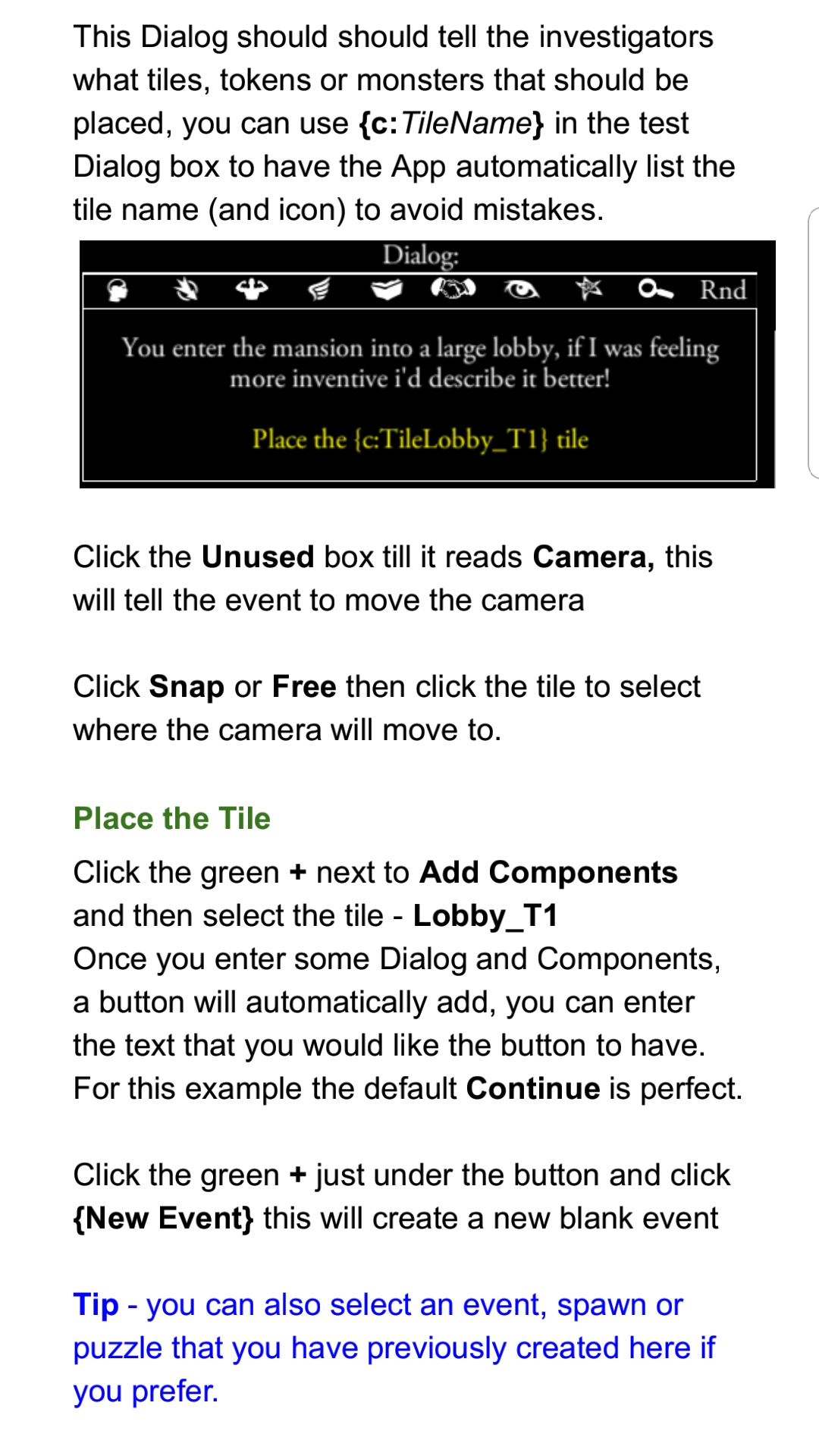
On the topic of tile names, instead of translating the tile name, you could simply replace it with the component name.
For example
The hall 2 tile is placed in an event and the dialogue says:
"Hall 2 {MAD20}"
Then in the "add components" section a tile is added with the component name "Tile1".
In the dialogue you can replace that with the tile components name, {c:Tile1}. That will persist through all languages as the variable has different languages.
You will notice this in Stress and Strain. The reason I did this was if I decided to change the tile, QItem, etc. I wouldn't have to go and change it in the events.
I have not tried, but I suspect you can do the same with spawns.
scrubbless
on 2 Aug 2018
Hi Scrubbles,
Yeah, our discussion its based on that, i noticed you did that, and thought every scenario would be that way, so i just said to daniel that he didn't had to translate those parts, but then we found out that if the creator of the scenario didn't put it that way its a extra work to translate.
Its a good practice to do it all just using references i guess u should add that in your guide !
Thanks
nzocrato
on 2 Aug 2018
I did! :D
scrubbless
on 2 Aug 2018
There seems to be some confusion about what is being discussed in regards to names.
With 'In the Dark' the tile names do use the {c:TileName} reference.
The same goes for the item names.
The issue is with the monster names - in particular the name 'Dark Druid'.
In hindsight it might have been better to use the monster reference name.
With the 'Dark Young' monster, I should have used the monster reference.
But with the term 'Dark Druid' it gets more complicated because there are times I have to refer to a Dark Druid rather than the Dark Druid. James knows the terminology used to refer to the Druids can get confusing. It could be argued there are places where the term an evil Druid might be more appropriate and helpful. e.g. "{action} Is Eric Colt an evil Druid?" rather than "{action} Is Eric Colt a Dark Druid?"
But I decided not to go down that route because part of the challenge of 'In the Dark' is figuring things out. Each clue subtly reveals information. The investigators should soon learn that they are trying to discover who is 'The Dark Druid' but as the investigations progresses they discover....
Spoiler Follows....
There is The Dark Druid and the Dark Druid's acolyte. Both are evil Druids. Only one is The Dark Druid.
I hope this helps.
NicolaZee
on 3 Aug 2018
Hello James
In regards to the guide, it might be good to add a bit about how to reference the monster names.
In addition a bit about the use of {qst:
I find if there is some text like a person's name that crops up in several places I use this to ensure the name is consistent.
One thing I would like to know would be how to access the text from the specific FFG localisation files.
The following text is used in every scenario and is in the FFG localization file
"EXPLORE_MOVE,You may move 1 space into the explored area."
I've not figured out how to access it from Valkyrie.
NicolaZee
on 3 Aug 2018
They are all new techniques to me Nicola! If you work it out, let me know and i'll add it to the guide.
scrubbless
on 3 Aug 2018
Hello James
I'm going to add a new Valkyrie issue as I can't figure out how to access EXPLORE_MOVE.
NicolaZee
on 3 Aug 2018
Hi @NicolaZee, i thought that ! Since In the dark is so subtle i think it will be a huge challenge to translate it keeping every clue in the way they were in the original version. Well its up to @danielfrancelino now!
nzocrato
on 3 Aug 2018
Without a doubt, 'In the Dark' is the hardest scenario to translate.
This is not because there is huge amounts of text.
The text file is smaller in size than 'Stress and Strain'.
Th problem is that it resembles a little bit a 'Sherlock Holmes Consulting Detective' scenario because every clue contains a clue and in some cases multiple clues.
It might help if I typed up the background underlying story because it might help to put into context the clues.
NicolaZee
on 3 Aug 2018
It'll take some time, but I'm really excited to put the translated version into test. I hope the translation does not become a challenge for the players, rather than the scenario itself.
danielfrancelino
on 3 Aug 2018
In the dark translation is 50% done!
danielfrancelino
on 6 Aug 2018
Translating 'In the Dark' is very hard as I think Indoy will confirm.
So well done getting half way there.
Please don't hesitate to ask any questions!
NicolaZee
on 6 Aug 2018
@nzocrato , can you gimme a hand? Could you check in your collection if you have the "Dark Druid Monster"? If you do, can you check the name in Portuguese?
danielfrancelino
on 6 Aug 2018
In the localisation text file Localization_pt.txt the translation of Dark Druid is:
MONSTER_DARK_DRUID,Druida Sombrio
So, I think FFG uses the term Druida Sombrio
FFG's translation seems to me to be more Spanish but more than likely I'm confused.
I tried Google automatic translation and the term Dark Druid translates as Druida Escuro.
To maintain consistency with the rest of the text used by FFG maybe you'll have to go with matching whatever FFG uses?
Maybe Bruce can help clarify whether the Localization_pt.txt is the correct text file for Portuguese.
NicolaZee
on 6 Aug 2018
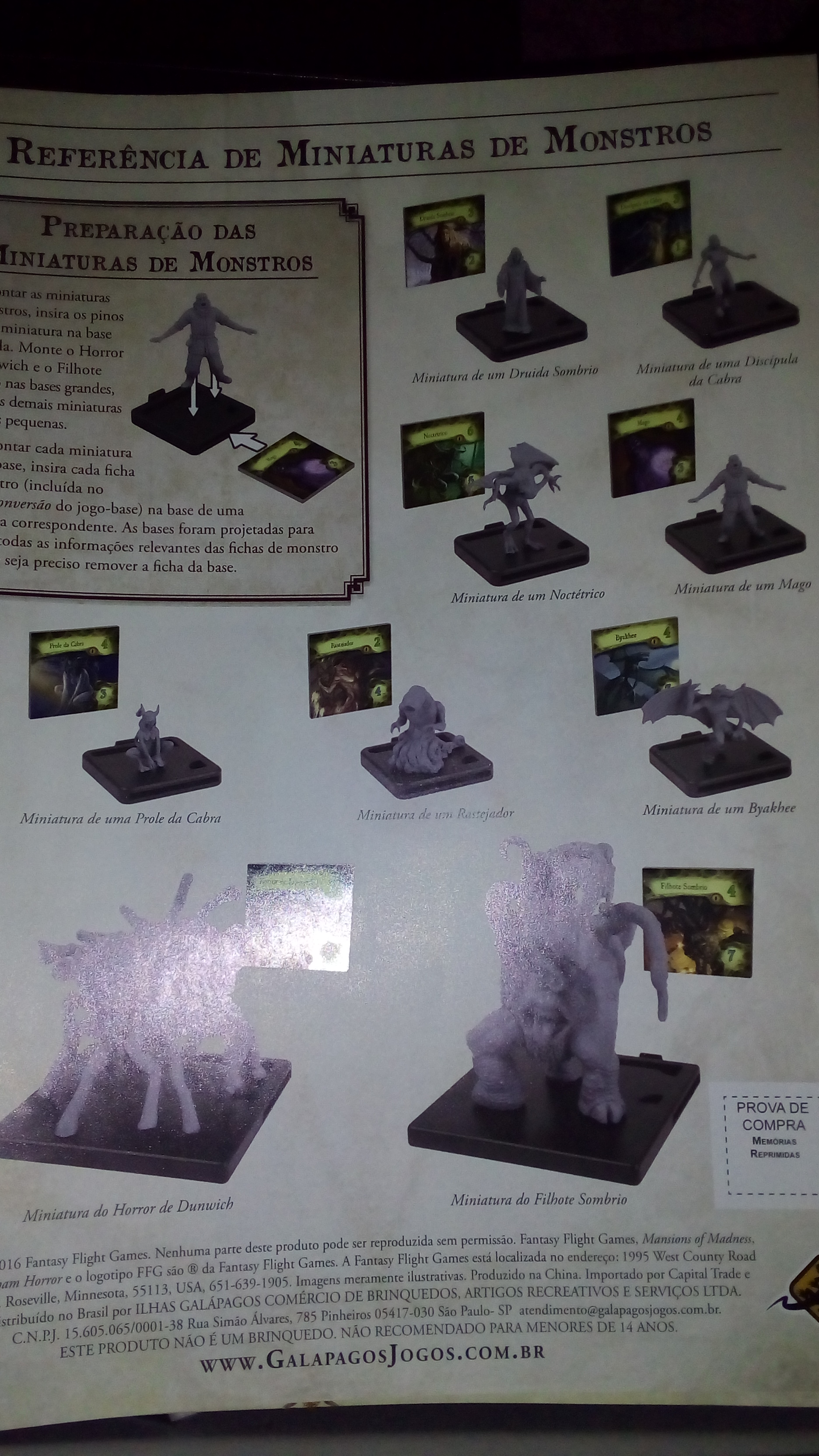
@danielfrancelino I took a picture of The monsters reference guide.
nzocrato
on 6 Aug 2018
Excellent Idea.
So Druida Sombrio it is then!
:)
NicolaZee
on 6 Aug 2018
@nzocrato I have only the MoM 2nd edition and I didn't even had curiosity of opening the conversion kit for 1st edition that actually comes with the 2nd edition. I opened it today and guess what? It comes with the monster tiles whose translated names I was looking for...
danielfrancelino
on 8 Aug 2018
@nzocrato would you mind helping me again with a translation? Did you happen to find the Portuguese translation for the Thrall monster?
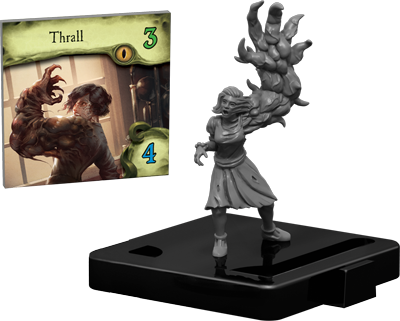
That's the last term I need to finish the translation of the In the Dark scenario.
@BenRQ , could you help us again with converting the excel file into the txt localization file?
danielfrancelino
on 9 Aug 2018
@danielfrancelino Thrall = Thrall
=)
nzocrato
on 9 Aug 2018
So I guess I'm done!
danielfrancelino
on 9 Aug 2018
Hi @danielfrancelino,
I did the first one but you will probably need to do it again if you play-test it with some friends.
Here is how you can do it
1) you copy/ paste the column A and B into a text editor
2) replace all TAB with ',' (you should copy paste the tab character from the text, between event id and translation)
3) save file with the right name translation.portugese.txt
It's done.
You can compare with this file if you want to be sure you did it right.
BenRQ
on 9 Aug 2018
@NicolaZee I've finished translating In the Dark into Portuguese.
Localization.Portuguese.txt
What would be the next step? I'd like to run this scenario in Valkyrie to validate the translation (find possible mistakes). What would you recommend?
danielfrancelino
on 9 Aug 2018
Locate your app data editor folder
%AppData%RoamingValkyrieMomEditorInTheDark
Copy the Localization.Portuguese.txt into the scenario folder.
Open Quest.Ini using a text editor.
Add the line Localization.Portuguese.txt to the [QuestText] section of the file.
[QuestText]
Localization.English.txt
Localization.French.txt
Localization.Portuguese.txt
Run Valkyrie
Click the 'Options' button in Valkyrie and set your language to .Portuguese.
Good Luck and please don't hesitate to ask any question.
NicolaZee
on 9 Aug 2018
Hello danielfrancelino
Have you printed out the crib sheet that goes with the scenario.
If not, I strongly recommend you do so.
I'd, also, recommend making notes as well.
There is only so much information most people can cope with!
NicolaZee
on 9 Aug 2018
May be worth translating that document too if its got a lot of text on it.
scrubbless
on 9 Aug 2018
Hi @NicolaZee , I located the folder %AppData%RoamingValkyrieMomEditorInTheDark
But it seems empty. Are the files hidden or something?
I could only find the Localization files in the path:
C:UsersDanielAppDataLocalTempValkyrieInTheDark.valkyrie
The same place where I found the file
InTheDarkClueCribSheet.pdf
But as soon as I close the program, it cleans all files under this folder.
danielfrancelino
on 9 Aug 2018
@NicolaZee and @scrubbless , here it goes the crib sheet translated into Portuguese as well:
InTheDarkClueCribSheet-Portuguese.pdf
danielfrancelino
on 9 Aug 2018
Hello danielfrancelino
There are two file locations:
- The downloaded copy where the scenario is downloaded when you click download.
- The editor copy where the scenario can be edited.
I assumed you were working on an editor copy.
To work in an editor copy you must manually set one up.
From the Valkyrie main menu, click 'Scenario Editor'
Click on the 'In the Dark' scenario entry
Click the 'Copy' Button to make a copy that can be edited
In the Quest Name change the name so you don't get confused about versions. : )
I recommend adding one to the version number (v3.5)
Click the 'Menu' button and then the 'Save' button
Then click the 'Main Menu' button
You will now have a copy in your app data folder
Locate your app data editor folder and there should now be a new folder in it.
The name might be something like 'Scenario 1'
%AppData%RoamingValkyrieMomEditor
Check the 'Quest.ini' file to ensure you've found the right folder.
Copy the Localization.Portuguese.txt into the scenario folder.
Open Quest.Ini using a text editor.
Add the line Localization.Portuguese.txt to the [QuestText] section of the file.
[QuestText]
Localization.English.txt
Localization.French.txt
Localization.Portuguese.txt
Run Valkyrie
Click the 'Options' button in Valkyrie and set your language to .Portuguese.
Good Luck and please don't hesitate to ask any question.
NicolaZee
on 10 Aug 2018
Hi @NicolaZee ! Following your instructions, I did a few playtests and corrected all issues I found. I also renamed the scenario to v3.5.
Localization.Portuguese.txt
Do you believe we need more testing? From my side, we are good with the translated version above. What do you think?
danielfrancelino
on 22 Aug 2018
Hello danielfrancelino
Language can be very ambiguous.
It is very easy to get a few words here and there a bit wrong and the mystery becomes incoherent.
The translation to French took Indoy hours of work and testing was very hard.
Much harder than the other scenarios he worked on.
So my main question is did the scenario make sense?
Did the printed out pdf sheet make sense?
Did you manage to win?
Most people take around 3 attempts before they win!
Last but not least what did you think of the scenario.
Most people think it's good but much too hard!
NicolaZee
on 23 Aug 2018
Hello danielfrancelino
Have you tried it with more than 3 investigators?
If you play with more than 3, there is a 2 in 3 chance of a plot twist.
NicolaZee
on 23 Aug 2018
Well, for me it took a lot of time indeed. And the playtest made me change many sentences I already translated, so they would make more sense. Besides all wrong tags, extra spaces, missing spaces and so on.
I won exactly on my third attempt. And only managed to win after using the pdf for notes. After that I had a few defeats, this time on purpose, aiming to check other dialogues.
danielfrancelino
on 23 Aug 2018
But I always used only 2 investigators. So I didn't see the plot twist.
I think it's a great scenario. Of course it's hard. It's mansions of madness. ;)
I'd say it's my preferred type of scenario. Investigation rather than pure fighting monsters.
I love eldritch horror, for example, but if you don't do the role-playing, it' just tossing dice and praying for the next mythos card don't execute everybody in a glimpse.
In the dark makes you actively responsible for the direction of the story. You can be all successes in your dice, and yet fail miserably due to poor judgement (like a couple of my playtests).
danielfrancelino
on 23 Aug 2018
I'm very glad you enjoyed my scenario.
That's a relief as otherwise it would have been a waste of the time you spent translating it.
With 5 star scenarios, you get out what you put in.
In addition (because of the complexity and variation) if you don't play it for a few months (especially with 4 investigators) you'd be surprised how much of a challenge the scenario can still be.
I call it 'the Beast' and it has claws!
If you ever start finding it too easy, just play it with no crib sheet!
Then for the ultimate challenge, play it with no notes.
I don't recommend this because I've never won 'In the Dark' playing with no notes.
In a sense playing with the 2 investigators is a slightly cut-down version because the plot-twist is turned off.
With less than 4, there is no chance of a plot twist.
With 4, there is only a 2 in 3 chance of a plot twist.
I'd recommend playing once with 4 but without laying tiles, monsters and so on and cheating on the dice rolls so you just treat them as automatic successes.
Alternatively (if you're confident of your translation) I'm happy to release it as is with the attribution:
Portugese Translastion: DanielFrancelino
NicolaZee
on 23 Aug 2018
You got me curious. I'll try it first with four investigators :)
danielfrancelino
on 23 Aug 2018
@NicolaZee I guess I'm pretty confindent with the translation! Did a couple more of playtests today.
Localization.Portuguese.txt
If you don't mind releasing it, I guess my job with with scenario is done. It's a pitty that translating it and playing that many times kind of spoil the fun. However, I'm gone try it again in a few months. Such a great scenario!
@nzocrato you are working with stress and strain, correct? I'm looking for my next translation challenge.
I remember that somebody is translating Believe Or Die - A Search For Ashcan Pete.
A glimpse of the past is already translated.
So Amnesia, In Places Unseen, and Exotic Material are possible candidates, right?
@NPBruce , what is your suggestion?
By the way, thanks everyone for the kind support!!
danielfrancelino
on 24 Aug 2018
Hello danielfrancelino
Thanks for your praise.
Great work on the translation - especially on the play-testing
Any feedback is gratefully received.
Please don't forget to vote on the poll in BGG!
I am very happy to release your translation.
Playing many times does spoil the fun.
You are likely to find the next scenario you do is a lot less work!
NicolaZee
on 25 Aug 2018
Hello danielfrancelino
Portuguese Translation now released as version 3.5
NicolaZee
on 27 Aug 2018
Related issues
 chrismaliszewski
·
6Comments
scrubbless
·
3Comments
chrismaliszewski
·
6Comments
scrubbless
·
3Comments
 jlederer2
·
7Comments
jlederer2
·
7Comments
 cowistree
·
7Comments
cowistree
·
7Comments
 EMILIPULIDO
·
8Comments
EMILIPULIDO
·
8Comments
Most helpful comment
Hi all,
here is my personal method for translation, as I realize it is quite different.
Maybe it can benefit some of you.
I agree it's important to try the scenario first, and understand the flow of events.
But I find it quite hard to do the translations from the editor, or from a text file.
First of all, I think it takes a lot of time to rewrite all text, and to try to find the right translation, when you are not native speaker of the original text. So I use automatic translation, and I fix/improve 50% of the words.
(please note automatic translation quality is very dependant on the languages, and it is quite good for French, this may not apply to all languages).
With text files, you can't put comments, remarks, text color, mark questions while you are doing it.
Also you don't have saves / automatic versioning, if you do something wrong ^^
That's why I use an online editor like google sheet, with one cell per event text.
What I do:
1) I extract the text file into a excel / google sheet
2) I separate event name and text in two columns (this is a bit technical as you have a use regexp, but can be done very fast once you know how to do it)
3) translate all line via google translate or any other tool
4) put the translation in a third column, so it is easy to read both column at the same time
5) then I adapt / rewrite every line so it fits the meaning, and original writing style
6) finally, I make sure to keep the technical tag between { } intact, this may have been touched by the automatic translation.
Once it is done, extraction to a txt file is just a copy paste to a text editor, and a replace, to remove the 'tabs' between event and text.
I'm happy to help someone to show how I create the spreadsheet (it takes me 2 minutes to do), so feel free to ask.