Valet-plus: Fatal error: Call to undefined function apcu_fetch()
Having same issue as #133 , followed the suggestions but no luck. Any Suggestions?
Fatal error: Call to undefined function apcu_fetch() in /User/r2d2/.composer/vendor/weprovide/valet-plus/server.php on line 37
env details
php -v
PHP 7.1.16 (cli) (built: Apr 12 2018 03:28:19) ( NTS )
Copyright (c) 1997-2018 The PHP Group
Zend Engine v3.1.0, Copyright (c) 1998-2018 Zend Technologies
with Zend OPcache v7.1.16, Copyright (c) 1999-2018, by Zend Technologies
; Add America/New_York string for replacing with machine timezone ; Max execution time per request ; Max memory per instance ;The maximum size of an uploaded file. ;Sets max size of post data allowed. This setting also affects file upload. To upload large files, this value must be larger than upload_max_filesize session.auto_start = off ; Disable garbage collector ; Use mailhog for sending emails [opcache] [apcu] [xdebug]
z-performance.ini
date.timezone = "America/New_York"
max_execution_time = 300
memory_limit = 128M
upload_max_filesize = 128M
post_max_size = 128M
session.gc_probability = 0
suhosin.session.cryptua = off
memory_limit=2G
zend.enable_gc = off
sendmail_path = /usr/local/bin/MailHog sendmail test@test
opcache.enable = 1
opcache.enable_cli = 1
opcache.memory_consumption = 2048
opcache.interned_strings_buffer = 20
opcache.file_cache=1
opcache.max_accelerated_files = 80000
opcache.max_wasted_percentage = 5
opcache.use_cwd = 1
opcache.validate_timestamps = 1
opcache.revalidate_freq = 0
opcache.file_update_protection = 2
opcache.revalidate_path = 0
opcache.save_comments = 1
opcache.load_comments = 1
opcache.fast_shutdown = 1
opcache.enable_file_override = 0
opcache.optimization_level = 0xffffffff
opcache.inherited_hack = 1
opcache.blacklist_filename = ""
opcache.max_file_size = 0
opcache.consistency_checks = 0
opcache.force_restart_timeout = 180
opcache.error_log = ""
opcache.log_verbosity_level = 1
opcache.preferred_memory_model = ""
opcache.protect_memory = 0
apc.cache_by_default = false
; apcu and php-fpm cause valet to hang, so we turn off apcu for now.
; See https://github.com/weprovide/valet-plus/issues/49
apc.enabled=0
apc.shm_size=512M
apc.ttl=7200
apc.mmap_file_mask=/tmp/apc.XXXXXX
apc.enable_cli=1
xdebug.remote_enable=1
xdebug.remote_host=localhost
xdebug.remote_port=9000
xdebug.remote_autostart=1
xdebug.idekey=PHPSTORM
.
pcel list
Installed packages, channel pecl.php.net:
=========================================
Package Version State
apcu    5.1.11  stable
apcu_bc 1.0.4   stable
geoip   1.1.1   beta
 dwillitzer
All 18 comments
Hi @djdesign - sounds like your valet's frontend is still running on a different PHP version than your cli - could you try rebooting your machine as this seems to solve quite a few issues after updating. Let me know if this helps or if you require extra assistance.
 samgranger
on 13 Apr 2018
samgranger
on 13 Apr 2018
@samgranger I have restarted, but doesn’t help.
dwillitzer
on 13 Apr 2018
Same problem here, same config.
 FredericMartinez
on 13 Apr 2018
FredericMartinez
on 13 Apr 2018
Currently working on some improvements for this. @djdesign Are the apcu.so lines added to your php.ini file?
 Neodork
on 13 Apr 2018
Neodork
on 13 Apr 2018
@Neodork Yes I see It listed at the top.
extension="apc.so"
extension="apcu.so"
extension="geoip.so"
dwillitzer
on 13 Apr 2018
@djdesign Those are invalid. Remove those and switch back. valet use 5.6 and valet use 7.1. Or did you remove the full path?
Neodork
on 13 Apr 2018
@djdesign Did you try run valet install after valet use?
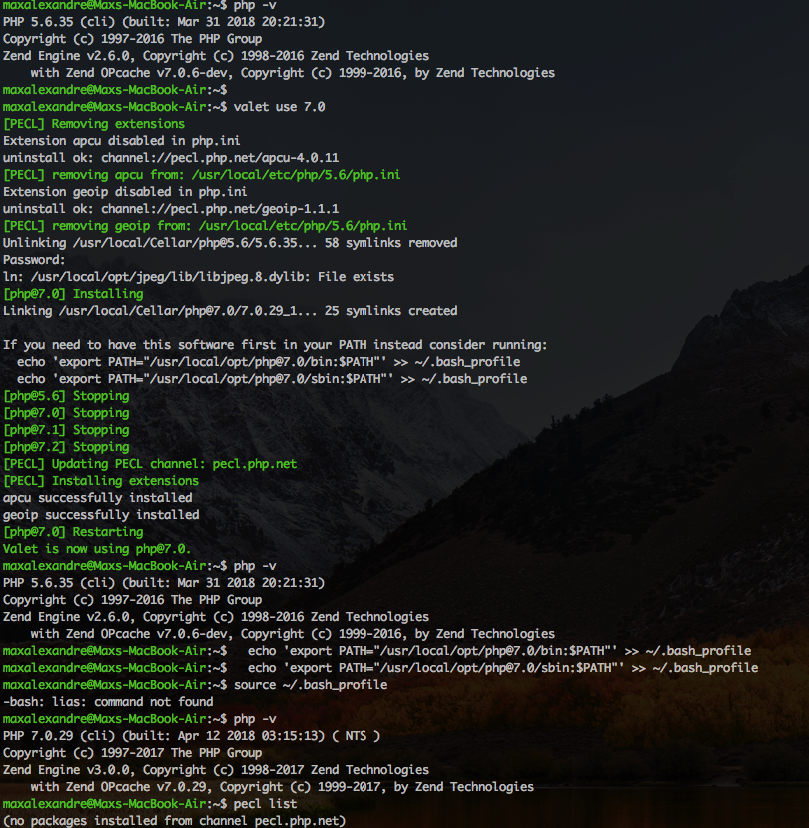
After run valet use, i need run valet install for working on new version php.
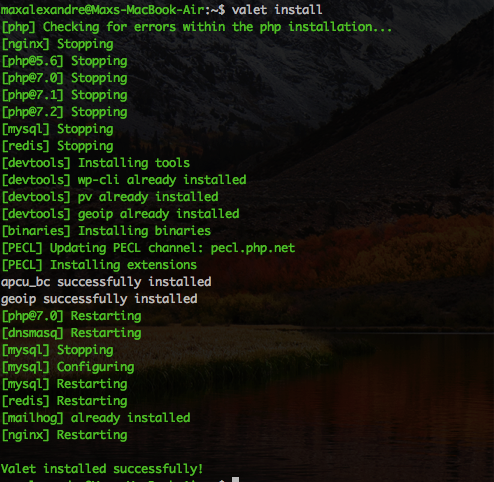
 MaxSouza
on 13 Apr 2018
MaxSouza
on 13 Apr 2018
I don't know if that's the correct procedure
MaxSouza
on 13 Apr 2018
This is the results I get.
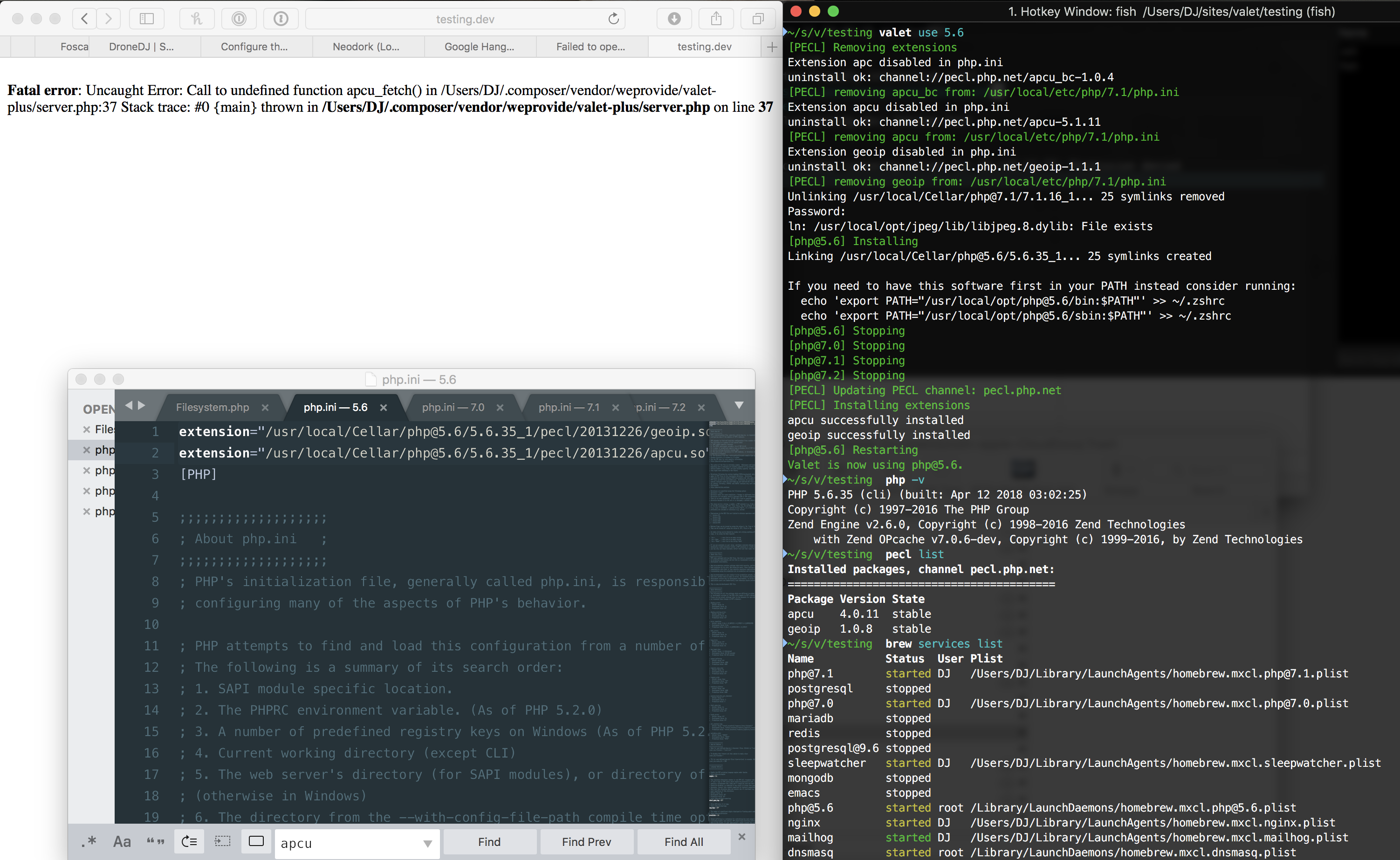
dwillitzer
on 13 Apr 2018
@djdesign Could you show me brew list | grep php
Neodork
on 13 Apr 2018
@Neodork
~/s/v/testing $  brew list | grep php
php-cs-fixer
[email protected]
phpunit
The reason you see 7.1 is I switched over 7.1 seeing if anything else changed, but did not change or fix the bug. If I left it with php5.6 then it would show that in the list.
dwillitzer
on 13 Apr 2018
Oke so no old installations present, that's good. How about ls -la /usr/local/etc/php/7.0/cond.d/ are there any ext-apcu.ini files present?
Neodork
on 13 Apr 2018
~/s/v/testing$  ls -la /usr/local/etc/php/7.0/cond.d/
ls: /usr/local/etc/php/7.0/cond.d/: No such file or directory
~/s/v/testing  ls /usr/local/etc/php/*/conf.d/
/usr/local/etc/php/5.6/conf.d/:
ext-opcache.ini   z-performance.ini

/usr/local/etc/php/7.0/conf.d/:
ext-opcache.ini   z-performance.ini

/usr/local/etc/php/7.1/conf.d/:
ext-opcache.ini   z-performance.ini

/usr/local/etc/php/7.2/conf.d/:
ext-opcache.ini       php-memory-limits.ini z-performance.ini
I had the same problems as others on here (including having none of the listed workarounds or restarts work). I finally got mine working using:
Verify PHP runs without errors (deal with any errors it complains about. Usually it's something like "syntax error, unexpected '=' in /usr/local/etc/php/7.1/php.ini on line 1" which looks like someone is missing adding a newline when inserting entries at the top of the file).
php -v
Check to see which PHP is running (in my case it showed as: "[email protected] error root /Library/LaunchDaemons/[email protected]")
brew services list
Restart that PHP (note, I didn't use sudo here):
brew services restart [email protected]
 lazyguru
on 17 Apr 2018
lazyguru
on 17 Apr 2018
I solved this problem by uninstalling PHP and Valet Plus.
When you enter php -v, you shoud have command not found.
Then, reinstall PHP with brew and valet plus.
FredericMartinez
on 17 Apr 2018
I've had contact with @djdesign through google hangouts. The problem was mostly related to having PHP-FPM serving an other version of PHP as the CLI. As mentioned in this thread a few times before. He did have some issues with the DB afterwards but I don't think those were related to this issue.
Neodork
on 26 Apr 2018
Thanks for helping @djdesign out @Neodork - closing this issue for now.
samgranger
on 14 May 2018
Thanks @lazyguru, brew services restart [email protected] works!
FredericMartinez
on 11 Jun 2018
Related issues
 eclectic-coding
·
31Comments
eclectic-coding
·
31Comments
 ezequielalba
·
15Comments
ezequielalba
·
15Comments
 farmaworld
·
18Comments
farmaworld
·
18Comments
 glennjacobs
·
22Comments
glennjacobs
·
22Comments
 rav-redchamps
·
13Comments
rav-redchamps
·
13Comments
Most helpful comment
I had the same problems as others on here (including having none of the listed workarounds or restarts work). I finally got mine working using:
Verify PHP runs without errors (deal with any errors it complains about. Usually it's something like "syntax error, unexpected '=' in /usr/local/etc/php/7.1/php.ini on line 1" which looks like someone is missing adding a newline when inserting entries at the top of the file).
php -vCheck to see which PHP is running (in my case it showed as: "[email protected] error root /Library/LaunchDaemons/[email protected]")
brew services listRestart that PHP (note, I didn't use sudo here):
brew services restart [email protected]