Vagrant version
$ vagrant -v
Vagrant 2.2.0

$ brew cask info virtualbox
virtualbox: 5.2.22,126460
Host operating system
macOS Mojave
Version 10.14.1
Guest operating system
ubuntu/bionic64 (virtualbox, 20181018.0.0)
Vagrantfile
# -*- mode: ruby -*-
# vi: set ft=ruby :

# All Vagrant configuration is done below. The "2" in Vagrant.configure
# configures the configuration version (we support older styles for
# backwards compatibility). Please don't change it unless you know what
# you're doing.
Vagrant.configure("2") do |config|
  # The most common configuration options are documented and commented below.
  # For a complete reference, please see the online documentation at
  # https://docs.vagrantup.com.

  # Every Vagrant development environment requires a box. You can search for
  # boxes at https://vagrantcloud.com/search.
  config.vm.box = "ubuntu/bionic64"

  # Disable automatic box update checking. If you disable this, then
  # boxes will only be checked for updates when the user runs
  # `vagrant box outdated`. This is not recommended.
  # config.vm.box_check_update = false

  # Create a forwarded port mapping which allows access to a specific port
  # within the machine from a port on the host machine. In the example below,
  # accessing "localhost:8080" will access port 80 on the guest machine.
  # NOTE: This will enable public access to the opened port
  # config.vm.network "forwarded_port", guest: 80, host: 8080

  # Create a forwarded port mapping which allows access to a specific port
  # within the machine from a port on the host machine and only allow access
  # via 127.0.0.1 to disable public access
  # config.vm.network "forwarded_port", guest: 80, host: 8080, host_ip: "127.0.0.1"

  # Create a private network, which allows host-only access to the machine
  # using a specific IP.
  config.vm.network "private_network", ip: "192.168.33.10"

  # Create a public network, which generally matched to bridged network.
  # Bridged networks make the machine appear as another physical device on
  # your network.
  # config.vm.network "public_network"

  # Share an additional folder to the guest VM. The first argument is
  # the path on the host to the actual folder. The second argument is
  # the path on the guest to mount the folder. And the optional third
  # argument is a set of non-required options.
  # config.vm.synced_folder "../data", "/vagrant_data"

  # Provider-specific configuration so you can fine-tune various
  # backing providers for Vagrant. These expose provider-specific options.
  # Example for VirtualBox:
  #
  # config.vm.provider "virtualbox" do |vb|
  #   # Display the VirtualBox GUI when booting the machine
  #   vb.gui = true
  #
  #   # Customize the amount of memory on the VM:
  #   vb.memory = "1024"
  # end
  #
  # View the documentation for the provider you are using for more
  # information on available options.

  # Enable provisioning with a shell script. Additional provisioners such as
  # Puppet, Chef, Ansible, Salt, and Docker are also available. Please see the
  # documentation for more information about their specific syntax and use.
  # config.vm.provision "shell", inline: <<-SHELL
  #   apt-get update
  #   apt-get install -y apache2
  # SHELL
end
Debug output
https://gist.github.com/cockcrow/c07562d9907d55296a01236fd50abdb0
Expected behavior
vagrant up correctly.
Actual behavior
NS_ERROR_FAILURE
Steps to reproduce
vagrant up
It is okay to use VBoxHeadless -s 6a98d13b-a3ae-4f73-925f-b2ab59e83789 and then vagrant ssh into the box.
 cockcrow
All 14 comments
@cockcrow - Have you tried reinstalling VirtualBox, and also tried bringing up a VM through the GUI?
 briancain
on 13 Nov 2018
briancain
on 13 Nov 2018
@cockcrow - Have you tried reinstalling VirtualBox, and also tried bringing up a VM through the GUI?
Yes, I've tried reinstall both VirtualBox and vagrant.
There's also NS_ERROR_FAILURE when starting VM from GUI, but VBoxHeadless command works magically.
The VBoxHeadless could bring up the VM and vagrant ssh works, but the private network was not configured in the VM.
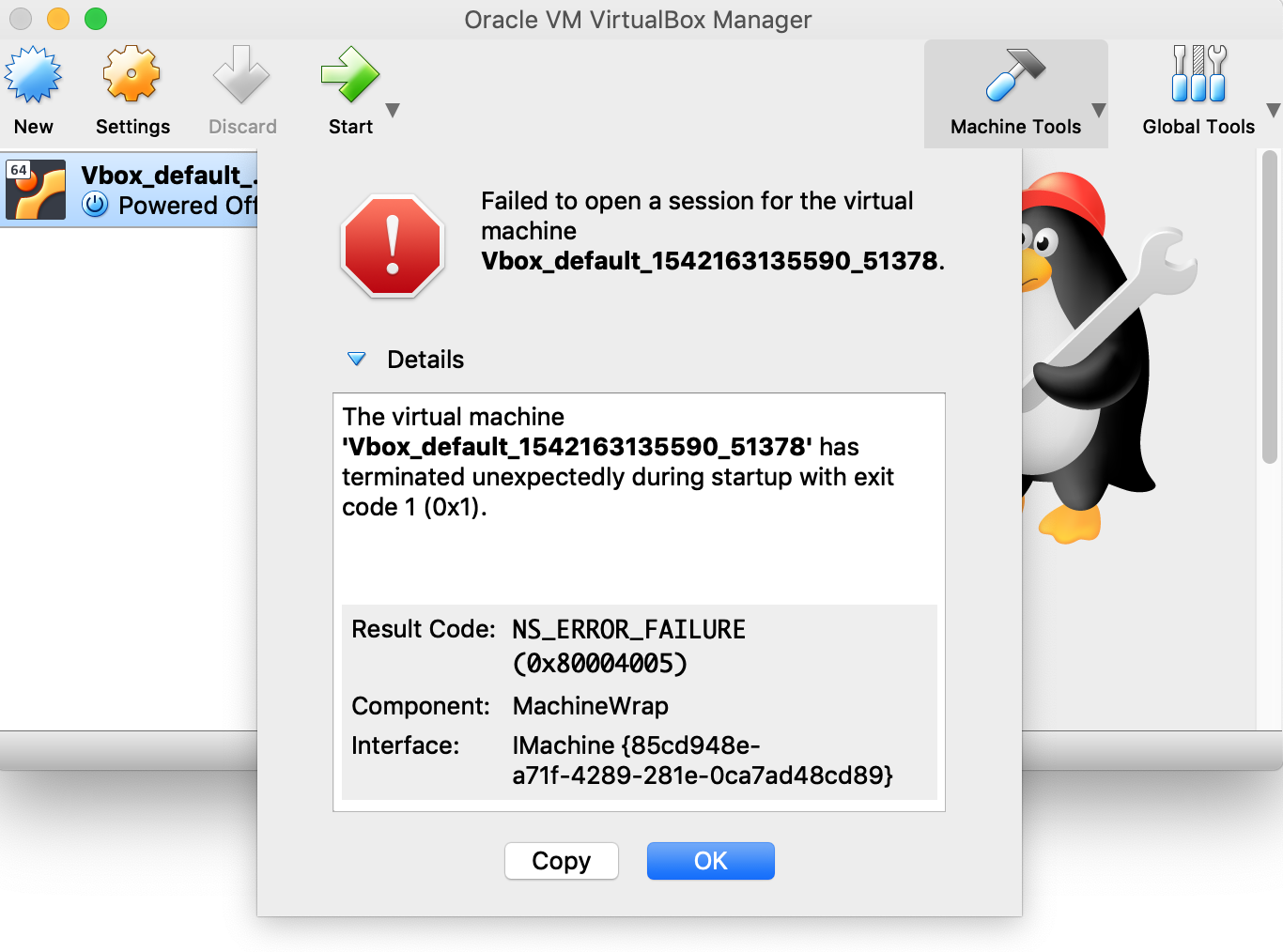
Result Code: | NS_ERROR_FAILURE (0x80004005)
-- | --
Component: | MachineWrap
Interface: | IMachine {85cd948e-a71f-4289-281e-0ca7ad48cd89}
Have you tried some of the steps in this thread to resolve the issue on mac? https://github.com/hashicorp/vagrant/issues/8687#issuecomment-413687866
briancain
on 14 Nov 2018
Have you tried some of the steps in this thread to resolve the issue on mac? #8687 (comment)
Yes, but not works.
cockcrow
on 15 Nov 2018
Try downgrading to VirtualBox 5.2.20 r125813. I had a similar (but possibly unrelated) issue on my Mac where vagrant stopped working when I upgraded to VirtualBox 5.2.22 (as noted in your log). For me, specifically, some communication between Vagrant and the VM (WinRM) stopped working.
 ColinNg
on 23 Nov 2018
ColinNg
on 23 Nov 2018
Downgrading to 5.2.20 seems to have fixed the issue for me.
 AntonNiklasson
on 29 Nov 2018
AntonNiklasson
on 29 Nov 2018
I also encountered the same problem
macOS Mojave
version 10.14 (18A391)
vagrant --version
Vagrant 2.1.1
VirtualBox 5.2.20 r125813 (Qt5.6.3)
Guest operating system
centos 7.2
 wangyoukun
on 12 Dec 2018
wangyoukun
on 12 Dec 2018
@cockcrow 你好 你解决这个问题了么?
wangyoukun
on 12 Dec 2018
VirtualBox v6.0.2 and vagrant 2.2.3 solve the issue.
cockcrow
on 18 Jan 2019
I also encontered the same problem. Even using VirtualBox v6.04 and vagrant 2.2.3
 juliosmelo
on 7 Feb 2019
juliosmelo
on 7 Feb 2019
I experienced the same issue where vagrant up failed with VirtualBox 6.0.4 and downgraded to VirtualBox 5.2.20 to get around the problem.
 harveymonster
on 8 Feb 2019
harveymonster
on 8 Feb 2019
On the off chance this is useful to anyone, I recently upgraded to Mojave 10.14.4 and could not run my (two year old?) installation of vagrant. A web search led me to this page. I was able to get running again by updating brew, then using it to reinstall virtualbox and vagrant using the latest version of each:
brew update
brew cask reinstall virtualbox
brew cask reinstall vagrant
After that, vagrant worked fine.
 cwreynolds
on 10 May 2019
cwreynolds
on 10 May 2019
Sorry for the later feedback. I did the same thing that @cwreynolds did and vagrant is working fine after that.
juliosmelo
on 17 May 2019
I'm going to lock this issue because it has been closed for _30 days_ ⏳. This helps our maintainers find and focus on the active issues.
If you have found a problem that seems similar to this, please open a new issue and complete the issue template so we can capture all the details necessary to investigate further.
![hashibot[bot] picture](https://avatars.githubusercontent.com/in/8332?v=4&s=40) hashibot[bot]
on 1 Apr 2020
hashibot[bot]
on 1 Apr 2020
Related issues
 Cbeck527
·
3Comments
Cbeck527
·
3Comments
 jsirex
·
3Comments
jsirex
·
3Comments
 StefanScherer
·
3Comments
StefanScherer
·
3Comments
 DreadPirateShawn
·
3Comments
DreadPirateShawn
·
3Comments
 rrzaripov
·
3Comments
rrzaripov
·
3Comments
Most helpful comment
VirtualBox v6.0.2andvagrant 2.2.3solve the issue.