Vaadin-grid: Column positions out of order when 100+ columns exist along with a header row
Description
Column positions out of order when 100+ columns exist along with a header row
Expected outcome
Columns should be displayed (left to right) in the order they were added to the grid.
Actual outcome
In example below once you add 100 columns, columns numbered 97 and 100 will switch position.
Live Demo
https://gitpod.io/#snapshot/ce0690b7-e30c-48ee-b18b-cf75869d34a8
Enter 100 in the input box, then click the button. If you comment out the code to prepend the header row, the columns are then in the correct order.
Browsers Affected
- [x ] Chrome
- [x ] Firefox
- [x ] Safari
- [ ] Edge
- [ ] IE 11
- [ ] iOS Safari
- [ ] Android Chrome
 szembek
All 4 comments
I can confirm the problem.
Here a sample to reproduce (from the first example with less code)
@Route("horizontal-grid")
public class HorizontalGridView extends VerticalLayout {
    private Grid<String> grid;
    private TextField numColumns;
    private Button refreshButton;
    private VerticalLayout content;

    @Override
    protected void onAttach(AttachEvent attachEvent) {
        super.onAttach(attachEvent);
        add(createContent());
    }

    private Component createContent() {
        numColumns = new TextField("# Columns to add");
        numColumns.setValue("101");

        refreshButton = new Button("Refresh", new Icon(VaadinIcon.REFRESH));
        refreshButton.addClickShortcut(Key.ENTER);
        refreshButton.addClickListener(listener -> {
            if (NumberUtils.isCreatable(numColumns.getValue())) {
                rebuildGrid();
            }
        });

        HorizontalLayout topBar = new HorizontalLayout(numColumns, refreshButton);
        topBar.setAlignItems(FlexComponent.Alignment.BASELINE);
        topBar.setWidthFull();

        setupGrid();

        content = new VerticalLayout(topBar, grid);

        return content;
    }

    private void setupGrid() {
        //ListDataProvider<String> roleProvider = DataProvider.ofItems();
        grid = new Grid<>();
        List<String> items = new ArrayList<>();
        items.add("");
        setupColumns();
        setupHeaders();

        grid.setItems(items);
    }

    private void rebuildGrid() {
        if (grid != null) {
            content.remove(grid);
            setupGrid();
            grid.setHeight("200px");
            content.add(grid);
        }
    }

    private void setupColumns() {
        if (numColumns.getValue() != null && NumberUtils.isCreatable(numColumns.getValue())) {

            for (Integer colIndex = 0; colIndex < Integer.valueOf(numColumns.getValue()); colIndex++) {
                if (colIndex == 100) {
                    Column<String> curCol = grid.addColumn(entry -> "" + 100);
                    curCol.setHeader("Col " + colIndex);
                } else if (colIndex == 99) {
                    Column<String> curCol = grid.addColumn(entry -> "" + 99);
                    curCol.setHeader("Col " + colIndex);
                } else {
                    Column<String> curCol = grid.addColumn(entry -> "-");
                    curCol.setHeader("Col " + colIndex);
                }
            }
        }

    }

    private void setupHeaders() {
        HeaderRow header = grid.prependHeaderRow();
    }
}
It has been reproduced with Vaadin 14.3.0 and 14.2.3.
It can be reproduced with a html example in the demo of the vaadin-grid:
<vaadin-grid>
          <vaadin-grid-column-group>
            <vaadin-grid-column><template class="header">Col 0</template></vaadin-grid-column>
            <template class="header"></template>
          </vaadin-grid-column-group>
          <vaadin-grid-column-group>
            <vaadin-grid-column>
              <template class="header">Col 1</template></vaadin-grid-column>
            <template class="header"></template>
          </vaadin-grid-column-group>
            ...
          <vaadin-grid-column-group><vaadin-grid-column><template class="header">Col 100</template></vaadin-grid-column><template class="header"></template></vaadin-grid-column-group>
        </vaadin-grid>
It's working until the number of columns is less than 100.
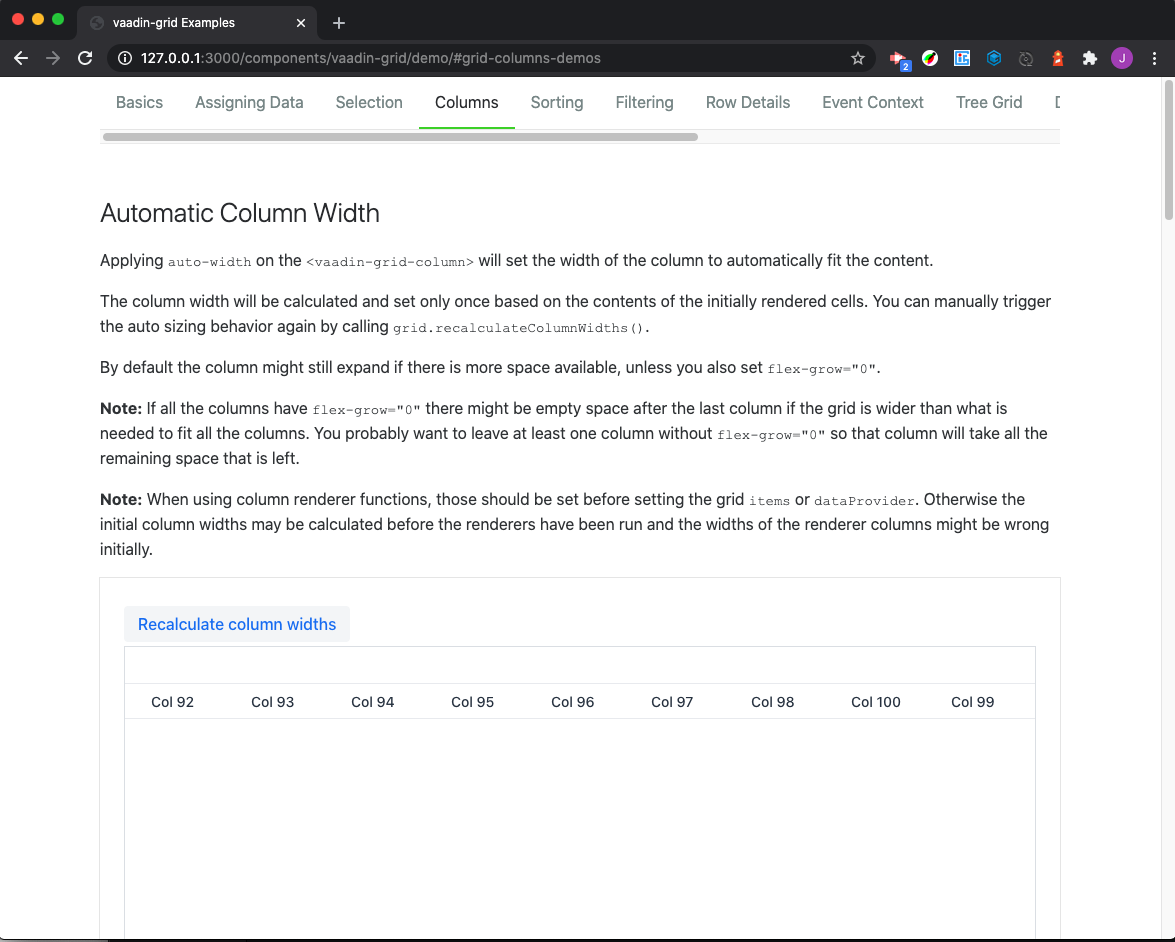
But I tried to reproduce in a polymer project and it looks ok. (See the attached project)

 jcgueriaud1
on 14 Jul 2020
jcgueriaud1
on 14 Jul 2020
I tried to reproduce in a polymer project and it looks ok. (See the attached project)
Thanks for the reproduction. Transferred this to vaadin-grid-flow repo based on your findings.
 web-padawan
on 14 Jul 2020
web-padawan
on 14 Jul 2020
I've updated the vaadin-grid-test, it was working because of a lack of import (vaadin-grid-column-group was not imported).
The issue is in vaadin-grid-column-group.
The _order of the column Col 98 is 990000000.
The _order of the column Col 99 is 1000000000.
The _order of the column Col 100 is 1010000000.
So this constant trailingZeros does not reflect the level
on which we're working on.
// Trailing zeros are counted so we know the level on which we're working on.
            const trailingZeros = /(0+)$/.exec(order).pop().length;
/(0+)$/.exec(990000000).pop().length;
7
/(0+)$/.exec(1000000000).pop().length;
9
/(0+)$/.exec(1010000000).pop().length;
7
So it's a bug of the web component, it's not related to the Java wrapper.
jcgueriaud1
on 14 Jul 2020
Thank you for helping to investigate. I guess then I have to transfer it back 😄
web-padawan
on 14 Jul 2020
Related issues
 marcushellberg
·
6Comments
marcushellberg
·
6Comments
 tomivirkki
·
3Comments
tomivirkki
·
3Comments
 pdesjardins90
·
4Comments
pdesjardins90
·
4Comments
 madiganz
·
4Comments
madiganz
·
4Comments
 jouni
·
5Comments
jouni
·
5Comments
Most helpful comment
I can confirm the problem.
Here a sample to reproduce (from the first example with less code)
It has been reproduced with Vaadin 14.3.0 and 14.2.3.
It can be reproduced with a html example in the demo of the vaadin-grid:
It's working until the number of columns is less than 100.
But I tried to reproduce in a polymer project and it looks ok. (See the attached project)
vaadin-grid-test.zip