Vaadin-grid: Paper-tooltip display issue on row column item
Description
Inside my cell I have a class that is broken down into items.
<vaadin-grid-column width="500px" flex-grow="0">
    <template class="header">Autoclip Configuration</template>
    <template>
        <autoclip-config item="[[item]]"></autoclip-config>
    </template>
</vaadin-grid-column>
autoclip-config.html
<div class="block-wrapper" id="upper-wrapper">
    <template is="dom-repeat" items="[[firstAlarmItems]]">
        <autoclip-config-item item="[[item]]"></autoclip-config-item>
    </template>
</div>
autoclip-config-item
<paper-tooltip class="tooltip" animation-delay="0" offset="10">
    <div class="header">Example</div>
    <div class="sub-header">This is my example</div>
</paper-tooltip>
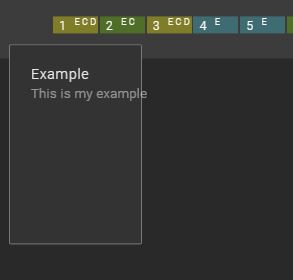
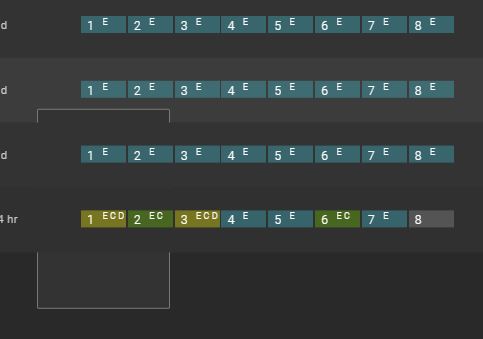
Works properly when it is the last row, but for any other row, the tooltip gets hidden by the rows below it. Each square in the picture is a autoclip-config-item
 madiganz
All 4 comments
This is the same issue as #842, see this comment for possible workaround (placing shared tooltip / menu etc outside of the grid).
BTW the iron-list also has this issue and the same workaround is used in Chrome history.
 web-padawan
on 3 Jan 2018
web-padawan
on 3 Jan 2018
Is stramel's code a valid workaround to solve this issue as well? I worry that it may be difficult to pass the necessary info up so I can display it correctly from an element outside of the grid.
After trying stramel's code, it did work.
madiganz
on 3 Jan 2018
In the meanwhile, if you need a tooltip element working nice with vaadin-grid and not getting clipped, please take a look at this proof of concept: j-tooltip.
web-padawan
on 20 Feb 2018
The link is out of date, the issue is still happening. Any updates?
 mihaisavezi
on 29 Aug 2019
mihaisavezi
on 29 Aug 2019
Related issues
 finaris-cs
·
4Comments
finaris-cs
·
4Comments
 SenerDemiral
·
3Comments
SenerDemiral
·
3Comments
 timeu
·
6Comments
timeu
·
6Comments
 poczenorbert
·
4Comments
poczenorbert
·
4Comments
 Springrbua
·
4Comments
Springrbua
·
4Comments