V-calendar: Content Style and Theme Style not working
I want to customize the calendar header using the theme prop, but it's not working when I use headerTitle style property.
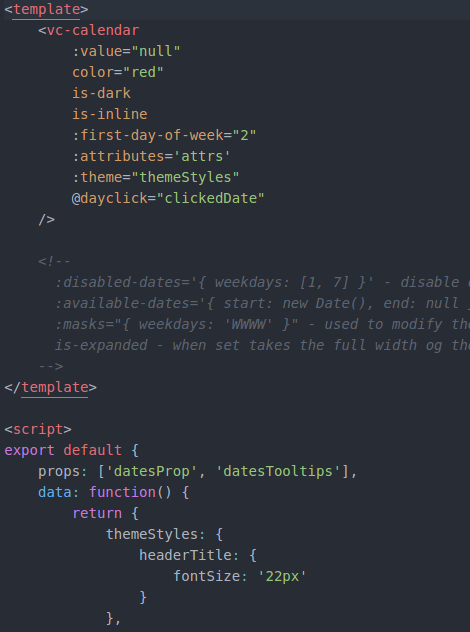
I tried using a function as well, but still no results.
I want to customize the content style as well, but it's also not working:
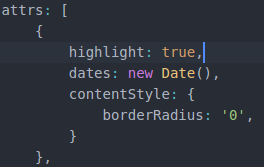
Anyone know what the problem is or if I am missing something or doing something wrong?
Thank you!
 ilkovulchev
All 4 comments
I thing the prop to bind to is not theme but theme-styles
 paulwvnjohi
on 15 Jan 2020
paulwvnjohi
on 15 Jan 2020
@paulwanjohi I've tried theme-styles as well, although i think i read somewhere that it's deprecated now. Either way it did not work though
ilkovulchev
on 15 Jan 2020
I have had success using the theme prop and overwritting the styles you see defined here https://github.com/nathanreyes/v-calendar/blob/master/src/utils/defaults/theme.js.
themeStyles: {
container: {
light: 'vc-text-gray-900 vc-bg-white h-100'
},
header: {
light: 'calendar-header'
}
}
 NoCodeMonkey
on 16 Jan 2020
NoCodeMonkey
on 16 Jan 2020
Provide an example of how I use the theme.
I think developers just need more time to complete the theme guide.
<template>
  <v-calendar
    class="calendar"
    :theme='themeStyles'
    :attributes='attrs'
    ...
  />
</template>
<script>
import * as moment from 'moment'

export default {
  data () {
    return {
      themeStyles: {
        dayNotInMonth: 'not-in-month'
      },
      attrs: [
        {
          key: 'today',
          highlight: {
            fillMode: 'light'
          },
          dates: '2020-05-20',
          order: -1
        },
        {
          key: 'selected',
          highlight: {
            fillMode: 'light',
            class: 'selected-bg',
            contentClass: 'selected-color',
          },
          dates: {
            start: '2020-05-01',
            end: '2020-05-07'
          }
        },
      ]
    }
  }
  ...
}
</script>
<style scoped>
.calendar >>> .not-in-month {
  color: rgba(0, 0, 0, 0.5);
}

.calendar >>> .selected-bg {
  background-color: #3f51b5;
}

.calendar >>> .selected-color {
  color: white;
}
</style>
 BattleForged
on 20 May 2020
BattleForged
on 20 May 2020
Related issues
 rcascante
·
3Comments
rcascante
·
3Comments
 Nadavrbn
·
3Comments
Nadavrbn
·
3Comments
 neel
·
3Comments
neel
·
3Comments
 maksnester
·
3Comments
maksnester
·
3Comments
 bocanhcam
·
3Comments
bocanhcam
·
3Comments
Most helpful comment
Provide an example of how I use the theme.
I think developers just need more time to complete the theme guide.