V-calendar: Default styles overriding custom theme
This happens to me on version 1.0.0-beta.16.
I have created a custom date picker component that uses v-date-picker and adds some themes and functionality. This custom component is published in an internal company npm repository to be used across the system.
It looks something like so:
<template>
    <div class="date-filter__popup">
        <div>
            <v-date-picker
                v-model="selectedDate"
                ref="datePicker"
                :mode="datePickerMode"
                :is-inline="true"
                :show-day-popover="false"
                :theme="datePickerStyles"
                nav-visibility="hidden"
                @input="dateSelected"
                @drag="handleDrag">
            </v-date-picker>
        </div>
    </div>
</template>

<script>
import { Datepicker } from 'v-calendar';

export default {
    name: 'DateFilter',
    components: { Datepicker },
    computed: {
        datePickerStyles() {
            return {
                weekdays: 'date-filter__weekdays',
                dayContent: this.dayContentClass,
                container: 'date-filter__container',
                title: 'date-filter__title',
                dayNotInMonth: 'date-filter__day-content-not-in-month',
                arrows: 'date-filter__arrow',
                highlightStartEndClass: this.highlightClass,
                contentAccent: this.contentAccentClass,
                contentAccentContrast: this.contentAccentClass,
                bgAccentLow: 'date-filter__accent-bg',
                bgLow: 'date-filter__selected-borderless'
            };
        }
    }
}
</script>

<style lang="scss">
...
</style>
Using this component on a demo page from within the same npm module works fine, and I can see my styles being applied and overriding the default theme.
The problem is when I install this package in another app, and integrate my custom component there, the default VCalendar stylesheets exist twice (inline) and because of that it overrides my custom styles.
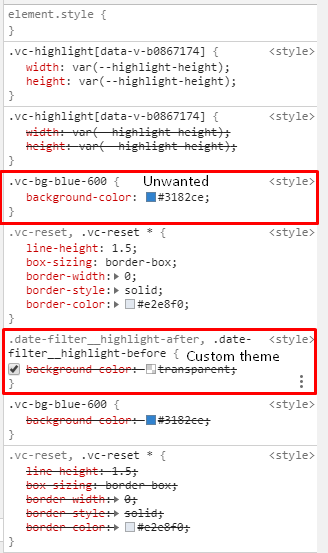
I'm trying to understand why are the component styles applied twice on the page, and is there a way to prevent this from happening? I'm assuming it has something to do with the fact that my npm package contains VCalendar as a dependency and so does my app.
 Nadavrbn
All 3 comments
It was caused by me importing v-calendar from both my dependency package and my app.
Instead I'm installing v-calendar on my dependency package only.
Though now I have the same issue as #317 (TypeError: t is not a constructor)
Nadavrbn
on 22 Jul 2019
Hey @Nadavrbn where did you find the theming API, i.e. props like highlightStartEndClass etc?
The theming guide doesn't state anything https://vcalendar.io/theming-guide.html
 ccarstens
on 7 May 2020
ccarstens
on 7 May 2020
For those trying to style the calendar, I couldn't find any up-to-date info except https://github.com/nathanreyes/v-calendar/blob/master/docs/.vuepress/components/homepage/custom-calendar.vue. So I think we just need to style it with CSS instead of a JS config object (except for individual dates/events).
 sebastiaanluca
on 14 Jan 2021
sebastiaanluca
on 14 Jan 2021
Related issues
 knagyorg
·
4Comments
knagyorg
·
4Comments
 nik736
·
3Comments
nik736
·
3Comments
 neel
·
3Comments
neel
·
3Comments
 eafomi4ev
·
3Comments
eafomi4ev
·
3Comments
 hanhtv204
·
4Comments
hanhtv204
·
4Comments