V-calendar: Styling of date picker
I have problems with styling of the date picker.
I have highlighted available dates to choose from and I'm using tint-color for the selected date. I don't want the selected date to have a border-radius as it is now.
Am I missing something or is it not possible?

HTML:
<v-date-picker
                                v-model='booking.arrivalDate'
                                mode='single'
                                :from-page="fromPage"
                                :attributes="attrsArrivalDates"
                                tint-color="#188c33"
                                :pane-width='330'
                                :input-props='{ class: "date-picker", placeholder: "{% trans %}YYYY-MM-DD{% endtrans %}" }'
                                popover-visibility="focus"
                                :available-dates='availableArrivalDates'>
                        </v-date-picker>
js:
`
 computed: {
attrsArrivalDates: function () {
          var vue = this;

          vue.booking.arrivalDate = d;

          if (vue.periods && vue.periods.length > 0) {

            return vue.periods.map(function (o) {
              return {
                firstDayOfWeek: 2,
                highlight: {
                  backgroundColor: '#1ebb42',
                  borderRadius: '0'
                },

                contentStyle: {
                  borderRadius: '0',
                  color: '#ffffff',
                },

                dates: o.arrivalDates,
              }
            });
          }
        },
 },`
 SaraLindberg91
All 8 comments
Hi, just put borderWidth and set that 0, something like this:
borderWidth: 0
 mrcat323
on 18 Oct 2018
mrcat323
on 18 Oct 2018
Hi,
I doesn't help the tint-color, only the highlight and content style. The tint-color is still 50% in border-radius.
I can solve it with CSS, but it would be a nice feature to be able to set the border-radius on tint-color as well.
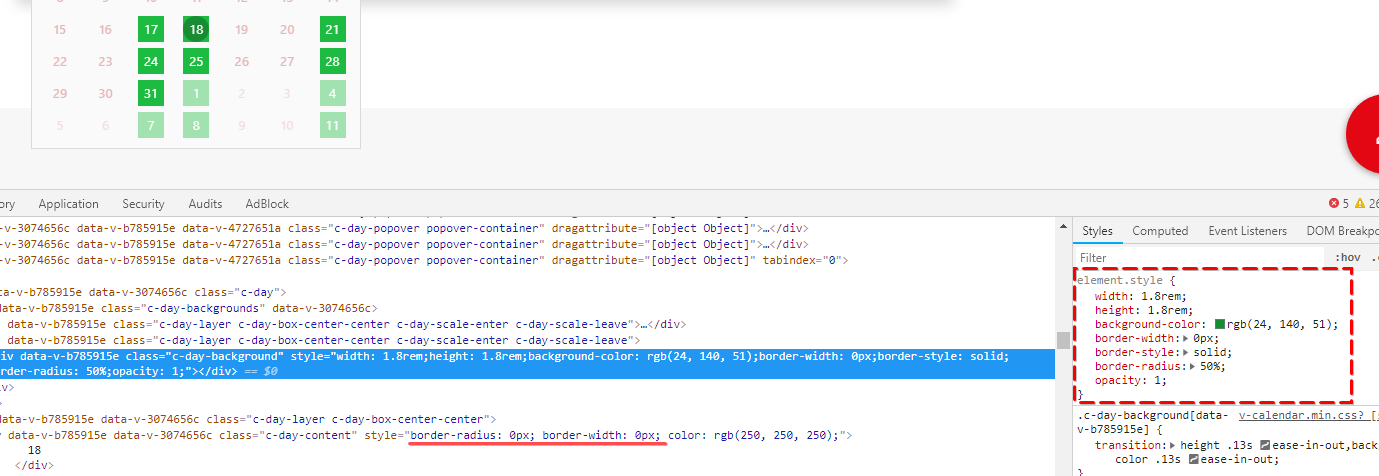
SaraLindberg91
on 18 Oct 2018
Have you tried to change borderRadius & borderWidth not to 0, but to 5px and borderColor to your color ?
Like this:
highlight: {
backgroundColor: '#1ebb42',
borderRadius: '5px',
borderColor: '#1ebb42',
borderWidth: '4px'
},
contentStyle: {
color: '#fff',
borderWidth: '4px',
borderRadius: '5px'
},
For me, this stuff 100% works
mrcat323
on 18 Oct 2018
It's the same, your should just set borderColor to your color. Try both examples.
mrcat323
on 18 Oct 2018
Let me know, if everything is :ok_hand:
mrcat323
on 20 Oct 2018
If you want to overwrite the tint-color property, you should use the select-attribute prop.
So in your case, the select-attribute would be:
{
                highlight: {
                  backgroundColor: '#1ebb42',
                  borderRadius: '0'
                },

                contentStyle: {
                  borderRadius: '0',
                  color: '#ffffff',
                  backgroundColor: 'transparent'
                },
}
Let me know if that worked for you :)
 clnc
on 26 Oct 2018
clnc
on 26 Oct 2018
If you want to overwrite the
tint-colorproperty, you should use theselect-attributeprop.So in your case, the select-attribute would be:
{
                highlight: {
                  backgroundColor: '#1ebb42',
                  borderRadius: '0'
                },

                contentStyle: {
                  borderRadius: '0',
                  color: '#ffffff',
                  backgroundColor: 'transparent'
                },
}
Let me know if that worked for you :)
It's not working on the (type = calendar) ?
Seems, it's only work the v-date-picker, but I was use the calendar.
 Jeremy-JM
on 5 Aug 2020
Jeremy-JM
on 5 Aug 2020
Closing this issue due to inactivity. The highlight.style, highlight.contentStyle props are available for use if needed.
 nathanreyes
on 28 Oct 2020
nathanreyes
on 28 Oct 2020
Related issues
 knagyorg
·
4Comments
knagyorg
·
4Comments
 redraw
·
3Comments
redraw
·
3Comments
 sokolovdm
·
3Comments
sokolovdm
·
3Comments
 jeffster9
·
3Comments
jeffster9
·
3Comments
 neel
·
3Comments
neel
·
3Comments
Most helpful comment
If you want to overwrite the
tint-colorproperty, you should use theselect-attributeprop.So in your case, the select-attribute would be:
Let me know if that worked for you :)