Uwazi: Many files in large upload are silently ignored
I'm experiencing a problem importing a large collection of files. I have a zip file with 464 PDFs plus one import.csv file, totalling 388 MB. I can upload to the Uwazi import tool, apparently successfully, and 111 of the PDFs then show up in the private document library. But the remainder of the documents never appear. The problem is reliably reproducible.
This is both a backend problem and a UX problem:
There seems to be some kind of issue that prevents some PDFs from being imported. My guess is that some text extraction program or something is failing, and that's preventing Uwazi from completing the import of that file. (It's likely that some of these PDFs have format problems, although I'd hope that wouldn't stop Uwazi from importing them even if it can't index them properly.)
There's no status indication for what has happened after an upload. I see no success message even on a simple, one-file archive that is successfully imported, and I get no failure notification when something goes wrong. (This initially made it difficult to detect a different problem, namely that my reverse proxy was rejecting large files before even hitting Uwazi. But I was able to debug that using the network monitor to spot the "413 payload too large" message, and the limit is now set much higher, so it should no longer be causing problems.)
I'm happy to share more information or the archive itself, if that would be helpful.
 duncanka
All 13 comments
Does anyone have insight into what might be going on here or what might work to resolve it? I'd hate to have to import thousands of documents by hand.
duncanka
on 5 Jan 2021
@duncanka I'm taking a look at the moment.
 txau
on 5 Jan 2021
txau
on 5 Jan 2021
@duncanka I've been running some obvious tests and so far everything is working as expected. so let's see if we can figure this out together.
First I tried loading a .zip with 5 files, some of them fairly large (up to 1000 pages and more than 100MB). First Uwazi shows a file upload progress (just getting the zip file in the server):

Then an import progress (processign the records contained in the CSV):

Then a completion message:

Then I introduced known errors that will halt the import process, in this case a malformed PDF in the second row of the CSV:
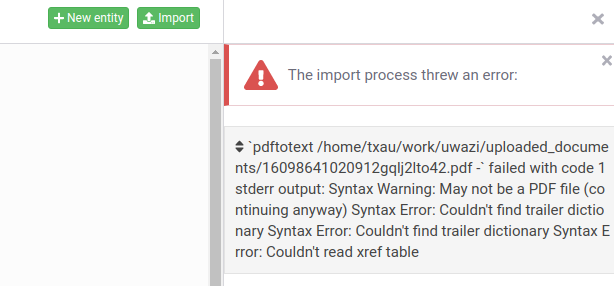
Uwazi shows the error but manages to import the first row of the CSV, the second row gives a conversion error and the rest of the process gets halted:

I ran another test replacing the malformed PDF by a missing file with similar results:
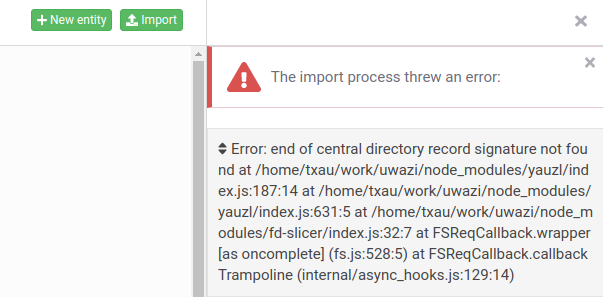
I also tried a stress test loading a CSV with 400+ rows with mixed sizes ranging from 55KB to 30 MB and the import process managed it perfectly.
My local environment may be different to yours since I'm accessing Uwazi directly without a proxy. This definitely accounts for the max file upload size, which you have already figured out. I wonder if the proxy is interfering in some other way, but I feel like this is unlikely.
There's no status indication for what has happened after an upload. I see no success message even on a simple, one-file archive that is successfully imported, and I get no failure notification when something goes wrong.
I find this intriguing since as you could see from my screenshots Uwazi provides indications in every step (although I found a small annoying issue with the file upload progress being shown from 1% on, so from 0% to 1% you don't know what is going on). So definitely not getting the progress/failure messages already is an issue. Wild guess: do you have the last version of Uwazi installed??
Since you also said:
I can upload to the Uwazi import tool, apparently successfully, and 111 of the PDFs then show up in the private document library. But the remainder of the documents never appear.
my gut feeling is that the process is stopping because of malformed or missing PDFs and since you don't get any error you are left in the dark. You don't even get any errors in Uwazi logs?
txau
on 5 Jan 2021
@txau, thanks for all the testing effort!
I was previously running the release from Dec. 23. I updated to the latest release, restarted Uwazi, and tried again. When I open another tab to the private library, it still shows exactly 111 of my 464 PDF files.
Weirdly, I still do not get the "Importing data in progress" or the "Import completed" messages; it goes straight back to "Upload a ZIP or CSV file." I get the same result even when importing a single-PDF test file. Yet if I refresh the page or load it in another tab, the uploaded files do appear. It's possible this UI issue is completely unrelated to the issue of files not being processed.
I see no information in the Uwazi error or debug logs. (Incidentally, it might be good if those logs included startup messages, so that you can tell with certainty that logging is working.)
The file I'm working with is here. Can you confirm that you're able to upload that archive successfully using your deployment of Uwazi?
duncanka
on 10 Jan 2021
I did also try uploading a corrupted PDF, and I get an entity with the "conversion failed" tag on it. I do see error messages from that failed conversion in error.log, which suggests that something different is going on with the larger file.
duncanka
on 10 Jan 2021
@duncanka thanks for providing the file. I'm going to test it out.
txau
on 10 Jan 2021
@txau Any luck reproducing the problem?
duncanka
on 13 Jan 2021
@duncanka I haven't had the chance to look into it yet, I've been delayed by a problem in our e2e tests #3410 . I hope I can take a look today!
txau
on 13 Jan 2021
@duncanka I tried your file and it works like a breeze. No conversion problems or anything.
I suspect your problem is coming from the load balancer. If I am correct, uploading and processing uses websockets, so maybe nginx is blocking them leaving the process incomplete? I want to run my own tests for this scenario as well.
Also if you are getting conversion problems, make sure you have the latest version of Poppler installed.
txau
on 13 Jan 2021
I tried bypassing the proxy and sure enough, the UI behaved exactly as expected. I also got an explanation for why the import didn't complete: there was a validation error where some of my required fields were missing.
Once I fixed that, the import worked even with the proxy, albeit in the background with no UI updates after the upload finished. So the only remaining bug is that the UI somehow fails when the proxy is in use.
(Though I think there's still a feature request on the data-processing side: it seems like a good idea to record import failures in one or the other of the log files. That could save some future head-scratching.)
duncanka
on 14 Jan 2021
@duncanka for the websockets, please try this out: https://github.com/huridocs/uwazi/issues/3424
I managed to reproduce the problem locally and it gets easily fixed with a proper nginx configuration.
txau
on 14 Jan 2021
(Though I think there's still a feature request on the data-processing side: it seems like a good idea to record import failures in one or the other of the log files. That could save some future head-scratching.)
There is an on going discussion on that topic: #3000
txau
on 14 Jan 2021
Perfect, thanks! The solution described in #3424 worked for me.
duncanka
on 14 Jan 2021
Related issues
 fititnt
·
5Comments
fititnt
·
5Comments
 HSips
·
8Comments
HSips
·
8Comments
 RafaPolit
·
7Comments
RafaPolit
·
7Comments
RafaPolit
·
7Comments
RafaPolit
·
7Comments
 simonfossom
·
3Comments
simonfossom
·
3Comments