In this particular document: https://summa.cejil.org/es/document/82yoxj1io1icc8fr
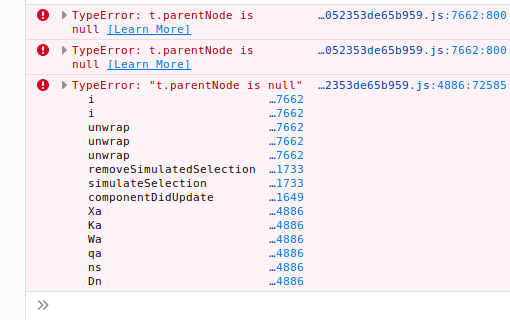
I managed to reproduce the error when adding points VI and VII (in that particular order) to the TOC. The client crashes and you get a blank screen and this error in the console:
 txau
txau
All 19 comments
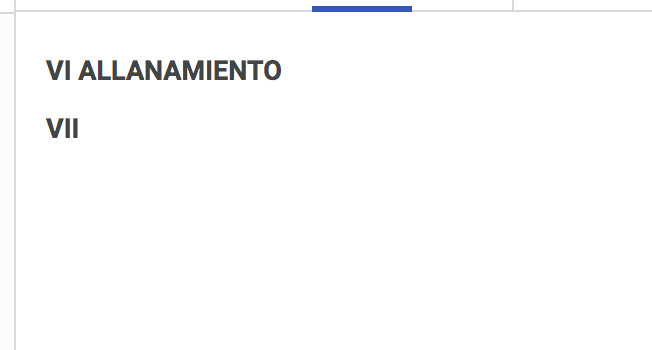
@txau I downloaded the document and uploaded it to a local uwazi instance then added VI and VII to the TOC. However that did not produce an error:
Maybe I'll have better luck if I get a copy of the entire database.
 habbes
on 2 Oct 2019
habbes
on 2 Oct 2019
@txau I still haven't managed to reproduce it even when using a copy of the data.
habbes
on 2 Oct 2019
@txau Are you able to reproduce it deterministically or does it occur only some of the times you try it?
habbes
on 2 Oct 2019
@habbes yes, this is happening on a consistent way. I'm using Firefox (maybe its a browser issue). Also, when I add the point VI, I add it will the whole text, that is selecting "VI ALLANAMIENTO" and adding it to the TOC. Then when I select "VII" the errors occurrs.
txau
on 2 Oct 2019
@txau I've just tried it with Firefox, and now I also get the error.
habbes
on 2 Oct 2019
Still investigating this issue, but so far what I have found is that this error is not really related to Table of Content, it seems to have to do with the text selection. So you would probably see the same error if you highlighted those same snippets one after the other even without adding them to the TOC.
The text selection and associated events seem to be have strangely and differently in Chrome and Firefox. I'm still trying to piece things together to get a clearer and more concrete view of what's going on. I managed to produce the error on Chrome by playing with text selection and de-selection, but I haven't figured out how to produce it deterministically.
habbes
on 3 Oct 2019
@habbes do you think these are related? https://github.com/huridocs/uwazi/issues/2280 https://github.com/huridocs/uwazi/issues/1015
txau
on 3 Oct 2019
@txau I think it could be related to the fake selection mention in #1015, not sure about #2280 though.
habbes
on 3 Oct 2019
@habbes just scrolling in this document gives me the same error "TypeError: t.parentNode is null": https://demo.uwazi.io/en/document/t1t5ux7d4sj2pl0eajoxenrk9?page=8
txau
on 4 Oct 2019
@txau had you selected any piece of text while scrolling, or just scrolling alone caused the error?
habbes
on 4 Oct 2019
I've been investing the text selection code and behaviour to understand what is going and this is what I've found out so far:
First, it's important to know that the Uwazi progressively loads and unloads pdf pages when you scroll in and out of them (holding at most 3 pages any point in time). Also it's important to note that if a page has some selected text and that page gets unloaded due to scrolling, Uwazi remembers the range that was selected and when that page comes back into view, uwazi wraps that range of text with <span> that simulates a fake selection (the text is highlighted with some light green color).
Whenever a new selection is made, if there was a "fake selection" active, this fake selection element is unwrapped first.
habbes
on 7 Oct 2019
The way Uwazi whether to apply the fake selection wrapping is by checking whether the text that was selected is within the range of the currently loaded page. Let's assume we've selected some page on 4. If you scroll down to page 6 or 7, page 4 will be unloaded and the text would be lost from the window, but Uwazi will remember the selection range. When you scroll back up to page 5, page 4 will also be loaded. Uwazi will compare the selection range and notice that it belongs to a currently loaded page, at this point it will "wrap it" with fake selection. If you scroll out of view again, or if you select another piece of text, Uwazi will first "unwrap" the fake selection before proceeding.
habbes
on 7 Oct 2019
I probably wrote more details than necessary, but I guess I wanted to document this cause it took me a while to figure out. But the real problem is in the code that compares the selected text range with the range of the currently loaded pages. It turns out the range goes 1 unit passed the last character, this led to off-by-one errors leading to falsely detecting that the selected text was within the currently selected pages when it was not, and this led to a null error when trying to "unwrap" the non-existent text.
habbes
on 7 Oct 2019
In this particular text the "ALLANAMIENTO" text is at the very end of page 9. But when page 9 is unloaded and page 10 is in view, Uwazi still thinks the text is in the current page and tries to wrap it. But when it tries to unwrap it after a new selection is made, the page crashes.
habbes
on 7 Oct 2019
Another weird thing that happens is that when you're scrolling through page 10 after selecting "ALLANAMIENTO", the custom CSS of the page seems to get lost. I don't know if anyone else has noticed this:

I have not yet pieced things together as to why this happens, but it occurs when the non-existent text is "wrapped" with fake selection.
habbes
on 7 Oct 2019
I should also note that there seem to be some differences in the behaviour related to text selection between chrome and firefox but I haven't thoroughly studied this different enough to understand them completely.
habbes
on 7 Oct 2019
@txau had you selected any piece of text while scrolling, or just scrolling alone caused the error?
I haven't been able to replicate it, so ignore it.
Regarding the rest, thanks for the detailed explanation. I guess this faulty behavior is a result of evolving from loading all the pages, to lazy loading only 3 pages at a time. What do you think of just deselecting when the page gets unloaded and not trying to load it again?
txau
on 7 Oct 2019
@txau hmm that's a good point. Well I don't know what was the initial intent of loading in trying to restore the fake selection, so I don't know what we would be losing in removing that feature.
habbes
on 7 Oct 2019
I resolved the issue by slightly changing how it checks whether the selection is in the current range (basically replaced <= with <).
habbes
on 7 Oct 2019
Related issues
 fititnt
·
5Comments
fititnt
·
4Comments
fititnt
·
5Comments
fititnt
·
4Comments
 AlWalid
·
6Comments
AlWalid
·
6Comments
 RafaPolit
·
7Comments
RafaPolit
·
7Comments
 danicatalan
·
8Comments
danicatalan
·
8Comments